Quick answer: Setting up Google Analytics for law firms takes four jobs. Create a Google Analytics 4 (GA4) property and web data stream, install the tag on your site, mark your real lead actions as key events, and connect Google Search Console. Track form submissions, click-to-call taps, consultation bookings and chat starts. Never send names, emails, phone numbers or form contents to Google Analytics.
This guide walks through each step using Google’s own help documentation, as of November 2026. It covers the WordPress setup options, a privacy checklist written for law firms, a KPI table and a 30-minute monthly reporting routine.
Key takeaways
- GA4 shows what visitors do on your site. Search Console shows how you appear in Google Search. You need both, and you should link them.
- “Key events” is the new name for what GA4 used to call conversions. Mark only the actions that create a potential client: forms, calls, bookings and chats.
- Use a Domain property in Search Console. It covers http, https and every subdomain, but it can only be verified through DNS.
- Keep personal data out. Google’s policy bans sending PII to Analytics. For a law firm, that includes the details on an intake form.
- On WordPress, pick one way to install the tag. Use Site Kit, Tag Manager or Rank Math, never two at once, or every visit gets counted twice.
What is the difference between GA4 and Google Search Console?
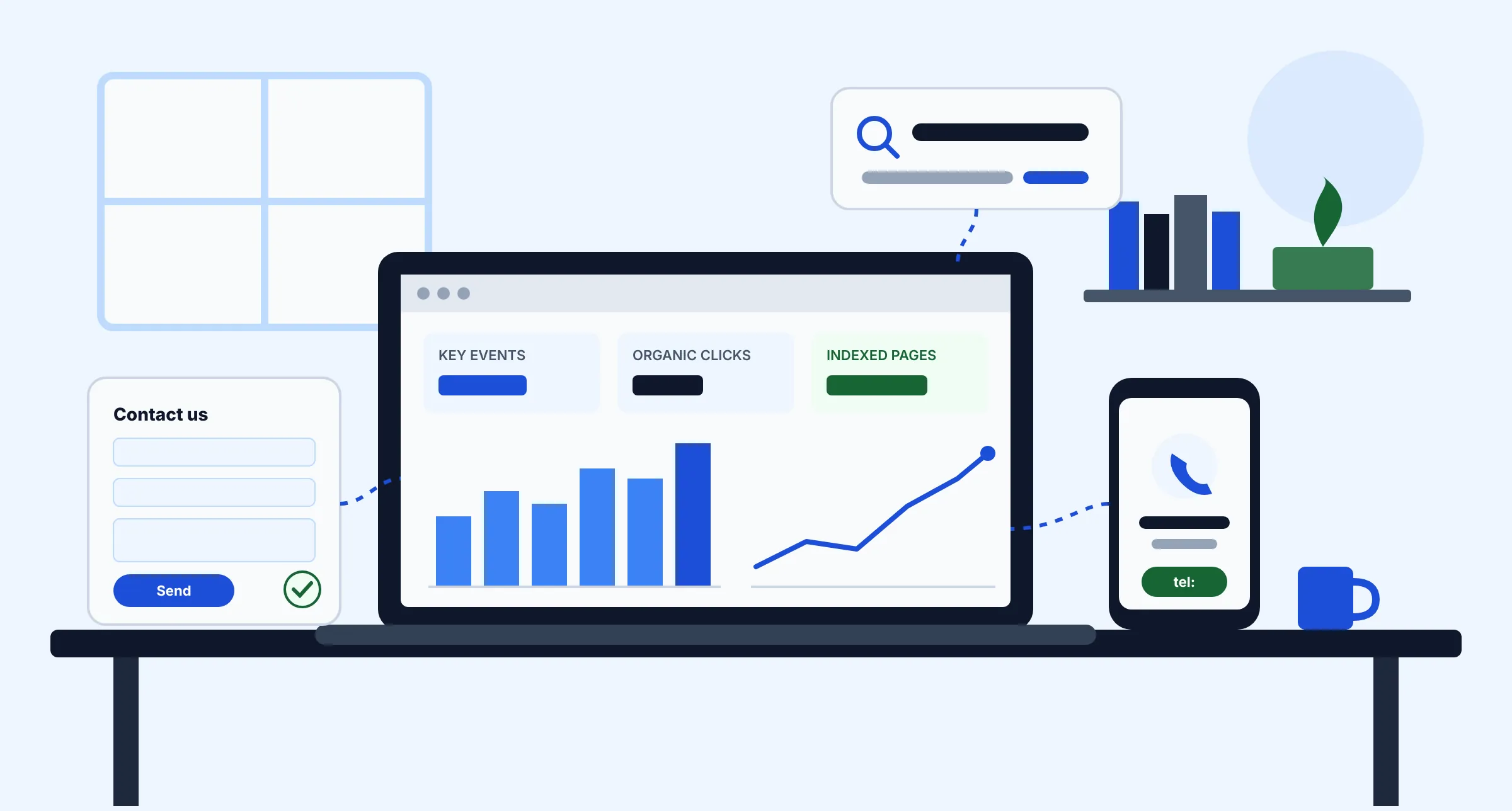
Google Analytics 4 measures what people do after they land on your website. Google Search Console measures what happens before the click: the searches you appear for, how often people click, and whether Google can crawl and index your pages. Both are free. Neither one replaces the other.
| Question | Google Analytics 4 | Google Search Console |
|---|---|---|
| Where does the data come from? | A tag (JavaScript) on your site that records visits and events | Google Search itself; no tag needed |
| What does it answer? | Which channels and pages produce calls, forms and bookings | Which searches show your pages, and your clicks, impressions, CTR and average position |
| Technical health? | No | Yes: Page indexing, Core Web Vitals and sitemaps |
| How far back can you look? | Explorations: 2 or 14 months on standard properties. Standard reports are not limited by that setting | 16 months of search data |
| Who in the firm needs access? | Whoever reports on marketing and leads | Whoever manages the website and SEO |
How do you set up Google Analytics for a law firm?
Create the account and property under a firm-owned Google account, not a personal Gmail and not your agency’s account. Then give outside vendors their own access. If a developer leaves, the firm keeps its data. These steps follow Google’s Set up Analytics for a website guide.
- Create an account. Go to analytics.google.com and click Start measuring. If you already have an account, go to Admin → Create → Account. Name the account after the firm.
- Create a property. Enter a property name, your reporting time zone (the firm’s local time) and currency. Then choose an industry, a business size and your goals.
- Add a web data stream. Go to Admin → Data streams → Add stream → Web. Enter your domain and keep enhanced measurement on. Enhanced measurement records page views, scrolls, outbound clicks, site search, video engagement, file downloads and form interactions without extra code.
- Copy your Measurement ID. It starts with
G-and appears under the stream details. You’ll paste it into a plugin or Tag Manager in the next section. - Install the tag. Choose one of the WordPress options below.
- Raise data retention to 14 months. Go to Admin → Data settings → Data retention. Standard properties can choose 2 or 14 months. The setting affects explorations and funnel reports, which you’ll want for comparing one year with the next.
- Filter out office traffic. Define your office IP address as internal traffic in the stream’s tag settings, then create an internal traffic data filter. Leave the filter in Testing first. An active exclude filter permanently discards the data it matches.
- Check data redaction. In the web stream, open Redact data. Email redaction is on by default for new properties. You can also add query parameters to strip, such as
name,emailorphone. - Confirm data is arriving. Open the Realtime report and visit your site from a phone. Google says data can take up to 30 minutes to appear.
How do you install GA4 on a WordPress law firm website?
Most small firms on WordPress use one of three methods: the Site Kit by Google plugin, Google Tag Manager, or the Rank Math SEO plugin’s Analytics module. Each one can place the GA4 tag. Pick exactly one. If two plugins, or a plugin and your theme, both print the tag, every page view is counted twice.
| Method | Best for | What it does | Watch out for |
|---|---|---|---|
| Site Kit by Google (free) | Solo and small firms that want the simplest setup and a dashboard inside WordPress | Google’s official plugin. It connects Analytics, Search Console, PageSpeed Insights and Tag Manager, and shows their data in your WordPress dashboard. It has more than 5 million active installs | Less control over custom events such as phone clicks. Check that your theme or another plugin isn’t also adding a tag |
| Google Tag Manager (free) | Firms that want reliable click-to-call, booking and chat tracking, or that use a developer | One container snippet on the site. All tags, triggers and events are managed in Tag Manager, with a Preview mode for testing | Steeper learning curve. Publishing a broken tag affects the whole site, so test in Preview first |
| Rank Math Analytics module | Firms already using Rank Math for SEO | Connects Search Console and GA4 in WordPress. The “Install Analytics Code” toggle adds the GA4 tag to every page | Turn the toggle on only if nothing else adds the tag. The free version refreshes data every 3 days and doesn’t pull GA4 traffic data (PRO refreshes daily) |
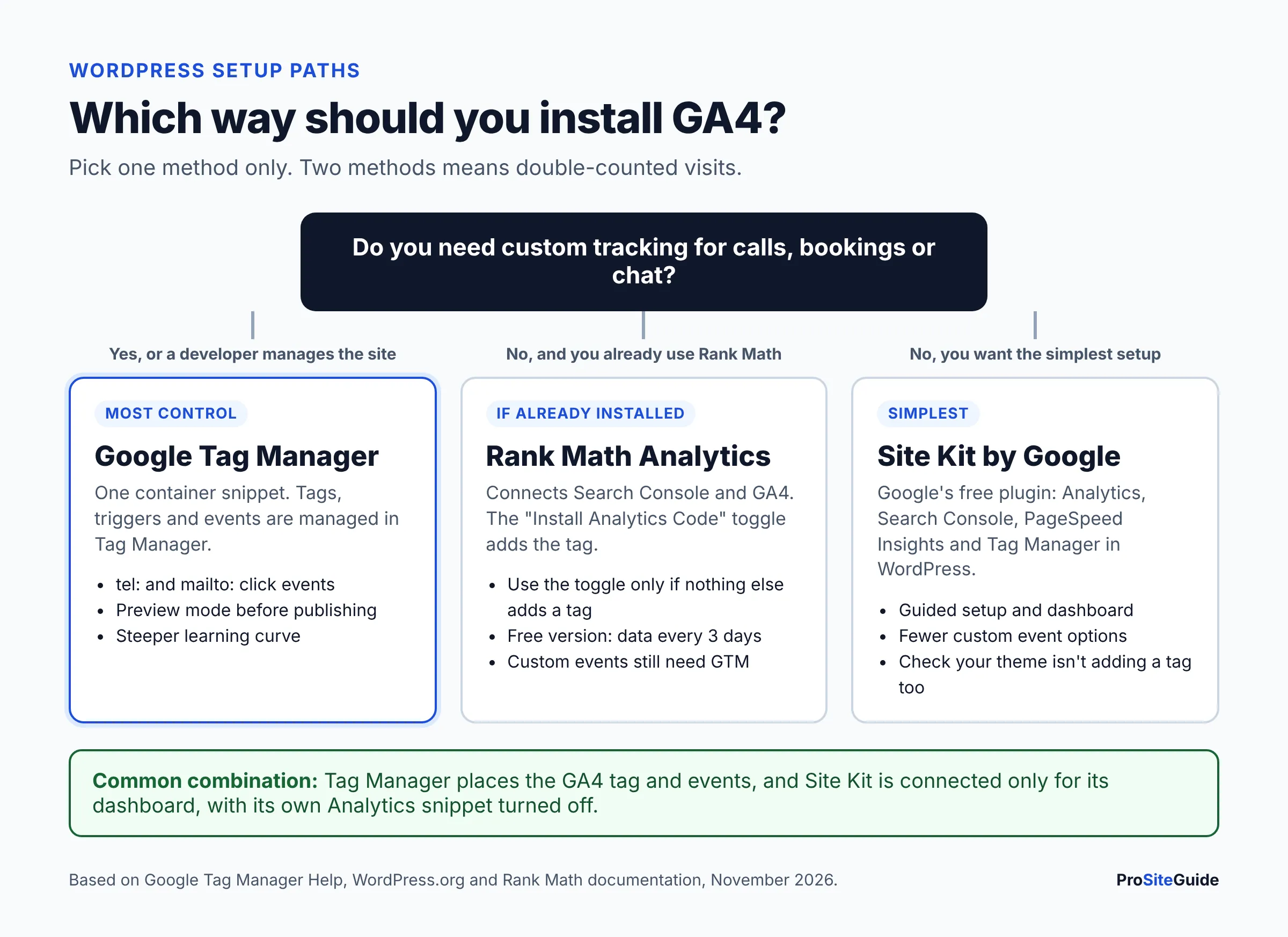
A practical combination for many firms: Tag Manager places the tag and handles events, and Site Kit is connected only for its dashboard and Search Console data, with its own Analytics snippet turned off. Whatever you choose, record it in your site documentation so the next developer doesn’t add a second tag. For other plugins worth installing (and ones to avoid), see our guide to the best WordPress plugins for law firms.
To add GA4 through Tag Manager, follow Google’s Google tag setup steps. Create a new tag of type Google Analytics → Google tag and enter your G- ID. Set the trigger to Initialization – All Pages, test in Preview, then click Submit → Publish.
How do you set up Google Search Console for lawyers?
Add your site as a Domain property, verify it with a DNS record, submit your XML sitemap, and link it to GA4. These steps take about 20 minutes, plus DNS waiting time.
Domain property or URL-prefix property?
Choose a Domain property if you can edit your DNS. Google’s verification help explains that a Domain property (example.com) includes all protocols and subdomains. DNS is the only way to verify it. A URL-prefix property (https://www.example.com) covers only that exact prefix. It can be verified with an HTML file, an HTML tag, your Google Analytics tag or your Tag Manager container. That makes it handy if your domain registrar login is hard to find.
- Add the property. In Search Console, open the property selector → Add property → Domain, and type your domain without https or www.
- Verify with DNS. Copy the TXT record Search Console gives you and add it at your DNS host. That may be your registrar or Cloudflare. If your registrar is listed in Search Console, you can choose it and sign in instead. Google says DNS changes can take up to two or three days. Leave the record in place after verification, or you may lose access.
- Submit your sitemap. WordPress SEO plugins usually generate one, for example
/sitemap_index.xmlin Rank Math or Yoast. In the Sitemaps report, paste the URL and click Submit. You want a status of Success. Couldn’t fetch often means robots.txt is blocking it or the URL returns a 404. - Add users, not owners. Give your agency or developer Full or Restricted user access. Keep ownership with the firm.
- Link Search Console to GA4. In GA4, go to Admin → Product links → Search Console links → Link. You need the Editor role in GA4 and must be a verified Search Console owner. Then publish the Search Console report collection under Library, because it’s unpublished by default (Google’s linking guide).
After linking, GA4 shows two extra reports. Google Organic Search Queries lists the searches that brought visitors. Google Organic Search Traffic lists landing pages with both Search Console and GA4 metrics. Search Console data reaches GA4 about 48 hours after Google collects it.
Moving hosts or rebuilding the site? Keep the same GA4 property and Search Console property, and check both reports for a few weeks after launch. Our guide to redesigning a law firm website without losing SEO covers redirects and the post-launch checks.
What should a law firm track in Google Analytics?
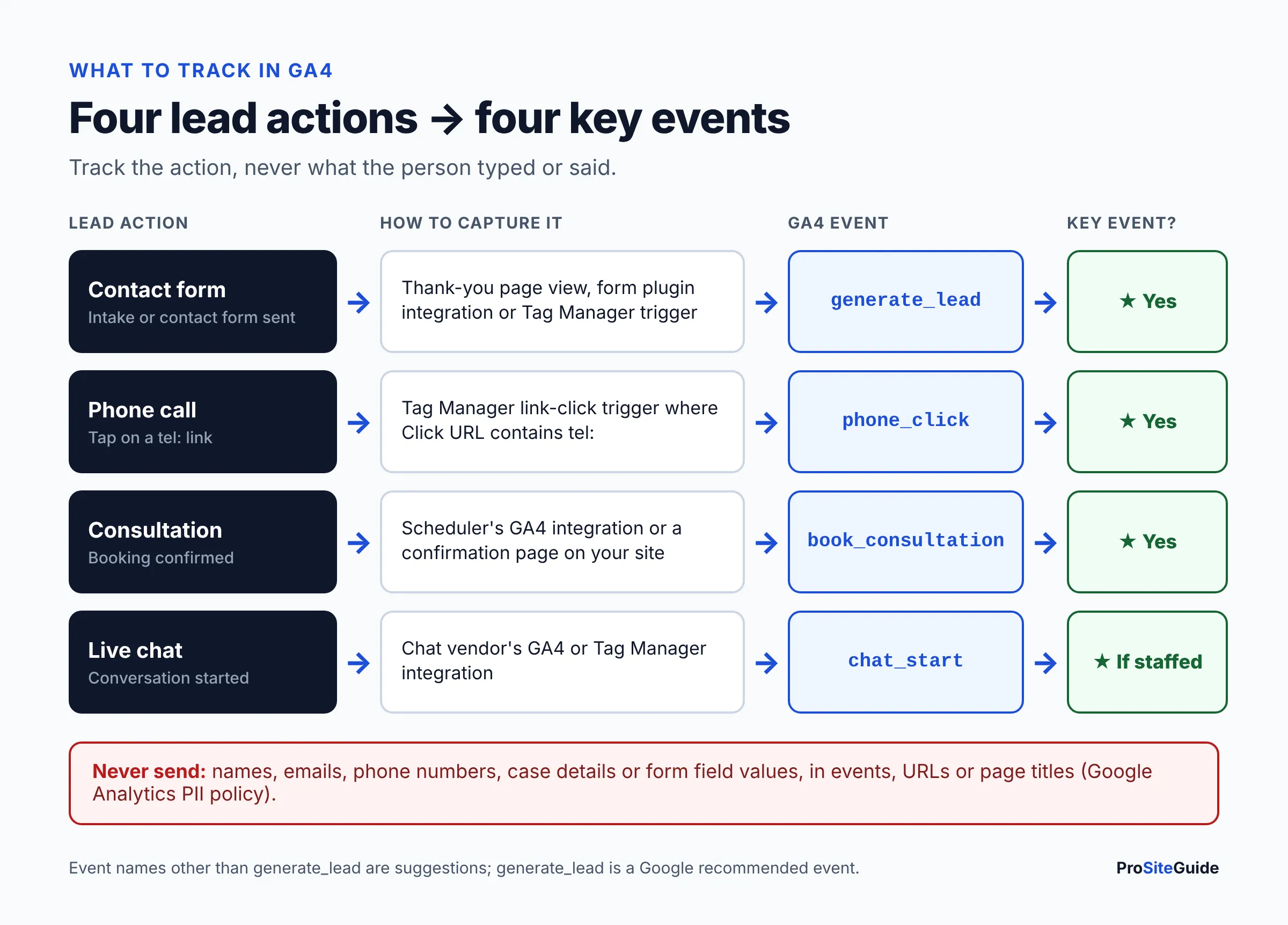
Track the four actions that start a client relationship: contact form submissions, phone calls from the site, consultation bookings and chat conversations. Mark each one as a key event. Google defines a key event as an action “particularly important to the success of your business.” Google’s Events and key events page explains that events previously marked as conversions are now called key events. “Conversion” now refers to the version shared with Google Ads for bidding.
| Lead action | How to track it | Suggested event name | Mark as key event? |
|---|---|---|---|
| Contact or intake form sent | Thank-you page view, a form plugin integration, or a Tag Manager trigger. Enhanced measurement form_submit is a fallback only | generate_lead (a Google recommended event) | Yes |
| Click-to-call tap | Tag Manager link-click trigger on links starting with tel: | phone_click | Yes |
| Consultation booked | Scheduler’s confirmation page or its own GA4 integration | book_consultation | Yes |
| Chat started | Chat vendor’s GA4 or Tag Manager integration | chat_start | Yes, if chats are staffed and qualify leads |
| Email link click | Link-click trigger on mailto: links | email_click | Optional |
| Directions or map click | Outbound click (enhanced measurement) | click (automatic) | No, review it as a secondary metric |
| Guide or PDF download | File downloads (enhanced measurement) | file_download (automatic) | No |
You can mark up to 30 key events on a standard property, which is far more than a law firm needs. Fewer is better. If page views or scrolls count as key events, your “lead” numbers stop meaning anything. To mark an event, go to Admin → Events and click the star next to it (Google’s steps). The change applies from that point forward, not to past data.
How do I track form submissions in GA4?
The most reliable way is to send visitors to a dedicated thank-you page after a successful submission, such as /thank-you/, and count views of that page as generate_lead. Enhanced measurement’s form_submit event can fire on searches, newsletter boxes and failed submissions. Treat it as a backup, not your lead count. Many form plugins also offer their own GA4 integration. Recent Site Kit versions can detect lead events from several popular form plugins, so check its settings if you use Site Kit.
Two rules matter more than the method. The thank-you URL must not contain form data (no ?name=…&email=…). The event must never carry what the person typed. Our guide to a secure contact form for a law firm website covers the form side: spam protection, notifications and where submissions are stored.
How do I track click-to-call on a law firm website?
Make every phone number a tel: link, then use Tag Manager. Create a Just Links click trigger that fires on Some Link Clicks where Click URL contains tel:. Attach a GA4 Event tag named phone_click (Google’s GA4 event tag steps). This counts taps, not completed calls. To measure answered calls by source, you need a call-tracking service or your phone system’s reports. Phone numbers that appear only as plain text can’t be tracked at all.
How do I track consultation bookings and chat?
Embedded schedulers and chat widgets often run inside an iframe or on the vendor’s domain. Your GA4 tag can’t see what happens inside them. Use the vendor’s own GA4 or Tag Manager integration if it has one, or redirect to a confirmation page on your own site after booking. Then test it with a real booking in Tag Manager’s Preview mode or GA4’s DebugView. If you’re still choosing a scheduler, our comparison of Calendly vs Acuity vs Microsoft Bookings for law firms covers the options.
How do you keep client information out of Google Analytics?
Google prohibits sending personally identifiable information to Analytics. Its PII policy names email addresses, personal mobile numbers, Social Security numbers and names as examples. It warns that PII often leaks through page URLs, page titles, form fields and search terms. For a law firm the risk goes beyond Google’s terms. Someone filling in an intake form may describe their legal problem. Your duty to protect that information is set by your state’s rules of professional conduct, so check your state bar’s guidance on website data.
- Never send form field values. No names, emails, phone numbers, case descriptions or “type of matter” answers in event parameters or custom dimensions.
- Check thank-you URLs and page titles. Some form plugins append entries to the redirect URL. Turn that off, and add those parameters to GA4 data redaction as a safety net.
- Watch site search. People type names and case details into search boxes. If that happens on your site, consider turning off the site search option in enhanced measurement.
- Don’t use User-ID with client identifiers. Small firm websites rarely need it.
- Limit access. Give each person their own login with the lowest role that works. Remove former staff and vendors.
- Keep GA out of client portals. Pages behind a login (portals, payment pages) generally shouldn’t load marketing tags at all.
Do I need a cookie banner for Google Analytics?
It depends on where your visitors are and which privacy laws apply to the firm. There is no single US rule. Some state privacy laws and non-US laws (if you serve EU or UK visitors) can require notice or consent. Google says site owners are responsible for obtaining any required consent. Its consent mode passes a visitor’s choice to Google tags through settings such as analytics_storage and ad_storage. At a minimum, disclose analytics in your privacy policy. If you add a consent banner, choose a consent platform that supports consent mode, and get advice on which laws apply to your firm.
Which Search Console reports should a law firm check?
Three reports cover most of what a small firm needs: Performance, Page indexing and Core Web Vitals.
- Performance shows clicks, impressions, CTR (clicks ÷ impressions) and average position, broken down by query, page, country and device. Filter queries by your firm name to separate branded searches (people who already know you) from non-branded ones like “divorce lawyer near me.” Non-branded growth is the clearest sign that SEO is working. Pages with many impressions but low CTR usually need a better title and description.
- Page indexing lists which URLs are indexed and why others aren’t. Google says not every URL should be indexed. Check that your home page, attorney bios and every practice area page are. Statuses like “Crawled – currently not indexed” on a practice area page usually mean the page is thin or duplicates another. Our guide on how to write practice area pages covers fixing that.
- Core Web Vitals groups your URLs as Good, Needs improvement or Poor, based on real-visitor data for LCP (good is 2.5 s or less), INP (200 ms or less) and CLS (0.1 or less). Low-traffic sites often show “no data.” That’s normal. See our guide to law firm website speed and Core Web Vitals for fixes.
Search Console covers your website, not your Maps listing. Calls and direction requests from Google Maps appear in your Google Business Profile performance data. Report both side by side. Many local searches end in a call straight from the profile without a website visit.
Which law firm website analytics KPIs matter most?
Track a short list of numbers tied to new matters, and watch the trend month over month and year over year. A single month on its own tells you little. Practice areas have different seasons and different search volumes, so compare against your own past results rather than “industry averages.”
| KPI | Where to find it | What it tells you | What to do if it drops |
|---|---|---|---|
| Total key events (leads) | GA4 → Reports → Engagement → Key events | Website-sourced inquiries | Test each form, phone link and booking flow first. Tracking breaks more often than demand disappears |
| Key events by channel | GA4 → Acquisition → Traffic acquisition (add the key events column) | Which sources produce leads: organic, Maps/GBP, paid, referral | Shift budget and effort toward the channels that produce leads |
| Session key event rate | GA4 → Traffic acquisition | The share of visits that produce a lead | Review calls to action, mobile layout and page speed |
| Leads by landing page | GA4 → Engagement → Landing page | Which practice area pages produce inquiries | Improve or expand pages that get traffic but no leads |
| Non-branded organic clicks | Search Console → Performance (query filter excluding firm name) | New people finding you through search | Check Page indexing, content gaps and local SEO |
| Impressions and CTR for key pages | Search Console → Performance → Pages | Visibility and how appealing your listing looks | Rewrite titles and meta descriptions |
| Indexed practice area pages | Search Console → Page indexing / URL Inspection | Whether your money pages can rank | Fix noindex tags, canonicals or thin content |
| Core Web Vitals status | Search Console → Core Web Vitals | Real-user speed and stability | Optimize images, scripts and hosting |
GA4 counts inquiries, not clients. Once a quarter, compare GA4 leads with the intakes your firm actually logged, and how many became signed matters. That’s the only way to know which channels bring cases and not just contacts. Keep that comparison in your practice management or intake system, not in GA4.
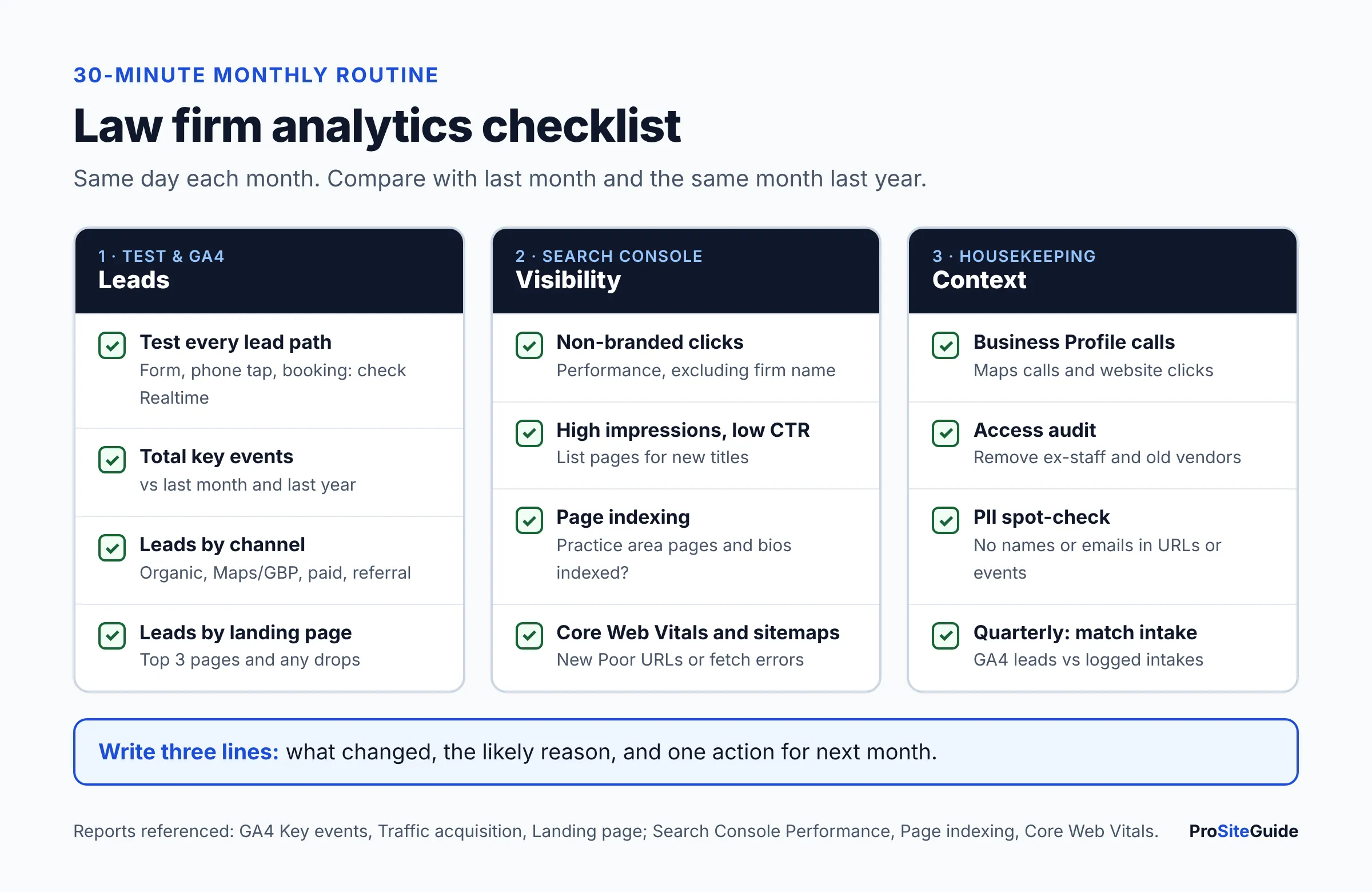
Monthly reporting checklist for law firm analytics
This 30-minute routine, done on the same day each month, catches broken tracking early and turns the data into decisions.
- Test your lead paths. Submit the contact form, tap the phone link on a phone and make a test booking. Confirm each one shows in GA4 Realtime. Exclude or note your test leads.
- Record total key events, compared with last month and the same month last year.
- Break leads down by channel and by landing page. Note the top three pages and any page whose leads dropped.
- In Search Console Performance, compare the last 28 days with the previous period. Record non-branded clicks, and list queries with high impressions but low CTR.
- Review Page indexing. Make sure every practice area page and attorney bio is indexed, and inspect anything new.
- Check Core Web Vitals and Sitemaps for new Poor URLs or fetch errors.
- Pull Google Business Profile calls and website clicks to show Maps performance alongside the website.
- Audit access. Remove anyone who no longer needs GA4, Tag Manager or Search Console access.
- Write three lines: what changed, the likely reason, and one action for next month.
When the report shows non-branded clicks stalling, the next step is usually local SEO work rather than more tracking. Our local SEO checklist for lawyers picks up where this guide stops. New to all of this? Our Start Here page shows the order to tackle domain, hosting, website and marketing tasks.
FAQ
Is Google Analytics free for law firms?
Yes. The standard version of Google Analytics 4 and Google Search Console are both free. Analytics 360, the paid enterprise tier, adds higher limits that a small firm won’t need.
Are key events the same as conversions in GA4?
Yes, for practical purposes. Events that used to be marked as conversions in GA4 are now called key events. In Google’s current terms, a “conversion” is a key event that you share with Google Ads for ad measurement and bidding.
Can I verify Search Console with my Google Analytics tag?
Yes, but only for a URL-prefix property. A Domain property can only be verified through DNS. If GA4 is already installed, the Analytics method is the quickest way to get started. Add a Domain property later when you have DNS access.
Why don’t my GA4 and Search Console numbers match?
They measure different things. Search Console counts clicks from Google Search results. GA4 counts sessions recorded by your tag, which can be blocked or affected by consent choices, and it counts all channels. Small differences are normal. Use each tool for what it does well.
How long until GA4 shows data?
Realtime data usually appears within 30 minutes. Standard reports can take up to 24 hours. Search Console data linked into GA4 arrives about 48 hours after collection. Plan on a full month of data before you draw conclusions.
Should my marketing agency own our Google Analytics account?
No. The firm should own the Analytics account, the Tag Manager account and the Search Console property, and grant the agency user access. That way your history stays with you if you change vendors.
Can GA4 tell me which visitor became a client?
Not on its own, and you shouldn’t try to make it, because that would mean sending identifying data to Google. Compare GA4’s lead counts by channel with your intake records instead.
Next steps
Start by creating the GA4 property and Search Console Domain property under a firm-owned account. Install the tag one way only and link the two tools. Then set up form, phone, booking and chat key events. Test each lead path, check that no client details reach Google, and put the monthly checklist on the calendar. After three months you’ll know which pages and channels bring in inquiries. Use that to decide where your next marketing dollar goes.
Want this handled for you? ProSiteGuide builds and maintains fast, secure WordPress sites for law firms. Book a free consultation.
Sources
- Google Analytics Help: Set up Analytics for a website and/or app
- Google Analytics Help: Events and key events
- Google Analytics Help: Mark events as key events
- Google Analytics Help: Enhanced measurement events
- Google Analytics Help: Recommended events
- Google Analytics Help: Data retention
- Google Analytics Help: Filter out internal traffic
- Google Analytics Help: Data redaction
- Google Analytics Help: Best practices to avoid sending PII
- Google Analytics Help: Search Console integration
- Tag Manager Help: Set up and install Tag Manager
- Tag Manager Help: Set up the Google tag
- Tag Manager Help: Set up Google Analytics events
- Tag Manager Help: Click triggers
- Google Tag Platform: Consent mode overview
- Search Console Help: Verify your site ownership
- Search Console Help: Manage your sitemaps
- Search Console Help: Performance report
- Search Console Help: Page indexing report
- Search Console Help: Core Web Vitals report
- WordPress.org: Site Kit by Google
- Rank Math KB: How to install Google Analytics with Rank Math
- Rank Math KB: Analytics module