This guide contains affiliate links. If you buy through them, we may earn a commission at no extra cost to you. It never changes our recommendations. Learn more.
Quick answer: If your firm wants to rank for many practice-area and city pages, keep full control of its SEO, and own a site it can move, self-hosted WordPress (WordPress.org) is usually the better long-term choice. If you are a solo lawyer who needs a clean, credible site this month and has no one to handle updates, Squarespace or Wix is often the smarter buy. Squarespace gives you a polished design with few settings to worry about. Wix gives you more SEO controls and built-in booking.
A disclosure first. ProSiteGuide is run by a WordPress developer who builds law firm sites for a living, so read this with that bias in mind. We have tried to be fair. Every price and feature below comes from the vendors’ own pricing pages and help docs, checked in November 2026. We also say plainly where WordPress is the wrong tool.
First: WordPress.org or WordPress.com?
“WordPress” means two different things, and the difference matters for cost and control.
- WordPress.org is the free, open-source software. It is licensed under the GPL, which gives you the right to run, change and move it. You pay a host to run it, and you (or someone you hire) look after it. When law firm marketers say “use WordPress,” this is what they mean.
- WordPress.com is a hosted service run by Automattic. It is closer to Squarespace: you pay a subscription and they handle the servers. According to its pricing page, paid plans let you install plugins. Plans run from Personal at $4/month to Business at $25/month, billed yearly (as of November 2026).
The rest of this article compares self-hosted WordPress.org with Squarespace and Wix, and mentions WordPress.com where it is a useful middle ground.
How much does each platform cost in 2026?
Squarespace and Wix charge one subscription that covers hosting, security patches and the builder. WordPress.org software is free, but you pay for hosting and any premium add-ons separately. Prices below are in USD, as of November 2026.
| Platform and plan | Billed yearly | Billed monthly | Notes for a law firm |
|---|---|---|---|
| Squarespace Basic | $19/mo | $25/mo | No code injection, so you can’t add custom schema or tracking code |
| Squarespace Core | $29/mo | $39/mo | Adds code injection and unlimited contributors. This is the realistic minimum for most firms. |
| Wix Light | Varies by region; see Wix plans | Not listed | No “scheduling and services” |
| Wix Core | Varies by region; see Wix plans | Not listed | Adds scheduling and services, 50 GB storage |
| Wix Business | Varies by region; see Wix plans | Not listed | 100 GB storage, 10 collaborators |
| WordPress.com Business | $25/mo | $40/mo | Hosted WordPress with plugins, plus downloadable full backups |
| WordPress.org | Software is free. Hosting and add-ons are extra (see below). | Most control, most responsibility | |
Sources: Squarespace pricing, Wix plans, WordPress.com pricing. Wix shows its prices for yearly subscriptions paid upfront. It also says prices vary by location and exclude tax, so check the figure at checkout.
What does self-hosted WordPress really cost?
“WordPress is free” is true of the software only. A typical small-firm WordPress.org site pays for:
- Hosting: anything from budget shared hosting to managed hosting. Hostinger’s WordPress plan starts at $1.99/month on a 48-month term and renews at $10.99/month. Kinsta’s entry managed plans are $30/month billed yearly ($350/year). Our law firm hosting comparison covers the trade-offs.
- Theme: many good themes are free. A premium theme bundle like GeneratePress One costs $99/year for one site.
- Forms: free form plugins exist. A premium option like Gravity Forms Basic is $59/year.
- SEO plugin: the free version of Yoast SEO covers sitemaps, canonical URLs and schema. Its redirect manager is a Premium feature.
- Domain: a separate yearly fee wherever you register it. See our guide to .law vs .com domains.
Using the prices above, software and hosting come to roughly $130 to $510 a year before the domain. That is about the same as Squarespace Core ($348/year) or Wix Core. The bigger cost is labor: someone has to run updates, take backups and fix problems. If you pay someone for that, it will usually cost more than the software. Our maintenance cost guide explains what to budget, and the law firm website cost guide covers build prices.
Which platform gives you more SEO control?
All three can rank. Search engines don’t penalize a site for being on Squarespace or Wix. The difference is how much you can adjust when you need to, such as consolidating duplicate pages, migrating old URLs, or adding schema markup (code that describes your firm to search engines). This is what each platform’s own documentation says.
| SEO control | Squarespace | Wix | WordPress.org |
|---|---|---|---|
| XML sitemap | Automatic, updated for you | Automatic, including image sitemaps | Automatic via an SEO plugin, fully configurable |
| robots.txt | Shared by all sites. You can’t edit it. | Auto-generated and editable | Fully editable |
| Canonical tags | Set automatically. The docs don’t describe a per-page override. | Set by default and customizable per page | Set by default and editable per page with an SEO plugin |
| 301 redirects | URL mappings capped at about 2,500 lines, with no redirects for images or files | Redirect manager with CSV import of up to 500 URLs at a time | Unlimited, via a plugin or server rules |
| Structured data (schema) | Automatic schema for business, organization, blog and other types. You can’t edit or remove it. Custom JSON-LD needs code injection (Core plan and up). | Automatic for some page types. You can add custom markup. | Any schema type, including LegalService and Attorney, via a plugin or code |
For a solo site of 10 to 15 pages, Squarespace’s automatic approach is fine and saves you from mistakes. For a firm planning hundreds of pages, or migrating an old site with many URLs, the locked robots.txt, the redirect cap and the fixed schema are real limits. Wix sits in between: it exposes more controls than Squarespace, but you still work inside its system.
Which is easiest to use day to day?
Squarespace and Wix are easier for a non-technical lawyer. You edit what you see, and there are no plugins to update. Squarespace is more structured, so it is hard to make a page look bad. Wix gives more drag-and-drop freedom, which also makes it easier to create messy layouts. With WordPress’s block editor, editing an existing page is straightforward once the site is built. Setting it up well, though, takes skill. That is why most firms on WordPress use a developer for the build.
Are there good law firm templates?
- Squarespace has a law firm templates page. It says templates can be tailored to practice areas such as family law, criminal defense and estate planning, with attorney bios and contact forms. It doesn’t say how many law-specific templates there are.
- Wix has a law template category spread over several pages. The templates are named by practice area, such as Family Law Firm, Criminal Law Firm, IP Law Firm and Tax Lawyer.
- WordPress has thousands of general themes and some law-specific ones. Quality varies widely, so choose for speed and accessibility rather than looks.
On any platform, a template is a starting point. Clear practice-area pages, attorney bios and the disclaimers your state requires matter more than the theme.
Forms, client intake and booking
Squarespace form blocks can send submissions to email, a Google Drive sheet, Mailchimp or Zapier. Each email contains every field the visitor filled in. For booking, Squarespace owns Acuity Scheduling. Acuity lists custom intake forms on all its plans, which run $16 to $55/month billed yearly, and it is a separate subscription. Only Acuity’s top plan offers a signed BAA for HIPAA. Most law firms don’t need that, but some health-law or injury intake workflows might.
Wix includes “scheduling and services” on its Core plan and above, according to its plans page. That makes it the simplest all-in-one route for a solo lawyer who wants to take booked consultations.
WordPress can connect to almost any form tool, scheduler or practice-management intake, including the tools compared in Lawmatics vs Clio Grow. Whatever platform you use, keep confidential details out of plain email forms. Our secure contact form guide covers how to do this.
What about accessibility?
The U.S. Department of Justice says the ADA’s requirements for businesses open to the public apply to their online services. It points to WCAG as helpful guidance. No platform makes a site accessible on its own. Wix offers an Accessibility Wizard that scans for issues, but states that it cannot guarantee compliance and that site owners are responsible for their content. The same applies to Squarespace and WordPress. Accessibility depends on your template, colors, headings, alt text and forms. Ask your developer or your state bar about obligations specific to your firm.
Who is responsible for security and maintenance?
This is the strongest argument for Squarespace and Wix. They patch the platform, run the servers and provide SSL. You can’t forget an update because there is nothing for you to update.
With WordPress.org, security is split between your host and you. Core, theme and plugin updates, backups, login protection and uptime checks are your job, or the job of whoever you hire. Done well, WordPress is very secure. A neglected WordPress site with old plugins is a common target. If no one at your firm will own this, either budget for a maintenance plan or choose a hosted platform. Our WordPress security checklist lists what needs doing.
Can you take your site with you if you leave?
- Wix: no. Wix says a site “needs to be hosted and operated on Wix’s servers”. Leaving means rebuilding.
- Squarespace: partial. It exports a WordPress-format XML file with layout pages, one blog, and text and image blocks. Most other page types, more than one blog, video and audio blocks, custom CSS and style settings don’t export. Expect to rebuild the design.
- WordPress.org: full. You own the files and database and can move them to any host. The built-in export tool also produces a portable XML file. Our guide to moving a law firm site to a new host walks through the process.
- WordPress.com: content export is available, and full downloadable backups come with the Business and Commerce plans.
Whichever platform you choose, register your domain in the firm’s own account, not a vendor’s or a freelancer’s. That keeps your most important asset portable.
Which scales better to many practice-area and location pages?
Growth-minded firms often build a page for each service in each city, such as “DUI defense in Dayton” or “estate planning in Springfield.” That can mean 50 to 300 pages. WordPress handles this well. Custom post types and reusable templates keep pages consistent. An SEO plugin manages titles, schema and redirects in bulk, and there is no redirect cap. Squarespace and Wix can host that many pages, but you will mostly build and edit them one by one. On Squarespace, the fixed schema and roughly 2,500-line redirect limit matter more as the site grows. A firm that adds attorneys, offices or a second brand will usually feel these limits within a few years.
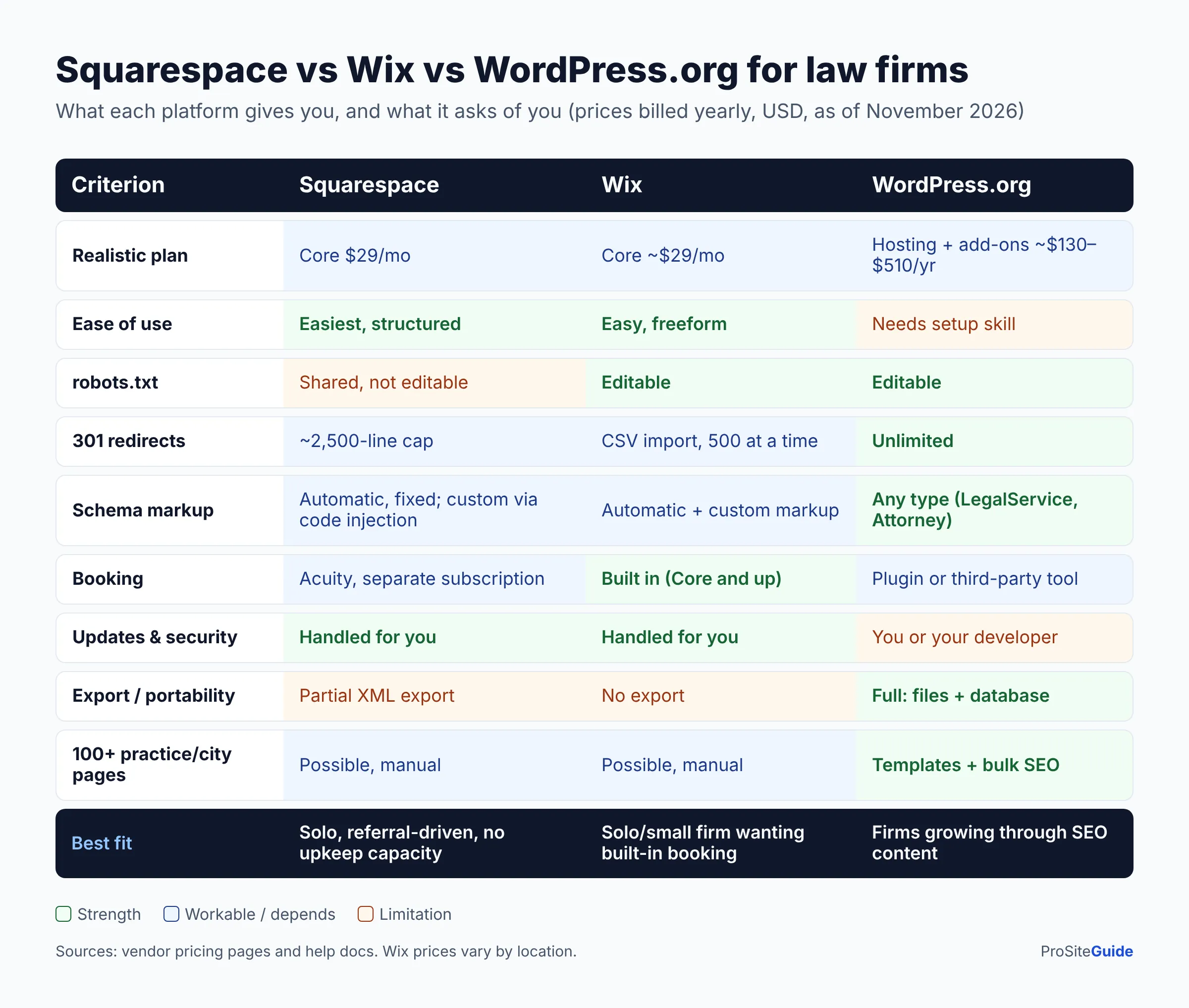
Squarespace vs WordPress vs Wix: side-by-side
| Squarespace | Wix | WordPress.org | |
|---|---|---|---|
| Starting price (yearly billing, Nov 2026) | $19/mo (Core $29/mo) | Varies by region (check Wix’s plans page) | Free software plus hosting from $1.99/mo intro |
| Ease of use | Easiest, very structured | Easy, more freedom | Needs setup skill |
| SEO control | Basic, mostly automatic | Moderate, many controls | Full |
| Built-in booking | Via Acuity (separate subscription) | Core plan and up | Via plugin or third-party tool |
| Maintenance burden | Handled for you | Handled for you | You or your developer |
| Portability | Partial XML export | None | Full |
| Scaling to 100+ pages | Workable, but manual | Workable, but manual | Strong |
| Best fit | Solo lawyer wanting a polished, low-effort site | Solo or small firm wanting built-in booking and more SEO settings | Firms investing in SEO, content and growth |
Which should your firm choose? A decision guide
Choose Squarespace if…
- You are a solo lawyer or a two-person firm, and most clients find you through referrals.
- You want a professional site with about 5 to 15 pages and will rarely add more.
- No one will handle updates or security, and you don’t want a monthly maintenance bill.
Choose Wix if…
- You want online consultation booking built in without a second subscription.
- You want more SEO controls than Squarespace, such as an editable robots.txt, custom canonicals and bulk redirects, while staying hands-off on hosting.
- You accept that leaving Wix later means rebuilding.
Choose WordPress.org if…
- Organic search is a main source of new clients, and you plan many practice-area, location or blog pages.
- You have several attorneys or offices, or plan to grow.
- You want to own the site outright and be able to change hosts or developers.
- You have a developer or maintenance plan, or will budget for one.
Consider WordPress.com if…
- You want WordPress’s flexibility and plugins but prefer a hosted service that handles servers, such as the Business plan at $25/month billed yearly.
FAQ
Is Squarespace or WordPress better for a law firm?
For a small firm that wants low effort, Squarespace is better. For a firm that competes on SEO and plans to grow, WordPress.org is better because it gives full control over redirects, schema, robots.txt and scale. The deciding question is whether someone will maintain a WordPress site.
Is Wix good for lawyers?
Yes, for many solo and small firms. It has law templates, built-in scheduling on Core and higher plans, and more SEO settings than many people expect. The main drawback is lock-in: Wix sites can’t be exported to another host.
Can a Squarespace or Wix site rank on Google?
Yes. Content quality, local relevance, reviews and links matter far more than the platform. The platform affects how much technical tuning you can do, which matters more as a site gets bigger.
What is the best website builder for lawyers on a tight budget?
For lowest total effort, choose Squarespace Core ($29/month billed yearly as of November 2026) or Wix Core (check current pricing for your region). Self-hosted WordPress can cost less in software, but only if you can handle maintenance yourself.
Can I move from Squarespace or Wix to WordPress later?
From Squarespace, you can export some content to WordPress, but you will rebuild the design and some pages. From Wix, there is no export, so you rebuild everything. In both cases, map your old URLs to new ones with 301 redirects so you keep your search rankings.
Conclusion and next steps
No platform is right for every firm. Squarespace and Wix are honest, good choices for solo lawyers and small firms that value low effort over control. WordPress.org pays off when your website is a growth engine with many pages, strong SEO and a firm that expects to grow.
- Decide whether organic search is a main way you get clients, or mostly a credibility check.
- Count the pages you will need in two years, including practice areas, locations and attorneys.
- Decide who will maintain the site, and budget for it.
- Register your domain in the firm’s own account and set up professional email on it.
- Pick the platform that matches those answers, not the one with the prettiest demo.
Want this handled for you? ProSiteGuide builds and maintains fast, secure WordPress sites for law firms. Book a free consultation.
Sources
- Squarespace – Pricing
- Wix – Plans
- WordPress.com – Pricing
- WordPress.org – About
- Squarespace Help – How does Squarespace optimize my site for search results?
- Squarespace Help – Understanding Google SEO emails and console errors
- Squarespace Help – URL mappings
- Squarespace Help – Exporting your site
- Squarespace Help – Set up form and newsletter storage
- Squarespace – Law firm website templates
- Acuity Scheduling – Plans
- Wix – SEO features
- Wix Help – Exporting or embedding your Wix site elsewhere
- Wix – Law website templates
- Wix – Accessibility
- WordPress.org – Tools Export screen
- WordPress.com – Export your content
- Yoast SEO plugin listing
- Hostinger – WordPress hosting
- Kinsta – Pricing
- GeneratePress – Pricing
- Gravity Forms – Pricing
- ADA.gov – Guidance on Web Accessibility and the ADA