Quick answer: To improve your law firm website speed, start by measuring real-visitor data in PageSpeed Insights and Google Search Console. Then fix things in this order: server response time (hosting and caching), the main hero image, third-party scripts like chat widgets and trackers, fonts, and plugin bloat. Google’s “good” Core Web Vitals targets are LCP of 2.5 seconds or less, INP of 200 milliseconds or less, and CLS of 0.1 or less, measured at the 75th percentile of visits.
This guide is for solo and small firms, most of which run on WordPress. It covers what the three metrics mean, how to read your reports without being misled by a single score, and which fixes are worth doing first.
Key takeaways
- Field data is what counts. Google’s Core Web Vitals assessment uses real-user data from the Chrome UX Report. The 0–100 Lighthouse performance score is a lab test for debugging.
- Most small-firm WordPress sites slow down for the same reasons: cheap or overloaded hosting, no page caching, oversized hero images, and too many third-party scripts.
- Fix in priority order. Hosting and caching usually help every page at once. Minifying CSS rarely moves the needle on its own.
- Speed is one signal, not a shortcut. Google says relevance comes first. Treat speed as a quality floor that helps visitors call or fill in your form.
- Never lazy-load the hero image. That is one of the most common self-inflicted LCP problems.
What are Core Web Vitals (LCP, INP, CLS)?
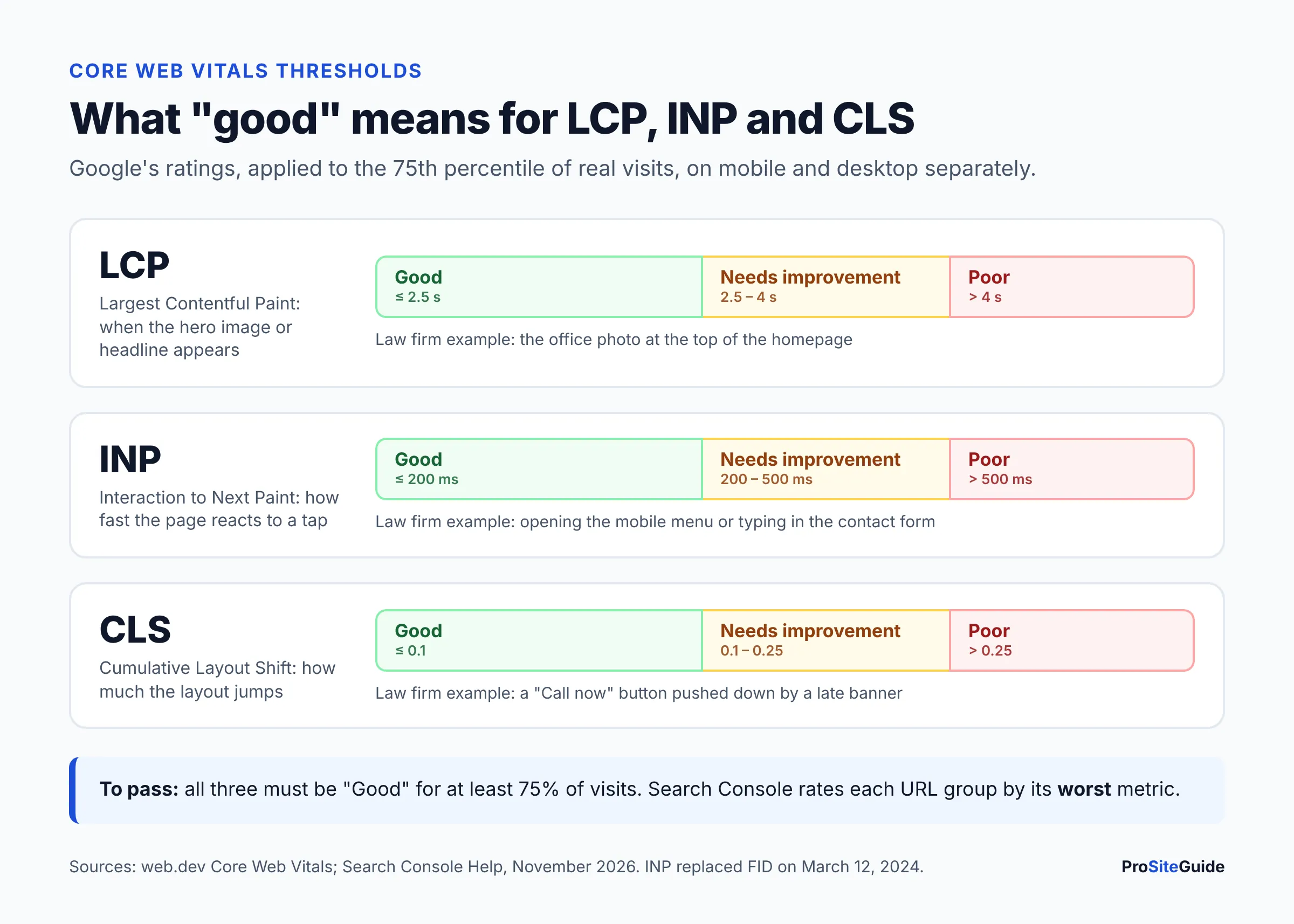
Core Web Vitals are three metrics Google uses to measure real-world page experience: loading, responsiveness and visual stability. The thresholds below come from web.dev’s Core Web Vitals guide and the Search Console Core Web Vitals report documentation.
- LCP (Largest Contentful Paint) is how long it takes the biggest visible element, usually your hero photo or headline, to appear.
- INP (Interaction to Next Paint) is how quickly the page visibly responds after someone taps, clicks or types. It replaced First Input Delay (FID) on March 12, 2024, so any guide still quoting a “100 ms FID” target is out of date.
- CLS (Cumulative Layout Shift) measures how much content jumps around while the page loads. Think of a “Call now” button that moves just as someone taps it.
| Metric | What it measures | Good | Needs improvement | Poor |
|---|---|---|---|---|
| LCP | Loading of main content | ≤ 2.5 s | 2.5–4 s | > 4 s |
| INP | Responsiveness to taps and clicks | ≤ 200 ms | 200–500 ms | > 500 ms |
| CLS | Visual stability | ≤ 0.1 | 0.1–0.25 | > 0.25 |
A page passes only when all three metrics are “good” at the 75th percentile of visits, measured separately for mobile and desktop. In plain terms, at least three out of four visits need a good experience. Search Console labels each group of URLs by its worst metric, so one poor metric fails the whole group.
Does law firm website speed affect Google rankings?
Yes, a little, but it is not the deciding factor. Google’s page experience documentation says Core Web Vitals are used by its ranking systems, but that “there is no single signal.” Google also says it will show the most relevant content even if the page experience is sub-par. A fast site with thin practice area pages will not outrank a slower site with genuinely helpful content.
Speed matters most for the people who land on your site. A prospective client searching on a phone, often stressed, needs your phone number, practice areas and contact form to appear quickly and stay put. Slow loading, late pop-ups and shifting buttons get in the way of that first call. We are not quoting a “conversion lift” figure here, because no reliable study measures this for small law firms. The practical case is simple: make it easy to contact you.
How to measure your law firm website speed
Use two free Google tools. Check both before you change anything, so you have a baseline to compare against.
PageSpeed Insights: field data vs lab data
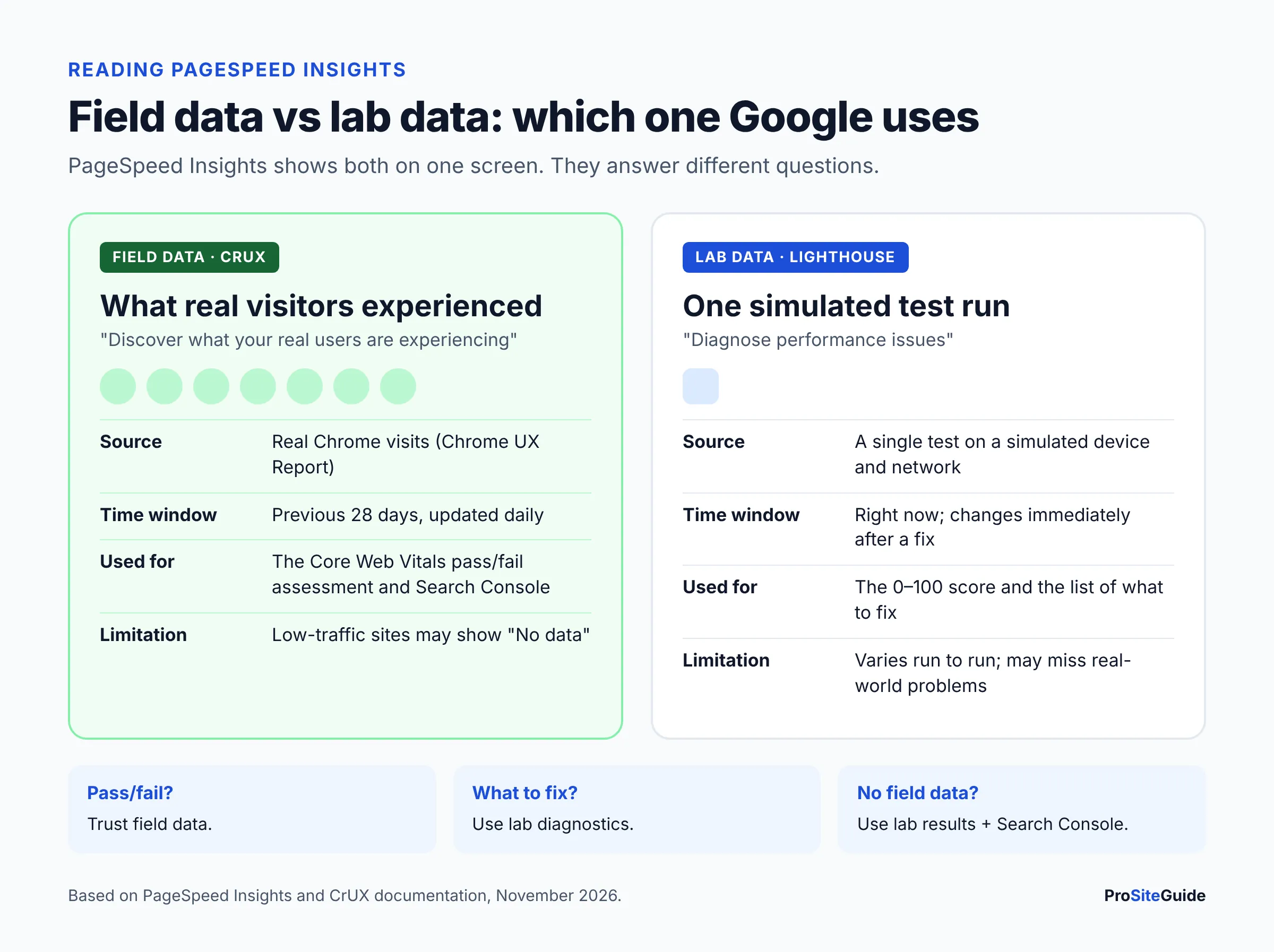
PageSpeed Insights (PSI) shows two very different things on one screen, as explained in the PSI documentation:
- Field data (“Discover what your real users are experiencing”) comes from the Chrome UX Report (CrUX), covering real Chrome visits over the previous 28 days. The Core Web Vitals pass/fail assessment uses only this data.
- Lab data (“Diagnose performance issues”) is a single Lighthouse test on a simulated device and network. It produces the 0–100 performance score (90–100 good, 50–89 needs improvement, 0–49 poor). It is useful for finding problems, but it is not what Google uses to judge your site.
Many small firm sites see “No data” in the field section. CrUX only includes pages and origins that are publicly indexable and have enough Chrome visitors. Google does not publish the exact traffic minimum. If a page lacks data, PSI falls back to origin-wide data for the whole site. If the whole site lacks data, use the lab results and the mobile tab as your guide.
Search Console Core Web Vitals report
In Google Search Console, open Experience → Core Web Vitals. The report groups similar URLs, for example all practice area pages built on one template, and shows which groups are Good, Need improvement or Poor on mobile and desktop. After you fix an issue, start validation from that issue’s page in the report. Google then monitors the affected URLs for 28 days. If Search Console is not set up yet, follow our GA4 and Search Console setup guide for law firms first.
Which pages should a law firm test?
Test the pages that bring in clients, not just the homepage: your homepage, your top two or three practice area pages, an attorney bio, and your contact page. Always check the Mobile tab first, since most local legal searches happen on phones and Google indexes the mobile version of your site.
How to speed up a law firm website: fixes in priority order
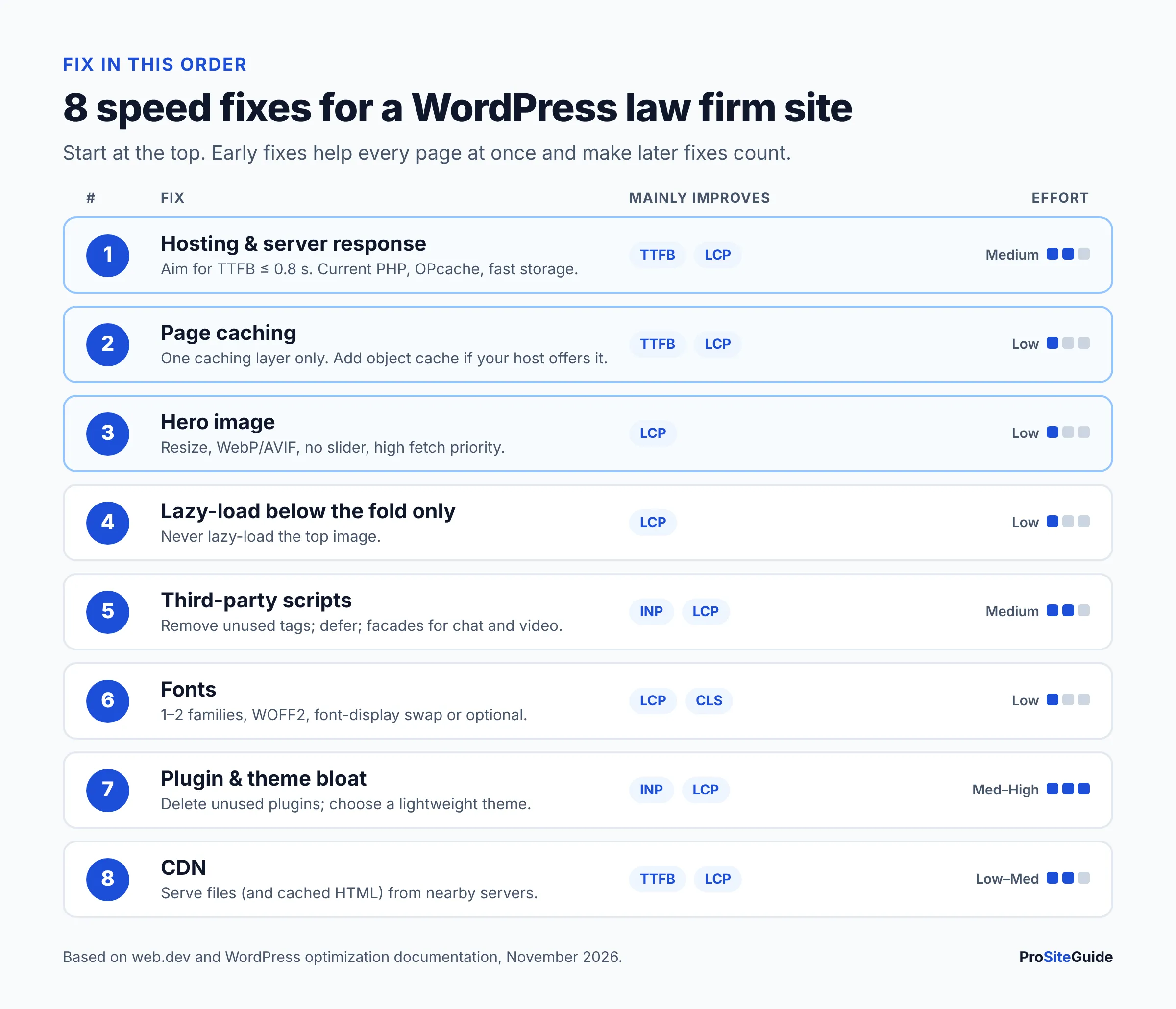
The order below is based on how much each fix tends to help and how many pages it affects. Do the first steps before you spend money on optimization plugins.
1. Fix slow server response (hosting and TTFB)
Time to First Byte (TTFB) is how long the browser waits for the first byte of your page from the server. web.dev considers 0.8 seconds or less good and over 1.8 seconds poor. TTFB is the first part of LCP, so a slow server makes every other fix less effective. Google’s LCP optimization guide suggests TTFB should take roughly 40% of your LCP time, not most of it.
If your lab TTFB is consistently high, the cause is usually crowded shared hosting, an outdated PHP version, or no caching. The official WordPress optimization guide recommends current PHP versions, an opcode cache such as OPcache, and SSD or NVMe storage. Managed WordPress hosts handle most of this for you. See our comparison of the best hosting for law firm websites. If you switch hosts, plan the move so the site never goes offline.
2. Turn on page caching (and object caching if offered)
Page caching stores a ready-made HTML copy of each page, so WordPress does not rebuild it from the database for every visitor. A brochure-style firm site is a perfect fit for it. Many managed hosts include server-level page caching. On other hosts, use one reputable caching plugin, never two. If your host offers Redis or Memcached, a persistent object cache also reduces database work, as the WordPress docs explain. Exclude any pages that must never be cached, such as client portals or payment pages.
3. Optimize the hero image (and every image after it)
On most firm sites, the LCP element is a large hero photo of the office, skyline or attorneys. Common fixes:
- Resize before uploading. A 5,000-pixel camera photo shown at 1,400 pixels wastes bandwidth. Export at roughly the size it is displayed.
- Use modern formats. WordPress supports WebP, and WordPress 6.5 added AVIF support, which the core team says can be “up to 50% smaller than JPEGs” at the same quality. AVIF only works if your server’s image library supports it. Check under Tools → Site Health → Info → Media Handling.
- Let the hero image load first. Since WordPress 6.3, core adds
fetchpriority="high"to the image it judges most likely to be the LCP. Page builders and sliders sometimes defeat this by loading the hero as a CSS background. If yours does, use a normal image block instead. - Avoid sliders and autoplay video heroes. They add scripts and delay the main content. One strong image plus a clear headline and phone number usually works better.
4. Lazy-load below-the-fold images only
Lazy loading delays offscreen images until a visitor scrolls near them. WordPress has added loading="lazy" by default since version 5.5, for images that have width and height attributes. The mistake to avoid is lazy-loading the image at the top of the page. web.dev advises against lazy-loading images likely to be visible on load, especially the LCP image. If an optimization plugin lazy-loads “all images,” exclude the hero.
5. Tame third-party scripts (chat widgets, trackers, embeds)
Third-party scripts are often the biggest cause of poor INP on law firm sites. Live chat widgets, intake bots, call-tracking, review badges, heatmaps, multiple ad pixels and embedded YouTube videos all compete for the browser’s main thread. Google’s guidance on loading third-party JavaScript is direct: load them with async or defer, and “if the script doesn’t add clear value to your site, remove it.”
- Audit tags yearly. Remove pixels for ad campaigns you no longer run and duplicate analytics tags.
- Use facades for chat and video. A facade is a lightweight static stand-in that loads the real widget only when someone clicks it. Lighthouse specifically lists live chat widgets and video players as candidates.
- Weigh the widget against the alternative. If you use chat mainly for intake, a staffed answering service may cover the same need with less on-page code. Our Smith.ai vs Ruby comparison covers that option.
6. Simplify fonts
Many law firm themes load three or four font families in multiple weights. Each file delays text and can cause layout shifts when the font swaps in. Per web.dev’s font best practices: use WOFF2 files, limit the number of families and weights (or use one variable font), preload only the most important font, and set font-display to swap or optional. Self-hosting is not automatically faster than Google Fonts, so measure both.
7. Cut plugin and theme bloat
The WordPress docs put it plainly: “Deactivate and delete any unnecessary plugins,” and choose a lightweight theme. Heavy multipurpose themes and page builders load CSS and JavaScript for features you never use. Before buying a new theme, check its demo in PageSpeed Insights. Our guides to WordPress themes for law firms and the plugins law firms actually need help you keep the stack lean.
8. Add a CDN
A content delivery network (CDN) serves copies of your images, CSS and JavaScript from servers close to each visitor. With the right setup, it can cache whole HTML pages too. The WordPress docs note a CDN works best alongside a caching plugin. Some managed hosts include one. Otherwise, see our guide to setting up Cloudflare for a law firm website. Watch for cache rules that strip query strings or bypass caching on marketing URLs, which Google’s LCP guide flags as a common TTFB problem.
How to fix layout shift (CLS) on a WordPress site
Most CLS problems come from content that appears without reserved space. Based on web.dev’s CLS guide:
- Give every image and video embed
widthandheightattributes, or a CSSaspect-ratio. WordPress adds these automatically for Media Library images, but custom HTML and some builders do not. - Reserve space for cookie banners, review widgets and “free consultation” bars, or overlay them instead of pushing content down.
- Avoid pop-ups that inject themselves at the top of the page after load.
- Use matching fallback fonts so text doesn’t reflow when the web font loads.
Shifts that happen within 500 ms of a user’s tap, like an accordion opening, don’t count against CLS.
How to improve INP (responsiveness)
Poor INP means the page is busy running JavaScript when a visitor taps something. Examples include opening the mobile menu, expanding an FAQ, or typing in your contact form. Google’s INP guide points to long main-thread tasks, heavy event handlers and very large page structures (DOM size) as the main causes. On a typical firm site, the practical fixes are: remove or defer third-party scripts (step 5), switch away from bloated page-builder layouts, and replace heavy animation libraries. Form plugins can add a lot of script too. Pick a lightweight one and load its scripts only on pages that show a form.
Core Web Vitals WordPress checklist (prioritized)
| Priority | Fix | Mainly improves | Effort | Who usually does it |
|---|---|---|---|---|
| 1 | Move off overloaded shared hosting; current PHP; OPcache | TTFB → LCP | Medium | Host / developer |
| 2 | Server or plugin page caching (one only); object cache if available | TTFB → LCP | Low | Host / you |
| 3 | Resize and compress hero image; WebP or AVIF; no slider | LCP | Low | You |
| 4 | Lazy-load only below-the-fold images; never the hero | LCP | Low | You / developer |
| 5 | Remove unused tags; defer scripts; facades for chat and video | INP, LCP | Medium | Developer / marketer |
| 6 | One or two font families, WOFF2, font-display | LCP, CLS | Low | Developer |
| 7 | Delete unused plugins; lightweight theme | INP, LCP | Medium–High | Developer |
| 8 | CDN (with HTML caching where safe) | TTFB, LCP | Low–Medium | You / developer |
| 9 | Image dimensions; reserved space for banners and embeds | CLS | Low | Developer |
| 10 | Re-test, validate in Search Console, monitor monthly | All | Low | You / maintenance provider |
Step-by-step: speed up a WordPress law firm site this week
- Back up the site and, if your host offers one, make changes on a staging copy.
- Record a baseline. Run PSI (mobile) on your homepage, top practice pages and contact page. Screenshot the field data and the lab LCP element. Note the Search Console CWV status.
- Check your hosting basics. Confirm your PHP version under Tools → Site Health → Info → Server, and ask your host whether server caching and OPcache are on.
- Enable one caching layer and clear it after each change.
- Fix the LCP element PSI identifies, usually the hero image. Resize it, convert it, and make sure it isn’t lazy-loaded.
- List every third-party script (PSI’s lab diagnostics list third-party code by provider). Remove what you don’t use, and defer or facade the rest.
- Deactivate unused plugins one at a time, re-testing as you go, then delete them.
- Trim fonts to the families and weights your design really uses.
- Re-test the same pages and compare against your baseline. Lab results change right away, while field data takes up to 28 days to reflect changes.
- Start validation in Search Console and add a monthly speed check to your website maintenance routine.
What not to do
- Don’t chase a 100 score. The Lighthouse score is a lab diagnostic. Passing field Core Web Vitals and a site that feels fast on a phone matter more.
- Don’t stack optimization plugins. Two caching or minification plugins can conflict, break layouts, or cache pages that shouldn’t be cached.
- Don’t lazy-load everything. Lazy-loading the hero image makes LCP worse.
- Don’t remove security or backup tools to save milliseconds. Security plugins, backups and updates are part of the baseline, not bloat.
- Don’t defer scripts blindly. Aggressive “delay all JavaScript” settings can break contact forms, consent banners or call tracking. Test form submissions after every change.
- Don’t judge by one test. Lab results vary from run to run. Look for consistent patterns across several pages.
FAQ
What is a good PageSpeed Insights score for a law firm website?
In Lighthouse, 90–100 is rated good, 50–89 needs improvement and 0–49 poor. But the score that matters for Google is the field “Core Web Vitals Assessment” at the top of PSI. Aim to pass it on mobile, with LCP ≤ 2.5 s, INP ≤ 200 ms and CLS ≤ 0.1.
Why does PageSpeed Insights say “No data” for my site?
Your pages don’t have enough Chrome visitors to appear in the Chrome UX Report, which is common for small firms. Use the lab data and Search Console instead, and focus on the same fixes.
Why is my mobile score so much worse than desktop?
PSI’s mobile lab test simulates a slower device and network, so heavy images and scripts hurt more. Real phones are also less powerful than desktops. Prioritize mobile results.
How long until Core Web Vitals improvements show up?
Lab results change immediately. Field data in PSI covers a rolling 28-day window, and Search Console’s validation runs for 28 days, so expect about a month before reports fully reflect your fixes.
Do I need a speed optimization plugin?
Not always. If your host provides server caching and a CDN, you may need only an image optimization tool. If not, one well-maintained caching plugin is usually enough. Avoid overlapping plugins.
Is Squarespace or Wix faster than WordPress?
Hosted builders manage hosting and caching for you, but give you less control over scripts and images. A well-built WordPress site on good hosting can perform very well. The platform matters less than how much is loaded on each page.
Will a faster site get me more clients?
Speed alone won’t bring clients, but a slow or jumpy site makes it harder for visitors who already found you to call or submit a form. Combine speed work with clear practice pages and local SEO.
Conclusion: next steps
Improving law firm website speed is mostly a matter of doing the basics in the right order. Measure with field data, fix hosting and caching, slim the hero image, cut third-party scripts, and keep plugins and fonts lean. Then re-test, validate in Search Console, and check again monthly. If you are rebuilding your site from scratch, start with our Start Here guide and the free law firm website checklist.
Want this handled for you? ProSiteGuide builds and maintains fast, secure WordPress sites for law firms. Book a free consultation.
Sources
- web.dev: Web Vitals
- web.dev: Defining the Core Web Vitals metrics thresholds
- web.dev: INP becomes a Core Web Vital on March 12
- Google Search Central: Understanding page experience
- Search Console Help: Core Web Vitals report
- PageSpeed Insights: About PSI
- Chrome UX Report: Methodology
- web.dev: Optimize LCP
- web.dev: Time to First Byte
- web.dev: Optimize INP
- web.dev: Optimize CLS
- web.dev: Browser-level image lazy loading
- web.dev: Loading third-party JavaScript
- Chrome for Developers: Lazy load third-party resources with facades
- web.dev: Best practices for fonts
- WordPress Developer Resources: Optimization
- Make WordPress Core: Lazy-loading images in 5.5
- Make WordPress Core: Image performance enhancements in WordPress 6.3
- Make WordPress Core: WordPress 6.5 adds AVIF support