This guide contains affiliate links. If you buy through them, we may earn a commission at no extra cost to you. It never changes our recommendations. Learn more.
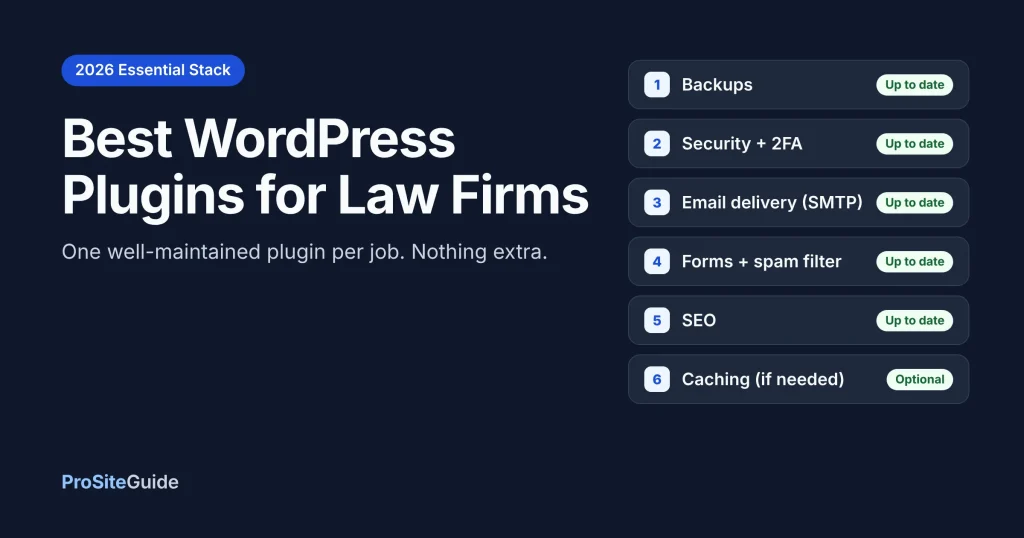
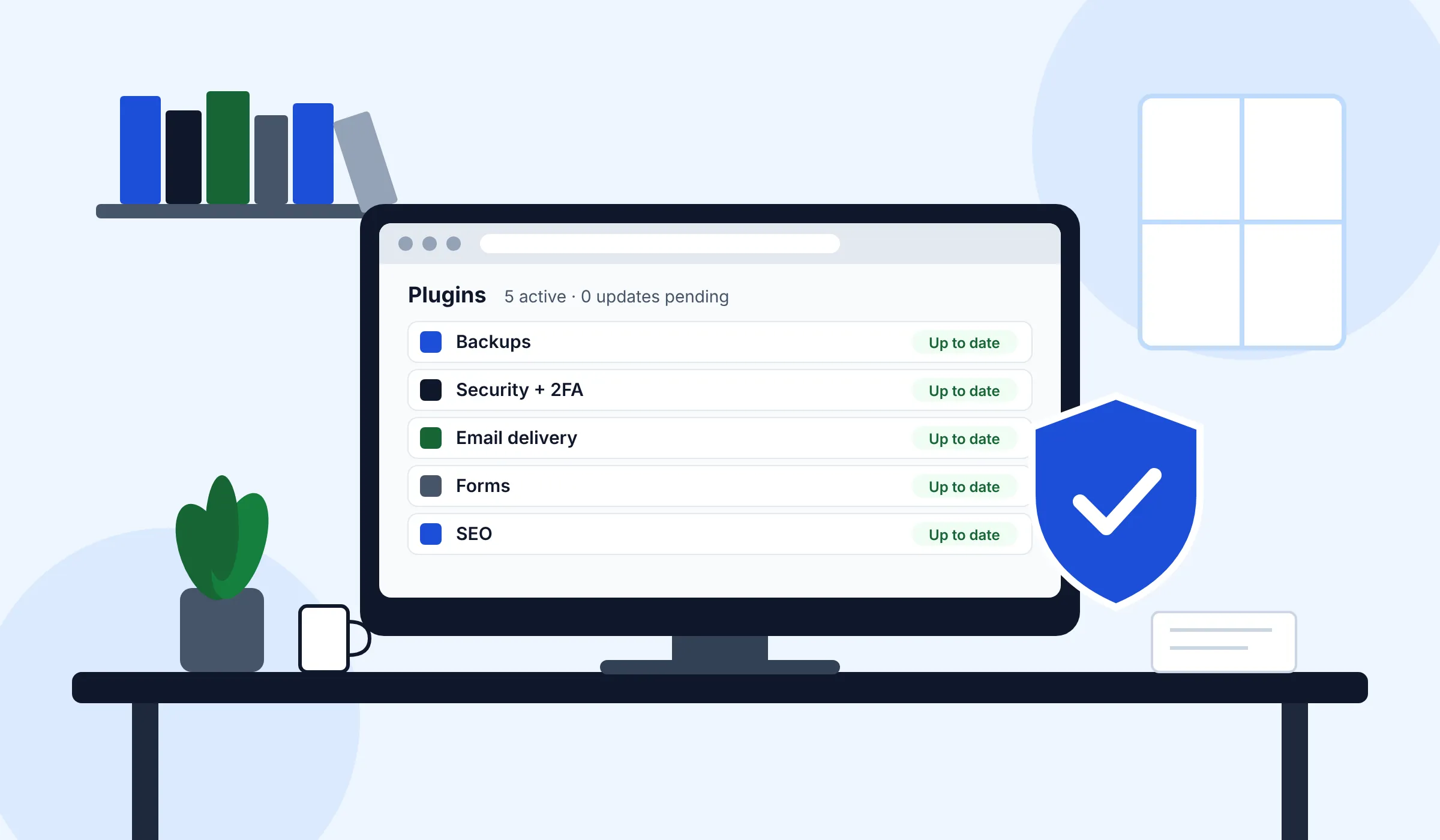
Quick answer: Most law firm websites need only one plugin for each of eight jobs: forms, SEO, security, backups, email delivery (SMTP), spam protection, consent (only if you track visitors) and, sometimes, scheduling. A strong default stack is WPForms or Gravity Forms, Rank Math or Yoast SEO, Wordfence, UpdraftPlus, WP Mail SMTP or FluentSMTP and Cloudflare Turnstile. Add caching only if your host doesn’t already provide it. Fewer plugins that are well maintained beat a long list every time.
Key takeaways
- Pick plugins by job, not by popularity. One tool per job. Two SEO plugins or two caching plugins cause conflicts.
- Every plugin is code you have to keep updated. Check the “Last updated” date, the active installs and the “Tested up to” version on WordPress.org before you install anything.
- Check your host before you buy a caching or backup plugin. Managed WordPress hosts often include both.
- Don’t use accessibility overlay widgets as a shortcut. In 2025 the FTC fined one overlay vendor $1 million over claims that its tool made sites WCAG compliant.
- Install in a set order: backups first, then security, then email delivery, then everything else. Test after each step.
How we compared these plugins
This roundup is based on official documentation, WordPress.org plugin listings and vendor pricing pages, all checked in November 2026. We have not run hands-on benchmarks, and we don’t give scores. For each plugin we looked at four things: what the free version actually covers, the published price of the paid tier, how many sites use it (as shown on WordPress.org) and how recently it was updated. Prices change often and many vendors show first-year discounts, so always confirm the renewal price before you buy.
Why fewer plugins is the better strategy
A plugin is an add-on that gives WordPress a feature it doesn’t have out of the box. Each one is third-party code running on the site that holds your firm’s name and your clients’ first messages. Every plugin you add is another thing to update, another possible conflict and another place a vulnerability could show up.
So the goal isn’t the “best” plugin in every category. It’s the smallest set that covers the jobs your site really has. Before you install anything, run this quick check:
- Last updated: within the past few months. A plugin that hasn’t been touched in a year or more is a warning sign. Several law-specific plugins listed in plugin directories have been flagged as possibly abandoned.
- Tested up to: the current major WordPress release (7.1.x as of November 2026).
- Active installs: a large user base doesn’t make a plugin safe, but it does mean problems get reported and fixed faster.
- Overlap: does your theme, host or an existing plugin already do this job?
- Exit plan: can you remove it later without breaking pages? This matters most with shortcodes and page builders.
The essential law firm plugin stack at a glance
Active installs and update dates below are as shown on WordPress.org on November 8, 2026. Paid prices are list or renewal prices from each vendor’s pricing page as of November 2026 (first-year promotions are noted in the sections below).
| Job | Plugin | Free version? | Paid from (as of Nov 2026) | Active installs (WordPress.org) |
|---|---|---|---|---|
| Forms | WPForms | Yes (WPForms Lite) | $99/yr renewal, 1 site ($49.50 first year) | 5+ million |
| Forms | Gravity Forms | No | $59/yr, 1 site | Not listed (sold direct) |
| Forms | Fluent Forms | Yes | $79/yr list, 1 site | 800,000+ |
| SEO | Rank Math | Yes | PRO $8.99/mo billed yearly | 4+ million |
| SEO | Yoast SEO | Yes | Premium $118.80/yr, 1 site | 10+ million |
| Security | Wordfence | Yes | Premium: confirm current price with Wordfence | 5+ million |
| Security | Kadence Security (formerly Solid / iThemes Security) | Yes | Confirm with vendor | 700,000+ |
| Security | Sucuri | Yes (scanner plugin) | Firewall $9.99/mo; platform $229/yr | 600,000+ |
| Backups | UpdraftPlus | Yes | Premium Personal $70/yr, 2 sites | 4+ million |
| Email delivery | WP Mail SMTP | Yes | Pro $99/yr renewal ($49 first year) | 4+ million |
| Email delivery | FluentSMTP | Yes (fully free) | Free | 700,000+ |
| Spam | Simple CAPTCHA with Cloudflare Turnstile | Yes | Free (Turnstile free plan) | 200,000+ |
| Spam | Akismet | Personal sites only | Pro $9.95/mo for commercial sites | 5+ million |
| Caching | WP Rocket | No (14-day trial) | Single listed at $5/mo billed yearly | Not listed (sold direct) |
| Scheduling | Simply Schedule Appointments | Yes | Plus $129/yr renewal ($99 first year) | 50,000+ |
| Consent | Complianz | Yes | Personal $59/yr | 1+ million |
| Consent | CookieYes | Yes (5,000 pageviews/mo) | Basic $100/yr | 1+ million |
Which form plugin is best for a law firm?
For most small firms, WPForms is the easiest choice and Gravity Forms is the most flexible. Fluent Forms is the value pick. All three can build a consultation request form with conditional fields, such as asking different questions for family law and personal injury inquiries. How you handle confidential details in those forms is a bigger question than which plugin you choose, so read our guide to setting up a secure contact form for a law firm website before you go live.
WPForms
The WPForms pricing page lists Basic (1 site) at $49.50 for the first year, renewing at $99/yr. Plus (3 sites) renews at $199/yr, Pro (5 sites) at $399/yr and Elite (unlimited sites) at $599/yr. Renewals are at full price, and there’s a 14-day money-back guarantee. The free WPForms Lite works fine for a simple contact form. Best for: non-technical firms that want a drag-and-drop builder.
Gravity Forms
Gravity Forms has no free version or trial. Basic costs $59/yr for 1 site, Pro $159/yr for 3 sites and Elite $259/yr for unlimited sites. Elite adds add-ons such as Signature, Partial Entries and Webhooks. Best for: firms with a developer who need complex intake logic or CRM integrations.
Fluent Forms
The Fluent Forms Pro single-site license lists at $79/yr, with a lifetime option. At the time of writing a discounted first year was shown. Pro includes conditional logic, multi-step and conversational forms, and conditional email routing on every plan. Best for: budget-conscious firms that still want advanced features.
Rank Math or Yoast: which SEO plugin should lawyers use?
Either is fine. Pick one and never run both. The free versions of both handle the basics: title tags, meta descriptions, XML sitemaps and basic schema markup (code that helps search engines understand your pages).
- Rank Math: The Rank Math pricing page lists PRO (unlimited personal sites) at $8.99/month billed annually, with a lower first-year promotion at the time of writing. The free version already includes more schema options than most firms need.
- Yoast SEO: Yoast SEO Premium costs $118.80/yr per site. The page says Premium includes redirect management, internal linking suggestions and the Local SEO, Video and News add-ons.
Our take: if a developer already set one up, keep it. Switching gains you little. A free version plus well-written practice area pages will do more for your rankings than any premium SEO feature.
What security plugin does a law firm website need?
You need one security plugin, plus a host that does its own server-level protection. The plugin’s job is login protection (two-factor authentication), a firewall and malware scanning. For the full hardening list (user roles, updates, file permissions), use our law firm website security checklist. We won’t repeat it here.
Wordfence
The free Wordfence plugin includes a web application firewall, a malware scanner, two-factor authentication and passkeys. Its listing notes that firewall rules and malware signatures reach free users 30 days later than Premium users. Premium adds real-time updates, an IP blocklist, country blocking and paid support. Premium is billed per site per year. A price change was reported for December 2026, so confirm the current price on Wordfence\’s site before you buy.
Kadence Security (formerly Solid Security / iThemes Security)
The same plugin has carried three names. Its WordPress.org listing shows the free version includes two-factor authentication, brute-force protection, file change detection and scheduled scans. Pro adds passwordless logins, trusted devices and Patchstack virtual patching. We couldn’t find a published Pro price after the rebrand, so confirm it with the vendor. Best for: firms that want a lighter plugin focused on logins and hardening.
Sucuri
Sucuri’s main product is a cloud firewall that filters traffic before it reaches your server. The free plugin is mostly an auditing and scanning tool. On Sucuri’s pricing page, the Basic Firewall costs $9.99/month, and the Basic Platform (firewall plus unlimited malware cleanups) costs $229/yr per site. If you already use Cloudflare’s firewall, you may not need it. Check what your existing firewall already covers before adding another.
Do you need a backup plugin if your host backs up your site?
Usually yes, for a second copy stored somewhere else. Host backups are often kept on the host’s own infrastructure, and you can’t count on them if the account itself has a problem. An off-site copy in Google Drive, Dropbox or Amazon S3 is cheap insurance.
- UpdraftPlus: The free version handles scheduled backups to remote storage. UpdraftPlus Premium starts at $70/yr for up to 2 sites. It adds incremental backups, automatic backups before updates, one-click migration and database encryption.
- Duplicator: Best known for migrations, with 1+ million active installs on WordPress.org. It’s useful when you move to a new host.
Whichever you pick, test a restore on a staging site at least once. A backup you have never restored is a guess.
Why your law firm site needs an SMTP plugin
SMTP (Simple Mail Transfer Protocol) is the standard way email is sent between servers. By default, WordPress sends form notifications through your web server, and those messages often land in spam or never arrive. An SMTP plugin sends them through a real email service instead, such as Google Workspace, Microsoft 365, Amazon SES or Brevo. For a law firm, a lost consultation request means a lost client.
- FluentSMTP: The FluentSMTP site says it is “free and will always be free.” That includes email logs, multiple connections and a fallback connection if your main service fails. This is the best value in the whole stack.
- WP Mail SMTP: The free version covers the connection. WP Mail SMTP Pro (1 site) costs $49 for the first year and renews at $99/yr. It adds email logs, failure alerts and backup connections.
SMTP only works well if your domain’s SPF, DKIM and DMARC records are correct. Our law firm email setup guide covers that.
Do you need a caching plugin?
Only if your host doesn’t already cache pages. Caching means saving a ready-made copy of each page so the server doesn’t rebuild it for every visitor. Many managed WordPress hosts do this at the server level, and adding a second caching layer can cause stale pages or broken forms. Check your host’s documentation first. Our best hosting for law firm websites comparison notes which hosts include it.
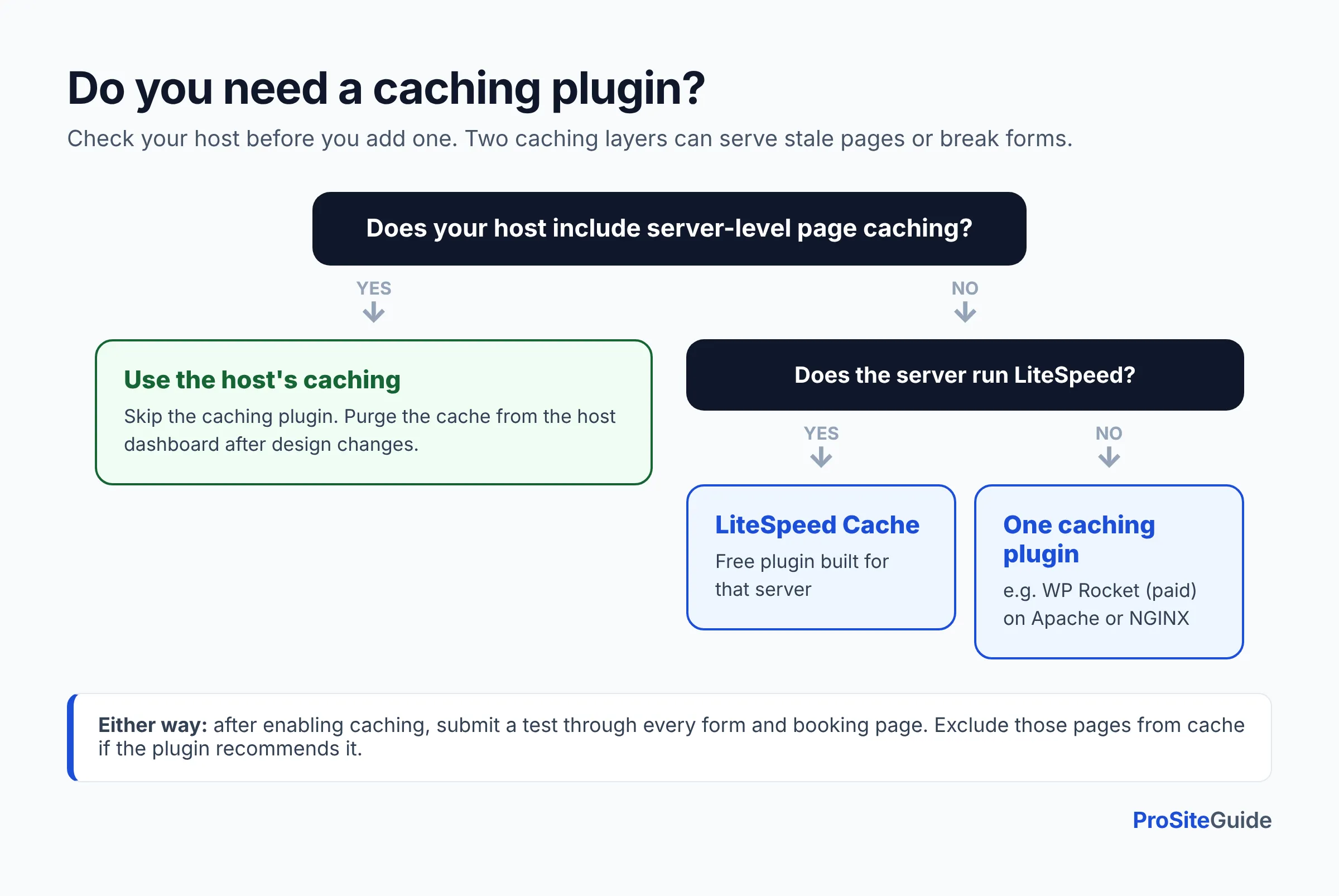
- Host caching: If it’s included, use it and skip the plugin.
- LiteSpeed Cache: Free, and the right choice if your host runs a LiteSpeed web server. It has 7+ million active installs on WordPress.org.
- WP Rocket: A paid plugin for Apache or NGINX hosts without built-in caching. The WP Rocket pricing page lists the Single plan (1 site) at $5/month billed yearly, discounted during a promotion at the time of writing. There’s no free version, only a 14-day trial.
How to stop contact form spam without annoying clients
Use Cloudflare Turnstile, a CAPTCHA replacement that usually doesn’t ask visitors to solve a puzzle. Cloudflare’s Turnstile documentation says it can be embedded on any website without routing traffic through Cloudflare. The free plan includes unlimited challenges. Check your form plugin’s spam settings for a built-in Turnstile option first. If there isn’t one, the free Simple CAPTCHA with Cloudflare Turnstile plugin adds it.
Akismet is a popular alternative, but read the terms. The Akismet pricing page limits the pay-what-you-can plan to personal sites. Commercial sites, which includes a law firm, need Pro from $9.95/month billed yearly.
What’s the best scheduling option for consultations?
Often it’s no plugin at all. If you already use a scheduling service such as Calendly, or the booking tool in your practice management software, embed its widget on a page. That adds no plugin to update. Choose a WordPress booking plugin only if you want bookings stored on your own site.
- Simply Schedule Appointments: The free Basic tier includes Google Calendar sync. Paid plans start with Plus at $99 for the first year ($129/yr renewal), which adds Zoom and Google Meet. SMS reminders and Stripe/PayPal payments come with Professional ($249/yr renewal).
- Amelia: A more feature-heavy booking system with two-way Google Calendar and Outlook sync, Zoom and payments. The free version has 90,000+ active installs on WordPress.org. Its pricing page showed promotional prices we couldn’t read reliably, so confirm current pricing with the vendor.
Keep booking forms short. Ask for name, contact details and matter type, not the facts of the case. Those can wait until you’ve run a conflict check.
Do law firm websites need a cookie consent plugin?
Only if the site uses cookies or scripts that track visitors, such as Google Analytics, ad pixels or embedded videos. Several US states now have privacy laws with opt-out rights, and the rules differ by state. Check with a privacy professional if you’re unsure which apply to you. If you do need a banner:
- Complianz: The free plugin includes a cookie scan, script blocking and a cookie policy generator. Detailed US state law support, Google Consent Mode and records of consent are listed as premium features. Premium Personal costs $59/yr for 1 site.
- CookieYes: The free plan covers up to 5,000 pageviews a month and includes a US State Laws (opt-out) template and Google Consent Mode v2. Basic costs $100/yr per domain.
Should you use an accessibility overlay plugin?
No, not as a substitute for real accessibility work. An overlay is a widget that adds a toolbar to your site and promises automatic fixes. In January 2025 the Federal Trade Commission announced a $1 million order against accessiBe. The FTC alleged that the company’s claims that its AI tool could make any website compliant with the Web Content Accessibility Guidelines (WCAG) were false, misleading or unsubstantiated.
Accessibility comes from the theme, the content and how forms are built: real headings, alt text, color contrast, labeled form fields and keyboard navigation. Plugins can help you find problems, but they don’t fix them for you. Our guide to law firm website accessibility and WCAG explains what to check.
Plugins most small firms can skip
- A second plugin for the same job: two SEO plugins, two caching plugins or two security plugins.
- Social auto-posters and share-count widgets: they add scripts and rarely bring clients.
- Old “lawyer directory” or “case manager” plugins: check the update date. Your practice management software should hold client data, not your website.
- Separate plugins for every tiny feature (a “scroll to top” button, a custom login logo). A developer can add these with a few lines of code.
- Accessibility overlays, for the reasons above.
Our recommended minimal stack
Here are two versions. Both assume a good host that handles server-side caching and daily backups.
| Job | Lean (mostly free) | Supported (paid, with vendor help) |
|---|---|---|
| Forms | WPForms Lite or Fluent Forms | Gravity Forms Basic or WPForms Basic |
| SEO | Rank Math (free) or Yoast SEO (free) | Same free plugin, or Yoast Premium if you need redirects |
| Security | Wordfence (free) with 2FA on | Wordfence Premium |
| Backups | UpdraftPlus (free) to cloud storage | UpdraftPlus Premium |
| Email delivery | FluentSMTP | FluentSMTP or WP Mail SMTP Pro |
| Spam | Cloudflare Turnstile | Cloudflare Turnstile |
| Caching | Host caching | Host caching (or WP Rocket if none) |
| Optional | Booking embed; Complianz if you track visitors | Simply Schedule Appointments; Complianz Premium |
That comes to six to eight plugins in total, not counting your theme. Your monthly website maintenance routine should include updating each one and checking that forms still deliver.
In what order should you set up plugins?
Set up protection first and features second, so that if something breaks you can roll back. Ideally do this on a staging copy of the site.
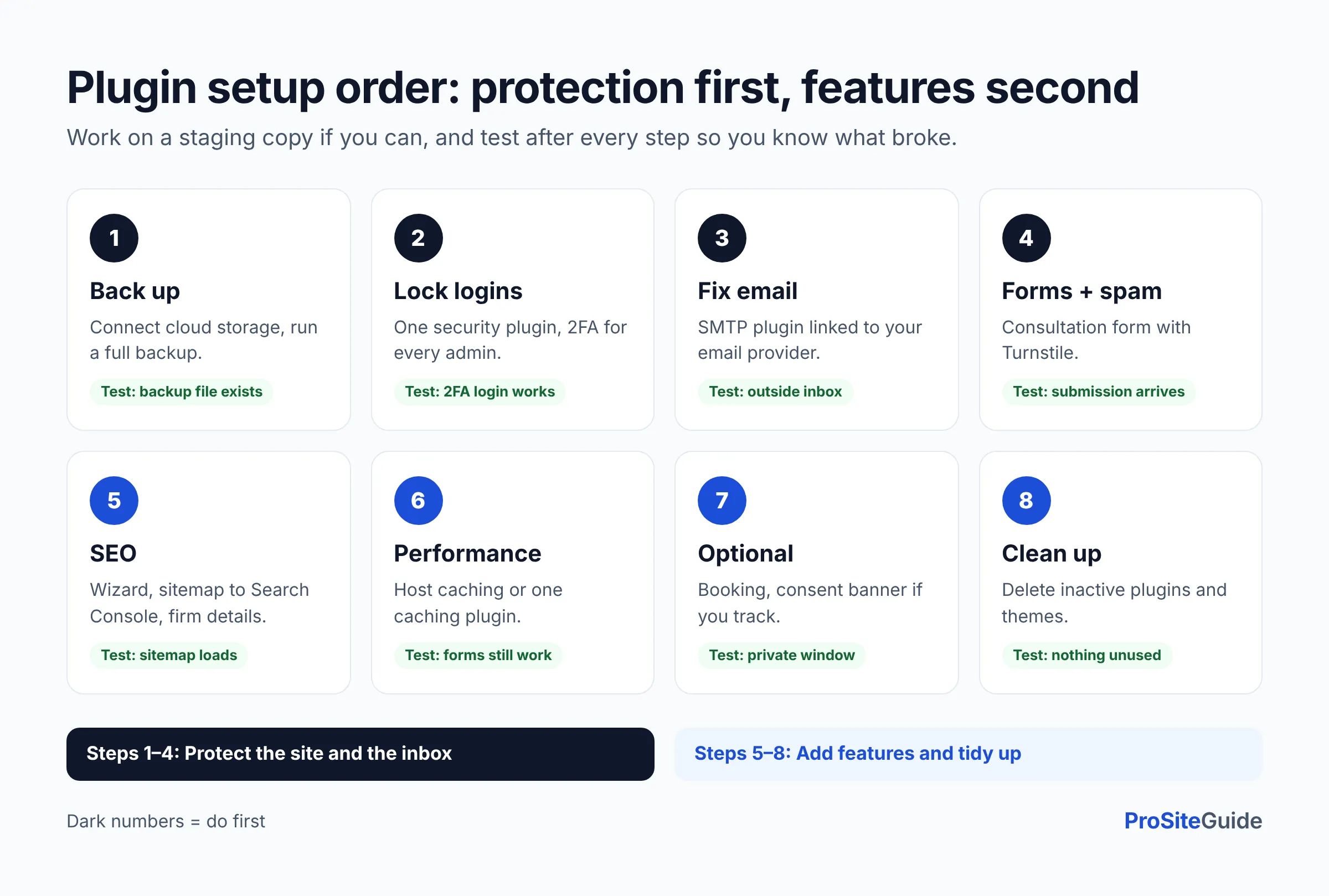
- Back up the site. Install UpdraftPlus (or confirm your host’s backups), connect cloud storage and run a first full backup.
- Lock down logins. Install one security plugin, turn on two-factor authentication for every admin and run a first scan.
- Fix email delivery. Install an SMTP plugin, connect it to your email provider and send a test email to an outside address.
- Build or connect forms. Set up the consultation form, add Turnstile and send a test submission. Confirm that it arrives.
- Configure SEO. Run the setup wizard, submit the sitemap in Google Search Console and add your firm’s details for local schema.
- Check performance. Turn on host caching (or one caching plugin). Exclude form and booking pages if the plugin recommends it, then retest the forms.
- Add optional plugins. Add scheduling and, if you use tracking scripts, the consent banner. Test the banner in a private browser window.
- Remove leftovers. Delete inactive plugins and themes. Deactivated code still sits on the server.
FAQ
How many plugins should a law firm website have?
There’s no magic number. A typical small-firm site can cover every essential job with six to eight well-maintained plugins. Quality and update history matter more than the count.
Are free WordPress plugins safe for lawyers to use?
Free plugins from established vendors with recent updates and large user bases are widely used. Paid tiers mostly add support and extra features, not basic safety. What matters most is keeping every plugin updated and removing the ones you don’t use.
Are there WordPress plugins made specifically for law firms?
A few exist, such as integrations from practice management vendors. Many generic “lawyer” plugins are rarely updated, though. If your practice management software offers an official form or intake integration, use that. Otherwise stick with mainstream plugins.
Should client information be stored in WordPress form entries?
Keep as little as you can. Many firms turn off entry storage or delete entries on a schedule, and route inquiries to email or their intake software. Our secure contact form guide covers the options. Check your state bar’s guidance on confidentiality and technology.
Do I need both a security plugin and Cloudflare?
They do different jobs. Cloudflare filters traffic before it reaches your server. A security plugin protects logins and scans files on the server. Many firms use both, but turn off overlapping features (such as two firewalls set to block the same traffic) to avoid conflicts.
Can I use these plugins on Squarespace or Wix?
No. Plugins are a WordPress feature. Hosted builders use their own built-in tools and app marketplaces. The trade-offs between WordPress and hosted builders are a separate decision.
Conclusion: build a small, maintained stack
The best WordPress plugins for law firms are the ones you’ll actually keep updated. Start with a backup, a security plugin with two-factor authentication, an SMTP plugin and a reliable form with Turnstile. Then add SEO, and add caching, scheduling and consent only when your site needs them. Your next steps:
- List the plugins on your site today and match each one to a job. Remove duplicates and anything that hasn’t been updated in a year.
- Send a test through every form and confirm it reaches the inbox.
- Work through the security checklist and put plugin updates on a monthly calendar.
Want this handled for you? ProSiteGuide builds and maintains fast, secure WordPress sites for law firms. Book a free consultation.
Sources
- WPForms pricing
- WPForms Lite on WordPress.org
- Gravity Forms pricing
- Fluent Forms pricing
- Rank Math pricing
- Yoast SEO Premium
- Wordfence on WordPress.org
- Webhosting.today: Wordfence price increase (Nov 4, 2026)
- Kadence Security on WordPress.org
- Sucuri plans
- UpdraftPlus Premium pricing
- Duplicator on WordPress.org
- WP Mail SMTP pricing
- FluentSMTP
- LiteSpeed Cache on WordPress.org
- WP Rocket pricing
- Cloudflare Turnstile documentation
- Cloudflare Turnstile plans
- Simple CAPTCHA with Cloudflare Turnstile on WordPress.org
- Akismet pricing
- Simply Schedule Appointments pricing
- Amelia on WordPress.org
- Amelia pricing
- Complianz on WordPress.org
- Complianz pricing
- CookieYes pricing
- FTC press release on accessiBe (January 3, 2025)