Quick answer: A Google Business Profile for a law firm is the free listing that shows your firm on Google Search and Maps. To set it up, sign in at business.google.com/create with a firm-controlled Google account, enter your firm’s real-world name, pick one specific primary category, add a staffed office address (or a service area), verify, then keep hours, photos and reviews current. Google’s rules for “individual practitioners” also decide whether each lawyer gets a separate profile, and your ethics duties shape how you reply to reviews.
Key takeaways
- Use your firm’s real name exactly as it appears on your sign and letterhead. Adding practice areas or cities to the name breaks Google’s guidelines and can get the profile suspended.
- Google treats lawyers as individual practitioners. A firm with several public-facing lawyers can have one firm profile plus one profile per lawyer, named only with the lawyer’s name.
- Virtual offices and P.O. boxes are not eligible. If clients don’t visit your office, hide the address and set a service area instead.
- You may ask every client for a review, but never offer anything in return and never ask only happy clients.
- Never confirm someone was your client, or discuss their matter, in a public review reply. ABA Formal Opinion 496 covers this.
What is a Google Business Profile, and why does it matter for a law firm?
A Google Business Profile (formerly Google My Business) is the free listing that appears in the map results and the knowledge panel when someone searches for your firm or a “lawyer near me” type query. It shows your name, address, phone, hours, website link, photos and reviews, and it lets people call you or get directions in one tap.
Google explains that local results are based on three things: relevance (how well your profile matches the search), distance (how far you are from the searcher) and prominence (how well known you are, including links and reviews). It also says plainly: “There’s no way to request or pay for a better local ranking on Google” (Google: How to improve your local ranking). So nobody can promise you a top-three map spot. What you control is accuracy, completeness and staying inside the rules.
Firm profile or lawyer profile? Google’s practitioner rules
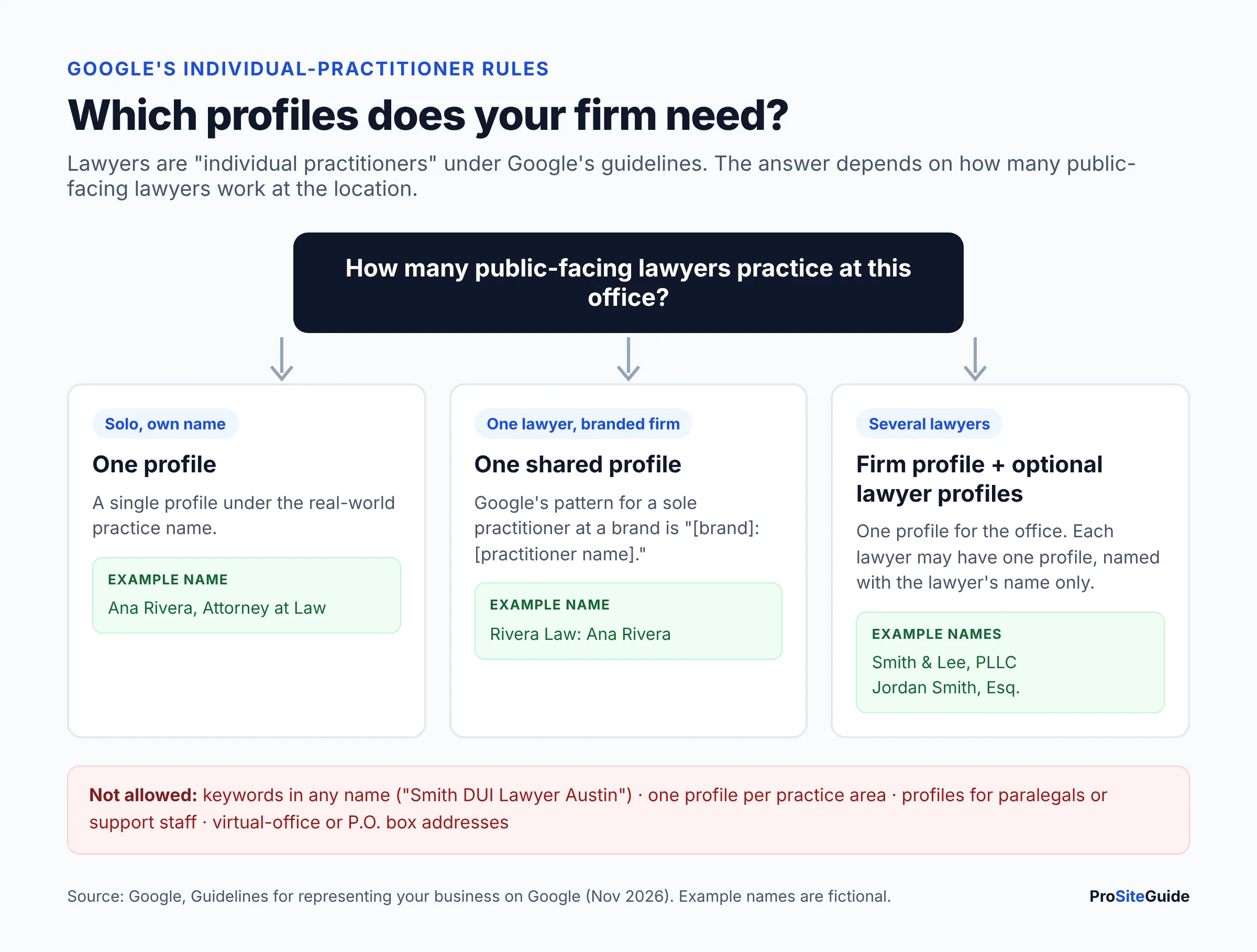
Google’s Guidelines for representing your business on Google name lawyers as “individual practitioners,” alongside doctors and financial planners. An individual practitioner is a public-facing professional who has their own clients. The rules that follow decide how many profiles your firm should have.
- Who qualifies: a lawyer who deals with the public and can be contacted directly at the verified location during stated hours. Paralegals, assistants and other support staff should not have their own profiles.
- One profile per lawyer: a lawyer may not create separate profiles for each specialty (for example, one for DUI and one for traffic tickets).
- Several lawyers at one office: the firm gets a profile for the location, and each lawyer’s profile uses only the lawyer’s name, not the firm name. Credentials such as “Esq.” or “J.D.” are allowed.
- A solo lawyer practicing under a firm brand: Google says a sole practitioner at a branded organization should share one profile named “[brand]: [practitioner name].” Google’s example is from insurance (“Allstate: Joe Miller”). Applying it to a solo firm is our reading of the rule, so a branded solo practice would follow a pattern like “Rivera Law: Ana Rivera.”
Do lawyer profiles help? Sometimes, but they also split your reviews across several listings. They can also become a problem when a lawyer leaves the firm. Many small firms keep only the firm profile. If you do create lawyer profiles, add them as users on accounts the firm controls, and agree in writing what happens to the profile if the lawyer leaves.
What you need before you start
- A firm-owned Google account. Google suggests using an email on your business domain. Don’t let an agency or a departing associate become the only owner. If your firm email isn’t set up yet, see our guide to law firm email on your own domain.
- Your exact legal or trade name as it appears on signage, letterhead and your website.
- An eligible address. Google says P.O. boxes, remote mailboxes and virtual offices are not eligible. A co-working space qualifies only if it has your signage and staff present who receive clients during your stated hours. Your state bar may have its own office or advertising rules, so check those separately.
- A local phone number the firm controls, plus the specific page on your website you want to link to.
- A few real photos: your logo, the building entrance, the office interior and your lawyers.
How to set up a Google Business Profile for a law firm (step by step)
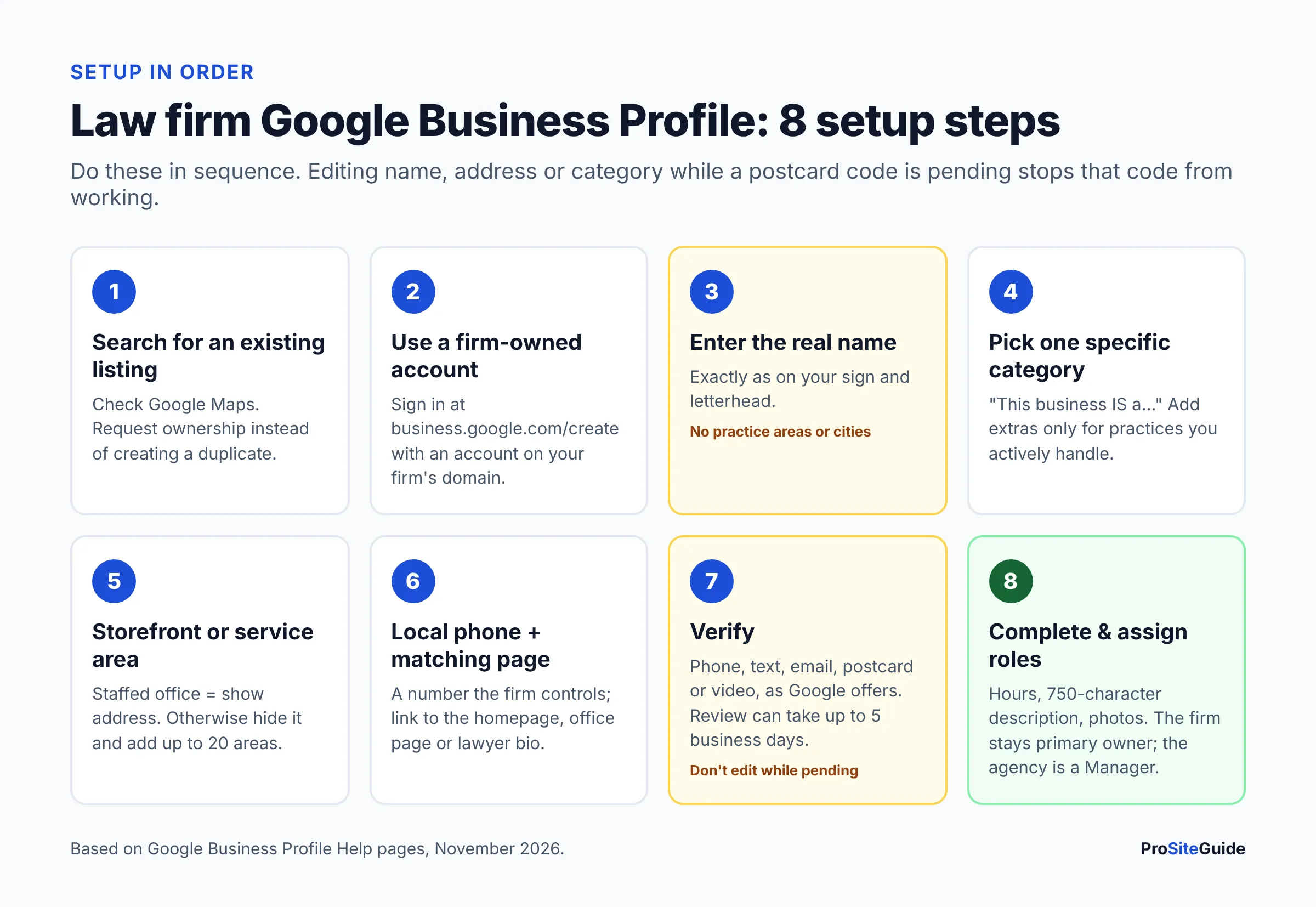
These steps follow Google’s create a Business Profile help page as of November 2026. Menu labels change from time to time, but the order stays roughly the same.
- Check for an existing listing. Search your firm name on Google Maps. Google often creates listings on its own, and former staff or old agencies may have claimed one. If someone else has already verified it, request ownership rather than creating a duplicate. Google allows only one profile per business location.
- Sign in and start. Go to business.google.com/create while signed in to the firm-owned Google account.
- Enter the real-world firm name. No taglines, practice areas, city names or phone numbers. “Smith & Lee, PLLC” is fine if that’s your actual name. “Smith & Lee Car Accident Lawyers Dallas” is not, unless that is genuinely your registered and signed name. Google allows legal suffixes such as PLLC only if you can show them in real-world use.
- Choose your primary category. Pick the most specific category that finishes the sentence “This business is a…”. If you only do family law, a family-law attorney category is a better fit than a generic one. Type a few words into the field and choose from Google’s list.
- Storefront or service area. Google asks whether customers can visit a staffed location during business hours. If clients meet you at your office, answer yes and enter the address. If you only meet clients at their homes, in court or online, answer no and add a service area.
- Add the service area if relevant. List cities, ZIP codes or counties, up to 20 areas. Google says the area should usually stay within about two hours’ drive of your base. You can’t use a radius.
- Add the phone number and website. Use the local number that rings at the firm and the page that best matches this listing (see the website section below).
- Verify. Google decides which methods you’re offered: phone or text, email, postcard, a recorded video, a live video call, or instant verification in some cases (Google: Verify your business). Postcards usually arrive within 14 days and the code expires after 30 days. After you submit, Google may take up to 5 business days to review it. While a postcard is pending, don’t edit the name, address or category, and don’t request a new code.
- Complete the profile. Add hours, a description, extra categories if they truly apply, attributes, photos and an opening date.
- Add people with the right roles. Keep the firm as primary owner. Give your marketing person or agency the Manager role. Managers can do almost everything except add or remove users or delete the profile (Google: Manage owners and managers).
How to optimize each section of the profile
Name: what’s allowed?
Only your real-world name. Google lists the extras it doesn’t allow: marketing taglines, hours, phone numbers, URLs, service descriptions and location details, plus ® or ™ symbols and all caps. Adding keywords to the name is one of the most common reasons local listings get reported and suspended. If you rename the firm, update your sign, website and letterhead first, then the profile.
Categories: how many should a law firm use?
Google lets you pick one primary category and up to 9 more (Google: Edit your Business Profile). Its guidelines also say to “use as few categories as possible.” Choose your main practice as the primary category. Add secondary categories only for practice areas you actively handle at that office. Categories describe what the firm is, so leave out services you only “offer” now and then. Put the detail on your website instead. Our guide to writing practice area pages shows how.
Address and service area
A storefront profile shows your address because clients come to you. A service-area profile hides the address and shows the region you serve. A hybrid shows both. Many solo lawyers who work from home but meet clients elsewhere fall into the service-area group. Don’t list a virtual office address to look local in another city. It isn’t eligible, and it puts the whole profile at risk.
Hours
List the hours when someone answers the phone or receives clients. Add special hours for holidays so people don’t call into a closed office. Google’s guidelines say businesses that operate only by appointment shouldn’t list hours. If your office is staffed on a normal schedule, list those staffed hours.
Description
You get up to 750 characters, with no links, HTML, prices or promotions. Say who you help, which practice areas you handle, where, and in what languages. Plain facts age better than adjectives. Also keep your state’s lawyer-advertising rules in mind: words like “expert” or “specialist” are restricted in many states unless you hold a recognized certification.
Photos
Google accepts JPG or PNG between 10 KB and 5 MB. It recommends 720 × 720 pixels and requires at least 250 × 250, and it wants images that “represent reality” without heavy filters (Google: Business Profile photos). Useful photos for a law firm:
- Your logo and a cover photo.
- The building exterior and entrance, so first-time visitors recognize it.
- The reception area and a meeting room.
- Team and individual lawyer photos.
Don’t upload anything that shows client files, screens or whiteboards.
Posts
Posts are short updates, offers or events that appear on your profile (Google: Create posts). Posts older than six months are archived unless they have a date range. Good post topics for a firm include office closures, a new attorney, a free community clinic or a new article on your site. A phone number in a post can get it rejected if Google can’t connect the number to your business.
What happened to Q&A?
Google has been retiring the public Questions & Answers section. Google shut down the Q&A API on November 3, 2025. In December 2025 a Google Product Specialist said Q&A would be replaced by an AI-powered “Ask” feature in Maps, and that existing answers may still inform those results (Search Engine Roundtable report). What you see may vary. Either way, the practical step is the same: answer the common questions (fees, free consultations, languages, parking, virtual meetings) clearly on your website and in your description, because those are the sources Google can draw on.
Which website page should the profile link to?
Link the firm profile to your homepage, or to a dedicated office page if you have several offices. Link each lawyer profile to that lawyer’s bio page. The page you link to should repeat the same name, address and phone number as the profile, load quickly on mobile and make it easy to call or use a secure contact form. Google also asks that the link not redirect to another site, and that you don’t block Googlebot on the page.
Optional UTM tracking: UTM parameters are tags added to the end of a URL so Google Analytics can tell where a visit came from. Google Analytics says you should always include utm_source, utm_medium and utm_campaign (Google Analytics: URL builders). A typical link looks like https://yourfirm.com/?utm_source=google&utm_medium=organic&utm_campaign=gbp. That way profile visits show separately in your reports instead of mixing with regular search traffic.
How do you track calls from your profile?
Start with the built-in Performance report. For verified profiles it shows calls (taps on the call button), website clicks, direction requests and the search terms people used (Google: Performance and insights). Google removed call history and chat from profiles on July 31, 2024 (Google: Chat and call history changes). You see counts, not caller details.
If you want call recordings or caller-level data, some firms use a call-tracking number. Google’s guidelines don’t mention call tracking directly. They do say the number must be under your direct control, should be local where possible, and must not redirect people to another business’s number or landing page. If you use one, it should ring straight to your firm and stay consistent over time. Recording calls also raises consent and confidentiality questions, so check your state’s recording law and your bar’s guidance first. If a virtual receptionist answers your calls, see our Smith.ai vs Ruby comparison for how those services fit intake.
Can a law firm ask clients for Google reviews?
Yes. Google allows businesses to ask for reviews and even suggests sharing a review link or QR code (Google: Tips to get more reviews). Google’s prohibited and restricted content policy sets the limits:
- No incentives. No discounts, gift cards, reduced fees or anything else in return for a review, or for changing or removing one.
- No review gating. You can’t “selectively solicit positive reviews” or discourage negative ones. Send the same request to every client, not just the happy ones.
- No conflicts of interest. Staff, former employees, relatives and business partners shouldn’t review the firm.
- No pressure. Don’t require reviews in the office, and don’t script what clients write.
Bar rules can be stricter than Google’s. Some states regulate client testimonials or require disclaimers about past results. Also think about when you ask. A request sent at the end of a matter, without reference to its details, is the cautious approach. Check your state bar’s advertising rules before you set up an automated review request.
How should lawyers respond to negative reviews?
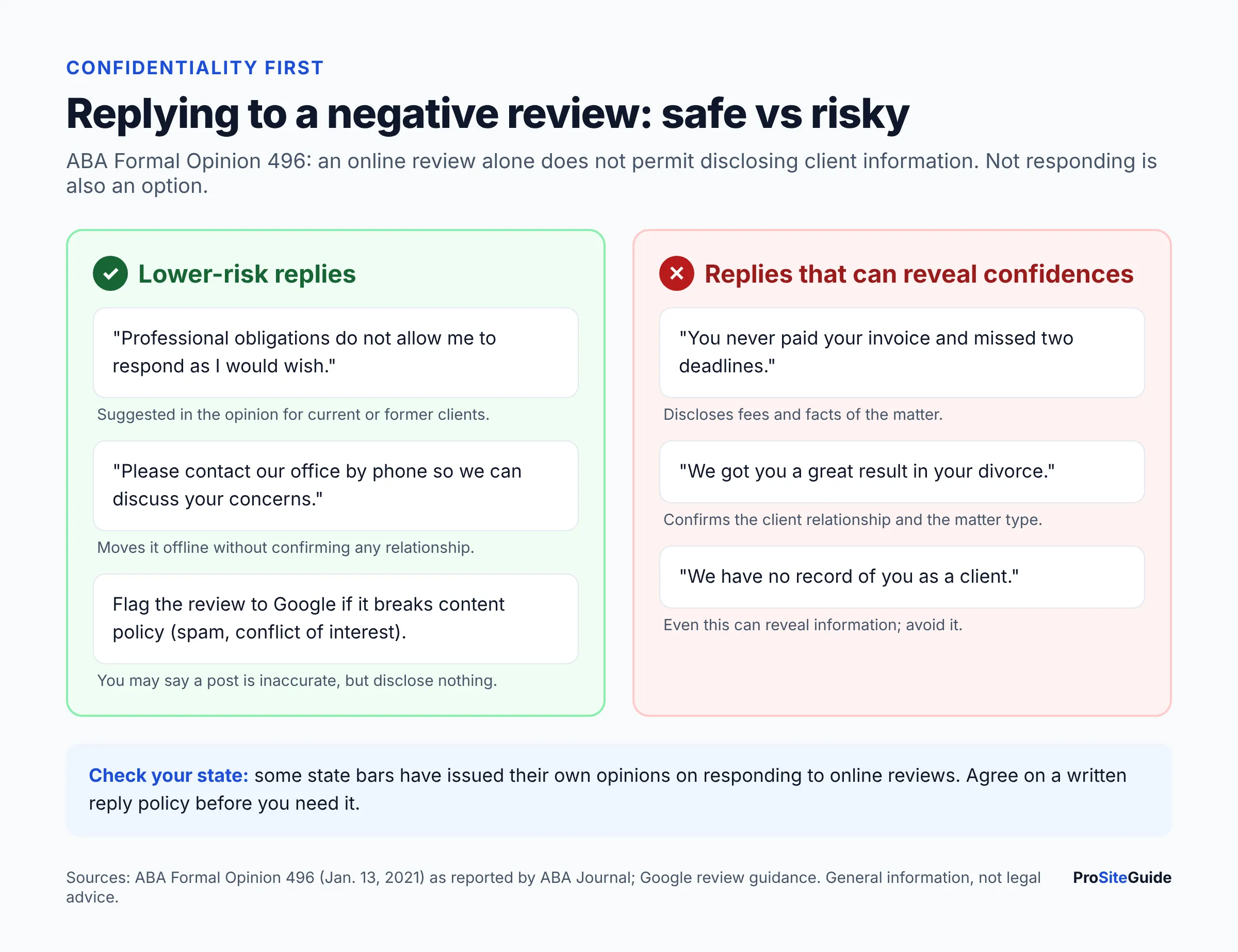
Carefully, and often briefly or not at all. In ABA Formal Opinion 496 (January 13, 2021), the ABA’s ethics committee concluded that a negative online review is not a “controversy” that lets a lawyer reveal client information under Model Rule 1.6. As summarized by the ABA Journal, the opinion suggests these options:
- Consider not responding at all.
- Ask the site to remove a post that breaks its policies. You can say the post is inaccurate without disclosing anything confidential.
- Invite the person to discuss it offline, without any details.
- For a current or former client, use a short reply such as “Professional obligations do not allow me to respond as I would wish.”
Even saying “you were never our client” or “you missed your deadline” can reveal confidential information. State rules vary, and some states have issued their own opinions, so check yours. Google’s general advice still applies to positive reviews: keep replies short and professional, and don’t use them to advertise. For lawyers that also means a thank-you shouldn’t mention the matter, the outcome or the fee. You can report a review that breaks Google’s policy, such as one posted by a competitor or full of off-topic content, but Google won’t remove a review just because it’s negative.
Why do law firm profiles get suspended, and how do you fix it?
Google says it may suspend profiles that don’t follow its guidelines. For law firms, these are the guideline problems that most often apply:
- Keywords added to the name.
- Virtual office or co-working addresses without staff and signage.
- Several profiles for the same office, or one per practice area.
- Service areas far beyond a reasonable drive.
- A sudden burst of big edits, such as a new name, address and category at once.
To recover, first fix whatever broke the rules. Then gather evidence that matches the profile, such as a business license or registration, a utility bill or tax documents with the same name and address. Submit it through the appeals tool. Google says appeals “can only be submitted once,” and it warns: “Do not create a new Business Profile for the same business” (Google: Suspended profiles). If you’re moving offices, plan the change first; our guide to moving a law firm website without downtime covers keeping the website side stable.
Law firm Google Business Profile optimization checklist
| Item | What “done” looks like | Google rule or limit |
|---|---|---|
| Ownership | Firm account is primary owner; agency or staff are Managers | One primary owner; Managers can’t add or remove users |
| Name | Exactly matches signage, letterhead and website | No keywords, taglines, locations, ® or ™ |
| Practitioner profiles | Only for public-facing lawyers; named with the lawyer’s name only | No per-specialty profiles; no staff profiles |
| Primary category | Most specific match for your main practice | 1 primary + up to 9 additional; “as few as possible” |
| Address / service area | Staffed office shown, or address hidden with service areas | No P.O. boxes or virtual offices; up to 20 areas, about 2 hours’ drive |
| Phone | Local number that rings at the firm | Under your direct control; primary + up to 2 more |
| Website link | Homepage, office page or lawyer bio with matching contact details; optional UTM tags | No redirects to other sites |
| Hours | Staffed hours plus holiday special hours | Appointment-only businesses shouldn’t list hours |
| Description | Who you help, practice areas, location, languages | Max 750 characters; no links, prices or promotions |
| Photos | Logo, cover, exterior, interior, team | JPG/PNG, 10 KB–5 MB, 720 × 720 recommended |
| Posts | Occasional updates: closures, new hires, events | Archived after 6 months unless dated |
| Reviews | Same request sent to every client; replies don’t reveal anything confidential | No incentives, no gating, no staff reviews |
| Monitoring | Monthly check of Performance report and any suggested edits | Performance data only for verified profiles |
Your profile works best alongside a solid website. Our free law firm website checklist covers the website side: contact details, speed, security and accessibility.
FAQ
Is a Google Business Profile free for lawyers?
Yes. Creating and managing a Business Profile costs nothing. Google Ads and Local Services Ads are separate, paid products, and paying for them doesn’t change your free map ranking.
Can I put “personal injury lawyer” in my business name on Google?
Only if it is genuinely part of your real-world name, used on your sign, letterhead and website. Adding it just for search breaks Google’s naming rules and is a common reason for suspensions.
Can a solo lawyer who works from home have a profile?
Yes, as a service-area business with the home address hidden, if you serve clients in a defined area. Don’t list a virtual office or mailbox address. Those addresses aren’t eligible.
Should every attorney at the firm have a profile?
Google allows a separate profile for each public-facing lawyer, but it isn’t required. Lawyer profiles can split your reviews across several listings and need a plan for when someone leaves. Many small firms keep a single firm profile.
How long does verification take?
It depends on the method Google offers. Postcards usually arrive within 14 days. After you finish any method, Google’s review can take up to 5 business days, and sometimes longer.
Can I offer a discount for a Google review?
No. Google prohibits any incentive for posting, changing or removing a review, and your state’s ethics rules may restrict it as well.
Can I get a negative review removed?
You can report a review that breaks Google’s content policy, such as spam, a conflict of interest or off-topic content. Google doesn’t remove reviews just because they’re negative. When you respond, don’t reveal client information.
Next steps
Set up the profile in this order. First, confirm the firm owns the profile. Next, fix the name and categories, then decide between a storefront and a service area. Once it’s verified, add photos, a 750-character description and holiday hours. Put the same review request into your file-closing routine for every client, and agree on a short, confidential review-reply policy. Then check the Performance report once a month. Profiles that stay accurate and consistent with your website hold up better than profiles stuffed with keywords.
Want this handled for you? ProSiteGuide builds and maintains fast, secure WordPress sites for law firms. Book a free consultation.
Sources
- Google: Guidelines for representing your business on Google
- Google: Create a Business Profile
- Google: Verify your business on Google
- Google: Edit your Business Profile
- Google: Service areas
- Google: Business Profile photos
- Google: Create posts
- Google: How to improve your local ranking
- Google: Tips to get more reviews
- Google Maps: Prohibited and restricted content
- Google: Suspended Business Profiles
- Google: Manage owners and managers
- Google: Performance and insights
- Google: Changes to chat and call history
- Google Analytics: URL builders
- ABA Journal: Lawyers must use caution responding to negative online reviews (Formal Opinion 496)
- Search Engine Roundtable: Google removing Q&A for Ask button (Dec. 2025)