Quick answer: The best appointment scheduling software for law firms depends on what you already pay for. If your firm runs on Microsoft 365, Microsoft Bookings is included at no extra cost and is fine for free consultations. Choose Acuity Scheduling if you charge for consultations or want intake forms and deposits on one shared office calendar. Choose Calendly if you are a solo or small team that wants the simplest personal booking links, especially on Google Workspace.
Whichever tool you pick, keep the booking form short. Collect contact details and the names needed for a conflict check, not the facts of the case. This guide compares the three tools on price, intake questions, payments, reminders and WordPress embedding, with prices checked on each vendor’s official pages as of November 2026.
Key takeaways
- Microsoft Bookings comes with Microsoft 365 Business Basic, Standard and Premium. It has no payment support, and SMS reminders need a Teams Premium license.
- Acuity Scheduling (a Squarespace company) is priced per account, not per user. Its Standard plan covers up to 6 calendars and adds SMS reminders. Every plan supports intake forms, payments and deposits.
- Calendly is priced per seat. The Free plan gives one event type. Payments, reminder workflows and removing Calendly branding start on Standard.
- All three can be embedded on a WordPress site. Calendly and Acuity provide embed code. Bookings offers an iframe, and a plain link button is the fallback.
- A booking form is not a secure intake channel. Ask only for contact details and conflict-check names, and link to your secure contact form for anything sensitive.
Which scheduling tool should your law firm choose?
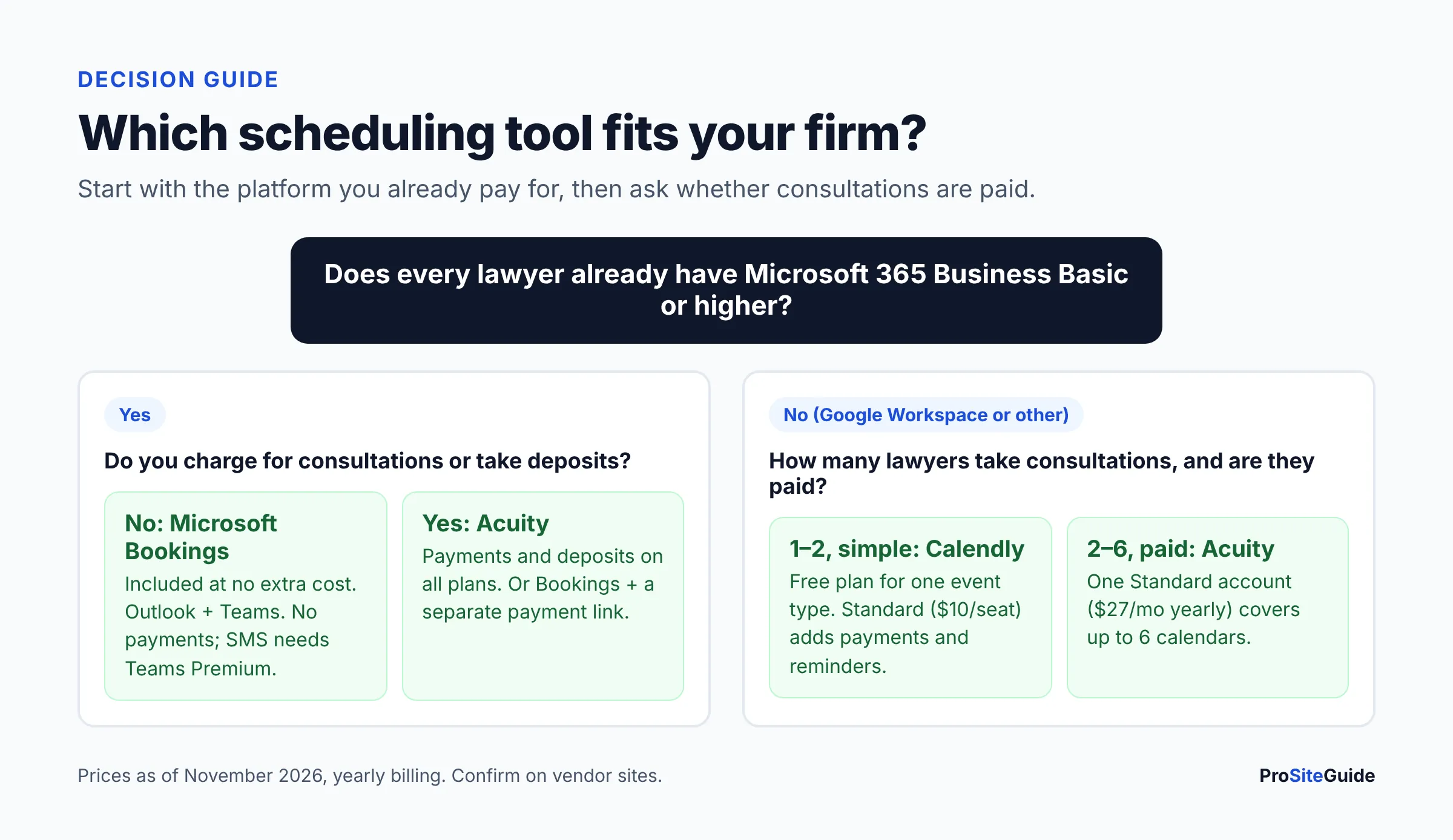
Start with the platform you already pay for, then ask whether you charge for consultations. Those two questions settle most decisions. Here is the verdict by firm type.
Firms on Microsoft 365 offering free consultations: Microsoft Bookings
If every lawyer already has Microsoft 365 Business Basic or higher, Bookings adds no extra cost. It reads staff free/busy time from Outlook, can create a Teams meeting link for each booking, and stores booking data in your Exchange Online tenant. The trade-offs are no online payments, fewer design options, and SMS that needs an add-on license. If you are still setting up the tenant, see our Microsoft 365 setup guide for law firms first.
Firms that charge for consultations: Acuity Scheduling
Acuity is the strongest fit when a paid consultation, deposit or cancellation policy matters. Every plan includes custom intake forms and payments through Stripe, Square or PayPal. Its features page says it can collect a full prepayment, a partial deposit, or store card details at booking. Because Acuity charges per account rather than per user, a firm with 2 to 6 lawyers can share one Standard plan.
Solos and Google Workspace firms that want simple booking links: Calendly
Calendly is the quickest to set up for one lawyer with one or two meeting types. The Free plan covers a single event type and one calendar connection. Most firms will want Standard, which adds payments, automated reminders and white-labeling (removing the Calendly logo). Calendly fits well alongside Google Workspace. If you are deciding between platforms first, read Google Workspace vs Microsoft 365 for law firms.
How we compared these scheduling tools
ProSiteGuide has not run hands-on tests of these products, and we do not give scores. This comparison is based on each vendor’s official pricing pages, help-center articles and documentation, which we read in November 2026. Plans and features change often, so confirm details on the vendor’s site before you buy.
Calendly vs Acuity vs Microsoft Bookings: comparison table
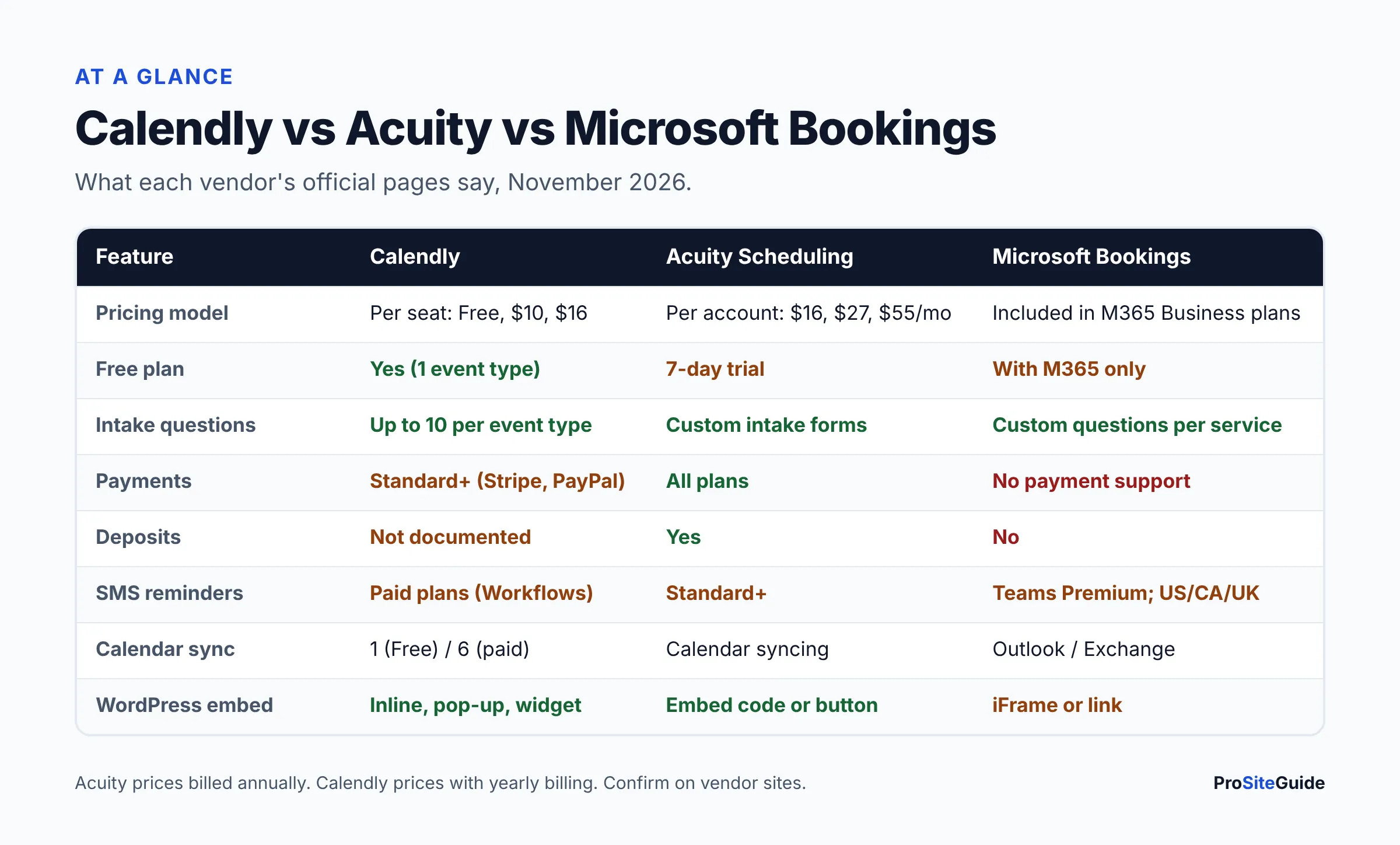
The table below summarizes what each official source says. “Not documented” means we could not confirm the feature on the vendor pages we opened.
| Feature | Calendly | Acuity Scheduling | Microsoft Bookings |
|---|---|---|---|
| Pricing model | Per seat (per user) | Per account, priced by number of calendars | Included in eligible Microsoft 365 plans |
| Price (as of November 2026) | Free; Standard $10/seat/mo; Teams $16/seat/mo (yearly billing shows up to 17–20% savings) | Starter $16/mo, Standard $27/mo, Premium $55/mo billed annually ($20 / $34 / $69 billed monthly) | No separate price. Business Basic is $7/user/mo (Microsoft list price from July 1, 2026) |
| Free plan | Yes: 1 event type, 1 calendar connection | No; 7-day free trial | No standalone free plan |
| Users / calendars | One seat per host | Starter 1, Standard up to 6, Premium up to 36 calendars | Staff added per Bookings calendar |
| Intake questions | Up to 10 custom questions per event type, all plans | Custom client intake forms, all plans | Custom and required questions per service |
| Payments for consultations | Stripe or PayPal on Standard and up | Stripe, Square, PayPal on all plans | No payment support |
| Deposits | Not documented (upfront payment per event type) | Yes: prepayment or partial deposit | No |
| Email reminders | Standard and up (Workflows) | All plans | Yes, confirmation and reminder emails |
| SMS reminders | Paid plans via Workflows (not during trial) | Standard and Premium | Requires Teams Premium; US, Canada or UK numbers |
| Calendar sync | 1 connection (Free), 6 (paid) | Calendar syncing to prevent double-booking | Outlook / Exchange free/busy |
| Embed on WordPress | Inline, pop-up text, pop-up widget | Embed code or button | iFrame or link |
| Remove vendor branding | Standard and up | Premium | Not applicable |
| Routing / screening forms | Teams and up | Not documented | Not documented |
Sources: Calendly pricing, Acuity Scheduling plans, Acuity features, Microsoft Bookings FAQ and Microsoft 365 pricing updates.
What does each option cost a small law firm?
Cost depends on how each vendor counts users. Calendly charges per seat. Acuity charges per account and caps the number of calendars. Bookings is part of your Microsoft 365 subscription. Here is a worked example for a firm with three lawyers who each take consultations, using yearly-billed list prices as of November 2026:
- Calendly Standard: 3 seats × $10 = about $30 per month.
- Acuity Standard: $27 per month for the account, which covers up to 6 calendars.
- Microsoft Bookings: $0 extra if all three already have Microsoft 365 Business Basic ($7/user), Standard ($14/user) or Premium ($22/user). Add Teams Premium only if you need SMS reminders.
Card-processing fees from Stripe, Square or PayPal come on top of these prices whenever you collect payments.
Calendly for lawyers: strengths and limits
Calendly is a per-seat scheduling tool built around personal booking links and event types. An event type is a bookable meeting, such as “30-minute phone consultation.”
- Pros: a usable Free plan; three embed styles; up to 10 invitee questions per event type on all plans, per Calendly’s help center; Stripe and PayPal payments on Standard and up; routing forms on Teams for firms that want to send different practice areas to different lawyers.
- Cons: costs grow with every lawyer you add. Reminders and payments need a paid plan. Text reminders run through Workflows and are not available during a trial, according to Calendly’s text-message article.
- Confidentiality note: Calendly includes invitee answers in notifications by default. On Standard and up you can remove answers from notifications. Do that if any question could draw out case details.
Acuity Scheduling for law firms: strengths and limits
Acuity Scheduling is an appointment platform owned by Squarespace. It focuses on client-facing services: intake forms, payments, packages and reminders.
- Pros: intake forms and payments on every plan, including deposits; one account can hold several lawyers’ calendars; clients can accept terms and cancellation policies at booking; SMS reminders on Standard and up.
- Cons: no free plan, only a 7-day trial. The Acuity logo is removed only on Premium. The Starter plan supports a single calendar.
- Good for: flat-fee practices (estate planning, immigration, family law) that charge for a strategy session and want payment taken before the appointment.
Microsoft Bookings for law firms: strengths and limits
Microsoft Bookings is a Microsoft 365 app with a public booking page tied to Outlook calendars. It offers Personal Bookings for one lawyer’s own page and Shared Bookings for a team page with services and staff.
- Which plans include it: Microsoft lists Bookings in Microsoft 365 Business Basic, Business Standard, Business Premium, E1/E3/E5, F1/F3, A3/A5, Teams Essentials and Teams Premium, plus several Office 365 plans. It is not sold as a standalone app.
- Pros: no extra subscription; booking data is stored in Exchange Online under your tenant’s existing compliance policies; Teams links can be created automatically; you can require clients to tick a custom consent box before booking.
- Cons: the official FAQ says plainly that “there’s no payment support in Bookings.” Bookings appointments can only be edited in the Bookings web app, not in Outlook. SMS needs Teams Premium and a US, Canada or UK phone number.
- Watch out: the same FAQ lists a known issue where one attendee cancelling a group booking can send cancellation emails to all other attendees. Avoid group bookings for anything where attendees should not see each other.
What should a law firm booking form ask, and what should it never ask?
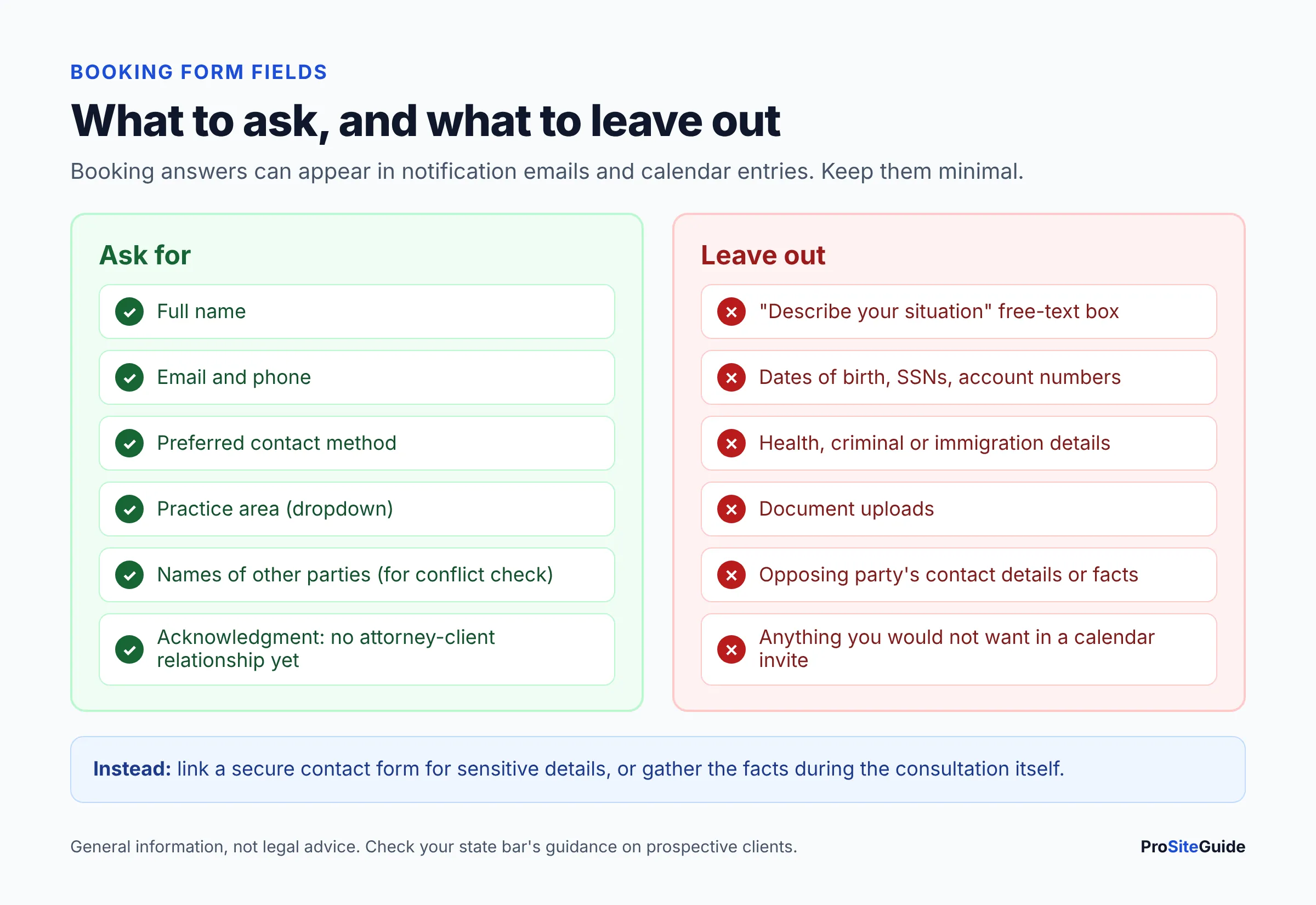
A law firm booking form should collect only what you need to confirm the appointment and run a conflict check. It should not collect the facts of the matter. Anything typed into a booking form lands in a third-party system, in notification emails and often in calendar entries that staff can see.
There is also an ethics angle. The ABA’s guidance on lawyer websites, summarized by the ABA Journal, notes that a website inquiry may come from a prospective client. That is someone who consults a lawyer about possibly hiring them. Under ABA Model Rule 1.18, information from a prospective client can create confidentiality duties and even conflicts that limit who the firm can represent later. The same guidance suggests clear warnings that tell visitors not to send confidential information before a relationship exists. Rules vary by state, so check your state bar’s guidance.
Safe booking form checklist
- Ask for: name, email, phone, preferred contact method, and practice area as a dropdown.
- For conflict checks: ask for the names of other people or businesses involved, and nothing else about them.
- Do not ask for: a “describe your situation” box, dates of birth, Social Security numbers, health details, immigration status or documents.
- Add a short notice above the submit button: booking does not create an attorney-client relationship, and please do not include confidential details.
- Link a secure channel for anything sensitive, such as your secure contact form on the firm website, or share details during the consultation itself.
- Turn off answer copies in notifications where the tool allows it, and limit who can view the booking calendar.
How do online booking tools fit with conflict checks?
None of the three tools runs a conflict check for you. A practical workflow: the client books a slot, staff check the names against your conflicts database the same day, and the lawyer confirms or cancels before the consultation. Use a minimum lead time so you are not booked too soon to finish the check. Bookings calls this “minimum lead time” in its scheduling policy, and Calendly and Acuity have similar notice settings. If a phone answering service books appointments for you, make sure it collects the same short list. Our Smith.ai vs Ruby comparison covers how virtual receptionists handle intake and scheduling.
How do you add online consultation booking to a WordPress site?
You add online consultation booking to WordPress by pasting the scheduler’s embed code into a Custom HTML block on a dedicated page. No plugin is required for any of the three tools. Follow these steps:
- Set up the tool first. Create the consultation type (length, buffer time, minimum notice), connect each lawyer’s calendar, and add your short question list and confirmation email.
- Copy the embed code. In Calendly, open the event type’s menu, choose Add to website, pick inline, pop-up text or pop-up widget, and copy the code, per Calendly’s embed guide. In Acuity, use the embed option for your scheduling page. In Bookings, the FAQ says the iFrame code is on the Bookings page tab.
- Create a “Book a consultation” page in WordPress and add a Custom HTML block.
- Paste the code, then add your notice above the scheduler: no attorney-client relationship, no confidential details, and a link to the secure contact form.
- Preview on a phone and a desktop. Check that the scheduler fits the screen and that keyboard users can reach every button. If a Bookings iFrame does not load on your site, use a button that links to the booking page instead.
- Make a test booking and read every email and text the client would receive, including what your calendar entry shows.
- Link to the page from your contact page, practice area pages and header button, and set up an analytics event for completed bookings if you track conversions.
Embedded schedulers load third-party scripts, which can slow a page. Keep the scheduler on its own page rather than in every page’s sidebar. See our law firm website speed guide for how to check the impact. If you prefer a plugin-based setup, our list of WordPress plugins for law firms covers forms and related tools.
Which other scheduling options should law firms consider?
- Practice-management software with built-in scheduling. Many legal practice-management and client-intake platforms include booking pages that feed straight into matters, intake and conflict checks. If you already pay for one, check its scheduling features before adding another tool.
- Google Calendar appointment schedules. For firms on Google Workspace, appointment schedules create a shareable booking page. Google notes that some features need an eligible Workspace or Google One subscription, and you can connect Stripe to request payment. Our Google Workspace setup guide for law firms covers the account side.
- A phone-first approach. Some firms prefer a receptionist or answering service to screen callers before any booking, especially in high-volume practices.
For more side-by-side reviews, browse our tool comparisons hub.
FAQ
What is the best appointment scheduling software for law firms?
There is no single best tool. Microsoft Bookings suits Microsoft 365 firms with free consultations. Acuity suits firms that charge for consultations or want deposits. Calendly suits solos and small Google Workspace teams that want simple booking links.
Is Microsoft Bookings free with Microsoft 365?
Yes, if you have an eligible plan. Microsoft lists Bookings in Microsoft 365 Business Basic, Business Standard and Business Premium, among others, with no separate charge. SMS reminders need a Teams Premium license.
Can clients pay for a consultation when they book?
With Acuity and Calendly, yes. Acuity supports payments and deposits on all plans, and Calendly supports Stripe or PayPal on Standard and up. Microsoft Bookings has no payment support, so you would need to send a separate payment link. Check your state’s rules on handling advance fees.
Is Calendly free for lawyers?
Calendly’s Free plan allows one event type and one calendar connection. Reminders, payments and branding removal need Standard, at $10 per seat per month with yearly billing as of November 2026.
Is it safe to collect case details in a booking form?
It is better not to. Booking answers can appear in notification emails and calendar entries. Collect contact details and conflict-check names only, and gather the facts through a secure channel or during the consultation.
Do booking confirmations come from the firm’s email domain?
For Bookings, Microsoft says notification addresses depend on your Microsoft 365 domain settings. For any tool, set up SPF, DKIM and DMARC so confirmations reach the inbox. Our law firm email setup guide explains how.
Conclusion: next steps
- Check whether your Microsoft 365 plan already includes Bookings before paying for anything.
- If you charge for consultations, start Acuity’s 7-day trial. If you only need simple links, try Calendly Free.
- Write a short booking form using the checklist above, with a confidentiality notice and a link to a secure channel.
- Embed the scheduler on a dedicated WordPress page, test it on mobile, and make a test booking.
Want this handled for you? ProSiteGuide builds and maintains fast, secure WordPress sites for law firms. Book a free consultation.
Sources
- Calendly: Pricing
- Calendly Help: How to add or remove invitee questions
- Calendly Help: How to send text messages with Workflows
- Calendly Help: Embed options overview
- Calendly Help: Payments integrations
- Acuity Scheduling: Plans and pricing
- Acuity Scheduling: Features
- Microsoft Learn: Microsoft Bookings overview
- Microsoft Learn: Shared Bookings FAQ
- Microsoft Learn: SMS notifications in Bookings
- Microsoft Learn: Add custom and required questions
- Microsoft: Microsoft 365 pricing and packaging updates (2026)
- Google Calendar Help: Appointment schedules
- ABA Journal: Websites may trigger unforeseen ethics obligations