Quick answer: This Sucuri review covers a cloud website firewall plus monitoring and hands-on malware cleanup that you can add to any website, including WordPress. As of November 2026, Sucuri’s platform plans for one site are listed at $229, $339 and $549 per year. Sucuri is worth considering if your host offers no firewall or cleanup help, or if you want one team to clean a hacked site and clear blocklists. If your managed host already covers those, the free Sucuri plugin and scanner may be all you need.
Sucuri is part of GoDaddy: its terms of service name the company as GoDaddy Media Temple, Inc. d/b/a Sucuri, a subsidiary of GoDaddy Operating Company, LLC. This guide explains what you get, how the firewall works, what it costs, and what to weigh before you change your DNS. For a side-by-side with other tools, see our WordPress security plugins comparison for law firms.
What is Sucuri and what does it do for a law firm website?
Sucuri sells website security as a service. Its main product, the Website Security Platform, bundles four things: a cloud-based web application firewall (WAF), scheduled malware and blocklist monitoring, unlimited manual malware removal, and a content delivery network (CDN). It is platform-agnostic, so it works with WordPress, other content management systems and custom sites, according to Sucuri’s plan comparison.
For a small law firm, the appeal is simple. Your site is your storefront, and a hacked site that redirects visitors to spam or gets flagged as unsafe costs trust. Sucuri aims to stop attacks before they reach your host and to clean up if something gets through. It does not remove the need for updates, backups and good passwords. Our law firm website security checklist covers those basics.
How does the Sucuri website firewall work?
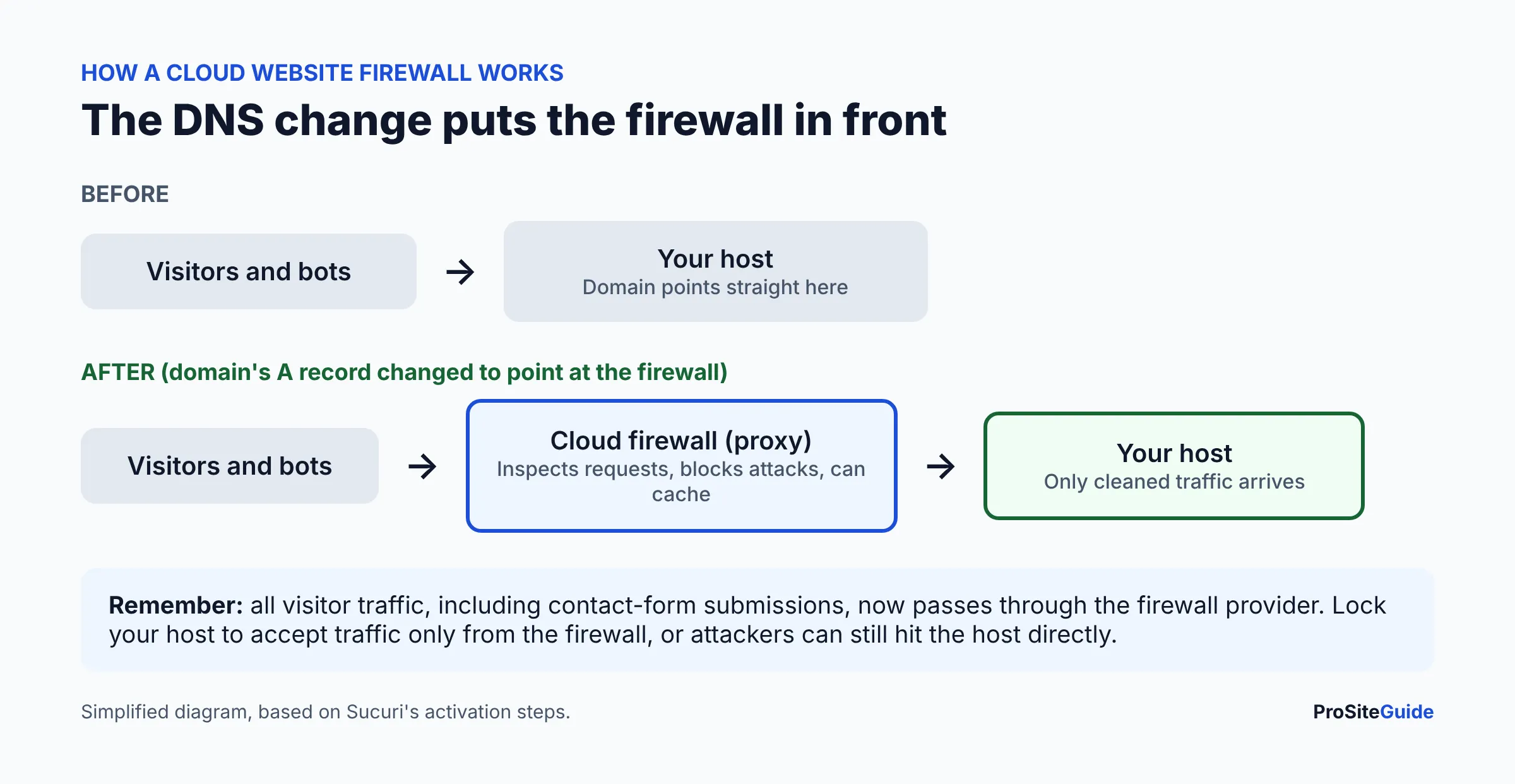
It is a reverse proxy. Per Sucuri’s activation steps, you add your site to the firewall, then enable protection by changing your DNS records. Once active, the firewall “intercepts and inspects all incoming packets” so that only safe requests reach your server. Sucuri says it creates SSL certificates for the firewall servers automatically, and that Professional or Business plans can upload a custom certificate.
Because traffic now flows through Sucuri, two practical points follow:
- DNS access matters. You (or whoever manages your domain) must be able to edit DNS records. If your domain is at GoDaddy, our guide to registering a law firm domain at GoDaddy explains where DNS lives.
- Lock down the origin. If attackers learn your host’s real IP address they may bypass the firewall. Ask Sucuri support or your host how to restrict the server to firewall traffic only.
- Visitor data passes through it. Sucuri’s terms say the firewall service may collect IP addresses and request URLs, and that HTTP traffic may contain data fields users complete. That can include contact-form entries.
That last point is a confidentiality consideration, not a reason to avoid the tool. ABA Formal Opinion 477 says lawyers must make reasonable efforts to secure client information in transit, with the level of care depending on the sensitivity of the information (ABA Formal Opinion 477). Read the provider terms, avoid collecting sensitive details in web forms, and check your state bar’s guidance. See also our guide to a secure contact form for a law firm website.
Does Sucuri stop DDoS attacks?
Sucuri lists DDoS mitigation as part of the firewall and says its Anycast network can mitigate large attacks, including layer 3, 4 and 7 attacks (plan comparison). Its page also lists a “currently under attack” option during setup. We cannot verify attack-size limits, so ask Sucuri what applies to your plan if DDoS is your main worry. For most small firms, a DDoS attack is a rarer risk than a compromised plugin or stolen password.
Does Sucuri scan for malware remotely or on the server?
Both, depending on what you use. The free SiteCheck scanner is remote: it only sees what a browser sees, so Sucuri says it will not detect anything on the server side. It checks for known malware, blocklist status, out-of-date software and similar issues, and Sucuri notes remote scanners have limited access and results are not guaranteed.
Paid platform plans add a server-side scanner. Sucuri’s terms of service describe a “Website Server Side Scanner that checks your website files for security issues that might be missed by a remote scan,” alongside SEO spam scanning, blocklist notifications, uptime, DNS and SSL change alerts. Scan frequency depends on the plan (see the table below).
How much does Sucuri cost in 2026?
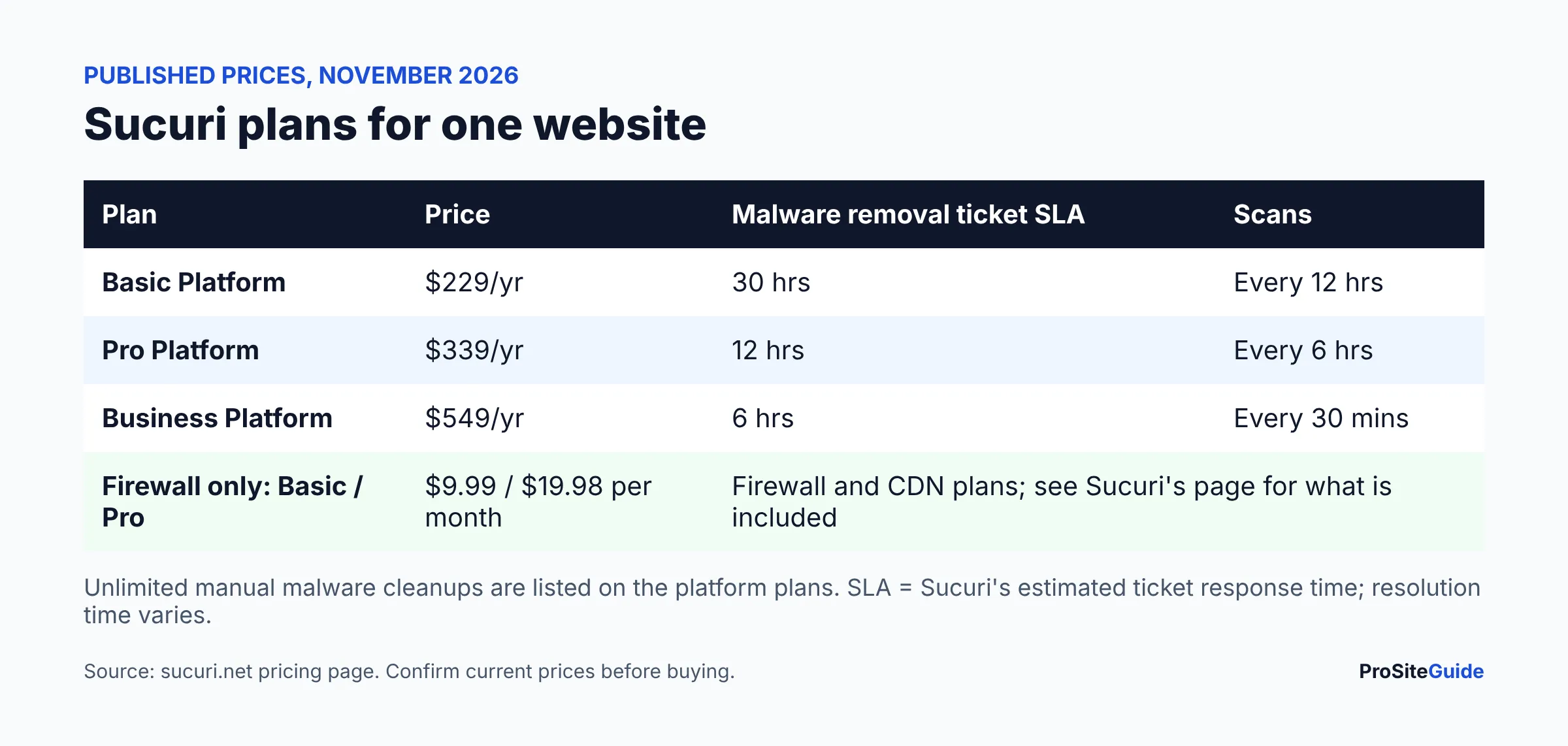
As of November 2026, Sucuri’s pricing page lists these prices, each covering one site. Prices change, so confirm on the page before you buy.
| Plan | Listed price | Malware removal SLA (ticket response estimate) | Advanced scans |
|---|---|---|---|
| Basic Platform | $229/year | 30 hours | Every 12 hours |
| Pro Platform | $339/year | 12 hours | Every 6 hours |
| Business Platform | $549/year | 6 hours | Every 30 minutes |
| Basic Firewall (firewall + CDN plan) | $9.99/month | See Sucuri’s pricing page for exactly what is included | |
| Pro Firewall (firewall + CDN plan) | $19.98/month | See Sucuri’s pricing page | |
- Sucuri also lists a Junior Dev plan ($999.98/year, for 2 to 5 sites) and custom multi-site pricing. Those are aimed at agencies and developers, not a single law firm site.
- The SLA is an estimate of ticket response time. Sucuri states that resolution time varies with complexity and queue volume.
- The plans list SSL support; only the Pro and Business plans can be preloaded with your existing purchased SSL certificate.
- Services renew automatically at the then-current rate, which may be higher or lower, per the terms. Put the renewal date on your calendar.
- A 30-day cancellation window applies, with a refund of the subscription fee if you have not submitted a malware removal request in that period (per the terms).
What does “unlimited malware removal” include?
Sucuri lists unlimited manual cleanups on every platform plan, with removal of backdoors and “blocklist warning removal,” where the team requests removal of your site from blocklists on your behalf (plan comparison). It also lists quarantined backups of files touched during cleanup and a post-cleanup report with recommendations.
Read the fine print. The terms promise “reasonable commercial efforts” to clean an infected site, and if Sucuri cannot clean it, the sole remedy is a refund of the annual fee. The terms also say Sucuri does not warrant that the service will prevent infection or re-infection. Cleanup is not a guarantee against being hacked again, so you still need to fix how the attacker got in. If that has already happened to you, start with our guide on what to do if your law firm website is hacked.
Is the free Sucuri plugin enough?
The Sucuri Security plugin is free for all WordPress users, and you do not need a paid subscription to use it, according to the terms. Sucuri lists security activity auditing, file integrity monitoring, remote malware scanning, blocklist monitoring, hardening and post-hack actions. The plugin’s WordPress.org page shows it is widely installed (600,000+ active installations at the time we looked).
The plugin does not include the firewall. Sucuri says connecting the firewall through the plugin is only available to customers on a platform plan. Think of the free plugin as a monitoring and audit-log tool, and the paid plans as the firewall and cleanup service. Do not run two full security plugins that overlap; our security plugin comparison explains how to layer them.
What are the pros and cons of Sucuri?
Pros
- Cleanup help is included: unlimited manual removals and blocklist removal requests on platform plans.
- Works with any CMS or host, because it sits in front of the site rather than inside it.
- Firewall, DDoS protection and CDN are bundled; no separate CDN account to manage.
- A free scanner and a free plugin let you try the tools before paying.
- Published, itemized pricing for the single-site plans.
Cons
- It needs a DNS change, and a mistake there can take your site or email offline. Get help if you are unsure.
- Visitor traffic is routed through a third party, which deserves a look at the terms.
- Renewal pricing can change, and billing is automatic.
- The cleanup remedy is limited to refunds if Sucuri cannot clean the site, and there is no guarantee against re-infection.
- Support is ticket-based on the single-site plans, so do not expect a phone-in-the-moment experience. Check Sucuri’s page for current support options.
- Overlap: if your host or Cloudflare already filters traffic, you may be paying twice for similar protection.
Do you still need Sucuri if your host has security?
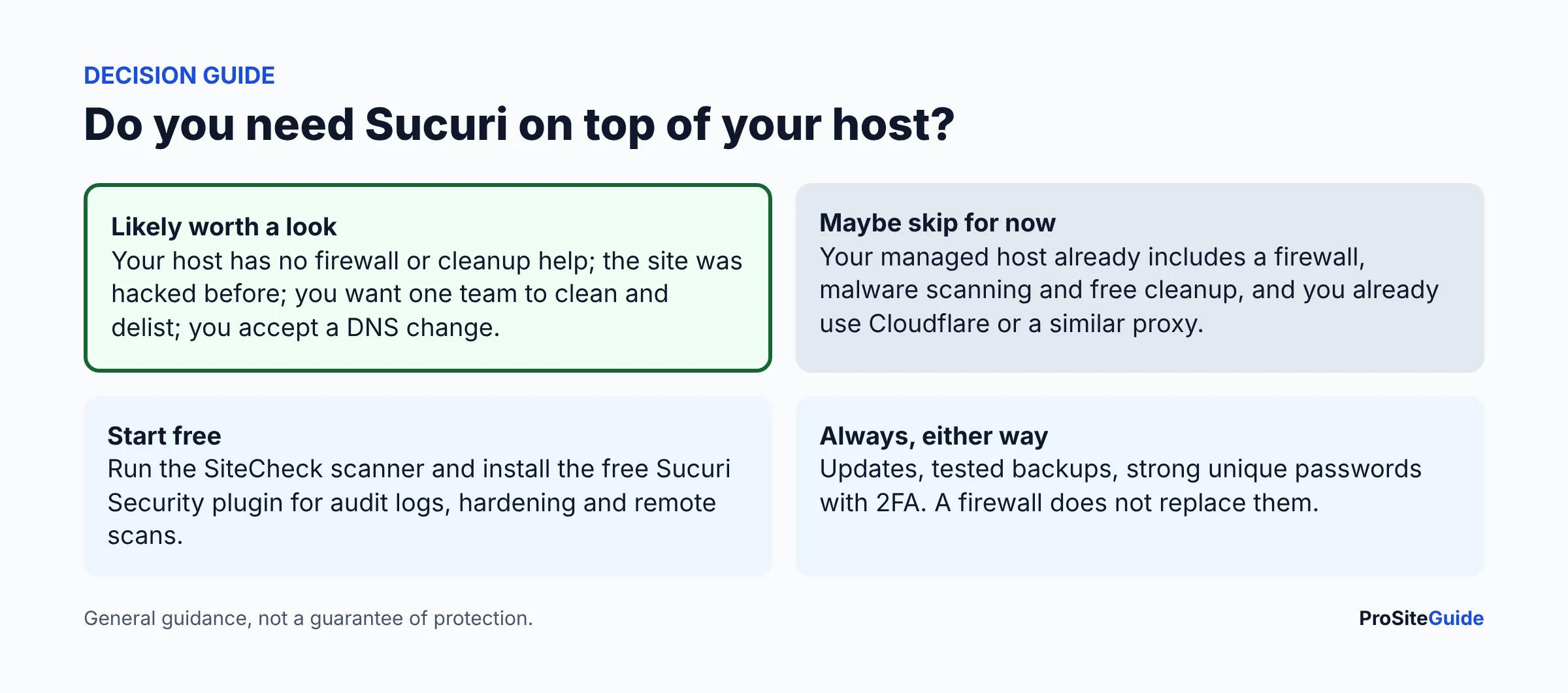
Often, partly. Good managed WordPress hosts typically include server-level firewalls, malware scanning, backups and sometimes cleanup. Compare what your host lists before buying. Ask these questions:
- Is there a web application firewall, and who maintains the rules?
- Is malware cleanup included, or billed per incident?
- Who requests blocklist removal if Google flags the site?
- Are backups stored off the server, and have you tested a restore?
Our hosting guides show what several providers include, such as the Hostinger review and the SiteGround review. If the answers cover you, skip the paid plan. If you already put your site behind Cloudflare, read our Cloudflare for law firm websites guide first, since stacking two proxies adds complexity.
How do you set up Sucuri on a WordPress site?
At a high level, based on Sucuri’s activation steps:
- Buy a plan and add your domain in the Sucuri dashboard.
- Sucuri shows the DNS records to use. Note your current DNS settings first, including email (MX) records, so you can roll back.
- Choose SSL and caching options. If your site is under attack, Sucuri provides an “I am currently under attack” setting.
- Change the DNS record as instructed. Changes can take time to spread.
- Lock the origin server so only the firewall can reach it, and restrict admin access if possible.
- Test the site, the contact form and email delivery. Keep your normal website maintenance routine going: updates and backups still matter.
If you also want Sucuri’s free plugin, install it from the WordPress plugin directory and generate the free API key so audit logs are stored off-site.
Who should (and should not) buy Sucuri?
- Worth a look: firms whose host offers little security, firms that have been hacked, or firms that want a single vendor for firewall plus cleanup.
- Probably not needed yet: firms on a managed host with firewall, scanning and free cleanup, especially if they already use a proxy like Cloudflare.
- Start free: run SiteCheck on your site today, then decide.
For the wider picture of hardening a firm website, use the tool comparisons hub or our Start Here page. Passwords and 2FA protect the admin login that a firewall cannot; see our 1Password review.
FAQ
Is Sucuri owned by GoDaddy?
Yes. Sucuri’s terms of service identify the company as GoDaddy Media Temple, Inc. d/b/a Sucuri, a subsidiary of GoDaddy Operating Company, LLC. You do not need to host or register your domain at GoDaddy to use it; the plans are described as platform-agnostic.
How much is Sucuri per year?
As of November 2026, Sucuri lists $229, $339 and $549 per year for its Basic, Pro and Business platform plans (one site each), plus firewall-only plans at $9.99 and $19.98 per month. Confirm on Sucuri’s pricing page.
Is the Sucuri SiteCheck scanner free?
Yes, SiteCheck is a free remote scanner. It checks what is visible from outside, so it cannot see server-side files. Treat a clean result as a useful signal, not proof of safety.
Does Sucuri work with WordPress?
Yes. It works with WordPress and other platforms. For WordPress there is also a free plugin for audit logs, integrity checks and hardening, as described on Sucuri’s plugin page.
Does Sucuri remove Google blocklist warnings?
Sucuri lists blocklist warning removal on its platform plans, meaning it requests removal on your behalf. Outcomes depend on the blocklist authority, so check the plan details.
Is a cloud firewall safe for client confidentiality?
It can be, if you understand that traffic passes through the provider. Review the terms, minimize sensitive data in web forms, and check your state bar guidance. This is general information, not legal advice.
Conclusion: next steps
- Run the free SiteCheck scan on your site and note any warnings.
- List what your host already includes (firewall, scanning, cleanup, backups).
- If gaps remain, compare Sucuri with the options in our security plugin guide.
- Before any DNS change, record current settings, including email records.
Want this handled for you? ProSiteGuide builds and maintains fast, secure WordPress sites for law firms. Book a free consultation.