Quick answer: If your law firm website is hacked, do not panic and do not start deleting things. Call your host, put the site into maintenance mode, save a copy of the files and logs, change every password, scan, then either restore a clean backup or clean the site. Ask Google to review it only after everything is fixed. Because a firm website can touch client information, also think through your ethics duties early.
Key takeaways
- Preserve evidence before you clean. A copy of the infected site and your logs helps you (or an expert) find how the attacker got in.
- Changing the WordPress password is not enough. Change hosting, SFTP, database, domain and email passwords too, then again after cleanup.
- Restoring a backup only works if the backup predates the hack and you close the hole it came through.
- Google only reviews a site after you fix every issue on every page. One request, not repeated ones.
- If client confidential information may have been exposed, ABA Formal Opinion 483 says to act promptly, investigate and consider notice. State laws add their own rules.
How do I know my law firm website was hacked?
A hacked website is one where someone gained unauthorized access and changed files, content or settings. The WordPress.org documentation lists the clear signs it calls indicators of compromise (WordPress.org: My site was hacked):
- Your site is blacklisted by Google, Bing or similar services, or flagged for distributing malware.
- Your host has disabled the site.
- Visitors say their antivirus is flagging it.
- Someone tells you your site is being used to attack other sites.
- Unauthorized changes appear, such as new user accounts.
- You can see the defacement, or odd pages and redirects, when you open the site.
Other practical clues: search results showing pharmaceutical or gambling titles under your domain, contact-form emails that stopped arriving, or admin users you do not recognize. A site that is merely slow or down may not be hacked at all, so ask your host to confirm.
What should I do in the first hour?
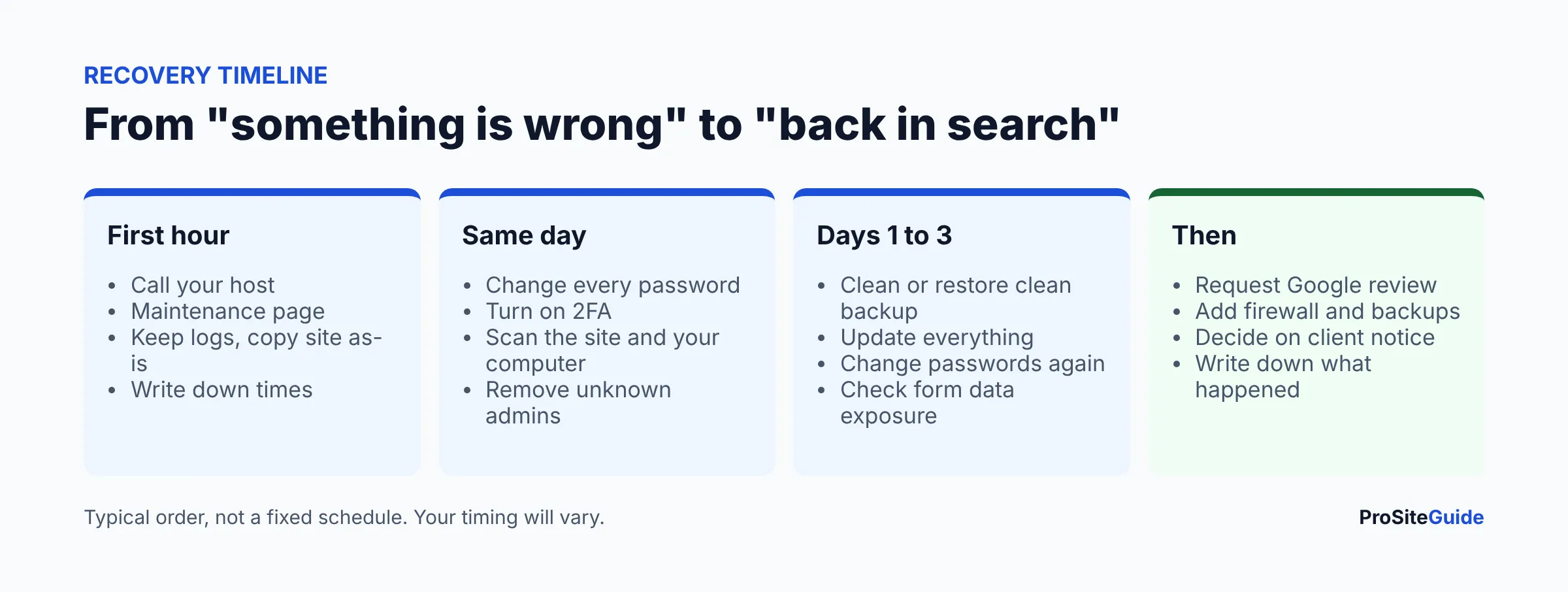
- Stay calm and write things down. Note what you saw, when (with time zone), and what changed recently, such as a new plugin or theme update. WordPress.org calls this the start of an incident report.
- Call your host. On shared hosting the problem may reach beyond your site, and the host can confirm whether it is a hack or a service problem. Ask what backups exist and how far back they go.
- Take the site offline or into maintenance mode. This protects visitors and stops further damage. Your host can often do this at the server level if you cannot log in.
- Preserve evidence. Before cleaning, take a snapshot of the files and database as they are, and ask the host to keep access and error logs. WordPress.org recommends taking one more snapshot before cleanup, even if it is infected.
- Scan your own computer. WordPress.org notes infections often start on a local machine that captures logins. Run a full antivirus scan on every device used to manage the site.
- Check email. If the site was sending spam, your server may be blacklisted. If your email runs on the same server, see our guide to law firm domain email, SPF, DKIM and DMARC.
How do I change passwords and lock the attacker out?
Reset every access point, not only the WordPress login. Use long, unique passwords from a manager (see our password manager guide for law firms) and turn on two-factor authentication (2FA) wherever it is offered.
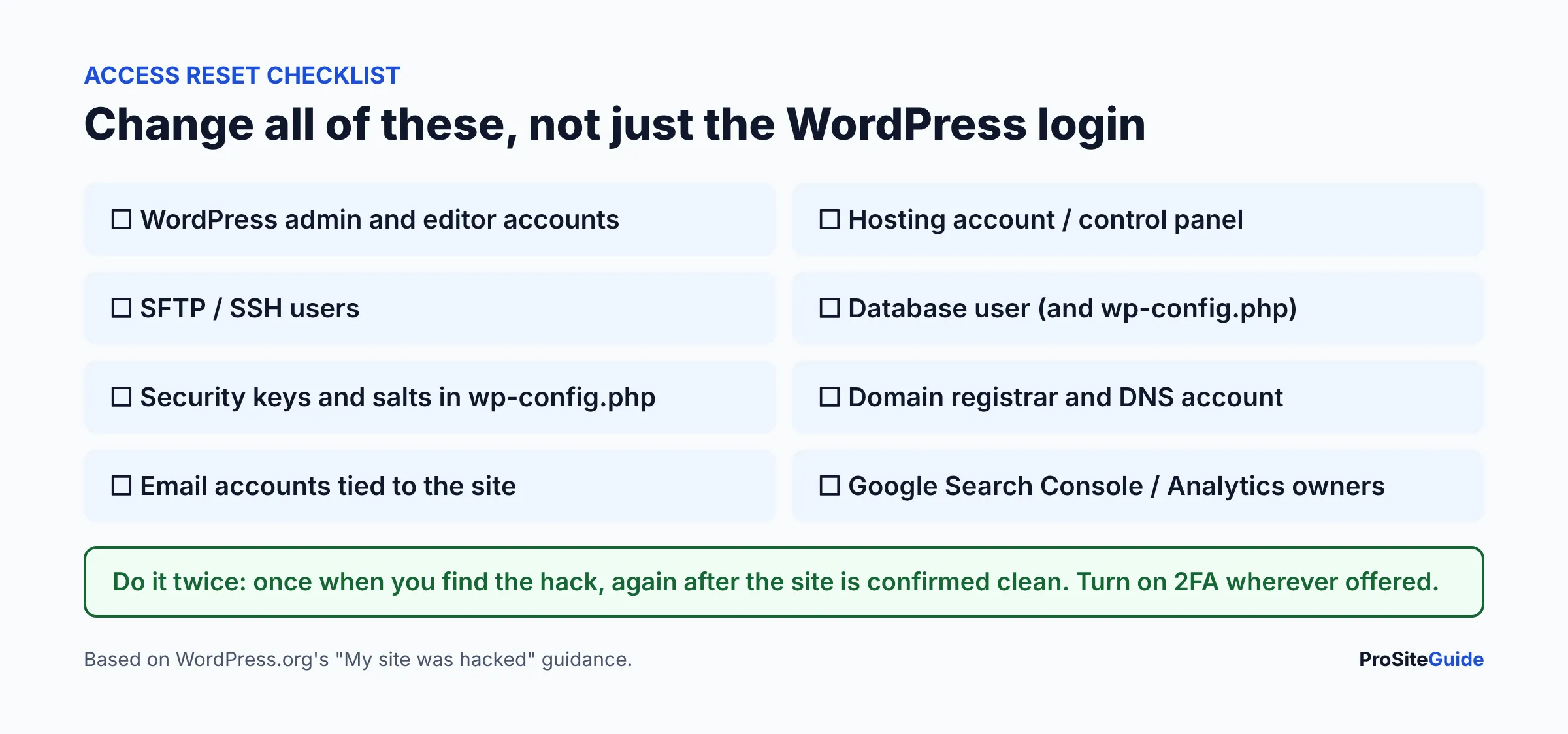
- Force a password reset for all WordPress users, especially administrators, and delete accounts you do not recognize.
- Replace the security keys and salts in
wp-config.php. WordPress.org says this logs out anyone still signed in, including an attacker. It offers a generator at api.wordpress.org/secret-key/1.1/salt/. - Do not forget SFTP, hosting control panel and database credentials.
Do it twice. WordPress.org advises changing passwords again once you are certain the site is clean, because an attacker may have captured the first new ones.
How do I scan a hacked WordPress site?
Use two kinds of scanner together. WordPress.org says no single solution is best, but combining them improves your odds. A remote scanner looks at your site from the outside. An application scanner (a plugin) looks at files from the inside.
| Type | Examples | What it can and cannot do |
|---|---|---|
| Remote scanner | Sucuri SiteCheck (free), VirusTotal | Checks visible code, blacklist status and outdated software. Sucuri states it cannot see server-side issues, and cannot detect backdoors or scan every file. |
| Plugin scanner | Wordfence, Sucuri Security plugin, Quttera, GOTMLS | Runs inside WordPress, so it can inspect files and the database. Needs a working WordPress install. |
A clean SiteCheck result is not proof of a clean site, because of the limits Sucuri itself lists. For a comparison of the plugins, see WordPress security plugins for law firms.
Should I clean the site or restore a backup?
Restore if you have a backup from before the first sign of trouble. Clean in place if you do not. Either way, you must find and close the way in, or the attacker returns.
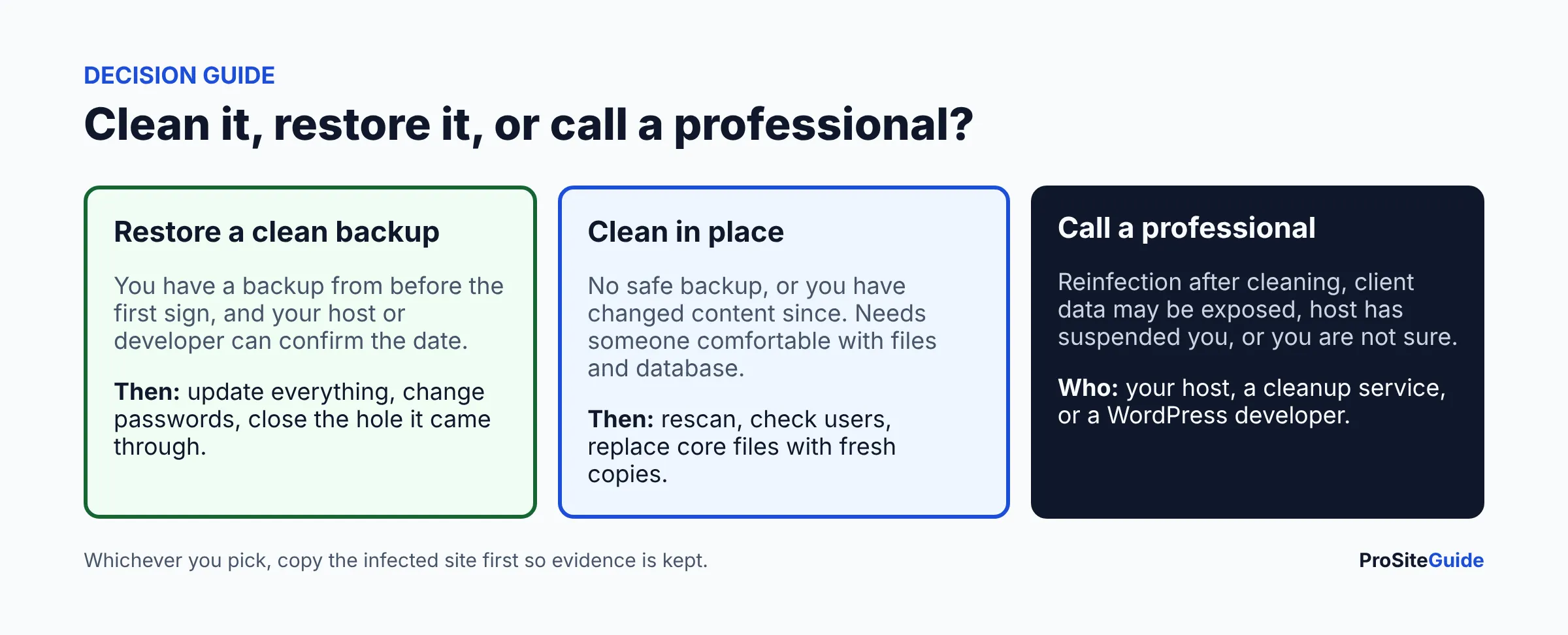
Restoring a clean backup
Work out when the infection began (file dates, logs, first symptom), then pick a backup older than that. After restoring, update every plugin, theme and WordPress itself right away, since an outdated component is a common way in. Any content you added after the backup date must be re-entered.
Cleaning in place
The WordPress.org guidance suggests these steps:
- Replace
/wp-adminand/wp-includeswith fresh copies of the same version of WordPress, uploaded by SFTP. It warns that the dashboard reinstall option often only overwrites existing files, while hacks add new ones. - Inspect
wp-content: delete plugins and themes you do not use and reinstall the rest from official sources. - Check
.htaccess, the file most often altered, plusindex.php,header.php,footer.phpandfunctions.phpin your theme. - Look for backdoors: hidden files that let the attacker back in even after you change passwords. Also remove unknown admin users, and check scheduled tasks and the database for injected content.
Backdoors are hard to find by eye. If you are not comfortable in files and databases, this is the point to bring in help.
When should I call a professional cleanup service?
- The site is reinfected after cleaning.
- Your host has suspended the account or will not restore it.
- Client information may have been exposed (a developer or security firm can help determine what happened).
- You cannot log in, or cannot tell which backup is clean.
- You do not have the time. Downtime costs a firm leads.
Options: your host (some include cleanup), a malware-removal service such as Sucuri (see our tool comparisons hub), or a WordPress developer. Ask what is included, how long it takes, and whether they will explain how the attacker got in.
How do I get Google to remove the hacked warning?
Fix everything first, then request a review in Search Console. Google’s Security Issues report covers three categories: hacked content, malware and unwanted software, and social engineering. If you have not set up Search Console, our GA4 and Search Console setup guide walks through it. You will need verified ownership to see the report.
- Open the Security Issues report and expand each issue. Use the sample URLs to find the problem; the list is a sample, not necessarily complete.
- Fix the issue across the whole site and fix every issue listed. Google says fixing only some pages will not earn a partial return to search results.
- Test your fixes, and make sure the pages are not blocked from Google by login, robots.txt or noindex.
- Select Request Review. Explain the issue, the steps you took and the outcome.
- Wait. Google says most reviews take several days or weeks, with emails when the request is received and completed. Do not resubmit while pending.
Sources: Security Issues report and Manual Actions report help pages. Other blocklists (Bing, antivirus vendors) have their own removal processes; WordPress.org recommends registering with the major webmaster consoles.
Could my contact form or intake data have been exposed?
Possibly, and for a law firm this is the question that matters most. Check where form submissions go. Some plugins store entries in the WordPress database, which an attacker with admin or database access could read. Others only email you. Review: stored form entries, uploaded files in the media library, user accounts, and any email or CRM integrations whose keys sit in the site settings. If entries were stored, assume they could have been read and note what they contained. Afterward, follow our guide to a secure contact form for a law firm website and avoid storing sensitive details on the site at all.
What are a lawyer’s ethics duties after a website hack?
This is general information, not legal advice. Check with your state bar or ethics counsel. ABA Formal Opinion 483 (October 2018), “Lawyers’ Obligations After an Electronic Data Breach or Cyberattack,” addresses what lawyers should do when client confidential information may be compromised. As summarized by secondary sources (the ABA site blocked our automated access, so we could not read the opinion itself), it points to these duties:
- Monitor so a breach is detected, which is part of a firm having reasonable security.
- Act promptly to stop the breach and limit the damage, then restore systems.
- Make reasonable efforts to determine what occurred: what was accessed and whose information it was.
- Consider notifying clients when material client confidential information was compromised, tied to the duty to keep clients informed.
The opinion deals with ethics rules only. State data-breach notification laws vary, as do their triggers and deadlines, and your cyber insurance policy may require quick notice to the insurer. A marketing site with no client data is a different situation from one holding stored intake forms. Keep your incident notes: what you found, when, and what you did. They support any decision on notice.
How do I prevent it from happening again?
- Put a web application firewall (WAF) in front of the site. See Cloudflare for law firm websites or a security plugin comparison.
- Keep WordPress, themes and plugins updated and remove unused ones.
- Use 2FA and unique passwords; give each person their own login.
- Run automatic offsite backups and test a restore.
- Work through the law firm website security checklist and consider ongoing website maintenance.
- Consider better hosting: our guide to moving hosts covers it. Start with the Start Here hub if you are rebuilding your setup.
FAQ
What should I do first if my WordPress site is hacked?
Call your host, put the site in maintenance mode, and save a copy of the files, database and logs before changing anything. Then change all passwords and scan.
Can I fix a hacked website myself?
Sometimes. If you have a clean backup and can restore it and update everything, yes. Finding backdoors is harder; if the site is reinfected or client data may be involved, bring in a professional.
How long does Google take to remove the hacked warning?
Google says most reviews take several days or weeks. You get emails when it is received and when it finishes. Resubmitting while pending is discouraged.
Is a free scanner enough to confirm my site is clean?
No. Remote scanners such as Sucuri SiteCheck cannot see server-side files and say they do not detect backdoors. Use a plugin scan and a manual check too.
Do I have to tell clients my website was hacked?
It depends on whether client confidential information was compromised and on your state’s rules. ABA Formal Opinion 483 discusses notice duties. Get advice from your state bar or ethics counsel.
Will a backup restore remove the hack?
Only if the backup predates the infection. Even then, update everything and change passwords, or the same weakness is used again.
Conclusion: your next steps
Today: call your host, switch to maintenance mode, copy the site, and reset all access. This week: scan, restore or clean, update, then request Google review. After that: add a firewall, backups and a maintenance routine, and decide with your ethics counsel whether any notice is needed.
Want this handled for you? ProSiteGuide builds and maintains fast, secure WordPress sites for law firms. Book a free consultation.