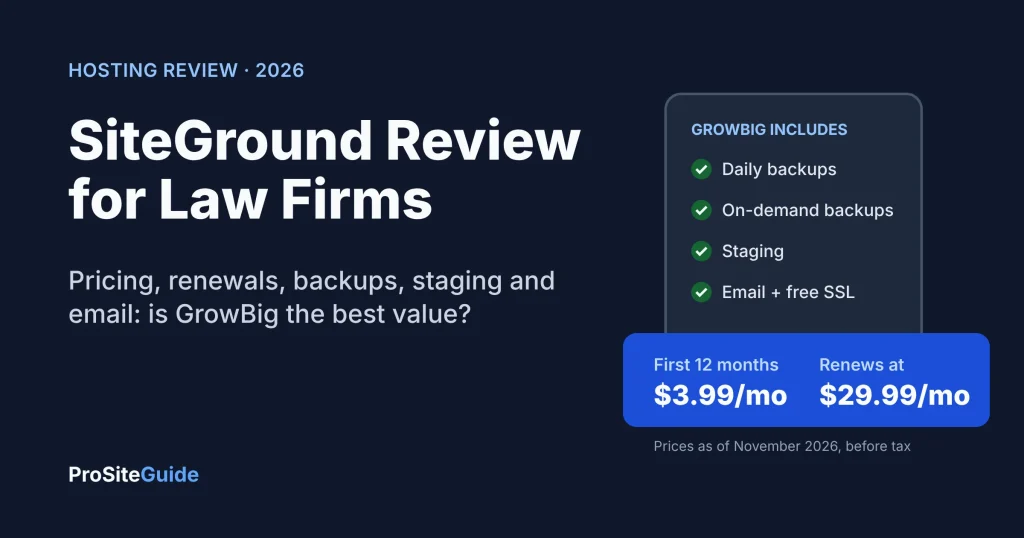
Quick answer: This SiteGround review comes down to one point. SiteGround is a strong, low-hassle choice for a small law firm’s WordPress site, as long as you budget for the renewal price and not the sign-up price. GrowBig is the plan most firms should pick: it costs $3.99/mo for the first 12 months, then renews at $29.99/mo on a 12-month term, and it adds staging and on-demand backups that the cheapest plan lacks (prices as of November 2026).
Key takeaways
- Best plan for most firms: GrowBig. StartUp has no staging and no manual backups. GoGeek mainly makes sense for agencies or busy sites.
- The renewal jump is large: GrowBig goes from $47.88 for the first year to $359.88 a year at the 12-month regular rate. That’s about 7.5 times the first-year price.
- Backups are good but not complete: you get up to 30 daily copies and 5 manual backup slots on GrowBig. Downloading a backup as a file needs the paid Premium Backup add-on.
- Email is included but basic: all mailboxes share 10 GB in total. SiteGround itself recommends Google Workspace for heavier business email.
- Compared with alternatives: it costs far less than Kinsta or WP Engine and more than Hostinger after renewal. Of the four, only SiteGround and Hostinger include email hosting, and SiteGround’s doesn’t expire after year one.

How we compared
We haven’t run speed or uptime tests on SiteGround, and this review has no scores. Everything below comes from SiteGround’s official pages, checked in November 2026: the WordPress hosting plans page, the full feature comparison, its knowledge base, and its legal terms. We then looked at what a small firm actually needs: predictable costs, backups, safe updates, email and someone to call when the site breaks. Competitor prices come from each vendor’s own pricing page.
Is SiteGround good for law firms? The verdict
Yes, for most solo and small firms that run one brochure-style WordPress site. SiteGround sits in the middle of the market. It’s shared hosting, which means your site shares a server with other customers. On top of that it adds managed WordPress features such as automatic updates, daily off-site backups, one-click staging, a web application firewall, free SSL and 24/7 phone, chat and ticket support.
Who SiteGround fits
- Solo attorneys and firms of 2–10 lawyers with a practice-area site, a blog and a contact form.
- Firms that want phone support and a simple control panel instead of a developer-only platform.
- Firms (or their web developer) running a few sites, such as a main site plus a microsite for one practice area. GrowBig allows unlimited websites.
- Buyers who want US data centers. SiteGround lists Ashburn, Council Bluffs, Dallas and Los Angeles among its 11 locations.
Who should look elsewhere
- The lowest long-term price matters most: Hostinger renews for much less (see the comparison below).
- You want premium managed hosting with container isolation and a dashboard built for agencies: look at Kinsta or WP Engine, and expect to pay several times more.
- Your firm sends a lot of email or needs large mailboxes: keep the website on SiteGround but put email on Google Workspace or Microsoft 365.
SiteGround pricing: intro vs. renewal (November 2026)
SiteGround pricing has two layers. The first is a discounted price for your first invoice. The second is the regular price that applies to every renewal after that. The feature comparison page puts it plainly: advertised prices apply to prepaid 12-month plans, “Special prices are applicable for the first invoice,” and regular prices apply to all renewals. Prices exclude sales tax.
| Plan | First 12 months (intro) | Renewal, 12-month term | Renewal, 24-month term | Monthly billing | Websites / storage / suggested visits |
|---|---|---|---|---|---|
| StartUp | $1.99/mo ($23.88) | $17.99/mo | $14.99/mo | $24.99/mo | 1 site / 10 GB / ~10,000 per month |
| GrowBig | $3.99/mo ($47.88) | $29.99/mo | $24.99/mo | $34.99/mo | Unlimited / 50 GB / ~100,000 per month |
| GoGeek | $5.99/mo ($71.88) | $44.99/mo | $39.99/mo | $49.99/mo | Unlimited / 100 GB / ~400,000 per month |
Three details matter here. First, the plans page now says “unlimited traffic.” The visit numbers above are SiteGround’s own suggestions for which plan suits a site, not hard caps. Data transfer is listed as unmetered. Second, when we checked, the page showed an “early Black Friday” banner that offered a free domain and a free site transfer on all plans “for a limited time.” Third, the intro prices matched what SiteGround showed earlier in November, but promotions change, so confirm at checkout.
What does SiteGround really cost over 3 years?
Assume you buy the 12-month intro deal and then renew. How much you pay over three years depends on the renewal term you choose. A 24-month renewal has a lower monthly rate than two 12-month renewals.
| Plan | Year 1 (intro) | Years 2–3: two 12-month renewals | 3-year total | Years 2–3: one 24-month renewal | 3-year total |
|---|---|---|---|---|---|
| StartUp | $23.88 | $431.76 | $455.64 | $359.76 | $383.64 |
| GrowBig | $47.88 | $719.76 | $767.64 | $599.76 | $647.64 |
| GoGeek | $71.88 | $1,079.76 | $1,151.64 | $959.76 | $1,031.64 |
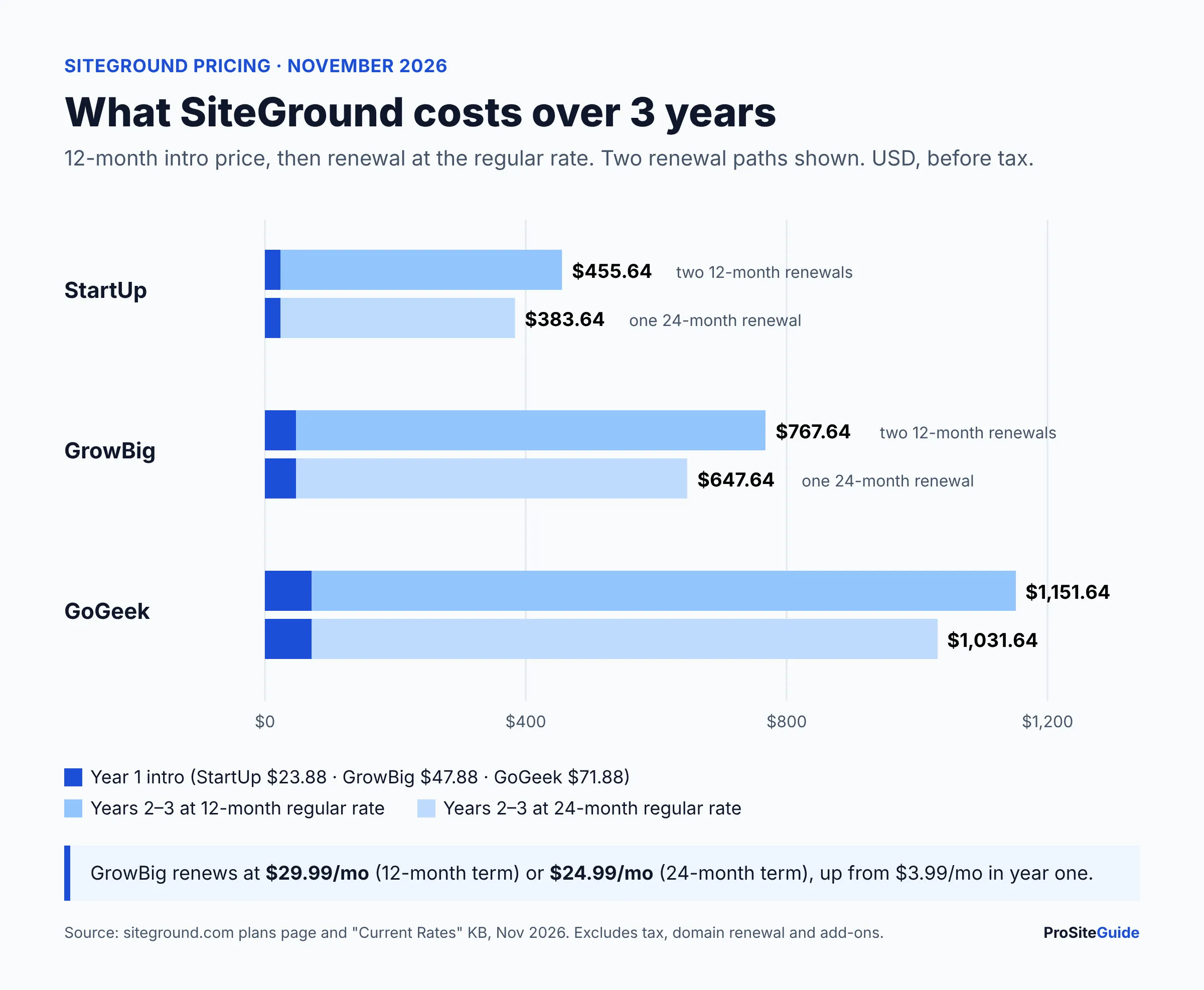
So a realistic budget for GrowBig is about $215–$255 a year averaged over three years, not $48. That’s still cheap for a law firm’s main marketing asset. Just put the renewal date in the firm’s calendar. To see how hosting fits the full budget, read our guide to the best hosting for law firm websites.
SiteGround GrowBig vs StartUp vs GoGeek: which plan should a firm choose?
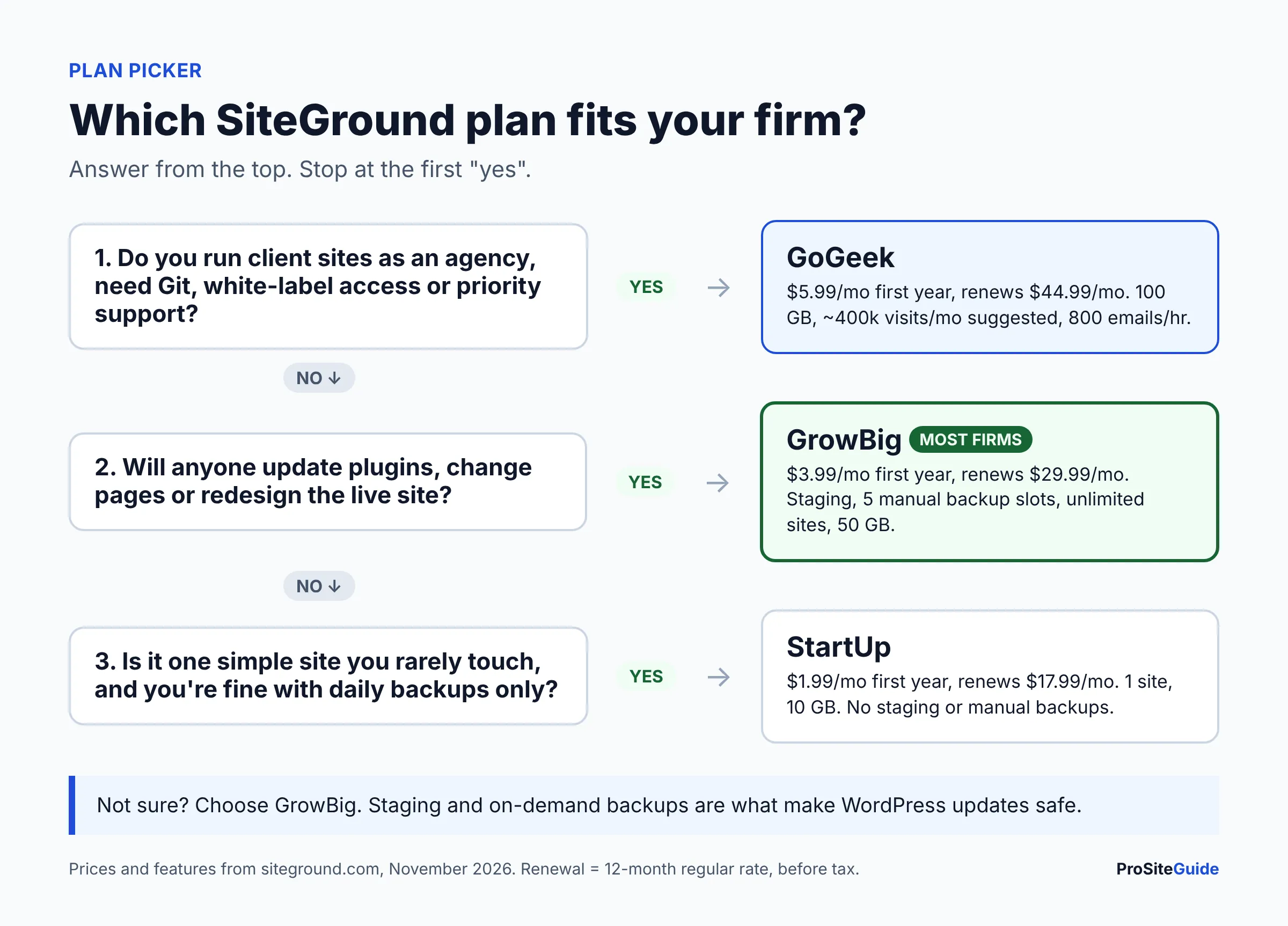
Choose GrowBig if you’ll ever update plugins or redesign pages on a live site. It’s the cheapest plan that includes staging (a private copy of your site where you can test changes before they go live) and on-demand backups (a snapshot you make yourself just before a risky change). Both features are listed under GrowBig’s “Exclusive Features” on the plans page.
- StartUp fits a single, rarely changed site where you accept relying on the automatic daily backups alone.
- GrowBig fits most firms. It adds staging, 5 manual backup slots, “30% faster PHP” (SiteGround’s claim), unlimited sites and 50 GB of storage.
- GoGeek adds Git with staging, white-label client access, private DNS, priority support and a higher email sending limit. It’s aimed at developers and agencies.
What’s included with SiteGround hosting?
Every plan includes free SSL, CDN, daily backups, email, a free domain for the first year, managed WordPress autoupdates, and the Speed Optimizer and Security Optimizer plugins. Each also includes WP-CLI and SSH, plus an AI agent for WordPress with free monthly AI tokens (per the plans page). Here is what the main items mean for a firm.
| Feature | What SiteGround offers | Why it matters to a firm |
|---|---|---|
| Daily backups | Up to 30 daily copies on shared plans, stored off the server that hosts your site. You can restore files, databases or email separately (Backup KB). | Recover from a bad update or a hack without paying a developer for emergency work. |
| On-demand backups | 5 free manual slots on GrowBig and GoGeek. None on StartUp. | Take a snapshot before every plugin or theme update. |
| Backup downloads | Only with the paid Premium Backup service. It adds 7 more daily copies, hourly backups for 48 hours and downloadable archives. | A copy you hold yourself, separate from the host. Price isn’t published on the KB page. |
| Staging | GrowBig and up. Up to 10 staging copies per account, a database under 5 GB, and no WordPress Multisite (Staging tutorial). | Test updates and redesigns without breaking intake forms on the live site. |
| Unlimited mailboxes, 10 GB shared across all of them, 400 emails/hour on StartUp and GrowBig (email policy). | Fine for a website contact address. Tight as a firm’s main email system. | |
| SSL and CDN | Free, pre-installed wildcard Let’s Encrypt SSL. CDN included. | HTTPS on every page, including intake forms. |
| Security | A web application firewall (WAF), AI bot protection and account isolation. | Blocks common WordPress attacks before they reach your site. |
| Support | 24/7 via phone, chat and tickets. Priority support on GoGeek. | A real person to call when the site goes down. |
| Data centers | 11 locations, 4 of them in the US. You can relocate a site later, which can take up to 72 hours (KB). | Hosting close to your clients helps load times. |
| Refunds | 30-day money-back guarantee on shared hosting. Domain fees aren’t refundable (refund policy). | A low-risk trial, but a “free” domain may be billed if you cancel. |
SiteGround pros and cons
Pros
- Very low first-year price, and published regular rates. You can see the renewal price before you buy.
- Staging and manual backups on GrowBig, which most firms need for safe updates.
- Daily off-site backups kept for up to 30 days, with restores of files, databases or email.
- 24/7 phone support, which many budget and premium hosts don’t offer.
- Email hosting included, plus a free email migrator.
- Four US data centers, with the option to change location later.
Cons
- A steep renewal jump: GrowBig goes from $3.99 to $29.99/mo on a 12-month renewal.
- The intro price only applies to a 12-month prepay. Monthly billing costs $34.99/mo for GrowBig.
- Downloadable backups cost extra through Premium Backup.
- Email storage is 10 GB shared across every mailbox, and new mail bounces once you hit the limit.
- It’s still shared hosting. Very busy sites, or firms wanting dedicated resources, should look at cloud or premium managed hosts.
Law-firm considerations before you buy SiteGround
1. Plan for the renewal, not the deal
Put the 12-month renewal date on the firm calendar. A month before, decide whether to renew for 24 months, which lowers GrowBig to $24.99/mo. SiteGround’s refund policy allows a full refund of a renewal if you cancel within 30 days of payment and before the new term starts, and a partial refund after the term starts. That gives you a short window if you forget.
2. Email: SiteGround mailboxes vs Google Workspace or Microsoft 365
SiteGround’s email is designed for “standard communication needs.” Its own email policy recommends Google Workspace for heavier business use. All of a plan’s mailboxes share 10 GB, and attachments are capped at 50 MB to send and 80 MB to receive. When the 10 GB is full, incoming mail is rejected, not queued. For a firm that receives scanned documents and long client threads, that limit can arrive quickly. Most firms are better off keeping the website on SiteGround and running email on a dedicated suite. See Google Workspace vs Microsoft 365 for law firms to choose one. Either way, set up SPF, DKIM and DMARC as covered in our law firm business email setup guide. Confidentiality duties around client communications come from your state’s rules of professional conduct, so check your state bar’s guidance.
3. Backups: keep one copy you control
SiteGround’s 30 daily copies live in SiteGround’s systems. Per the Backup KB, once you delete a site you lose access to its backups, and downloading backups needs Premium Backup. A sensible setup is SiteGround’s daily backups plus either Premium Backup or a reputable WordPress backup plugin that sends copies to cloud storage the firm owns.
4. Use staging for every meaningful update
A broken contact form can cost you leads without anyone noticing. On GrowBig, copy the site to staging, run the plugin and theme updates there, test the intake form, then push the changes live. SiteGround’s staging copies have WordPress cron turned off by default, so test emails and scheduled tasks may behave differently on staging than on the live site.
5. Vendor due diligence
SiteGround publishes a Data Processing Agreement alongside its terms. Keep a copy in your vendor file. Remember that a marketing website should never be where you store client files. Use the website for public information and a secure form, and keep matter data in your practice management software.
SiteGround vs Kinsta vs Hostinger vs WP Engine
SiteGround sits between budget and premium hosting. Here is how the entry WordPress plans compared on each vendor’s pricing page in November 2026. Several vendors were running Black Friday promotions, so check current prices before you buy.
| Host / plan | Entry price | Renewal / regular | Email hosting | Best for |
|---|---|---|---|---|
| SiteGround GrowBig | $3.99/mo, 12-month prepay | $29.99/mo (12-month term) | Included (10 GB shared) | Small firms wanting staging, phone support and a mid-range budget |
| Hostinger Premium | $1.99/mo on a 48-month prepay ($95.52) (Hostinger) | $10.99/mo | 2 mailboxes per website, free for 1 year on Premium | The lowest long-term cost |
| Kinsta Single 20GB | $35/mo monthly, with a discount for annual billing (Kinsta) | Same rate, no intro jump | Not offered | Premium managed hosting with predictable pricing |
| WP Engine Essential | $28/mo billed annually ($336), first year (WP Engine) | “Renewal pricing subject to change”; not published | Not offered | Developer-led firms that want WP Engine’s tooling |
For the details, read our Kinsta review for law firms, our Hostinger review and our WP Engine review. The head-to-head Kinsta vs WP Engine vs SiteGround comparison runs the 3-year math for the three managed hosts. For other side-by-side guides, browse our tool comparisons hub.
How to sign up for SiteGround and migrate a law firm site
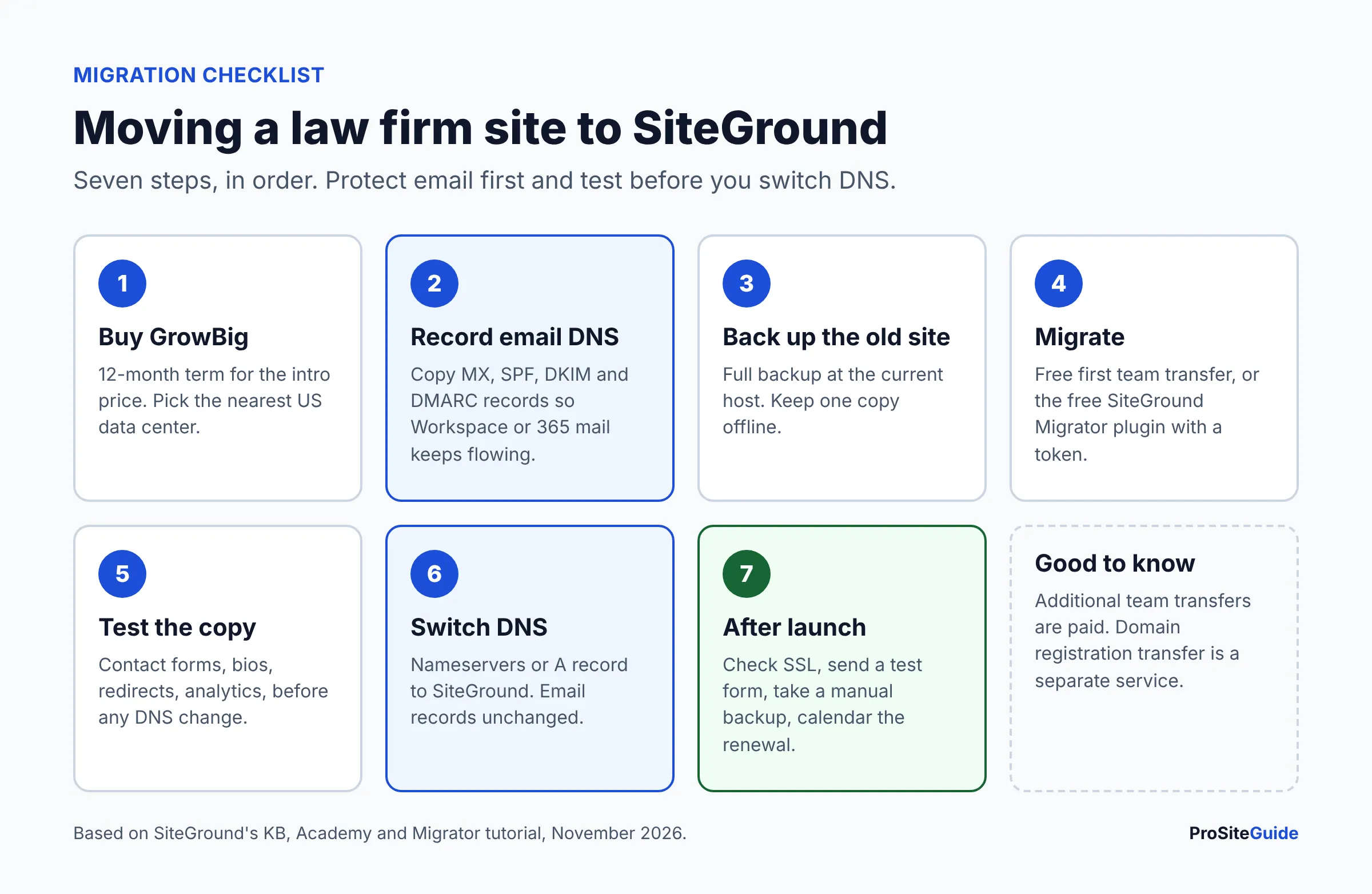
SiteGround offers three ways to move an existing WordPress site: its free Migrator plugin, a manual transfer done by its team, or a do-it-yourself move. According to the SiteGround Academy migration guide, your first “Manual Transfer by our Team” is free with a new plan, for one site. Extra transfers are paid, with the price shown when you order. The transfer KB article notes that the professional transfer doesn’t include moving your domain registration.
- Pick GrowBig and the closest US data center on the plans page. Choose the 12-month term to get the intro price.
- Decide where email will live before you touch DNS. If email stays with Google Workspace or Microsoft 365, write down your current MX, SPF and DKIM records so you don’t break mail during the move.
- Back up the current site at your old host and keep a copy offline.
- Migrate. Either request the free first team transfer from the Client Area, or install the free SiteGround Migrator plugin on the old site and paste in the migration token from Site Tools. SiteGround says the plugin copies the site without taking the live one down (Migrator tutorial).
- Check the copy on SiteGround’s temporary URL. Look at forms, the attorney bio pages, redirects and tracking codes.
- Point DNS to SiteGround. Update the nameservers (or A records), keeping your email records exactly as they were.
- After launch: confirm SSL is active, submit a test form, take a manual backup, and add the renewal date to the calendar.
For the full zero-downtime process, including DNS timing, read how to move a law firm website to a new host without downtime.
FAQ
Is SiteGround good for a small law firm?
Yes, for most small firms running a standard WordPress site. GrowBig gives you staging, manual and daily backups, free SSL, a CDN and 24/7 phone support at a mid-range price after renewal. Firms that want the lowest long-term cost, or premium dedicated resources, have better-fitting options.
How much does SiteGround cost after the first year?
On a 12-month renewal, StartUp costs $17.99/mo, GrowBig $29.99/mo and GoGeek $44.99/mo. On 24-month renewals the rates drop to $14.99, $24.99 and $39.99/mo. All are before tax, as of November 2026.
Is SiteGround GrowBig worth it over StartUp?
For a law firm, usually yes. The $12/mo difference at renewal buys staging and 5 on-demand backup slots, the two tools that make plugin and theme updates safe. It also allows unlimited websites and gives you 50 GB of storage instead of 10 GB.
Does SiteGround include email?
Yes. Every plan includes unlimited email accounts, but they share 10 GB of storage and StartUp and GrowBig can send up to 400 emails per hour. SiteGround recommends Google Workspace for heavier business email.
Does SiteGround offer a free migration?
Yes. The SiteGround Migrator plugin is free for WordPress sites, and SiteGround says the first manual transfer by its team is free with a new plan, for one site. Additional team transfers are paid.
Does SiteGround have a money-back guarantee?
Yes. Shared hosting plans come with 30 days from activation, and you request the refund by cancelling in the Client Area. Domain fees aren’t refundable and may be charged even if the domain was free as part of a promotion.
Where are SiteGround’s US data centers?
Ashburn (Virginia), Council Bluffs (Iowa), Dallas (Texas) and Los Angeles (California), out of 11 locations worldwide.
Conclusion: is SiteGround the best value managed WordPress host?
For a small law firm, SiteGround GrowBig is arguably the best value among hosts that include staging, daily backups and 24/7 phone support. You have to treat the $29.99/mo renewal as the real price, though. Your next steps:
- Budget about $650–$770 for three years of GrowBig, depending on your renewal term.
- Decide whether email stays on SiteGround or moves to Google Workspace or Microsoft 365.
- Plan the migration using the free first transfer or the Migrator plugin, and keep your own backup copy.
- If you’re still choosing, compare it against Kinsta, WP Engine and Hostinger in the reviews linked above.
Want this handled for you? ProSiteGuide builds and maintains fast, secure WordPress sites for law firms. Book a free consultation.
Sources
- SiteGround: Hosting for WordPress (plans, intro and renewal prices, data centers)
- SiteGround: WordPress hosting feature comparison
- SiteGround KB: Current rates of shared hosting plans
- SiteGround KB: Refund policy
- SiteGround KB: How to use the Backup service
- SiteGround KB: Acceptable use of SiteGround’s email service
- SiteGround Tutorials: Create a staging copy
- SiteGround KB: Could you transfer my website for me?
- SiteGround Academy: WordPress migration
- SiteGround Tutorials: WordPress Automatic Migrator
- SiteGround KB: Changing data center
- SiteGround: Data Processing Agreement
- WordPress.org: SiteGround Migrator plugin
- Kinsta: Pricing
- Hostinger: WordPress hosting
- WP Engine: Plans