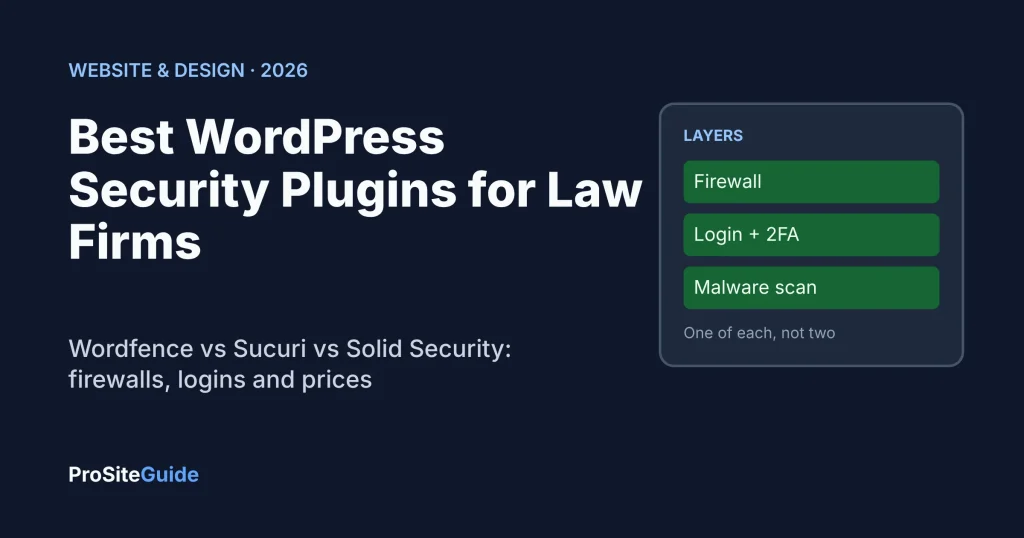
Quick answer: For most small law firms, the best WordPress security plugin setup is one firewall plus one login-hardening layer. Use Wordfence if you want an endpoint firewall and malware scanner inside WordPress. Use Sucuri if you want a cloud firewall and cleanup service in front of your site. Use Solid Security (now sold as Kadence Security) if your main gap is login protection. Do not run two firewall plugins at once.
Key takeaways
- A WordPress security plugin reduces risk. It does not replace updates, backups, strong passwords and a good host.
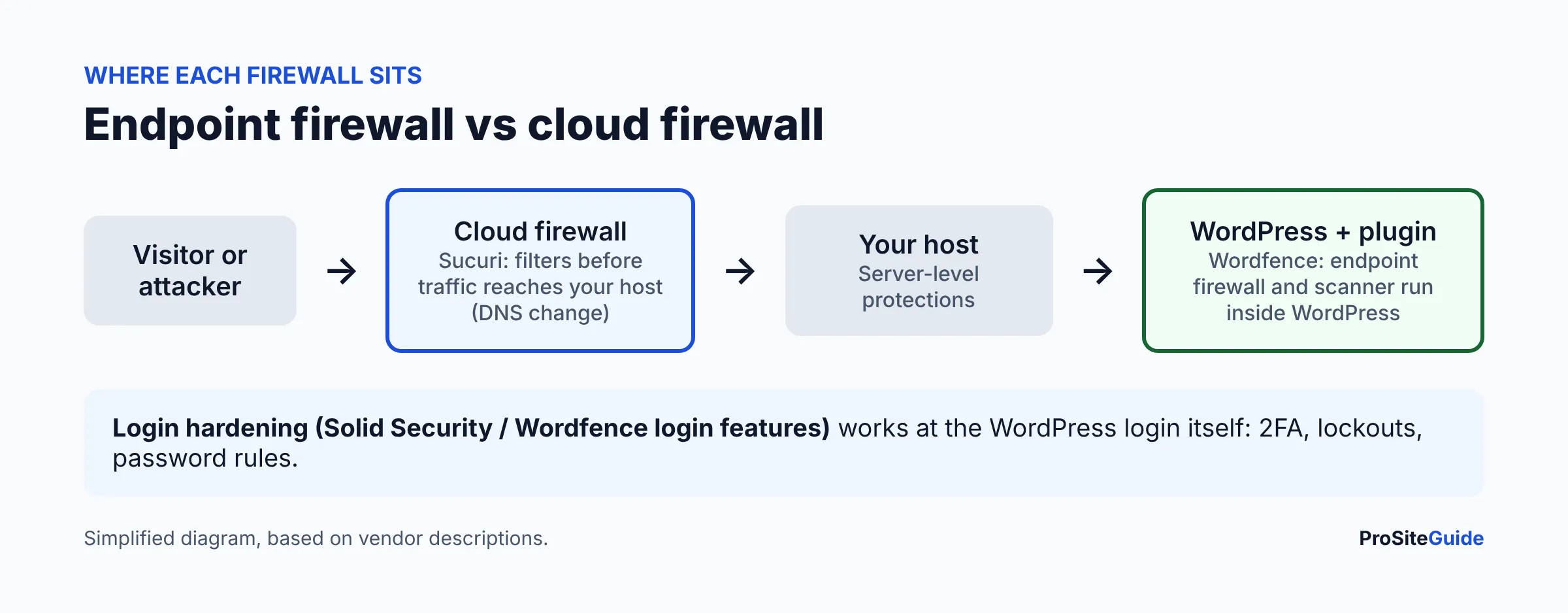
- Wordfence is an endpoint firewall (runs inside WordPress). Sucuri is a cloud firewall (sits in front of your site). Solid Security focuses on hardening and login security.
- Wordfence Free delays new firewall rules and malware signatures by 30 days. Paid plans get them in real time.
- Pick one firewall. Stacking two can cause conflicts and slowdowns.
- Check what your host already provides before you pay for more.
Why does a law firm need a WordPress security plugin?
A law firm site holds contact-form inquiries, staff logins and sometimes client portals. A compromise can expose that information or send visitors to spam pages. ABA Model Rule 1.6(c) says a lawyer must make reasonable efforts to prevent inadvertent or unauthorized disclosure of, or access to, information relating to a client’s representation. A security plugin is one reasonable, documentable step. Your state bar may add its own expectations, so check with it.
This guide compares the plugins. For the full list of what to lock down (updates, backups, SSL, user roles), use our law firm website security checklist. We will not repeat it here.
How we compared these plugins
This comparison is based on each vendor’s official pricing page, plugin listing and documentation as of November 2026. We have not run hands-on tests, and we give no scores or ratings. Prices change, so confirm on the vendor’s page before buying.
What is the difference between an endpoint firewall and a cloud firewall?
A firewall is software that blocks bad requests before they do damage. An endpoint firewall runs inside your WordPress install. A cloud (DNS-level) firewall filters traffic before it reaches your server, which requires pointing your domain’s DNS at the provider.
- Endpoint (Wordfence): Wordfence describes its firewall as protecting the site at the endpoint, with deep WordPress integration. It runs on your server, so it uses your server’s resources.
- Cloud (Sucuri): traffic is filtered on Sucuri’s servers first. Sucuri lists a CDN effect that reduces server load, and an HTTPS connection through its firewall. Setup involves a DNS change. Our Cloudflare for law firm websites guide explains how that kind of DNS-level setup works.
- Hardening (Solid Security): not primarily a firewall. It tightens login, passwords, lockouts and file monitoring.
Wordfence vs Sucuri vs Solid Security: comparison table
| Wordfence | Sucuri | Solid Security (Kadence Security) | |
|---|---|---|---|
| Type | Endpoint firewall + scanner | Cloud firewall + monitoring + cleanup | Hardening + login security |
| Free option | Yes (Wordfence Free) | No free plan found on its pricing page | Yes (free plugin on WordPress.org) |
| Brute-force / login limits | Yes, all tiers | Via firewall | Yes, local brute-force protection |
| 2FA | Yes, TOTP authenticator apps and passkeys | Not a core feature | Yes (authenticator apps, email, backup codes) |
| Malware scanning | Yes | Yes (platform plans) | Site scanner for vulnerabilities and file changes; see vendor for malware detail |
| Vulnerability alerts | Yes, plugin/theme monitoring | See vendor | Yes; Pro adds Patchstack virtual patching |
| Cleanup help | Care and Response plans | Included on platform plans | Not a cleanup service |
| Needs DNS change | No | Yes | No |
How much do Wordfence, Sucuri and Solid Security cost?
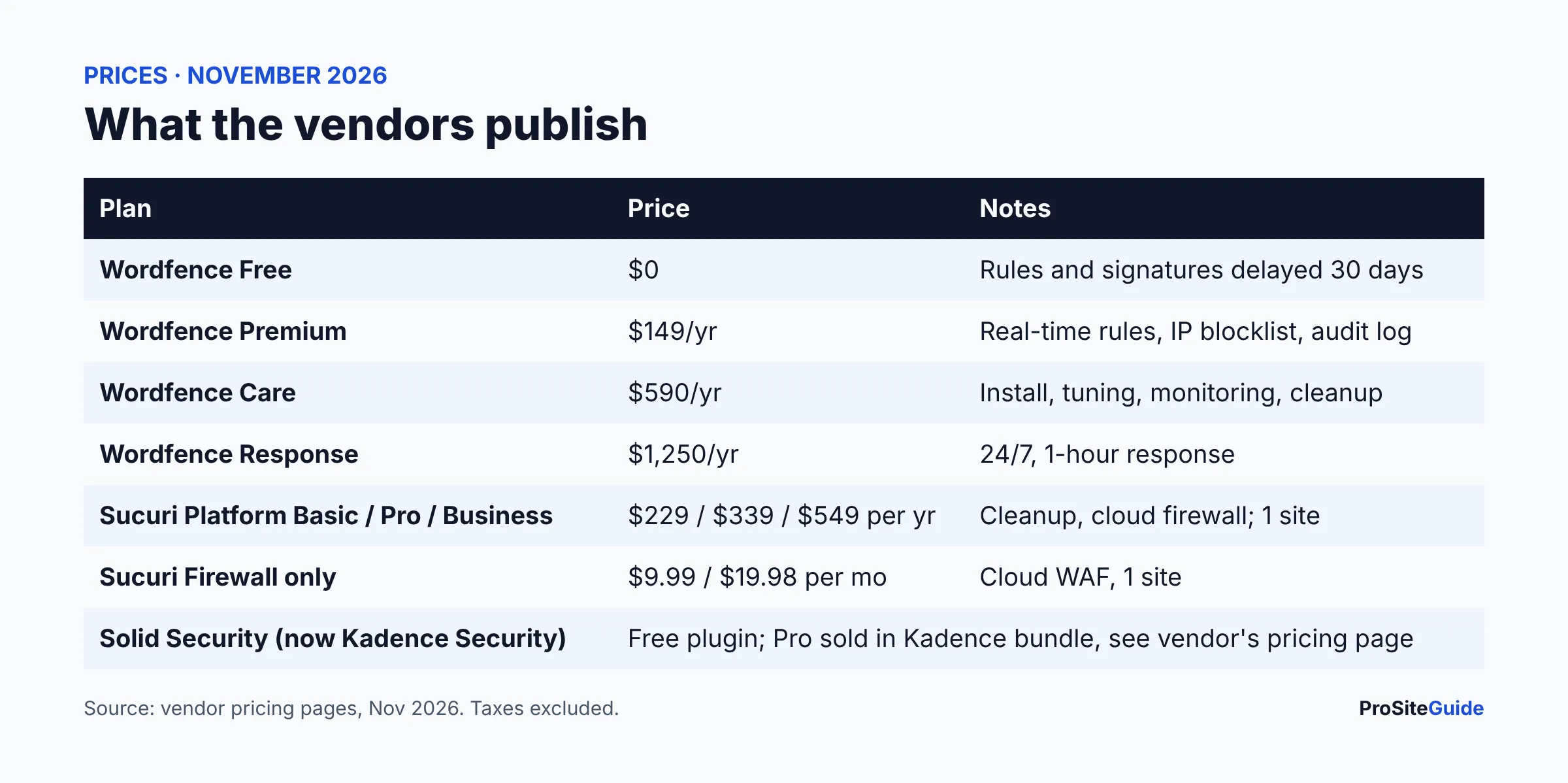
Prices as of November 2026, from the vendors’ own pages. All are annual unless noted.
Wordfence pricing
Per the Wordfence pricing page: Free is $0; Premium is $149 per year; Care is $590 per year; Response is $1,250 per year. Free has a 30-day delay on firewall rules and malware signatures. Premium adds real-time rules and signatures, a premium IP blocklist, country blocking, an audit log and ticket support. Care adds hands-on help from an analyst (install, configure, optimize, monitoring, malware removal). Response adds 24/7/365 incident response with a 1-hour response time. Wordfence says the licence is per site; see its FAQ on how many licences you need.
Sucuri pricing
Per Sucuri’s plans page: the Website Security Platform is billed yearly at $229 (Basic), $339 (Pro) and $549 (Business) for one site, with unlimited cleanups and different scan frequencies and response times. A firewall-only product (CloudProxy) is billed monthly at $9.99 (Basic) or $19.98 (Pro). Some per-tier details were unclear on the page, so confirm exact features with Sucuri before buying.
Solid Security pricing
Solid Security, formerly iThemes Security, is now branded Kadence Security on its WordPress.org listing (“by Nexcess”), and the old solidwp.com address redirects to Liquid Web’s Kadence pages. The free plugin is on WordPress.org. Pro features are now sold inside Kadence bundles on Liquid Web’s Kadence page, which listed a one-site plan at $350 per year when we checked. Those bundles also include other products, so see the vendor’s pricing page for what applies to you.
What does each plugin do well?
Wordfence: the all-in-one scanner and firewall
According to its plugin listing, Wordfence includes a web application firewall, malware scanner, login security (2FA, passkeys, CAPTCHA, blocking known-compromised admin passwords), brute-force limits and vulnerability checks. The scanner compares core, theme and plugin files with the WordPress.org repository. Best for: a firm that wants one plugin handling most security tasks.
Sucuri: the cloud firewall plus cleanup
Sucuri’s plans bundle a cloud firewall with monitoring and unlimited cleanups. Best for: a firm that wants a vendor to fix a hacked site and does not mind a DNS change. Because filtering happens off your server, it can reduce load on small hosting plans.
Solid Security: login and hardening
The listing shows free features such as 2FA, password requirements, banning users, local brute-force protection, file change detection and a site scanner. Pro adds items like passwordless login, trusted devices, user logging and Patchstack virtual patching. Best for: a firm that has a firewall at the host and wants to tighten logins.
Do WordPress security plugins slow down your site?
They can. An endpoint firewall and scanner run on your own server, so scans and request filtering use its resources. Wordfence lets you schedule scans. A cloud firewall moves filtering off your server but adds a network hop and DNS setup. Measure your pages before and after; our law firm website speed guide explains how.
Can you use two security plugins together?
Run only one firewall. Two plugins that both filter requests and rewrite server rules can block each other or double the load. It is fine to pair a firewall with a login-hardening tool, but disable overlapping features (for example, turn off duplicate brute-force or 2FA settings) so you only have one of each. The same goes for a cloud firewall plus an endpoint firewall: choose a primary and test carefully. Our best WordPress plugins for law firms list covers the rest of a sensible plugin stack.
Does your host already cover security?
Often partly. Kinsta’s plan page lists enterprise DDoS protection, and its menu lists bot protection and vulnerability protection. SiteGround describes AI-powered bot protection and 24/7 monitoring. Those features are on the host side, so you may not need a paid firewall plugin. They do not replace WordPress-level steps like 2FA, strong passwords and removing unused plugins. Compare hosts in our best law firm hosting guide.
Which WordPress security plugin should a law firm choose?
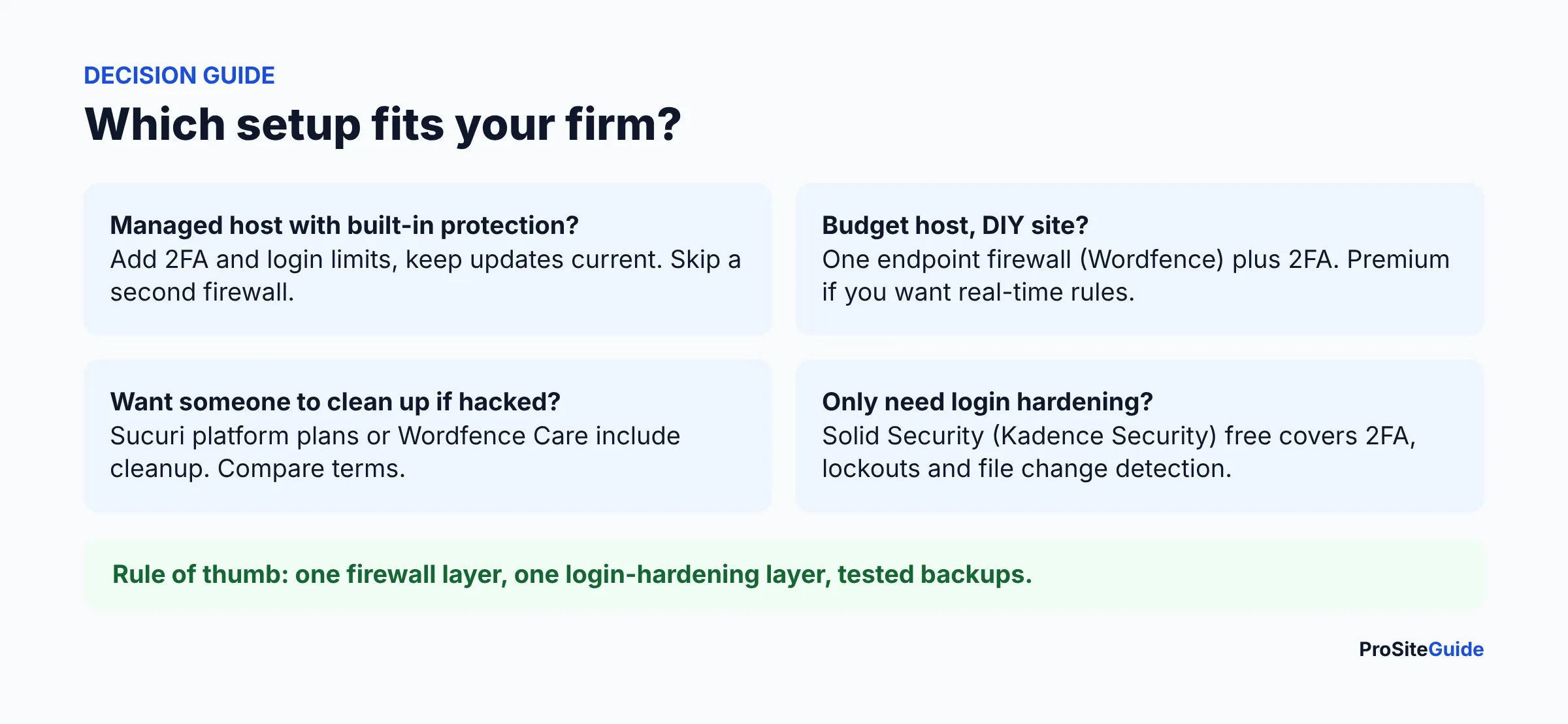
- Solo with managed hosting: free login hardening (Solid Security or Wordfence login features), 2FA on every admin, updates on, and use the host’s protections.
- Small firm on shared hosting, DIY: Wordfence Free at minimum; consider Premium ($149/yr) for real-time rules.
- Firm that wants cleanup included: compare Sucuri’s platform plans and Wordfence Care.
- Firm with a developer or maintenance plan: have them choose and monitor it; see law firm website maintenance.
How do you set up a security plugin safely?
- Take a full backup first.
- Install one firewall plugin only.
- Turn on 2FA for every administrator and editor.
- Enable login attempt limits and email alerts to a monitored address.
- Run a first scan and review results before deleting anything.
- Use a password manager so staff can use unique passwords.
- Test the contact form and key pages afterward.
- Recheck monthly and after major updates.
FAQ
What is the best WordPress security plugin for a law firm?
There is no single best. Wordfence is the most complete single plugin, Sucuri suits firms wanting a cloud firewall with cleanup, and Solid Security suits login hardening. Choose by the gap you need to fill.
Is Wordfence Free enough?
It covers a firewall, scanner and login protection, but firewall rules and malware signatures arrive 30 days late compared with Premium, per Wordfence’s pricing page. Whether that is acceptable depends on your risk tolerance.
Is Solid Security the same as iThemes Security?
Yes, it is the renamed product. Its WordPress.org listing now shows the name Kadence Security and says “formerly iThemes Security”. Some documentation may still use the older names.
Do security plugins make me compliant with Rule 1.6?
No. Rule 1.6(c) calls for reasonable efforts, and a plugin is one piece. Policies, access control, vendor choices and training also matter. Ask your state bar or ethics counsel for specifics.
Will a plugin remove malware for me?
Wordfence offers cleanup on its Care and Response plans, and Sucuri lists unlimited cleanups on its plans. Read each vendor’s terms for scope and timing.
Do I need Sucuri if my host has a firewall?
Often not. Check what your host provides and what it does not, then fill only the gaps.
Conclusion and next steps
- Check your host’s security features.
- Pick one firewall and one login-hardening layer.
- Turn on 2FA and login limits today.
- Work through the security checklist.
- Browse our tool comparisons or start here for other decisions.
Want this handled for you? ProSiteGuide builds and maintains fast, secure WordPress sites for law firms. Book a free consultation.