Quick answer: Hostinger is a good fit for a solo attorney or a small firm that needs a simple WordPress brochure site on a tight budget. It is not the right home for a firm that wants daily off-site backups kept for weeks, phone support, or a host that handles day-to-day site care for you. Pick the Unlimited plan rather than Premium, buy the longest term you are comfortable with, and plan for the renewal price, not the sale price.
This Hostinger review looks at the managed WordPress plans from a law firm’s point of view: what you get, what it really costs over four years, where the limits are, and when Kinsta or SiteGround is worth the extra money.
Key takeaways
- The $1.99/mo headline price needs a 48-month prepayment ($95.52). After that, Premium renews at $10.99/mo, as of November 2026.
- Premium includes weekly backups only. Unlimited ($2.79/mo on a 48-month term) adds daily backups, which most firms should want.
- The domain and mailboxes are free for the first year only. Budget for both from year two.
- Hostinger Mail stores mailbox data in Europe (France and Germany). That matters if you plan to use it for client email.
- Good for: budget-conscious solo and small firms with a simple site. Look elsewhere if you want hands-off management or longer backup history.

How we compared
We have not run hands-on tests of Hostinger for this article, and we do not give scores. This review is based on Hostinger’s official pricing pages, help center articles and legal terms, all checked in November 2026. Prices change often, especially around sales, so confirm the figures on the checkout page before you pay.
Is Hostinger good for law firms? The verdict
Yes, for the right firm. Hostinger is good value for a small law firm website if you are comfortable doing basic WordPress upkeep yourself (or paying someone to). It gives you LiteSpeed servers, a free SSL certificate, a web application firewall, malware scanning, free migration and 24/7 chat support at a very low first-term price.
The trade-offs are real, though. The cheapest plan only backs up weekly. Mailboxes are basic and stored outside the US. And the low price depends on paying for up to four years upfront. If your website is a lead source you cannot afford to lose for a day, a premium managed host is easier to justify. Our guide to the best hosting for law firm websites compares the main options side by side.
Who Hostinger fits
- Solo attorneys launching a first website on a small budget.
- Small firms with a brochure-style site: practice areas, attorney bios, contact page, a blog.
- Firms that already use Google Workspace or Microsoft 365 for email and only need web hosting.
- Firms that work with a developer who handles updates and off-site backups.
Who should look elsewhere
- Firms that want the host to take responsibility for performance and fixes, with expert WordPress support.
- Firms that need longer backup history than one to six weeks without managing their own backups.
- Busy multi-location firms running heavy marketing campaigns and lots of landing pages.
- Anyone who needs phone support. Hostinger’s contact page lists live chat and email; we did not find a phone line.
How much does Hostinger cost? Pricing and renewal
Hostinger’s WordPress hosting starts at $1.99/mo on a 48-month term and renews at $10.99/mo, as of November 2026. All plans are paid upfront, and the monthly figure is simply the total divided by the number of months. Here is what the Hostinger WordPress hosting page showed for each billing term.
| Billing term | Premium (pay today) | Unlimited (pay today) |
|---|---|---|
| 1 month | $12.99/mo | $18.99/mo |
| 12 months | $3.99/mo ($47.88) | $4.99/mo ($59.88) |
| 24 months | $2.99/mo ($71.76) | $3.79/mo ($90.96) |
| 48 months | $1.99/mo ($95.52) | $2.79/mo ($133.92) |
| Renewal rate | $10.99/mo | $16.99/mo |
Prices are as of November 2026, during Hostinger’s Black Friday promotion, and exclude tax. A third plan, Cloud Startup, costs $7.99/mo on a 48-month term ($383.52) and renews at $25.99/mo. Most small firms will not need it.
What does Hostinger cost over four years?
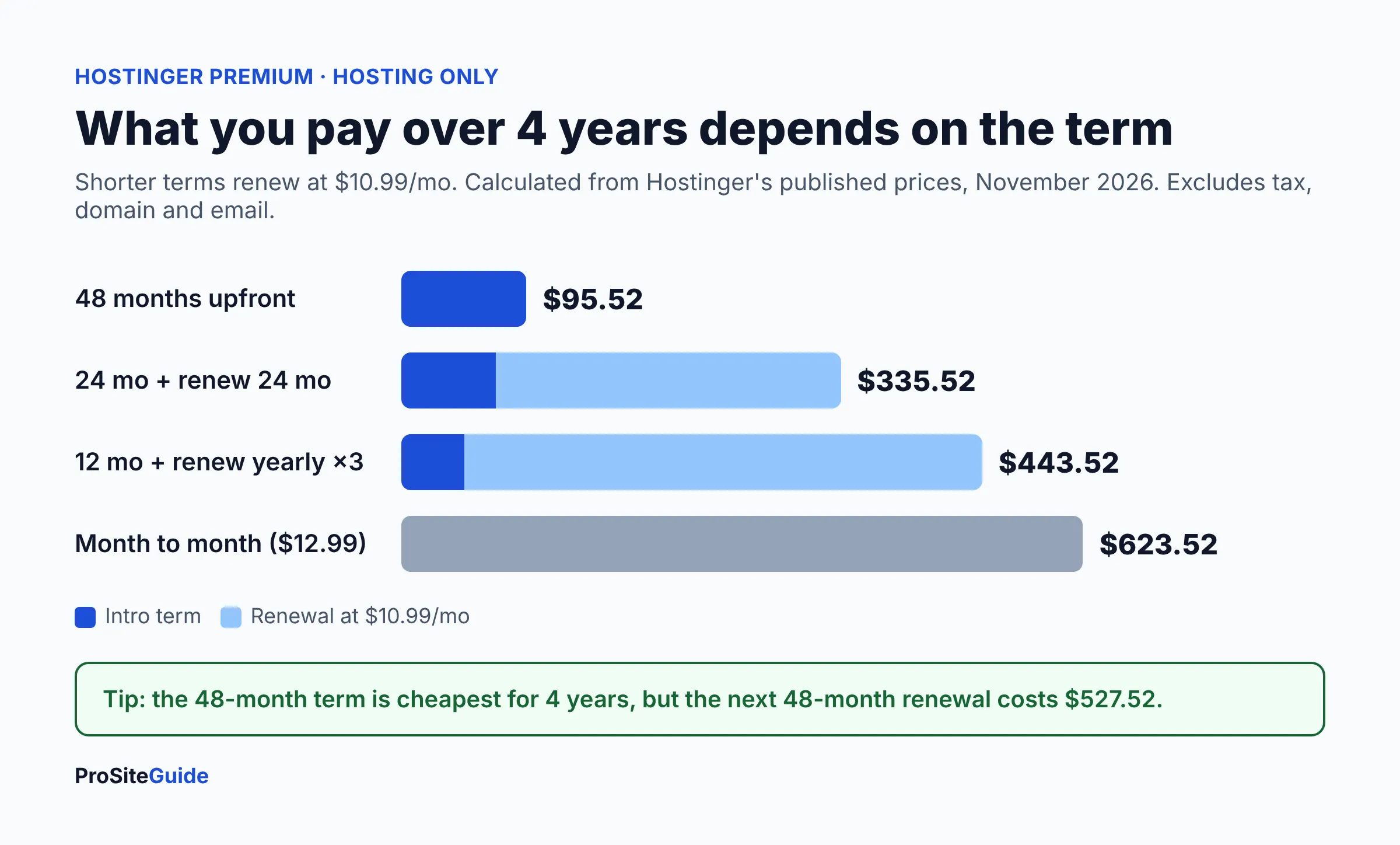
The term you choose changes the four-year cost far more than the plan does. Because every shorter term renews at the full rate, a 12-month start costs more than four times as much over four years as a 48-month prepayment. We calculated these totals from the published prices above. They cover hosting only.
| How you buy | Premium, 4-year total | Unlimited, 4-year total |
|---|---|---|
| 48 months upfront | $95.52 | $133.92 |
| 24 months, then renew 24 months | $335.52 | $498.72 |
| 12 months, then renew yearly ×3 | $443.52 | $671.52 |
| Month to month | $623.52 | $911.52 |
Two extra costs show up after year one:
- Domain: the free domain lasts one year. Hostinger’s domain page lists a .com renewal at $19.99/yr (November 2026).
- Mailboxes: free for one year, then the plan page says they auto-renew at $0.59/mo per mailbox on a 12-month term.
So a Premium 48-month buyer keeping a .com and two mailboxes would pay roughly $95.52 + $59.97 (three domain renewals) + $42.48 (two mailboxes for 36 months) ≈ $198 over four years, before tax. When the four years end, a new 48-month Premium term at $10.99/mo is $527.52. That renewal is the number to plan around.
What do you get on each plan?
Premium covers up to three websites with weekly backups. Unlimited adds daily backups, unlimited mailboxes and more storage. The resource figures come from Hostinger’s plan parameters and limits article.
| Feature | Premium | Unlimited |
|---|---|---|
| Websites | 3 | Unlimited |
| Storage | 20 GB SSD | 50 GB NVMe |
| Automatic backups | Weekly | Daily, with easy restore |
| Mailboxes (free 1st year) | 2 per website | Unlimited per website |
| CPU / RAM | 1 core / 2 GB | 2 cores / 3 GB |
| PHP workers | 40 | 60 |
| Inodes (file limit) | 400,000 | 600,000 |
| Free domain | 1 year | 1 year |
| CDN | Yes | Yes |
| Support | 24/7 chat | 24/7 chat |
Two quick definitions. A PHP worker is a server process that builds one uncached page request at a time; when all are busy, visitors wait. An inode is one file or folder on your account, so the inode limit caps how many files you can store. A typical law firm site will sit far below both limits.
A note on names: Hostinger says its Unlimited plan replaced the older Business plan on most pages in July 2026, with the same CPU and RAM, according to its hosting limits update. Some Hostinger pages still mention “Business,” so treat the two as the same tier.
Security features
Hostinger’s managed WordPress plans include a free SSL certificate, a web application firewall (WAF), malware scanning and automatic removal, DDoS mitigation and automatic WordPress updates, according to the plan page. The page’s FAQ also says enhanced DDoS protection is limited to Business and Cloud tiers. These host-level tools help, but they are not a full security plan. Pair them with the basics in our law firm website security checklist, such as two-factor login and a short plugin list.
Free migration
Migration is free with a paid plan. You buy the plan first, then submit a migration request in hPanel (Hostinger’s control panel). The plan page FAQ notes a limit of five active migration requests at a time and no bulk migrations, which is no issue for a single firm site. For a step-by-step plan that avoids downtime and email disruption, read how to move a law firm website to a new host.
Data centers
US firms can host their website in the United States. Hostinger’s server locations article lists Phoenix, Boston and Asheville for web and cloud plans, plus sites in Europe, Asia and Brazil. Pick the US location closest to your clients during setup. Hostinger also notes that the server location can only be changed once every 30 days.
Refund policy
Hostinger advertises a 30-day money-back guarantee on hosting. Its refund policy adds conditions worth knowing. Renewals count as new transactions with their own 30-day window. Free domains included in a deal are not refundable, and Hostinger may deduct the value of that free domain from your refund. Purchases made with cryptocurrency are not refunded.
Hostinger pros and cons for law firms
| Pros | Cons |
|---|---|
| Very low first-term price on 48-month plans | Renewal is about 5–6× the sale price |
| US data centers (Phoenix, Boston, Asheville) | Premium backs up weekly only |
| WAF, malware scanning and free SSL included | Daily backups kept only 7 days |
| Free migration and one-click staging | Mailbox data stored in Europe; 1 GB per mailbox |
| 24/7 live chat support | No phone support listed |
| 30-day money-back guarantee | Domain and email are free for year one only |
What should a law firm check before buying Hostinger?
Focus on three things: backups, email and your upgrade path. These matter more to a firm than raw speed figures.
How often does Hostinger back up, and for how long?
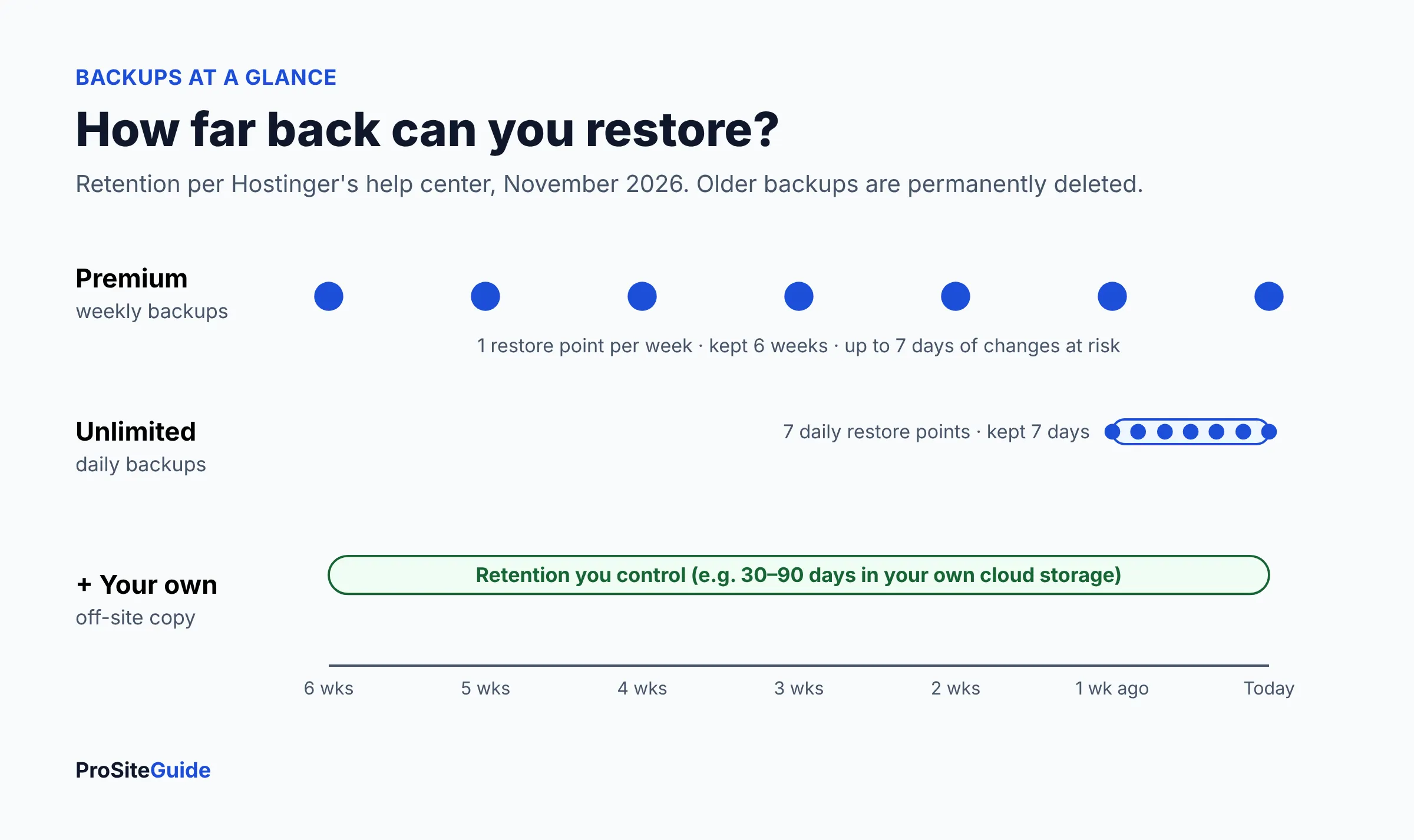
Premium makes weekly backups; Unlimited makes daily ones. Hostinger’s backup help article says weekly backups are kept for 6 weeks and daily backups for 7 days, then permanently deleted. On Premium, daily backups are a paid add-on, per Hostinger’s daily backups article (the price was not listed).
For a firm, a week of lost changes can mean missing contact form leads, attorney bio updates or new blog posts. Choose Unlimited, and add your own off-site backup with a plugin that sends copies to cloud storage you control. That way you are not relying on a single provider’s retention window.
Should you use Hostinger email for your firm?
Probably not as your main client email. The included mailboxes have 1 GB of storage each, according to the plan page. Hostinger’s server locations article says mailbox data is stored in Europe, in France and Germany, and that you cannot choose which. Most firms are better served by Google Workspace or Microsoft 365 with proper SPF, DKIM and DMARC records. See our law firm email setup guide for how to connect either to your domain. If client confidentiality rules affect where data can be stored, check your state bar’s guidance on cloud services.
What is the upgrade path?
You can move up from Premium to Unlimited, then to Cloud Startup ($7.99/mo intro, $25.99/mo renewal) for more resources and on-demand backups. That keeps you in the same control panel. If your firm later wants a host that manages more for you, you would migrate to a premium managed host instead.
A pre-purchase checklist
- Choose Unlimited if daily backups matter to you (they should).
- Pick the 24- or 48-month term to avoid paying full price within a year.
- Add the renewal rate to your budget: $10.99/mo (Premium) or $16.99/mo (Unlimited).
- Select a US data center (Phoenix, Boston or Asheville) during setup.
- Decide where your email will live before you move DNS.
- Set up an independent off-site backup in the first week.
- Put a calendar reminder 30 days before renewal to review the plan.
Hostinger vs Kinsta vs SiteGround
Hostinger is the cheapest of the three by a wide margin. Kinsta is a premium managed WordPress host, and SiteGround sits in between with similar promotional pricing but higher renewals.
| Hostinger Unlimited | SiteGround StartUp | Kinsta Single 20GB | |
|---|---|---|---|
| Entry price (Nov 2026) | $2.79/mo, 48-month prepay | $1.99/mo, 12-month prepay | $35/mo monthly, or $30/mo billed annually |
| Renewal | $16.99/mo | $17.99/mo | Same rate |
| Websites | Unlimited | 1 | 1 |
| Storage | 50 GB | 10 GB | 20 GB |
| Backups | Daily, 7-day retention | Included | Daily, 14-day retention |
| Free migration | Yes | Yes | Yes, unlimited |
| Best for | Lowest cost | Middle ground | Hands-off, premium support |
Sources: SiteGround WordPress hosting and Kinsta pricing, checked November 2026. Kinsta was offering the first month free at the time. SiteGround’s StartUp storage is listed as 10 GB, and its higher plans add on-demand backups and staging.
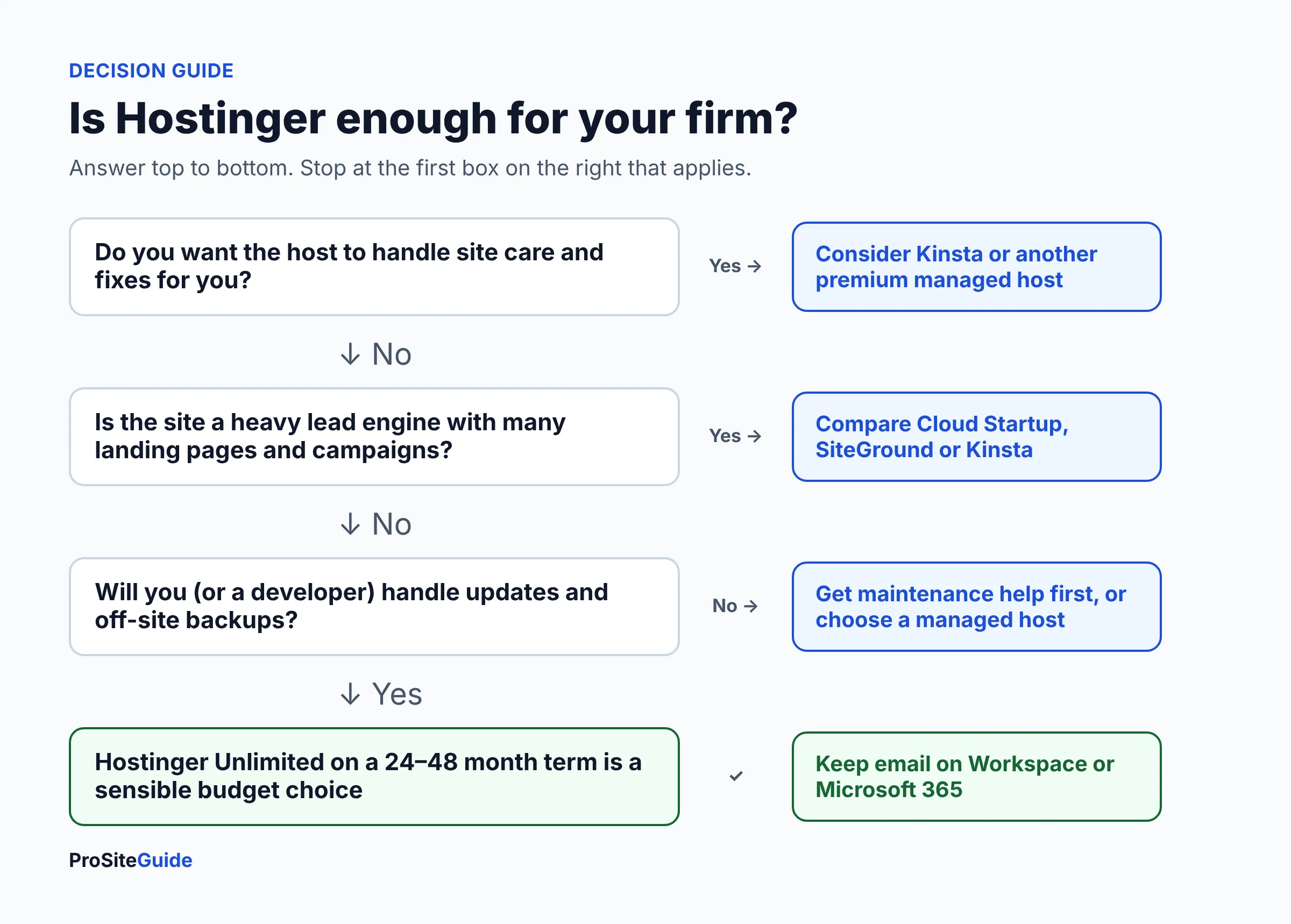
Pick Kinsta if you want the host to carry more of the technical load and you value longer backup retention. Our Kinsta review for law firms covers it in depth. For a three-way look at the premium tier, see Kinsta vs WP Engine vs SiteGround. Pick Hostinger if cost is the main constraint and someone on your side handles updates and backups.
FAQ
Is Hostinger good for a law firm website?
It is good for a simple, low-traffic law firm site on a budget. Choose the Unlimited plan for daily backups, host in a US data center and keep your client email on a dedicated business email service.
Is Hostinger really $1.99 a month?
Only on a 48-month term paid upfront ($95.52 for Premium, as of November 2026). It then renews at $10.99/mo. On a 12-month term the price is $3.99/mo.
Does Hostinger offer a refund?
Yes. Most hosting purchases can be refunded if cancelled within 30 days. Free domains from deals are not refundable, and their value may be deducted from your refund.
Does Hostinger have US servers?
Yes. Web and cloud plans can use data centers in Phoenix, Boston and Asheville. Note that Hostinger Mail data is stored in Europe regardless of where your website is hosted.
Will Hostinger move my existing site for free?
Yes. Migrations are free with a paid plan. You request them from hPanel after you buy, and you can have up to five active requests at a time.
Is Hostinger Premium or Unlimited better for a law firm?
Unlimited is the safer choice. It costs $0.80/mo more on the 48-month term and adds daily backups, more storage and unlimited mailboxes.
Conclusion: is cheap hosting good enough?
For many solo and small firms, yes. Hostinger provides the essentials for a fast, secure brochure site at a fraction of premium managed hosting prices. The catch is that you take on more of the responsibility: backups beyond seven days, plugin updates and email setup.
Next steps:
- Decide whether you or a developer will handle site maintenance. If no one will, look at a premium managed host.
- If Hostinger fits, buy Unlimited on the longest term you are comfortable with.
- Set up business email and an independent off-site backup before launch.
- Compare alternatives in our best hosting for law firms guide if you are still unsure.
Want this handled for you? ProSiteGuide builds and maintains fast, secure WordPress sites for law firms. Book a free consultation.
Sources
- Hostinger: Managed hosting for WordPress (plans and pricing)
- Hostinger: Web hosting
- Hostinger: Refund policy
- Hostinger: Parameters and limits of hosting plans
- Hostinger: New web and cloud hosting limits
- Hostinger: Server locations
- Hostinger: How to download backups
- Hostinger: How to activate daily backups
- Hostinger: Domain name search and TLD prices
- Hostinger: Contact us
- Kinsta: Pricing
- SiteGround: WordPress hosting