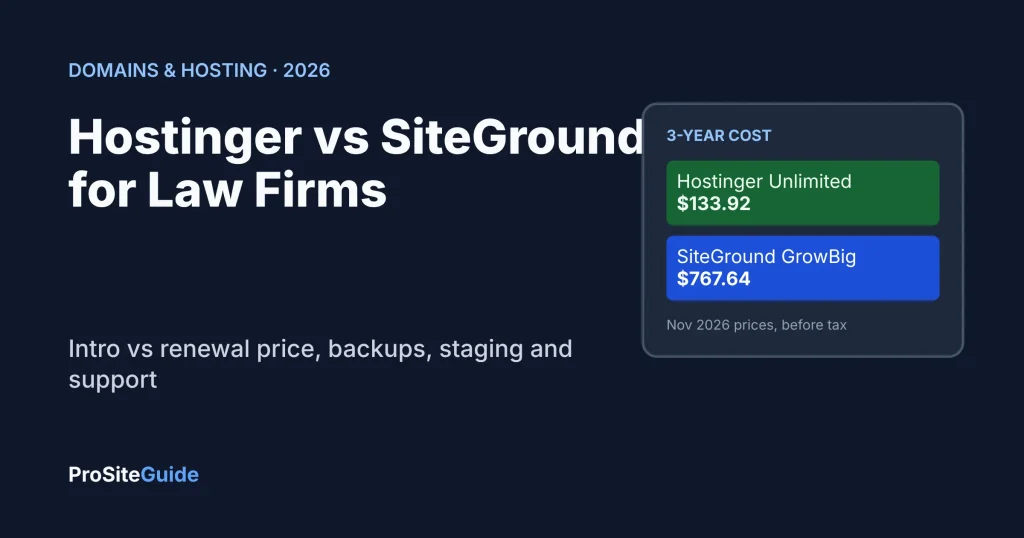
Quick answer: In the Hostinger vs SiteGround matchup, Hostinger wins on price and SiteGround wins on support and features. Hostinger costs far less over three years. SiteGround offers 24/7 phone support, daily backups kept up to 30 days and staging on its GrowBig plan. For a simple law firm brochure site on a tight budget, choose Hostinger Unlimited. If you want a phone number to call and safer update testing, choose SiteGround GrowBig.
- Cheapest over 3 years: Hostinger. The 48-month Unlimited prepay is $133.92 and covers the whole period (as of November 2026). SiteGround GrowBig costs $767.64 over the same three years at its 12-month terms.
- Best support: SiteGround lists 24/7 chat, phone and ticket support. Hostinger lists 24/7 live chat only.
- Best backups: SiteGround keeps up to 30 daily copies. Hostinger Unlimited keeps the last 7 days. Hostinger Premium needs a paid add-on for daily backups.
- Both lose on email for client work. Included mailboxes are fine for a contact address. Use Google Workspace or Microsoft 365 for confidential client email.
This guide compares the two hosts for a small law firm WordPress site. For full single-vendor detail, see our Hostinger review for law firms and SiteGround review for law firms. Not sure either is right? Start with our best law firm hosting guide or the Tool Comparisons hub.
How we compared Hostinger and SiteGround
We have not run speed or uptime tests on either host, so this article makes no performance claims and gives no scores. Everything below comes from each vendor’s official pricing, feature and help pages, opened in November 2026. Prices change often, especially around Black Friday, so confirm the final figure at checkout.
Hostinger vs SiteGround: side-by-side comparison
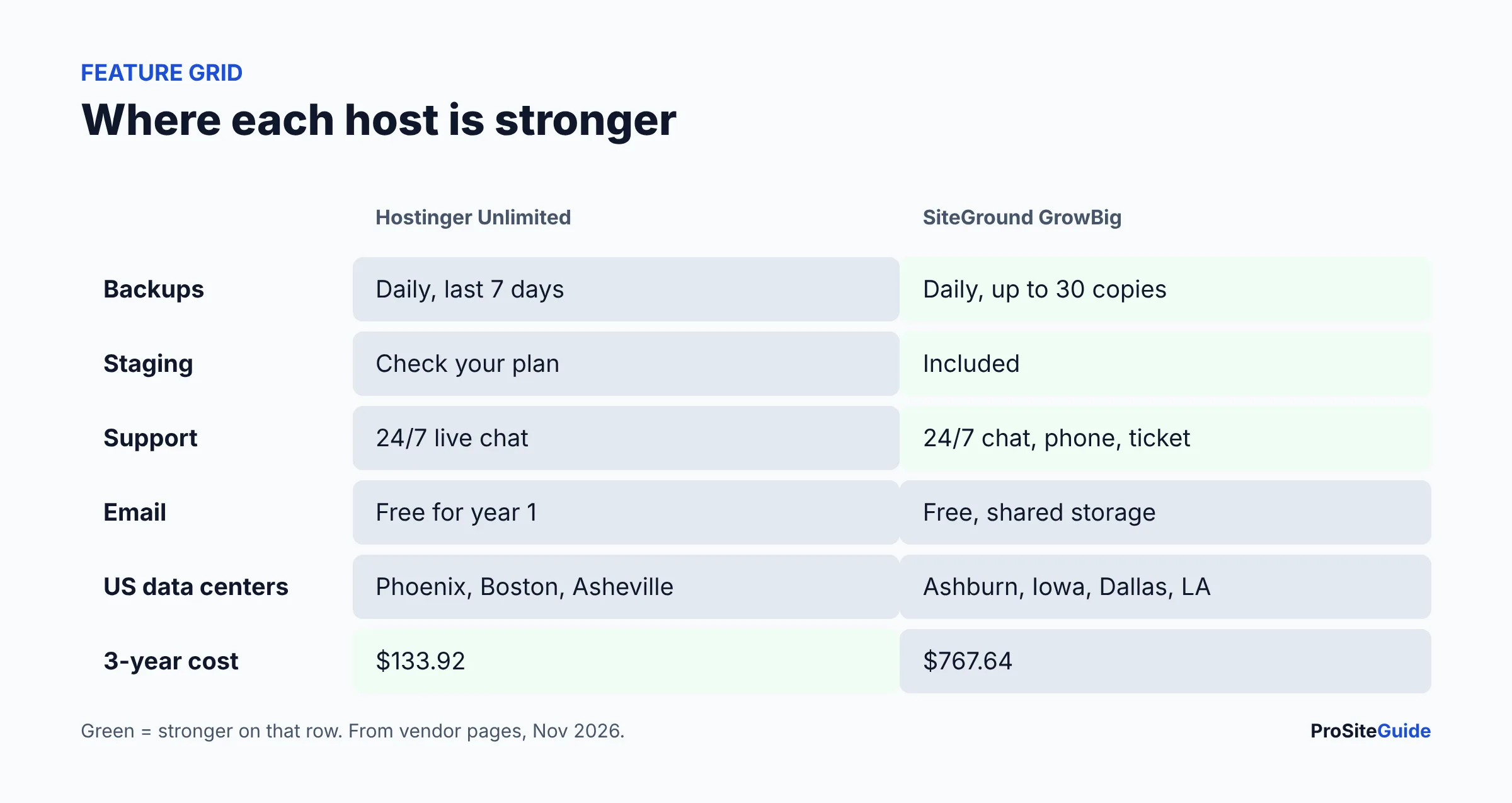
We compare the two plans most small firms would actually buy: Hostinger Unlimited (the plan with daily backups) and SiteGround GrowBig (the plan with staging). Entry plans are noted where they differ. Sources: Hostinger WordPress hosting and SiteGround WordPress hosting.
| Feature | Hostinger | SiteGround |
|---|---|---|
| Entry plans | Premium (3 sites, 20 GB), Unlimited (unlimited sites, 50 GB NVMe) | StartUp (1 site, 10 GB), GrowBig (unlimited sites, 50 GB), GoGeek (100 GB) |
| Backups | Premium: weekly. Unlimited: daily, last 7 days kept | Daily on all plans, up to 30 copies; 5 manual slots on GrowBig and up |
| Staging | Hostinger documents WordPress staging in hPanel; confirm on your plan | GrowBig and GoGeek only (not StartUp) |
| Premium: 2 mailboxes free for 1 year. Unlimited: unlimited mailboxes free for 1 year | Free email on all plans; mailboxes share a storage allowance | |
| Support | 24/7 live chat (we did not find a phone line) | 24/7 live chat, phone and ticket |
| US data centers | Phoenix, Boston, Asheville (plus Europe, Asia, Brazil) | Ashburn, Council Bluffs, Dallas, Los Angeles (11 locations worldwide) |
| Security | Free SSL, malware scanning, IP and country blocking; WAF per our review | Free SSL, enhanced security, Security Optimizer plugin, AI anti-bot per our review |
| Migration | Unlimited free migrations, site stays live | First WordPress migration free, site stays live |
| Refund | 30-day money-back guarantee | 30 days on shared hosting (14 days on cloud) |
How much do Hostinger and SiteGround cost over 3 years?
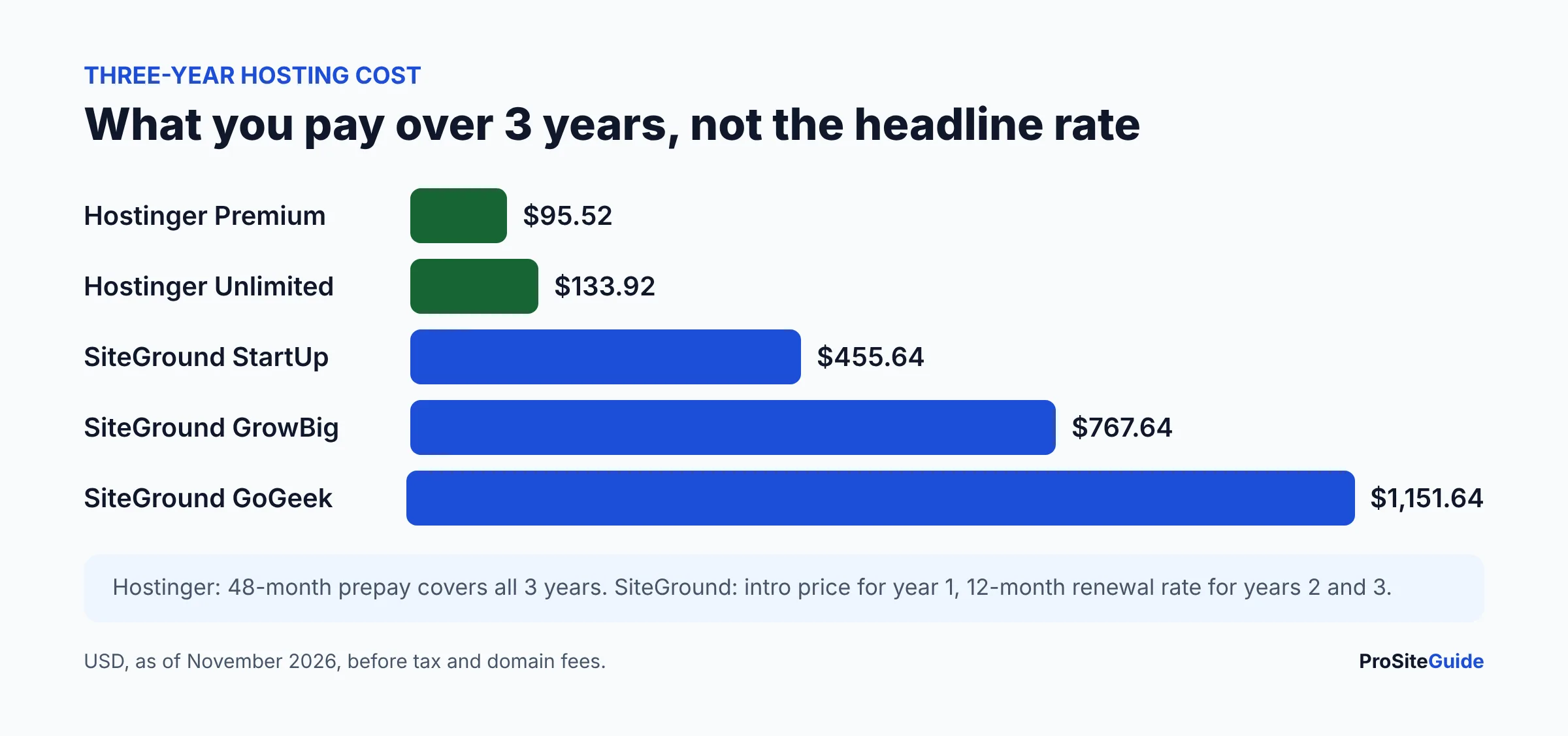
Both hosts advertise a very low first price and then renew much higher. The honest comparison is the total across three years, not the headline monthly rate. Prices below are USD, as of November 2026, before tax, and exclude domain renewals.
| Plan | Intro price | Renewal price | 3-year total |
|---|---|---|---|
| Hostinger Premium | $1.99/mo (48-month prepay, $95.52) | $10.99/mo after the 48-month term | $95.52 (prepaid term covers 3 years and more) |
| Hostinger Unlimited | $2.79/mo (48-month prepay, $133.92) | $16.99/mo after the 48-month term | $133.92 (prepaid term covers 3 years and more) |
| SiteGround StartUp | $1.99/mo (12-month prepay) | $17.99/mo on 12-month terms | $455.64 ($23.88 + 2 x $215.88) |
| SiteGround GrowBig | $3.99/mo (12-month prepay) | $29.99/mo on 12-month terms | $767.64 ($47.88 + 2 x $359.88) |
| SiteGround GoGeek | $5.99/mo (12-month prepay) | $44.99/mo on 12-month terms | $1,151.64 ($71.88 + 2 x $539.88) |
How to read this: Hostinger’s lowest price needs a 48-month prepayment, so you pay everything up front and are locked in for four years. SiteGround’s intro price applies to a 12-month prepay, then renews at the regular rate on the term you choose. SiteGround publishes its regular rates on its current rates page, and a 24-month renewal costs less per month than a 12-month one (for example GrowBig at $24.99/mo). Hostinger’s shorter terms cost more per month; see the vendor’s pricing page for the current figure.
The gap is large: on these figures GrowBig costs about $634 more than Unlimited over three years. Whether that is worth it depends on the support and backup differences below.
Which has better backups for a law firm site?
SiteGround is stronger. Its knowledge base says the standard backup service includes up to 30 daily backup copies on shared hosting and restore options, plus 5 free manual backup slots on GrowBig and higher plans. Hostinger Premium includes weekly backups only. Hostinger says its daily backups keep the last 7 days, included on Unlimited and available as an add-on for Single and Premium.
Either way, keep your own off-site copy. Host backups sit on the same company’s infrastructure, and a hacked or locked account can take them with it. Our law firm website security checklist and website maintenance guide explain a simple routine.
Staging: can you test updates before they hit the live site?
A staging site is a private copy where you test plugin and theme updates before applying them. For a law firm, that protects the intake form and phone buttons from a bad update. SiteGround’s plan page lists staging under GrowBig’s exclusive features, so StartUp does not include it. Hostinger documents WordPress staging in its control panel, but we could not confirm which plan tiers include it from the pages we opened, so check the plan you plan to buy.
Is email included, and is it enough for a law firm?
Both include email, but the terms differ. Hostinger lists free mailboxes for the first year (2 on Premium, unlimited on Unlimited), so budget for email from year two. SiteGround lists free email on its plans without a first-year limit. Our SiteGround review notes mailboxes share a storage allowance and that SiteGround itself points heavier business users to Google Workspace.
For client communication, a dedicated service is the safer choice. See our guides to setting up Google Workspace for a law firm and Microsoft 365 for law firms, and keep the host for the website only.
Support: who can you call when the site breaks?
SiteGround says it offers 24/7 support via live chat, phone and ticket. Hostinger lists 24/7 live chat on its pricing pages, and we did not find a phone number on its contact page. If you want to talk to a person during a bad moment, such as a contact form that has stopped working before a court deadline week, that difference matters. If you or your web developer handle problems by chat and ticket anyway, it matters less.
Data center locations: where will your law firm site live?
Both let you pick a US region. Hostinger’s server location page lists Phoenix, Boston and Asheville in North America. SiteGround lists Ashburn, Council Bluffs, Dallas and Los Angeles among its 11 data centers, and says you can change location later from the client area. Pick the one closest to your clients. Location does not by itself create a legal compliance advantage, and confidentiality duties turn on your own safeguards. Ask your state bar if you are unsure.
Security: what protects a law firm WordPress site on each host?
Hostinger lists free SSL, malware scanning, domain privacy and IP and country blocking on its web hosting plans. SiteGround lists free SSL, enhanced security, a Security Optimizer plugin and managed auto-updates for WordPress. Both are reasonable baselines. Neither replaces strong passwords, two-factor login, timely updates and tested backups. If the worst happens, read our guide on what to do when a law firm website is hacked if it is live, and see our WordPress security plugin comparison.
How hard is it to move your site to Hostinger or SiteGround?
Both offer free help. Hostinger says it provides unlimited free migrations with the site staying live. SiteGround offers a free WordPress Migrator plugin and says its first migration by the team is free. Moving the website does not move your domain or email, so plan those separately. Our guide to moving a law firm website to a new host walks through the steps and the email trap.
Pros and cons at a glance
| Hostinger | SiteGround | |
|---|---|---|
| Pros | Lowest three-year cost; daily backups on Unlimited; free migrations; US data centers | Phone support; up to 30 daily backups; staging on GrowBig; published renewal rates |
| Cons | Needs a 48-month prepay for the best price; renewal is 5-6x the intro rate; no phone line found; email free for year one only | Renewal is much higher (GrowBig $29.99/mo on a 12-month term); StartUp has no staging; email is basic |
Hostinger or SiteGround: which should a small law firm pick?
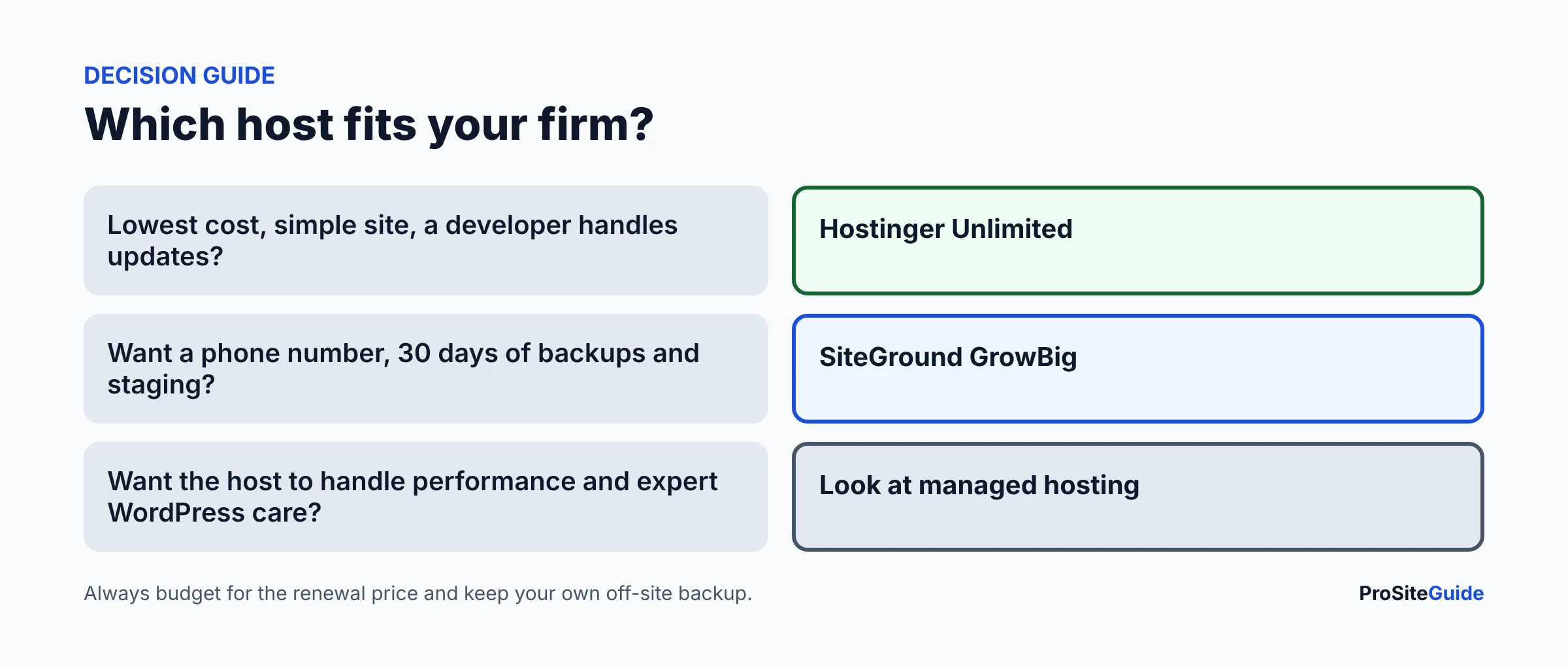
- Pick Hostinger Unlimited if budget matters most, the site is a simple brochure site, you have a developer or agency for updates, and you are comfortable paying four years up front.
- Pick SiteGround GrowBig if you want phone support, longer backup history and staging, and can absorb the higher renewal.
- Skip both if you want the host to run the technical side, for example performance tuning and expert WordPress support. Read our Kinsta vs WP Engine vs SiteGround comparison for the managed tier.
- Avoid the cheapest tier by default. Hostinger Premium backs up weekly, and SiteGround StartUp has no staging. Both gaps matter for a business site.
Before you buy: a short checklist
- Write down the renewal price and date, not the sale price.
- Choose a US data center.
- Decide where email will live before you change DNS.
- Set up your own off-site backup in week one.
- Add a calendar reminder 30 days before renewal. Both hosts refund within 30 days of a renewal payment only under their stated terms, so read them.
FAQ
Is Hostinger or SiteGround better for a law firm website?
Neither wins for everyone. Hostinger is much cheaper over three years. SiteGround offers phone support, longer daily backup retention and staging on GrowBig. Pick Hostinger for cost, SiteGround for support.
Is SiteGround worth the extra money over Hostinger?
It can be if you value a support phone line, up to 30 daily backups and staging. On our figures GrowBig costs about $634 more than Hostinger Unlimited over three years (as of November 2026).
Why do both hosts raise prices after the first term?
Both advertise a discounted first term and then charge the regular rate. Hostinger Premium goes from $1.99 to $10.99/mo, and SiteGround GrowBig from $3.99 to $29.99/mo on a 12-month term. Always budget for the renewal price.
Do Hostinger and SiteGround include free email?
Both include email. Hostinger lists mailboxes as free for the first year, and SiteGround lists free email on its plans. For confidential client email, use Google Workspace or Microsoft 365 instead.
Can I move my law firm website between Hostinger and SiteGround?
Yes. Both advertise free migration help, and the site can stay live during the move. Your domain registration and email need separate handling.
Do you recommend one for law firms?
We recommend matching the plan to your needs. We have not run speed or uptime tests on either host, so we make no performance claim.
Conclusion and next steps
Hostinger Unlimited is the budget pick, and SiteGround GrowBig is the pick for phone support and safer updates. Compare the three-year totals, then read the Hostinger and SiteGround deep dives. If you are starting out, our Start Here page lays out the order of decisions.
Want this handled for you? ProSiteGuide builds and maintains fast, secure WordPress sites for law firms. Book a free consultation.
Sources
- Hostinger: Managed hosting for WordPress (plans and pricing)
- Hostinger: Web hosting (security features, migration)
- Hostinger: How to activate daily backups
- Hostinger: Where are Hostinger servers located
- SiteGround: Hosting for WordPress (plans, prices, data centers)
- SiteGround KB: Current rates of shared hosting plans
- SiteGround KB: Backup service
- SiteGround: Support
- SiteGround KB: Refund policy