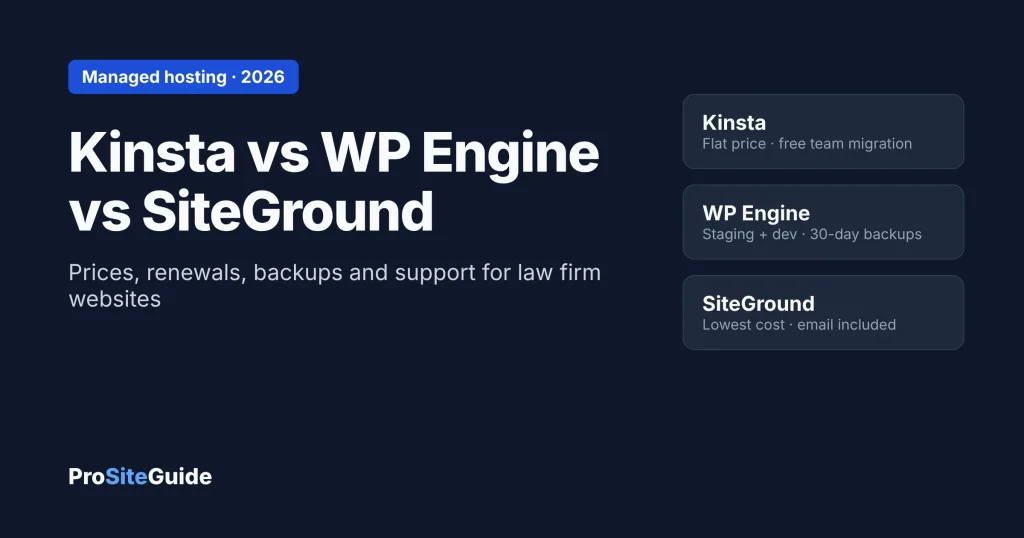
Quick answer: For most small law firms that want hosting they never have to think about, Kinsta is the simplest pick. It costs $35/month or $350/year, and that is the same price at renewal. It also includes free migrations done by its own team. WP Engine suits firms that work with an agency or developer and want separate staging and development copies of the site plus 30 days of backups. Its $28/month entry price is a first-year offer billed annually, and it does not publish the renewal price. SiteGround is the lowest-cost option and the only one of the three that hosts your email, but its $3.99 intro price renews at $29.99/month.
This comparison covers the managed tier: hosts that look after WordPress for you. For a broader comparison that includes budget shared hosting such as Hostinger, see our guide to the best hosting for law firm websites.
Verdict by firm type
- Solo or 2–3 lawyer firm, no developer on call: Kinsta. The price stays flat, its staff migrate the site for free, every site gets one-click staging, and support runs 24/7 by chat.
- Firm with a marketing agency or in-house developer: WP Engine. Each site gets production, staging and development environments, backups kept at least 30 days, and a Cloudflare-powered CDN. Phone support and an uptime SLA (a written uptime promise) come only with the much pricier Business plan.
- Budget-first firm that wants website and email with one company: SiteGround GrowBig. Email accounts, daily backups and staging are included. Budget for the renewal price, not the intro price.
- Firm that has outgrown basic shared hosting: pick Kinsta or WP Engine. Then follow our guide to moving a law firm website without downtime.
Kinsta vs WP Engine vs SiteGround: side-by-side
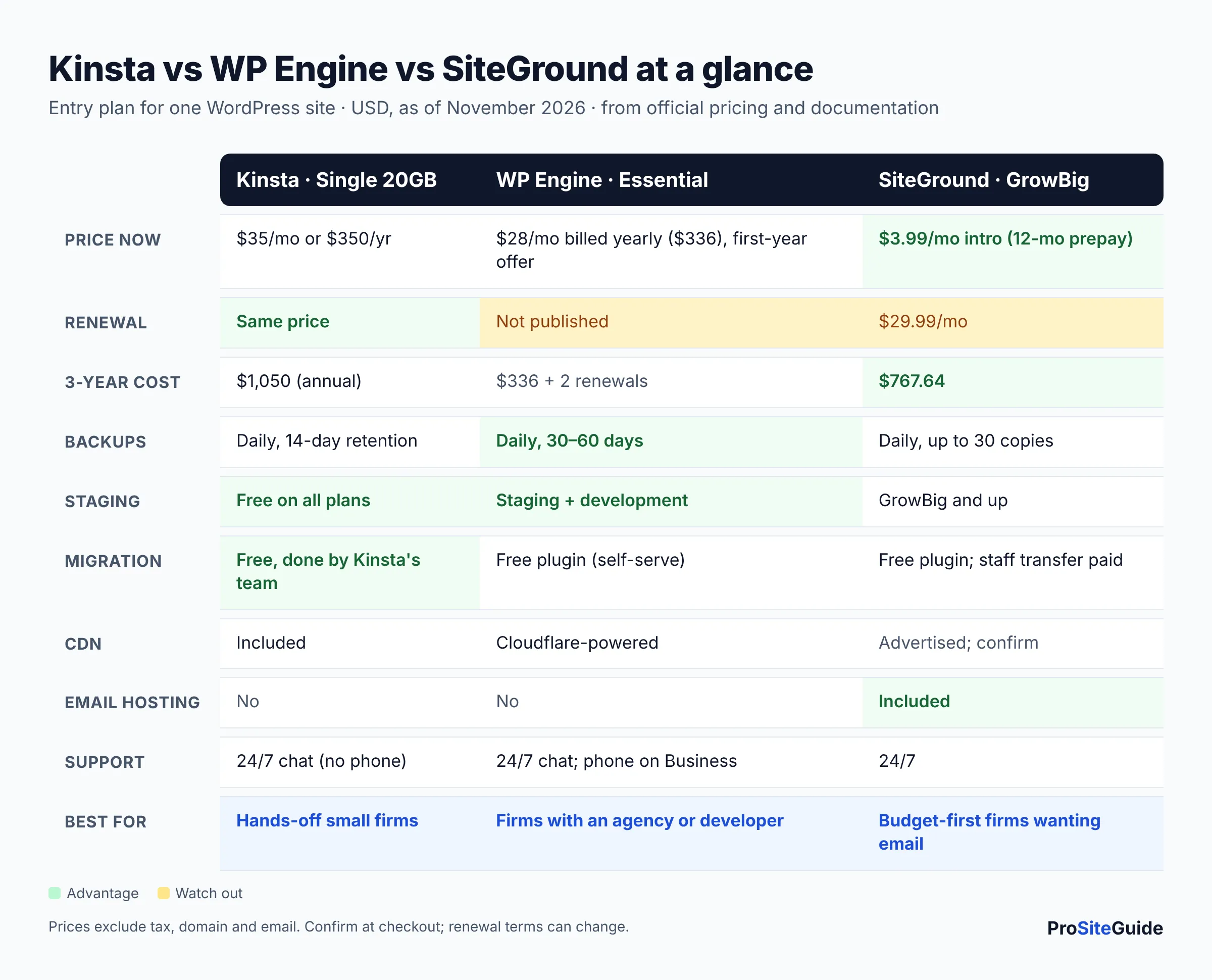
The table compares each host’s entry plan for a single WordPress site. Prices are in USD as of November 2026 and exclude tax.
| Feature | Kinsta (Single 20GB) | WP Engine (Essential) | SiteGround (GrowBig) |
|---|---|---|---|
| Entry price | $35/mo monthly, or $350/yr ($30/mo) annually; first month free | $28/mo, billed annually ($336 upfront); first-year price for new customers | $3.99/mo intro with a 12-month prepay |
| Renewal | Same as above | Not published (“subject to change”) | $29.99/mo |
| Automatic backups | Daily, kept 14 days; up to 5 manual backups | Daily, kept 30–60 days; manual backups any time | Daily, up to 30 copies; on-demand backups on GrowBig and up |
| Staging | Free one-click staging on all plans | Staging and development environments included | Included on GrowBig and GoGeek |
| Migrations | Unlimited, free, done by Kinsta’s team | Free self-serve migration plugin; managed migrations listed on Business | Free migrator plugin; staff transfer is paid |
| CDN | Included (125GB/mo CDN bandwidth) | Global CDN powered by Cloudflare | Built-in CDN advertised; confirm with SiteGround |
| Email hosting | No (site emails only, 150/day on entry plans) | No | Yes, email accounts included |
| Support | 24/7 chat; no phone support | 24/7 chat; phone on Business and up | 24/7 support |
How we compared
We have not run our own tests of these three hosts, and we don’t give scores. This comparison is based on each company’s official pricing pages, plan details, documentation and terms, checked in November 2026. We looked at what matters to a small firm’s website: what you pay now and at renewal, backups and restores, staging, migration help, email and support.
One limitation: SiteGround’s website blocked our automated checks while we wrote this. Its figures come from our November 2026 check of SiteGround’s WordPress hosting page, done for our other hosting guides. Confirm them on SiteGround’s checkout page before you buy.
What does each host really cost?
Kinsta pricing
Kinsta’s pricing page lists its entry single-site plan at $35/month on monthly billing. Paying annually costs $350/year, which works out to about $30/month. Kinsta says the plan renews at the same price, and it is currently running a “first month free” offer. Adding a second site costs $30/month.
WP Engine pricing
WP Engine’s plans page shows the Essential plan at $28/month, billed annually, which means paying $336 upfront. The fine print says this is first-year pricing for new customers on Essential plans only, and that “product renewal pricing [is] subject to change.” The page shows no monthly-billed Essential price. The next tier, Business, is listed at $400/month billed annually. Two more terms are worth knowing. WP Engine’s FAQ says it charges overage fees when visits exceed your plan limit ($2 per 1,000 extra visits on several plan families). It also says cancellations require 30 days’ notice.
SiteGround pricing
SiteGround’s GrowBig plan is $3.99/month for the first 12 months when you prepay a year. After that it renews at $29.99/month. That makes the first year cheap and the later years comparable to Kinsta.
Total cost over 3 years: an example
Intro prices make hosting look cheaper than it is, so here is the cost of one firm website over three years. Assumptions: one site, entry plan, annual billing, no add-ons or overages, and US prices as of November 2026 before tax. Domain and email costs are not included.
| Host | Year 1 | Years 2–3 | 3-year total |
|---|---|---|---|
| Kinsta Single 20GB (annual) | $350 | $350 + $350 | $1,050 |
| WP Engine Essential | $336 | Renewal price not published | $336 + two renewals ($1,008 only if the price stayed at $336) |
| SiteGround GrowBig | $47.88 ($3.99 × 12) | $359.88 + $359.88 ($29.99 × 12 each year) | $767.64 |
Two things change the picture. First, Kinsta and WP Engine don’t host email. If your firm doesn’t already pay for Google Workspace or Microsoft 365, add that per-user cost; our law firm business email guide covers setup. Most firms should use one of those anyway, for reasons explained below. Second, ask WP Engine for the renewal price in writing before you sign, because its year-two cost is the one number we could not pin down.
Kinsta: pros and cons for law firms
Kinsta is a managed WordPress host. Its staff handle the server, caching and backups, so your firm only looks after the site itself.
Pros
- Flat pricing. The renewal price matches the first-year price, so the budget is predictable.
- Hands-off migration. Kinsta’s migrations page says migrations are “free and unlimited.” Its team does the work, usually within one business day.
- Strong backup tooling. According to Kinsta’s backup docs, it takes a daily backup and also backs up automatically before restores, staging pushes and plugin updates. You can keep up to 5 manual backups and download one backup per week. For more frequent backups, Kinsta sells a 6-hourly add-on ($20/site per month) and an hourly add-on ($100/site per month).
- Free staging on every plan. Kinsta’s staging docs describe a free staging copy for each site. You can push only files or only selected database tables to the live site, which helps avoid overwriting new contact-form entries.
Cons
- No phone support. Kinsta’s support docs say support is 24/7 by chat inside the MyKinsta dashboard, and they explain why there is no phone line.
- No email hosting. Kinsta’s email docs say it doesn’t provide email on its plans. It sends only site emails, such as form notifications, with a cap of 150 per day on entry plans.
- Shorter backup retention on entry plans (14 days) than WP Engine.
For a deeper look at Kinsta alone, see our Kinsta review for law firms.
WP Engine: pros and cons for law firms
WP Engine is a managed WordPress host whose plans lean toward agencies and developers, with multiple environments per site and Git-based deployment on higher tiers.
Pros
- Three environments per site. WP Engine’s environment docs describe separate production, staging and development copies. Your developer can build a redesign in development while a plugin update is tested in staging.
- Longer backup retention. The backup and restore guide says daily backups are made automatically and kept for 30 days. You can create a manual backup before any change and restore from the dashboard. The plans page states retention of 30 to 60 days.
- Cloudflare-powered CDN and auto-renewing SSL on Essential.
- Free self-serve migration. The FAQ says “it’s free to migrate a site to WP Engine” using its migration plugin. You can test the copied site before switching your domain.
Cons
- Renewal price is unknown at signup. The $28 entry price is a first-year offer, and it must be paid annually.
- Phone support, an uptime SLA and managed migrations sit on Business, which is listed at $400/month. Essential gets 24/7 chat.
- No email hosting, and limited email support. WP Engine’s scope of support says it does not provide nameservers or email servers. It offers only “limited support on outgoing email” and recommends a third-party email service.
- Overage fees and a 30-day cancellation notice, per its FAQ.
SiteGround: pros and cons for law firms
SiteGround’s GrowBig is shared hosting with WordPress tools built in. It is cheaper than the other two but less hands-off.
Pros
- Lowest cost over three years in our example, even after the renewal increase.
- Email included. It is the only one of the three that hosts mailboxes on your domain.
- Daily backups (up to 30 copies), plus on-demand backups and staging on GrowBig and up.
Cons
- Big renewal jump, from $3.99 to $29.99/month.
- Do-it-yourself migration. SiteGround’s free WordPress Automatic Migrator plugin does the copying. Having SiteGround staff transfer the site is a paid service.
- Shared hosting: your site shares a server with other customers’ sites. It is fine for a typical brochure site, but it gives less headroom than a managed plan.
Does having email with your web host matter for a law firm?
Usually it doesn’t. Neither Kinsta nor WP Engine hosts mailboxes, and WP Engine’s support docs recommend third-party email hosting. Keeping email separate also means a website problem or host move does not take your inbox down with it. Most firms put mailboxes on Google Workspace or Microsoft 365 and keep the website wherever it runs best.
The detail that matters more is how your contact form emails get delivered. Kinsta caps site emails on entry plans, and WP Engine recommends a third-party sending service. On any of the three hosts, route form notifications through a proper email service with SPF, DKIM and DMARC set up, so intake messages don’t land in spam. Our guide to a secure contact form for a law firm website covers this step by step.
Who should choose which?
Choose Kinsta if…
- You want someone else to move the site and look after the server.
- You prefer a flat price over a teaser rate.
- Chat support is fine for you.
Choose WP Engine if…
- An agency or developer manages your site and wants staging plus development environments.
- You value 30+ days of backups.
- You are comfortable with annual billing and will get the renewal quote in writing.
Choose SiteGround if…
- Cost is the deciding factor.
- You want website and email under one bill.
- You or your developer can handle the migration with a plugin.
Alternatives
If even GrowBig is more than a one-page solo site needs, budget hosts such as Hostinger are covered in our law firm hosting roundup. Whichever host you pick, the host only handles part of security. Plugin updates, user accounts and form handling are still your job, so work through our law firm website security checklist.
FAQ
Kinsta vs WP Engine: which is better for a small law firm?
For a firm without a developer, Kinsta is easier: flat pricing, migration done for you and staging on every plan. WP Engine fits better when an agency runs the site and wants separate staging and development environments and longer backup retention.
WP Engine vs SiteGround: is the extra cost worth it?
In year one WP Engine costs far more. From year two, SiteGround’s $29.99/month renewal is in the same range as WP Engine’s first-year rate. You’d pay WP Engine’s premium for its development environment, longer backup retention and Cloudflare CDN. SiteGround’s edge is included email.
Do any of these hosts offer phone support?
Kinsta does not; its support is 24/7 chat. WP Engine offers phone support on Business and higher plans, not on Essential. We could not verify SiteGround’s current support channels for this article, so check its site.
Can I move my existing firm website to these hosts for free?
Yes, with differences. Kinsta’s team migrates sites for free. WP Engine and SiteGround provide free plugins that you or your developer run, and SiteGround charges for a staff-run transfer. Keep the old host active until the new site is tested.
Is managed WordPress hosting required for confidentiality?
No hosting plan by itself makes a site compliant with your professional duties. What matters more is not collecting sensitive case details through website forms, keeping WordPress updated and limiting who has admin access. Check your state bar’s guidance on technology and client confidentiality.
Conclusion and next steps
Kinsta is the low-maintenance default for small firms, WP Engine is the developer-friendly option with a renewal price you’ll need to confirm, and SiteGround is the budget choice with email included. To decide:
- Decide who maintains the site: you, a staff member, or a developer or agency.
- Compare three-year costs, not first-month prices, and add email if your host doesn’t include it.
- Confirm renewal prices and support channels on the checkout page.
- Plan the move with a tested copy before you switch DNS.
Want this handled for you? ProSiteGuide builds and maintains fast, secure WordPress sites for law firms. Book a free consultation.
Sources
- Kinsta: Pricing
- Kinsta: Free WordPress migrations
- Kinsta Docs: WordPress backups
- Kinsta Docs: Staging environment
- Kinsta Docs: Email
- Kinsta Docs: Contact support
- WP Engine: Plans and pricing
- WP Engine: Hosting and migration FAQ
- WP Engine: Backup and restore
- WP Engine: Environments (staging and development)
- WP Engine: Site migration plugin
- WP Engine: Support channels and scope
- SiteGround: WordPress hosting (figures from our November 2026 check; the page blocked automated access while this article was written)
- SiteGround Tutorials: WordPress Automatic Migrator (opened for our migration guide, November 2026)