Quick answer: This WP Engine review comes down to one question: who looks after your firm’s website? WP Engine is worth the price for a law firm whose site is run by a developer or agency that will use its staging and development copies, 30-plus days of backups and Cloudflare-powered CDN. Its Essential plan starts at $28/month billed annually ($336 upfront) as of November 2026. That is a first-year price for new customers, and WP Engine does not publish what you pay at renewal. A solo or small firm with no developer will usually get a simpler deal from Kinsta, or a cheaper one from SiteGround.
Key takeaways
- Price: Essential is $28/month billed annually for the first year. A month-to-month option is listed at $35/month for one site. Renewal pricing is “subject to change.”
- Best for: firms with an agency or in-house developer who will use production, staging and development environments.
- Not included: email hosting, DNS/nameservers, phone support (Business and up only) and help with custom code.
- Contract terms: plans auto-renew, cancellation needs 30 days’ notice, and visits over your plan limit can trigger overage fees.
- Law-firm angle: put email on Google Workspace or Microsoft 365, route contact-form email through a proper sending service, and keep your own offline backups.

WP Engine review: the verdict for law firms
WP Engine is a managed WordPress host. “Managed” means the company runs the server, caching, platform security and WordPress core updates, while you or your developer look after the site’s content, theme and plugins. It is one of the best-known premium hosts, and its plans lean toward agencies and developers.
For a small law firm, that profile cuts both ways. The tools are strong if someone technical uses them. If nobody does, you pay a premium for features that sit idle, and you take on an annual contract with an unknown renewal price.
- Good fit: a 3–10 lawyer firm whose marketing agency builds and updates the site, tests changes before they go live, and wants long backup retention.
- Reasonable fit: a firm running several sites (for example a main site plus practice-area microsites) that one developer manages from a single account.
- Poor fit: a solo attorney maintaining a simple brochure site alone, who wants a predictable flat price and a host that migrates the site for them.
How we reviewed WP Engine
We have not run our own speed or uptime tests on WP Engine, and we don’t give scores or star ratings. This review is based on WP Engine’s official plans page (USD), its support documentation, its Terms of Service (last updated January 1, 2026) and its Service Level Agreement, all opened in November 2026. We focused on what a small firm actually pays, what happens at renewal and cancellation, and the limits that matter for a law firm site. Prices and terms change, so confirm them at checkout.
WP Engine pricing in 2026: what does it really cost?
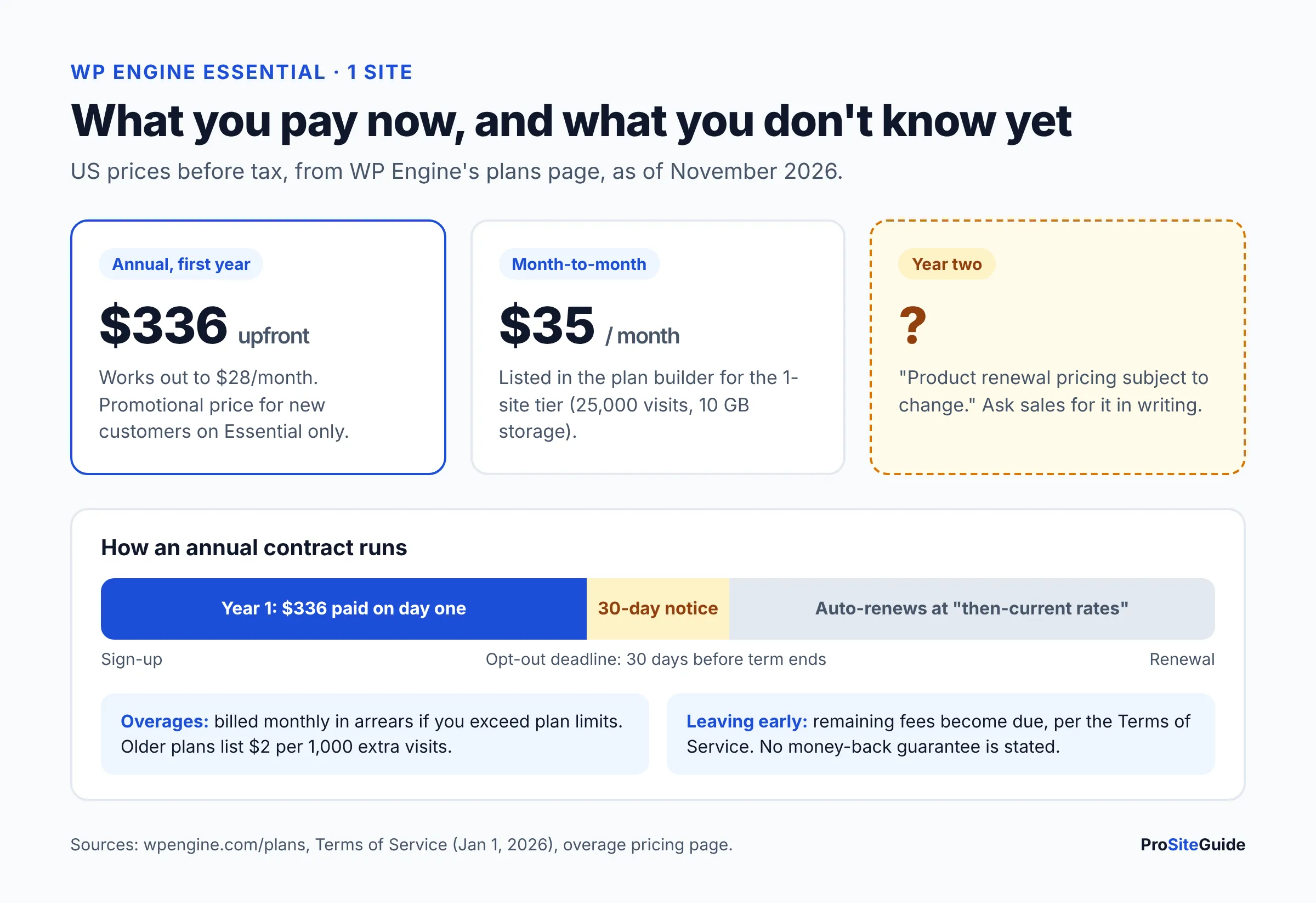
WP Engine pricing starts at $28/month for the Essential plan, billed annually, which means paying $336 on day one. WP Engine now sells three plans (Essential, Business and Enterprise) and sizes Essential by a separate “capacity” selector. Many older reviews still quote the retired Startup, Professional, Growth and Scale names, so check plan names before you compare prices.
The table below shows US prices as of November 2026, before tax, from the WP Engine plans page.
| Plan / capacity | Month-to-month | Annual (first year) | Sites | Visits/mo | Storage |
|---|---|---|---|---|---|
| Essential, 1 site | $35/mo | $336/yr ($28/mo) | 1 | 25,000 | 10 GB |
| Essential, up to 3 sites | $65/mo | $624/yr ($52/mo) | 3 | 75,000 | 15 GB |
| Essential, up to 10 sites | $130/mo | $1,248/yr ($104/mo) | 10 | 100,000 | 20 GB |
| Business | Not listed | From $400/mo, billed annually | Not stated | 400,000–800,000 | 50 GB–2 TB |
| Enterprise | Custom quote (“Talk to sales”) | Custom | 800,000+ | 2 TB+ | |
Visit numbers are WP Engine’s own estimates. A larger 30-site Essential tier also exists ($330/month or $3,168/year), but few small firms need it.
The renewal caveat
The fine print on the plans page says first-year pricing is “valid for new customers purchasing Essential plans only,” is “not valid for upgrades, renewals,” and that “product renewal pricing [is] subject to change.” The annual price is also tagged as including a promotional discount. In plain terms: you know your year-one cost, but not year two.
The Terms of Service add that plans renew automatically for the same term, and that renewal fees are charged at WP Engine’s “then-current rates,” provided it tells you about any increase before your opt-out deadline. Ask sales for the renewal price in writing before you pay, and put your renewal date in the firm calendar at least 45 days ahead.
Overages, taxes and add-ons
- Overages: the Terms say you’re responsible for overages, invoiced monthly in arrears. WP Engine’s overage pricing page lists $2 per 1,000 extra monthly visitors for its older plan families. It does not name Essential, so ask how overages apply to your plan. Repeat visits from one IP address within 24 hours count as one visit, and bot page views don’t count.
- Taxes: the plans page notes that “taxes and overages may apply during checkout.”
- Add-ons: AI-powered plugin updates, uptime monitoring, NitroPack page-speed optimization, and Advanced DDoS with a managed WAF (web application firewall) are optional add-ons on Essential. The plans page shows no prices for them.
What’s included on the WP Engine Essential plan?
Essential includes managed WordPress, PHP and MySQL, daily backups, staging and development environments, a Cloudflare-powered CDN, free SSL and 24/7 chat support. According to the plans page and support docs:
- Backups: automatic daily backups plus on-demand backups. The plans page says backups are kept “no less than 30 days and no longer than 60 days.” The backup and restore guide says you can create a backup before any change, restore from the portal, and download a backup as a ZIP file.
- Three environments per site: the environments guide describes production, staging and development copies, “a total of three environments per site.” Your developer can build a redesign in development while testing a plugin update in staging.
- CDN and SSL: a global CDN “powered by Cloudflare” and auto-renewing SSL. A CDN (content delivery network) serves your images and files from servers close to each visitor.
- Security: Layer 3+4 DDoS protection, security patching and plugin risk scans. The fuller Global Edge Security bundle (managed WAF, bot management, advanced DDoS) is extra.
- Caching: WP Engine’s EverCache server caching. That is why it bans some caching plugins (more on that below).
- Extras: 10 premium themes, Genesis Blocks, SSH access and “transferable sites,” which let an agency build a site and hand it over to the firm’s own account.
Business adds isolated server resources, 24/7 phone support, managed migrations, premium onboarding, Git-based deployment and a 99.99% uptime SLA (a written uptime promise with service credits). Essential runs on a shared environment and doesn’t list that SLA.
WP Engine pros and cons
Pros
- Developer-friendly workflow. Separate staging and development environments on every plan make it safer to change a live firm site.
- Longer backup retention than many rivals. 30–60 days of daily backups, versus 14 days on Kinsta’s entry plans.
- Cloudflare-powered CDN included on Essential, with SSL that renews itself.
- Free self-serve migration. WP Engine’s FAQ says “it’s free to migrate a site to WP Engine” using its migration plugin.
- Multi-site tiers. The 3-site capacity tier suits firms running more than one WordPress site.
Cons
- Unknown renewal price. The $28 entry rate is a first-year promotion.
- Lock-in terms. Auto-renewal, 30 days’ notice to cancel, and early termination makes “all remaining fees payable” due at once, per the Terms.
- No phone support on Essential. Phone help starts with Business, listed at $400/month.
- No email hosting and no DNS hosting. You need a separate email provider and must manage DNS at your registrar.
- Disallowed plugins. Some popular caching and backup plugins are removed automatically.
- No money-back guarantee stated on the current plans page, FAQ or Terms.
Is WP Engine good for law firms? Six things to check
WP Engine for law firms works well when you plan around its gaps. These are the points that matter more for a firm than for a typical small business.
1. Email lives somewhere else
WP Engine’s scope of support says it doesn’t provide nameservers or email servers and gives only limited help with outgoing email. That’s normal for premium hosts and usually a good thing: a website problem or host move won’t take your inbox down. Budget for Google Workspace or Microsoft 365 per user, and follow our law firm email setup guide for SPF, DKIM and DMARC.
2. Contact-form emails need a proper sending service
Intake inquiries are revenue, so form notifications must not land in spam. WP Engine recommends a third-party email service for site email, and it sells WP Offload SES (which sends through Amazon SES) as an ecosystem tool. Any reputable transactional email service works. Our guide to a secure contact form for a law firm website covers the setup and what not to collect.
3. Confidentiality is your job, not the host’s
No hosting plan makes a firm website compliant with your professional duties on its own. The bigger risks are forms that collect case details, weak admin passwords and outdated plugins. Keep forms short, limit who has admin access, and check your state bar’s guidance on technology and client confidentiality. Our law firm website security checklist lists the site-level steps.
4. Keep your own offline backups
WP Engine’s backups are good, but its Terms of Service state that “it is your responsibility to maintain offline backups of your site at all times,” and that after termination it can’t help with migration. Download a full backup ZIP every month or so and store it in the firm’s own cloud storage.
5. Check your plugins against the disallowed list
WP Engine’s disallowed plugins list includes some caching plugins (such as W3 Total Cache), several backup plugins and many “related posts” plugins. It removes them automatically. Most duplicate features WP Engine already provides, but ask your developer to check the list before you migrate.
6. Support covers the platform, not your site’s code
WP Engine support handles caching, CDN, SSL, backups and platform issues. It “cannot assist with custom code” and doesn’t fix design, SEO or third-party plugin bugs. If nobody at your firm can do that work, you still need a developer or a website maintenance plan, which is why WP Engine pays off most for firms that already have one.
WP Engine vs Kinsta vs SiteGround
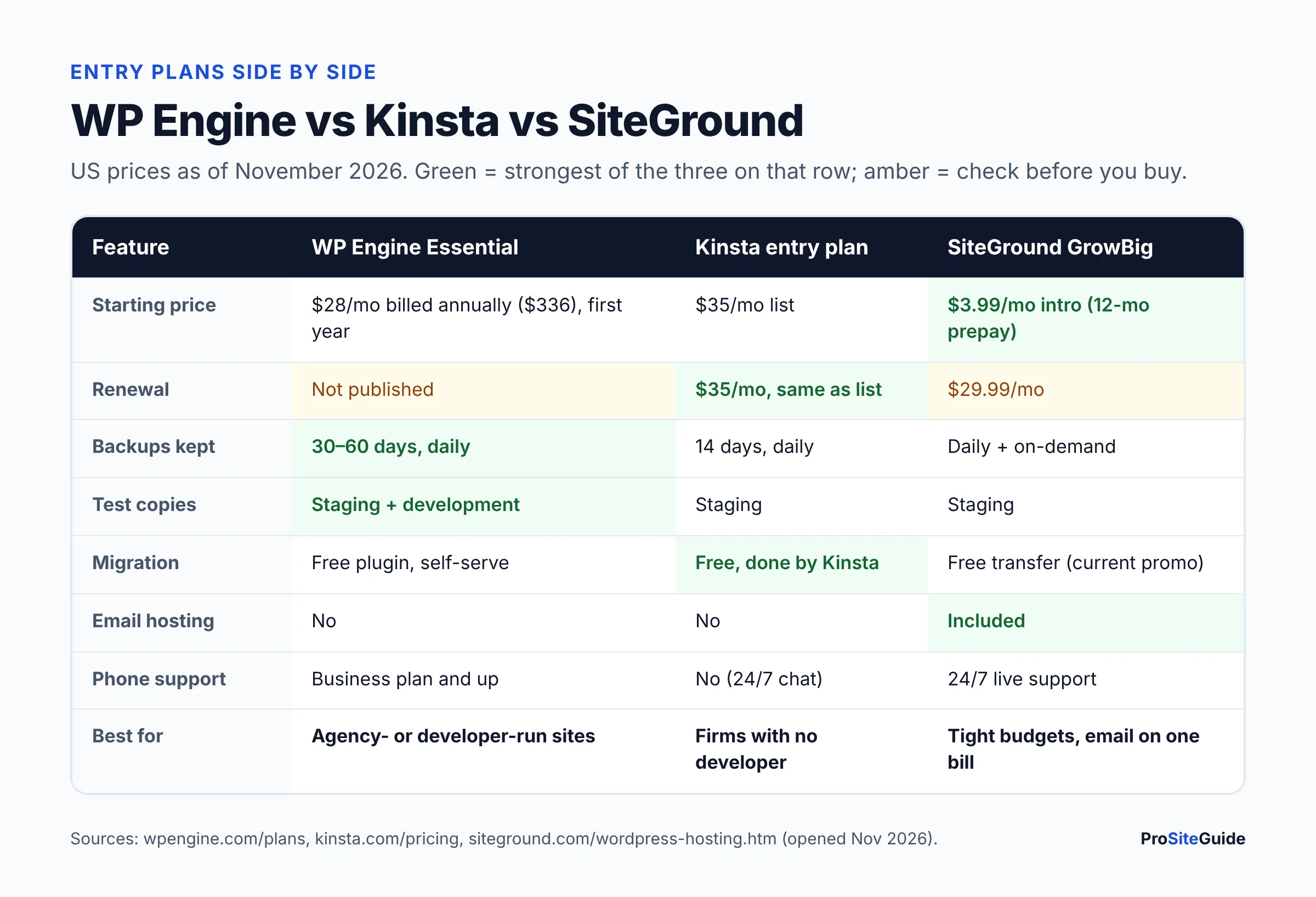
In the WP Engine vs Kinsta matchup, Kinsta is simpler for firms without a developer, while WP Engine offers more environments and longer backups. SiteGround is the budget choice and the only one of the three that hosts email. Entry plans, US prices as of November 2026:
| Feature | WP Engine Essential | Kinsta entry plan | SiteGround GrowBig |
|---|---|---|---|
| Price | $28/mo billed annually ($336), first year; $35/mo month-to-month | $35/mo list (Black Friday offer for new customers until Dec 1, 2026) | $3.99/mo intro, 12-month prepay |
| Renewal | Not published | Renews at $35/mo | $29.99/mo |
| Backups | Daily, kept 30–60 days | Daily, kept 14 days | Daily, plus on-demand |
| Staging | Staging + development | Free staging | Included |
| Migration | Free plugin (self-serve); managed on Business | Unlimited free, done by Kinsta | Free transfer promo currently advertised |
| Email hosting | No | No | Yes |
| Phone support | Business and up | No (24/7 chat) | 24/7 live support |
| Money-back | Not stated | See our Kinsta review | 30 days |
Sources: Kinsta pricing and SiteGround WordPress hosting, opened November 2026. For the full breakdown, including a 3-year cost example, read our Kinsta vs WP Engine vs SiteGround comparison. If Kinsta looks like the better fit, our Kinsta review for law firms covers its plans and limits in detail.
Is WP Engine worth it? A quick decision guide
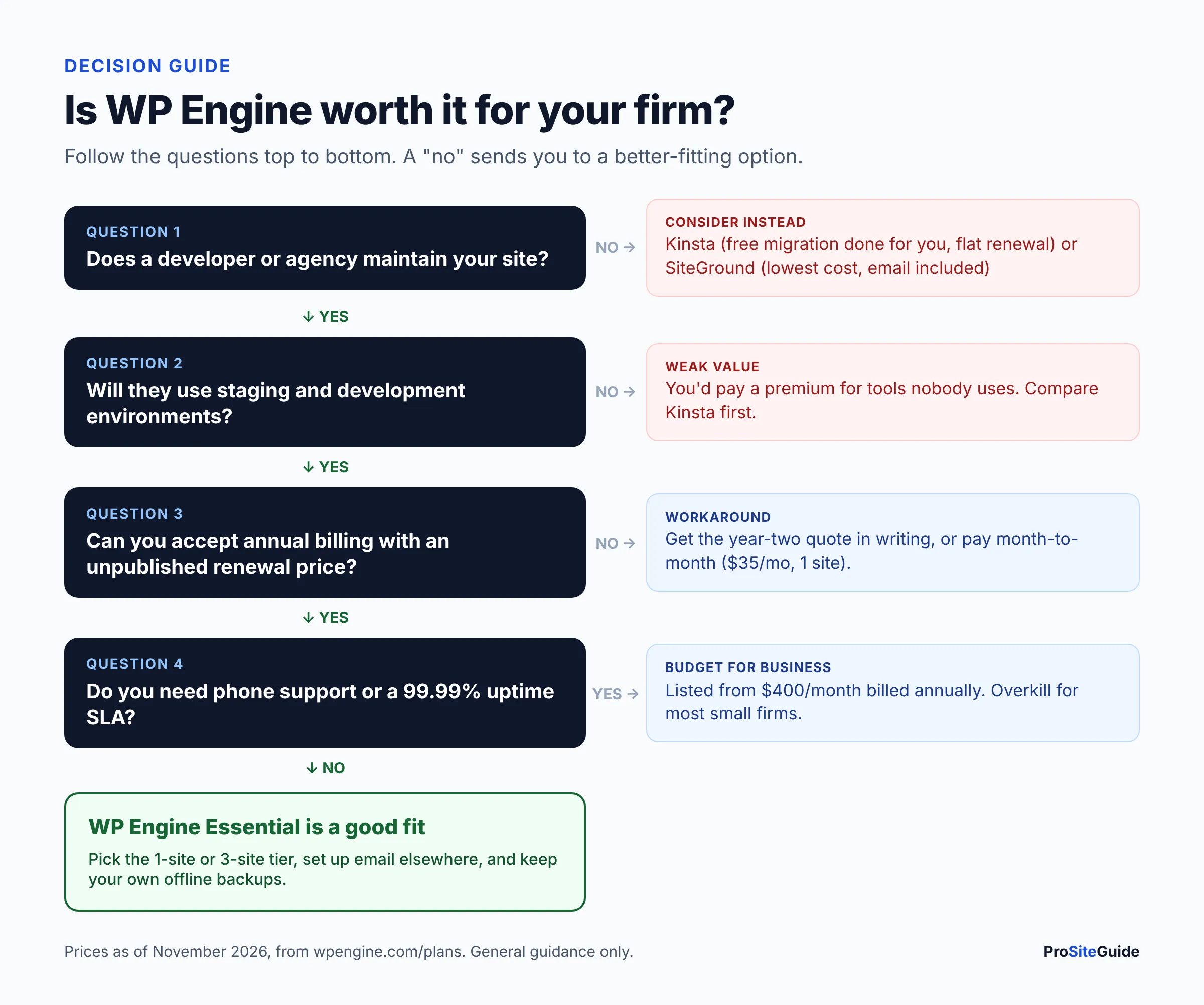
WP Engine is worth it if you will actually use what you’re paying for. Answer these in order:
- Does a developer or agency maintain your site? If no, start with Kinsta (migration done for you, flat renewal) or SiteGround (lowest cost, email included).
- Will they use staging and development environments? If they only edit pages, the extra environments add little.
- Can you commit to annual billing and an unknown renewal? If you need certainty, get the renewal quote in writing or choose month-to-month at $35.
- Do you need phone support or an uptime SLA? Those need Business at $400/month, which is overkill for most small firms.
- Do you run more than one site? The 3-site tier ($624/year first year) makes WP Engine better value for multi-site firms.
Still weighing budget options? Our roundup of the best hosting for law firm websites also covers lower-cost shared hosting, and our tool comparisons hub lists the other head-to-heads.
How to move a law firm website to WP Engine
On Essential, migration is self-serve with WP Engine’s free Site Migration plugin. Based on WP Engine’s migration guide, the process looks like this:
- Check requirements and plugins. The plugin needs WordPress 5.0+, PHP 7.4+ and the WP REST API enabled. Remove anything on the disallowed list.
- Back up the current site at your old host and keep a copy offline.
- Prepare the destination. In the WP Engine portal, open Site migration and copy the connection details.
- Install the plugin on your current site, paste the details, and run a full migration.
- Test the copy on WP Engine: pages, contact forms, redirects and the attorney bios.
- Run a second migration if content changed during testing, so nothing is lost.
- Add your domain in the portal and update DNS at your registrar. SSL is set up once DNS points to WP Engine.
- Keep the old host active for a week or two before cancelling it.
Our step-by-step guide to moving a law firm website without downtime covers DNS timing and email records in more detail.
How do you cancel WP Engine, and can you get a refund?
You cancel WP Engine from the User Portal, and your account may need 30 days’ notice. WP Engine’s billing support page says only the account Owner can request cancellation, in the Billing section under Manage Plan. The Terms of Service require notice of non-renewal at least 30 days before the term ends. They say fees are not refundable except as stated, and that ending early (unless WP Engine materially breaches the agreement) makes the remaining fees due at once.
We found no money-back guarantee on the current plans page, FAQ or Terms. Some older reviews mention one, so if a trial period matters to you, ask sales to confirm it in writing before you buy.
FAQ
Is WP Engine worth it for a small law firm?
It is worth it if a developer or agency manages your site and will use staging, development environments and long backup retention. A solo attorney maintaining a simple site alone usually gets better value from Kinsta or SiteGround.
How much does WP Engine cost per month?
As of November 2026, Essential costs $28/month billed annually ($336) for the first year, or $35/month month-to-month for one site. Business starts at $400/month billed annually, and Enterprise is quoted individually.
What does WP Engine cost at renewal?
WP Engine doesn’t publish its renewal price. The plans page says renewal pricing is “subject to change,” and the Terms say renewals are billed at then-current rates after notice. Get a written quote before you sign.
Does WP Engine include email hosting?
No. WP Engine doesn’t host mailboxes and recommends a third-party email provider. Most firms use Google Workspace or Microsoft 365.
Does WP Engine have phone support?
Only on Business and higher plans. Essential includes 24/7 chat support.
Will WP Engine migrate my site for free?
Migration is free on Essential, but you or your developer run it with WP Engine’s plugin. Managed migrations done by WP Engine staff are listed on Business and above.
WP Engine vs Kinsta: which is better for a law firm?
Kinsta is easier for firms without a developer: it handles migrations and lists the same price at renewal. WP Engine suits agency-run sites that need development environments and 30+ days of backups.
Can I use any WordPress plugin on WP Engine?
Most plugins work, but WP Engine blocks a list of disallowed plugins, mainly some caching, backup and related-posts plugins, because they duplicate its features or slow the server.
Conclusion and next steps
WP Engine is a solid managed WordPress host for law firms whose sites are run by a developer or agency. Its main drawbacks for small firms are the unpublished renewal price, annual-contract terms and phone support locked to a $400/month plan. Before you buy:
- Decide who maintains the site, and ask them whether they’ll use staging and development environments.
- Get the year-two price in writing, and diary the renewal and 30-day notice dates.
- Set up email separately and route form notifications through a sending service.
- Compare against Kinsta and SiteGround on 3-year cost, not first-year price.
- Plan the migration with a tested copy before you change DNS.
Want this handled for you? ProSiteGuide builds and maintains fast, secure WordPress sites for law firms. Book a free consultation.
Sources
- WP Engine: Plans and pricing (USD)
- WP Engine: FAQ
- WP Engine: Terms of Service (updated January 1, 2026)
- WP Engine: Service Level Agreement
- WP Engine: Overage pricing
- WP Engine: Billing support
- WP Engine: Backup and restore
- WP Engine: Environments (production, staging, development)
- WP Engine: Site Migration plugin
- WP Engine: Scope of support
- WP Engine: Disallowed plugins
- WP Engine: Global Edge Security
- Kinsta: Pricing
- SiteGround: WordPress hosting