Quick answer: Kinsta is worth it for a law firm that runs its site on WordPress, wants the host to handle security, backups and speed, and would rather pay more than babysit a server. Its entry WordPress plans cost $35 a month, or $30 a month on annual billing (as of November 2026). That is several times what budget shared hosting costs. You also pay separately for email, because Kinsta does not host it.
Below is a plain-English review for solo and small firms: what you get, what it really costs, where the extra charges hide, and when a cheaper host makes more sense.
Kinsta verdict: who it’s best for (and who should skip it)
Kinsta is a managed WordPress host. “Managed” means the host looks after the server, caching, backups, firewall and updates to the hosting stack. You or your web developer look after the website itself.
Kinsta is a good fit if your firm…
- Gets most new clients through its website and can’t afford downtime or a hacked homepage.
- Has a developer or agency making changes and wants a safe staging copy to test them first.
- Wants backups, malware cleanup and firewall protection included rather than bolted on with plugins.
- Values fast 24/7 support from WordPress specialists over the lowest possible price.
Skip Kinsta if your firm…
- Wants hosting and email on one bill. Kinsta does not provide email.
- Has a small brochure site and a tight budget. A good shared host costs far less and can serve a simple site well.
- Isn’t on WordPress. Squarespace and Wix include their own hosting (see Squarespace vs WordPress vs Wix for law firms).
- Needs a free domain bundled in. Kinsta’s plans don’t include domain registration, so you buy the domain elsewhere (our guide to .law vs .com vs .attorney domains helps you pick one).
How we reviewed Kinsta
We have not run our own speed or uptime tests, and we don’t give scores. This review is based on Kinsta’s official pricing page, product pages and documentation, opened in November 2026. We read the overage, money-back guarantee, backup, staging, email and data center docs in full, because that’s where the real costs and limits are. Prices and terms change, so confirm them on Kinsta’s site before you buy.
Kinsta pricing in 2026: which plan fits a law firm?
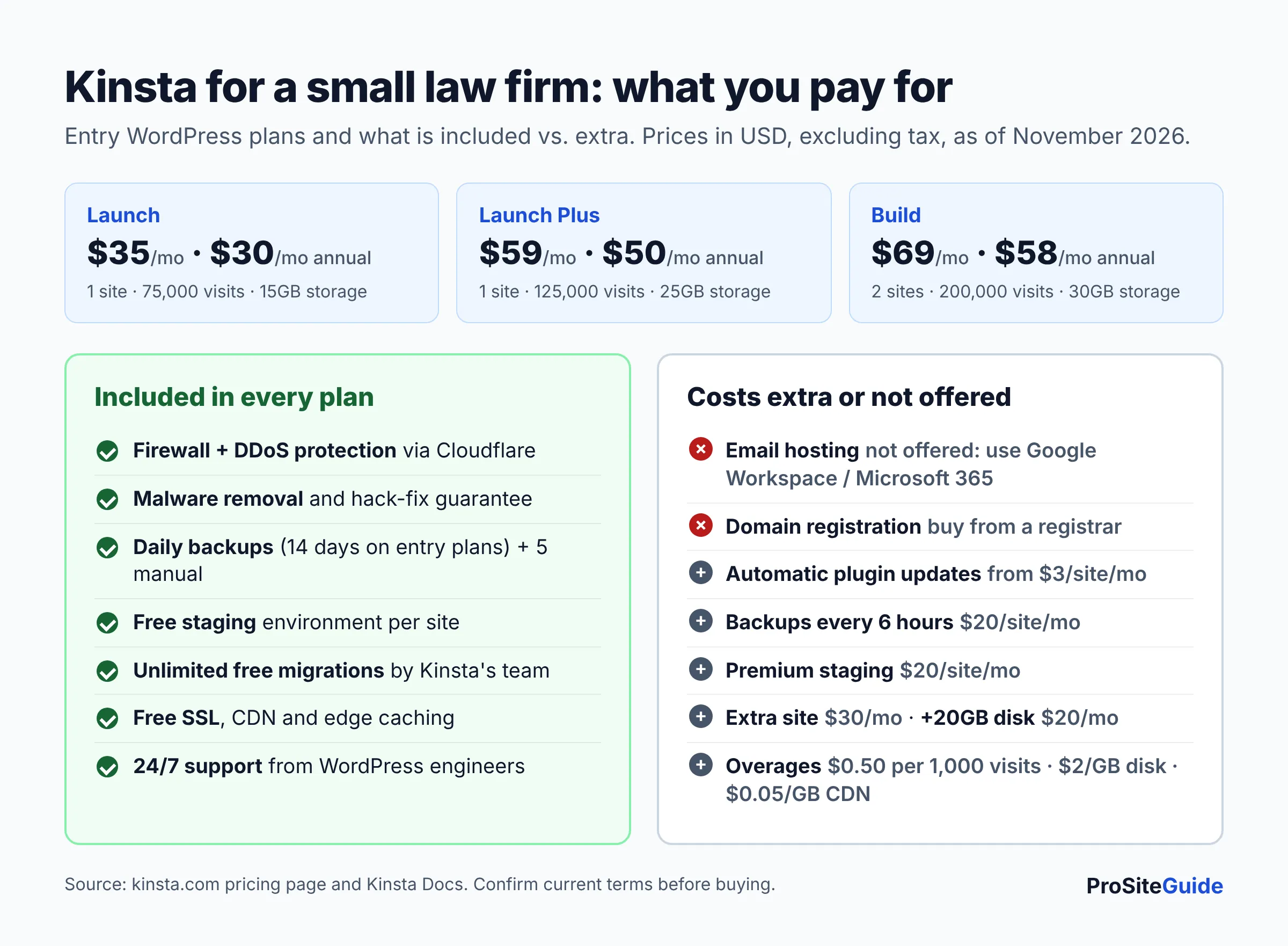
Kinsta’s pricing page lists several families of plans. Some are billed on monthly visits, some on server bandwidth, and some on number of sites. For a typical small-firm site with one WordPress install, these are the realistic options (US dollars, excluding tax, as of November 2026):
| Plan | Monthly billing | Annual billing | Sites | Traffic allowance | Storage | CDN bandwidth |
|---|---|---|---|---|---|---|
| Launch | $35/mo | $30/mo ($350/yr) | 1 | 75,000 visits (15GB server bandwidth) | 15GB | 125GB |
| Single 35k | $35/mo | $30/mo ($350/yr) | 1 | 35,000 visits | 10GB | 125GB |
| Single 20GB | $35/mo | $30/mo ($350/yr) | 1 | 20GB server bandwidth | 10GB | 125GB |
| Launch Plus | $59/mo | $50/mo ($590/yr) | 1 | 125,000 visits | 25GB | 250GB |
| Build | $69/mo | $58/mo ($690/yr) | 2 | 200,000 visits | 30GB | 250GB |
| WP 2 | $70/mo | $59/mo ($700/yr) | 2 | 70,000 visits or 40GB bandwidth | 20GB | 250GB |
A few things the table doesn’t show:
- Annual billing gives two months free. On the entry plans that saves $70 a year.
- First month free. The pricing page shows a first month at $0 on Launch, Single 35k, Single 20GB and WP 2 for new customers.
- Extra sites cost $30/month each, and extra disk space is $20 per 20GB per month.
- Bigger plans exist. Single-site plans go up to $375/month, multi-site plans up to WP 40 at $450/month, and Enterprise starts at $500/month.
Which one? Most small firm sites (a homepage, practice area pages, attorney bios, a blog and a contact form) fit comfortably in the entry tier. Launch gives the most room for the same $35, with 75,000 estimated visits and 15GB of storage. If you run two sites, for example a main firm site and a separate practice-area site, compare Build and WP 2. Kinsta also lets you change plans at any time with prorated billing.
What’s included in every Kinsta WordPress plan
According to the pricing comparison table, every WordPress plan includes:
- Security: a managed web application firewall (WAF) with DDoS protection, bot protection, vulnerability protection, free malware removal, and free SSL certificates with wildcard support.
- Backups: automatic daily backups, kept for 14 days on the entry plans.
- Staging: free one-click staging environments.
- Migrations: unlimited free migrations handled by Kinsta’s team.
- Performance: a CDN, edge caching, a built-in application performance monitoring (APM) tool and continuous database optimization.
- Team access: unlimited MyKinsta users with role-based permissions, plus SAML single sign-on.
- Support: 24/7 human support in 8 languages.
- Uptime: a 99.9% uptime guarantee on standard plans (Enterprise offers up to 99.99% with an SLA).
What’s not included
- Email hosting. Kinsta’s email documentation states plainly that it doesn’t provide email as part of its hosting plans. It recommends Google Workspace, Microsoft 365 or Zoho Mail. Your site can still send form notifications (transactional email) through Kinsta’s MailChannels integration.
- Domain registration. Buy and renew your domain with a registrar.
- Automatic plugin updates. Kinsta Automatic Updates is a paid add-on, starting at $3 per site per month.
- More frequent backups. Backups every 6 hours cost $20 per site per month. Hourly backups cost $100 per site per month.
For a law firm, the email gap matters most. Budget about the same again for a professional email suite. Our Google Workspace vs Microsoft 365 comparison covers that choice, and the law firm email setup guide explains the SPF, DKIM and DMARC records you’ll need.
What a law firm specifically gets from Kinsta
Security that doesn’t depend on plugins
Kinsta’s security page says all traffic passes through Cloudflare’s network, which filters attacks before they reach your server. Each site runs in its own isolated container, so a hacked site on the same platform can’t spread to yours. Vulnerability Protection, powered by Patchstack, blocks exploits against known plugin and theme flaws, even when no update exists yet.
If your site is compromised anyway, every plan includes a hack-fix guarantee: Kinsta cleans it up at no extra cost. Kinsta also says it holds SOC 2 Type II and ISO 27001 certifications, which can help if a client or insurer asks how your vendors handle security.
One caution. Strong hosting doesn’t make your site’s contact form a safe place for confidential case details. Keep intake forms short and route sensitive material elsewhere. See how to add a secure contact form and check your state bar’s guidance on technology and confidentiality.
Backups you can actually restore
Kinsta’s backup docs describe several layers:
- A daily automatic backup of files, database, redirects and settings.
- Up to 5 manual backups, useful right before a risky change.
- System backups taken automatically before a restore, a staging push, or a plugin or theme update.
- A downloadable ZIP backup once per week, so you can keep your own off-site copy.
Restores are done from the MyKinsta dashboard. One detail to know: Kinsta stores these backups on the same host machine as your site. If you want a truly separate copy, use the weekly download or the paid external backups add-on, which sends backups to Amazon S3 or Google Cloud Storage.
Staging for safe updates
A staging site is a private copy of your website. Your developer tests WordPress, theme and plugin updates there, then pushes the changes live once they work. According to Kinsta’s staging docs, each WordPress install gets its own free standard staging environment.
Standard staging has fewer resources than your live site, and it may go to sleep after 24 hours of inactivity. That’s fine for testing. Premium staging, with resources that match your live site, costs $20 per site per month. Routine updates are a big part of law firm website maintenance, and staging makes them much less risky.
Support
Kinsta’s support page promises 24/7/365 help from WordPress engineers, with chat built into MyKinsta. There’s no tiered queue, so the first person you reach is a technical engineer. Kinsta also says it checks every site’s uptime every 3 minutes. Kinsta reports its own figures of an average first response under 2 minutes and a 47-minute median resolution time. Those are the company’s numbers, not ours.
US data centers
Kinsta’s data center list offers 30 locations. Four are in the US: Ashburn (VA), Chicago (IL), Phoenix (AZ) and San Jose (CA). Pick the one closest to most of your clients. Many reviews still describe Kinsta as running on Google Cloud. Kinsta’s current subprocessor list names both Google and Oracle as hosting providers, so ask sales which one hosts your region if that matters to you.
Kinsta pros and cons
| Pros | Cons |
|---|---|
| Firewall, DDoS protection, malware removal and hack fixes included | No email hosting; you pay for email separately |
| Daily backups plus manual and pre-update backups | Entry price of $30–$35/month is high for a small brochure site |
| Free staging environment for every site | Overage fees if you exceed visits, bandwidth, storage or CDN limits |
| Unlimited free migrations done by Kinsta’s team | Automatic plugin updates and frequent backups cost extra |
| 24/7 support from WordPress engineers | No domain registration |
| First month free on entry plans, then a 30-day money-back guarantee | Plan lineup (visits vs bandwidth vs sites) is confusing at first |
Hidden costs: overages and the refund policy
What happens if you go over your plan’s limits?
Your site stays online, but Kinsta charges overage fees. Its overage documentation lists these rates (as of November 2026):
- Visits: $0.50 per 1,000 visits over the limit.
- Server bandwidth: $0.50 per GB.
- Disk space: $2 per GB per month, prorated daily.
- CDN bandwidth: $0.05 per GB.
Kinsta counts a “visit” as each unique IP address within 24 hours. Bot traffic and spam can push that number up. Kinsta emails you at 80% and 100% of your limits, and upgrading mid-month doesn’t cancel overages you’ve already run up. For a typical small-firm site the entry plans leave plenty of headroom. Still, check the Plan usage chart in MyKinsta after a big ad campaign or a news mention.
Does Kinsta have a money-back guarantee?
Yes. Kinsta’s money-back guarantee refunds Managed WordPress plan fees if you cancel within 30 days, with conditions. It’s for first-time customers only. Overages, one-time fees and dedicated server fees aren’t refundable. On free-first-month plans, the 30 days start when the free month ends. Cancellation takes effect at the end of the current billing period.
Is Kinsta worth it compared with cheaper hosts?
It depends on what your time and your site are worth. A shared host costs much less. Some bundle email, and many give a big discount on the first term. In return, you or your developer usually handle more of the security, backup and update work yourselves.
Here’s a simple way to decide:
- Choose Kinsta if the site drives real revenue, a developer maintains it, and you want security and backups handled at the host level.
- Choose a cheaper managed or shared host if the site is small, changes rarely, and the budget is tight. SiteGround and Hostinger are common picks. See our best hosting for law firm websites roundup.
- Compare premium managed hosts if you’ve already decided to pay for managed WordPress. Our Kinsta vs WP Engine vs SiteGround comparison puts plans, limits and extras side by side.
Hosting is only one line in the budget. Our guide to law firm website costs shows where it fits alongside design, maintenance and email.
How to get started with Kinsta (and migrate your site)
- Pick a plan. For one site, start with Launch. Choose annual billing only once you’re sure you’re staying.
- Choose a US data center close to your clients when you create the site.
- Request a free migration in MyKinsta. Kinsta’s migration page says its team moves the site, usually within one business day, with no downtime. It also removes any malware it finds on the way.
- Review the migrated site on its temporary URL. Test forms, pages and click-to-call buttons.
- Leave email where it is. When you change DNS, copy your MX, SPF and DKIM records exactly, so email keeps working.
- Point your domain to Kinsta and confirm the SSL certificate is active.
- Cancel the old host only after a few days of clean traffic and working email.
Our step-by-step guide to moving a law firm website to a new host without downtime covers the DNS and email steps in detail.
FAQ
How much does Kinsta cost per month?
Kinsta’s entry WordPress plans cost $35 a month on monthly billing, or $30 a month ($350 a year) on annual billing, as of November 2026. Prices exclude tax.
Does Kinsta include email?
No. Kinsta doesn’t host email inboxes. It recommends using a provider such as Google Workspace or Microsoft 365. Your website can still send form notifications through Kinsta’s transactional email service.
Is Kinsta good for a small law firm?
It’s a strong choice if your firm’s WordPress site matters to your business and you want security, backups and staging handled for you. For a small, rarely updated site on a tight budget, a cheaper host may be enough.
Does Kinsta offer a free trial?
New customers get the first month free on select entry plans (Launch, Single 35k, Single 20GB and WP 2). After the free month, a 30-day money-back guarantee applies for first-time customers.
Will Kinsta migrate my existing website for free?
Yes. All plans include unlimited free migrations done by Kinsta’s team, as long as the site is a standard WordPress install.
Do I still need a security plugin on Kinsta?
Kinsta says most sites don’t, because the firewall, malware monitoring, bot protection and vulnerability protection run at the host level. You still need strong passwords, two-factor login and regular updates. Our law firm website security checklist covers the rest.
Conclusion: should your firm pay for Kinsta?
Kinsta costs more than budget hosting. What you’re paying for is protection and peace of mind: host-level security, a free hack fix, daily backups, staging for every site, free expert migration, and engineers on call around the clock. For a firm whose website brings in clients, that’s often worth $30–$35 a month. For a small site that rarely changes, it may be more than you need.
Next steps: check your current monthly visits and storage, price an email suite alongside the hosting, and compare Kinsta with alternatives in our law firm hosting guide. If you go ahead, take the free first month and request the free migration.
Want this handled for you? ProSiteGuide builds and maintains fast, secure WordPress sites for law firms. Book a free consultation.
Sources
- Kinsta – WordPress hosting plans and pricing
- Kinsta – Managed Hosting for WordPress
- Kinsta Docs – Overages
- Kinsta Docs – WordPress Hosting Money-Back Guarantee
- Kinsta Docs – Backups
- Kinsta Docs – Staging Environments
- Kinsta Docs – Email
- Kinsta Docs – Data Center Locations
- Kinsta – Security
- Kinsta – Human expert support
- Kinsta – Free WordPress Migrations
- Kinsta – Subprocessor List (August 13, 2026)