Quick answer: Schema markup for law firms is a block of structured data (usually JSON-LD) that tells search engines exactly who your firm is, where it is, which lawyers work there and what each page covers. Most small firms need five pieces: LegalService on the home or contact page, Person on each attorney bio, BreadcrumbList site-wide, Article on blog posts, and a link between them using @id. The old Attorney type is deprecated on schema.org, so don’t build new markup around it.
Schema will not push a thin page to the top of Google. What it does is remove guesswork. It confirms your name, address, phone, hours, lawyers and practice areas in a format machines read without ambiguity. That’s the foundation local search and AI answers draw on.
Key takeaways
- Use LegalService as the firm’s type. Schema.org says the Attorney type is deprecated because “LegalService is more inclusive and less ambiguous.”
- Describe each lawyer as a Person linked to the firm with
worksFor, ideally insideProfilePageon the bio page. - Don’t add star ratings to your own site’s schema. Google says businesses that control reviews about themselves are ineligible for review stars.
- FAQ rich results have been limited to well-known government and health sites since August 2023. FAQ markup won’t get a law firm’s FAQ shown in results.
- One plugin should own your schema. Duplicate or conflicting blocks from a theme, a plugin and hand-written code give search engines mixed signals about your firm.
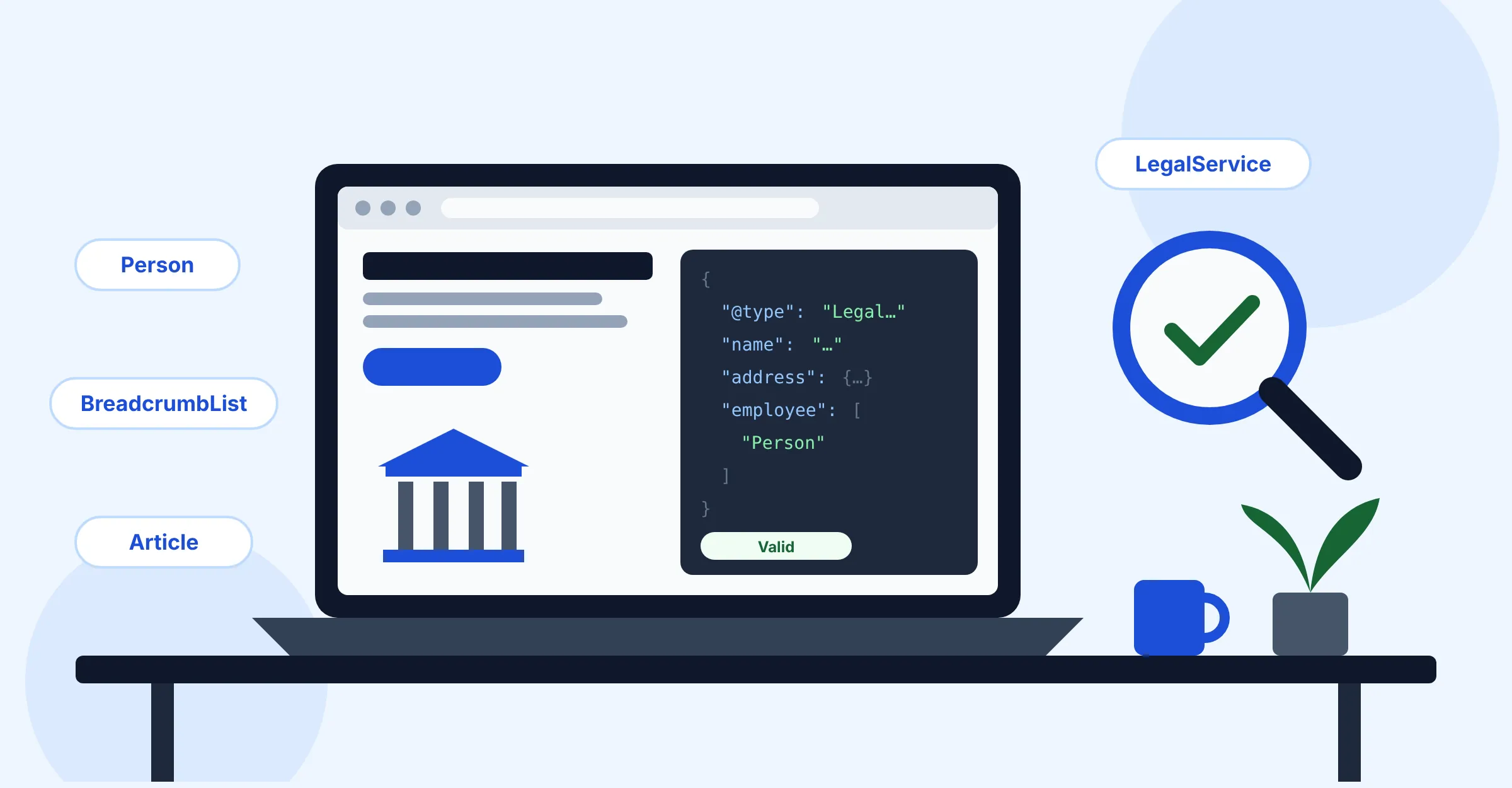
What is schema markup, and what does it actually do for a law firm?
Schema markup is code that labels the facts on a page using the shared schema.org vocabulary, which Google, Microsoft, Yahoo and Yandex founded together. Instead of a search engine guessing that “(555) 010-0100” in your footer is the firm’s main number, your markup states it outright.
Google supports three formats: JSON-LD, Microdata and RDFa. Its introduction to structured data says all three work equally well when valid, and recommends the one that is easiest to maintain, which is usually JSON-LD. JSON-LD sits in a single <script type="application/ld+json"> tag, separate from your visible HTML, so it’s the format this guide uses.
Does schema markup improve rankings?
Not directly, and nobody can guarantee it. Google’s documentation describes structured data as a way to help it understand a page and to make the page eligible for rich results. It never presents it as a ranking boost. Its general structured data guidelines also say Google “does not guarantee that your structured data will show up in search results,” even when the markup is valid.
Here’s what schema can and can’t do for a firm:
| Schema can | Schema can’t |
|---|---|
| Confirm your firm’s name, address, phone and hours in a machine-readable way | Make up for thin practice area pages or a weak local presence |
| Connect each lawyer to the firm and to their bio page | Guarantee a knowledge panel, map pack position or rich result |
| Make pages eligible for breadcrumb and article enhancements | Earn review stars for reviews you collect about your own firm |
| Reduce ambiguity when your firm name is shared with another business | Replace a verified, consistent Google Business Profile |
Does schema help with AI Overviews and AI search?
Google says there is no special markup for its AI features. Its page on AI features and your website states that there is “no special schema.org structured data that you need to add” to appear in AI Overviews or AI Mode. The same page lists “making sure your structured data matches the visible text on the page” as a best practice that still applies. So treat schema as accurate, consistent labeling that supports your content. It isn’t a separate AI optimization trick. Claims that one schema type “gets you cited by ChatGPT” aren’t backed by any official documentation we could find.
Which schema types does a law firm need?
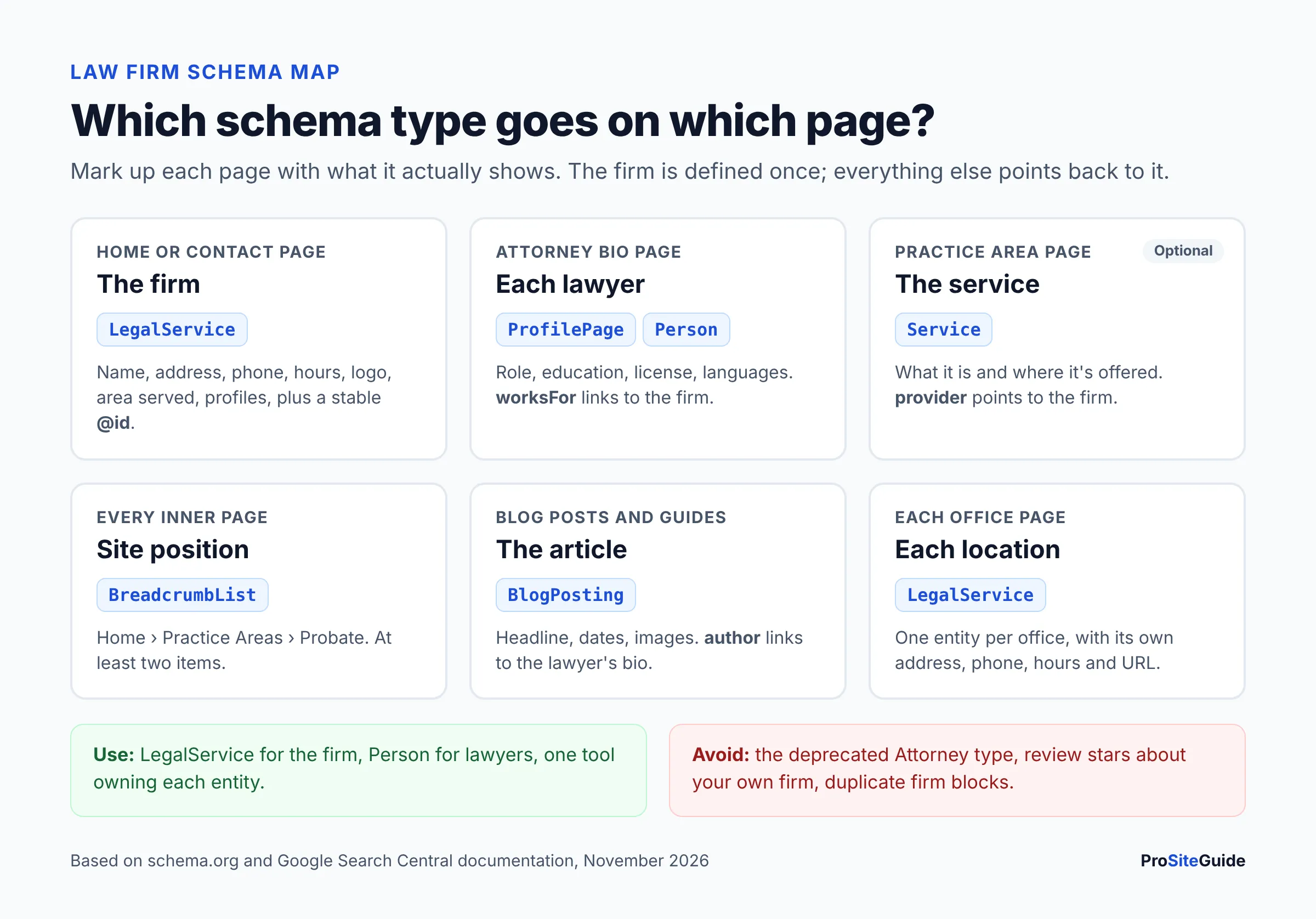
A typical solo or small firm site needs only a handful of types, each on the page it describes. Google’s guidelines say to place markup on the page it describes and to mark up only content visitors can see.
| Page | Schema type | What it says | Google feature it supports |
|---|---|---|---|
| Home page or contact page | LegalService (a LocalBusiness subtype) | Firm name, address, phone, hours, area served, logo, profiles | Local business and organization details |
| Attorney bio page | ProfilePage with a Person as mainEntity | Who the lawyer is, their role, education, license, languages | Profile page; author identity for articles |
| Practice area pages | Service linked to the firm (optional) | What the service is and where it’s offered | None directly, but it clarifies the page |
| Every page below the home page | BreadcrumbList | Where the page sits in your site structure | Breadcrumb trail (desktop) |
| Blog posts and legal guides | Article or BlogPosting | Headline, dates, author, publisher | Article enhancements |
| Multiple offices | One LegalService per office | Each location’s own address, phone, hours and URL | Local business details per location |
LegalService vs Attorney vs LocalBusiness: which type should you use?
Use LegalService. Here’s how the three relate:
- LocalBusiness is the broad parent type for any business with a physical location. It inherits from both Organization and Place.
- LegalService is the LocalBusiness subtype for “a business that provides legally-oriented services, advice and representation, e.g. law firms,” in schema.org’s own words. Google’s LocalBusiness documentation tells you to “use the most specific LocalBusiness sub-type possible.”
- Attorney is a subtype of LegalService that schema.org now marks as deprecated. It still parses, but there’s no reason to choose it for new markup. Rank Math’s Local SEO documentation also says Attorney has been replaced by LegalService.
A common mix-up: Attorney was a business type, not a type for a person. For the individual lawyer, use Person. If you see older guides marking up each lawyer as "@type": "Attorney", that was describing the lawyer as a business with an address, which was never quite right.
LegalService schema example (JSON-LD for the firm)
The examples below use a fictional firm, “Harbor & Pine Law, PLLC”, with placeholder domains (example.com), a reserved 555 phone number and a made-up address. Replace every value with your own details exactly as they appear on your site and your Google Business Profile.
Put this on the home page, or on the contact page if that’s where your address and hours are displayed:
{
  "@context": "https://schema.org",
  "@type": "LegalService",
  "@id": "https://www.example.com/#firm",
  "name": "Harbor & Pine Law, PLLC",
  "url": "https://www.example.com/",
  "logo": "https://www.example.com/images/logo-512.png",
  "image": "https://www.example.com/images/office-front.jpg",
  "description": "Estate planning and probate law firm serving Anytown and Example County.",
  "telephone": "+1-555-010-0100",
  "email": "info@example.com",
  "address": {
    "@type": "PostalAddress",
    "streetAddress": "100 Example Avenue, Suite 200",
    "addressLocality": "Anytown",
    "addressRegion": "TX",
    "postalCode": "00000",
    "addressCountry": "US"
  },
  "openingHoursSpecification": [
    {
      "@type": "OpeningHoursSpecification",
      "dayOfWeek": ["Monday", "Tuesday", "Wednesday", "Thursday", "Friday"],
      "opens": "08:30",
      "closes": "17:30"
    }
  ],
  "areaServed": [
    { "@type": "City", "name": "Anytown" },
    { "@type": "AdministrativeArea", "name": "Example County" }
  ],
  "knowsAbout": ["Estate planning", "Probate", "Wills and trusts"],
  "knowsLanguage": ["en", "es"],
  "sameAs": [
    "https://www.linkedin.com/company/example-firm",
    "https://www.facebook.com/examplefirm"
  ],
  "employee": [
    { "@id": "https://www.example.com/attorneys/jordan-lee/#person" }
  ]
}
On the page, it goes inside a script tag, either in the <head> or the body:
<script type="application/ld+json">
{ ...the JSON above... }
</script>
Notes on the fields that matter most:
- name and address are the only properties Google lists as required for LocalBusiness. Use your real-world firm name, with no added keywords. The same naming rule applies on your Google Business Profile.
- telephone should include the country and area code, per Google’s docs.
- url should be the page for that specific location. Multi-office firms point each office’s markup at that office’s page.
- @id is a permanent identifier for the firm (a URL plus
#firm). It doesn’t need to load as a page. It lets other blocks refer to the firm without repeating every detail. - areaServed and knowsAbout are valid schema.org properties for listing your service area and practice areas. Keep them consistent with what your pages say.
- sameAs lists profiles that clearly belong to the firm, such as LinkedIn or a bar directory listing.
- Google also recommends
geo(latitude and longitude to at least five decimal places) andopeningHoursSpecification. Addgeowith your real coordinates; we left it out because the firm is fictional.
Skip aggregateRating and review here. Google’s LocalBusiness page says those are for sites that capture reviews of other businesses. More on that in the mistakes section below.
Attorney schema example: Person markup for a bio page
Today, “attorney schema” means a Person on the lawyer’s bio page. Google’s ProfilePage documentation lists “an employee page on a company website” as a valid use, as long as the page focuses on one person affiliated with the site. That describes a well-built attorney bio page exactly.
{
  "@context": "https://schema.org",
  "@type": "ProfilePage",
  "@id": "https://www.example.com/attorneys/jordan-lee/",
  "url": "https://www.example.com/attorneys/jordan-lee/",
  "mainEntity": {
    "@type": "Person",
    "@id": "https://www.example.com/attorneys/jordan-lee/#person",
    "name": "Jordan Lee",
    "jobTitle": "Attorney",
    "url": "https://www.example.com/attorneys/jordan-lee/",
    "image": "https://www.example.com/images/jordan-lee.jpg",
    "worksFor": { "@id": "https://www.example.com/#firm" },
    "alumniOf": {
      "@type": "CollegeOrUniversity",
      "name": "Example State University School of Law"
    },
    "hasCredential": {
      "@type": "EducationalOccupationalCredential",
      "credentialCategory": "license",
      "name": "Licensed to practice law in Texas",
      "recognizedBy": {
        "@type": "Organization",
        "name": "State Bar of Texas"
      }
    },
    "knowsAbout": ["Estate planning", "Probate"],
    "knowsLanguage": ["en", "es"],
    "sameAs": ["https://www.linkedin.com/in/example-jordan-lee"]
  }
}- worksFor points to the firm’s
@id, so the lawyer and firm are connected without duplicating the firm’s address. - hasCredential, alumniOf, knowsAbout and knowsLanguage are all schema.org Person properties. Only include what the visible bio states.
- Be careful with wording. Structured data is still a communication about your services. Don’t describe a lawyer as a “specialist” or “expert” in markup unless the visible page can say so under your state’s attorney advertising rules. Check with your state bar if you’re unsure.
How do the pieces connect? Law firm structured data with @id
The point of law firm structured data is a consistent picture, not a pile of separate blocks. Define the firm once with an @id, define each lawyer once on their bio page with their own @id, then reference those IDs everywhere else.
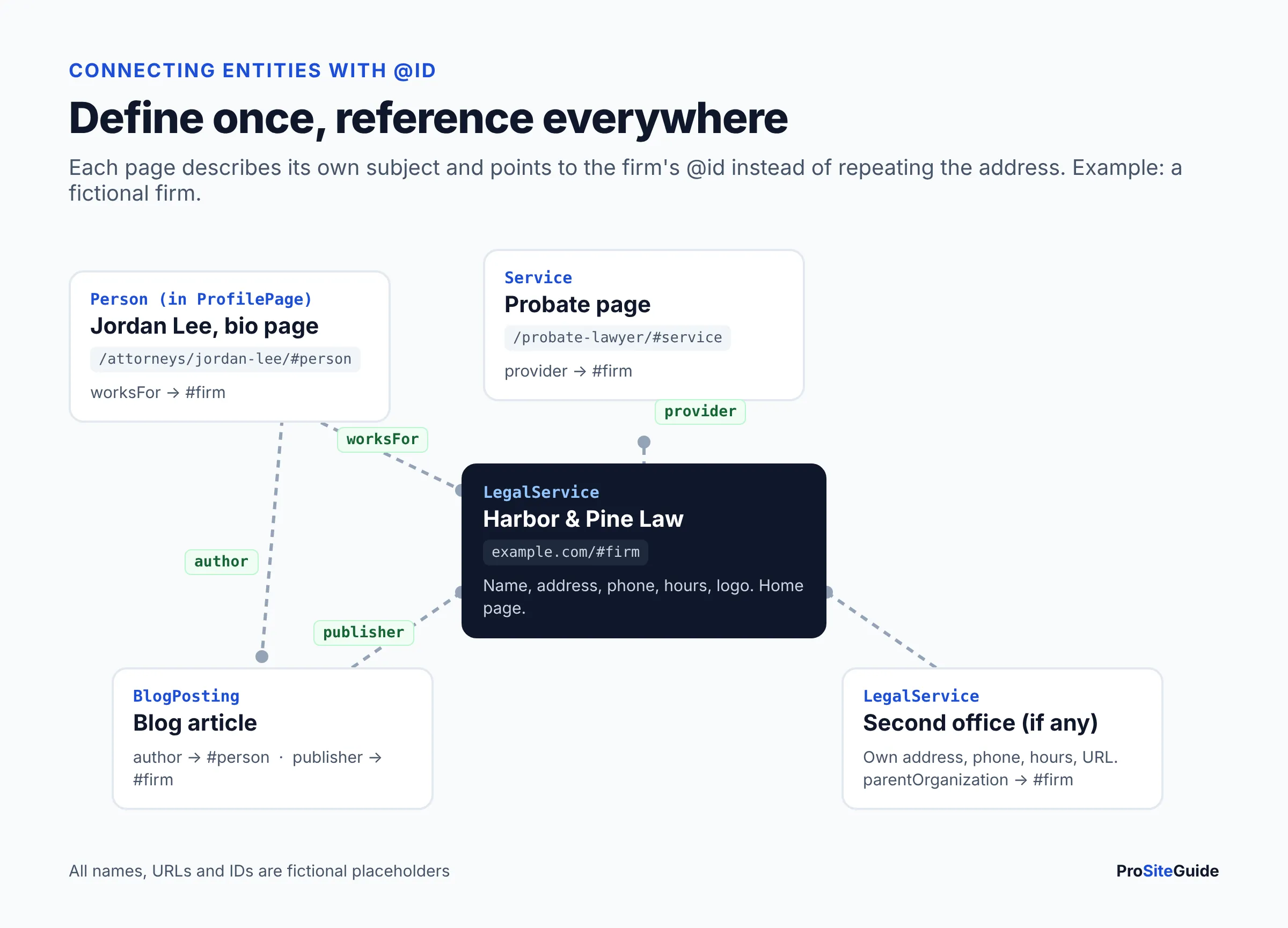
Here is a practice area page that refers to the firm instead of repeating it, with breadcrumbs in the same @graph:
{
  "@context": "https://schema.org",
  "@graph": [
    {
      "@type": "Service",
      "@id": "https://www.example.com/probate-lawyer/#service",
      "name": "Probate representation",
      "serviceType": "Probate law",
      "url": "https://www.example.com/probate-lawyer/",
      "provider": { "@id": "https://www.example.com/#firm" },
      "areaServed": { "@type": "AdministrativeArea", "name": "Example County" }
    },
    {
      "@type": "BreadcrumbList",
      "itemListElement": [
        {
          "@type": "ListItem",
          "position": 1,
          "name": "Home",
          "item": "https://www.example.com/"
        },
        {
          "@type": "ListItem",
          "position": 2,
          "name": "Practice Areas",
          "item": "https://www.example.com/practice-areas/"
        },
        {
          "@type": "ListItem",
          "position": 3,
          "name": "Probate"
        }
      ]
    }
  ]
}
Google doesn’t offer a rich result for Service, so this block is about clarity, not a visual feature. If your plugin can’t output it cleanly, the breadcrumb alone is fine. Per Google’s breadcrumb documentation, you need at least two ListItems. The last item can leave out item, in which case Google uses the page’s own URL. The doc currently describes the breadcrumb feature as available on desktop.
For blog posts, use Article or BlogPosting with the author tied to the lawyer’s bio. Google’s Article documentation recommends author.url pointing to a bio page, ISO 8601 dates with a time zone, and one author entry per person:
{
  "@context": "https://schema.org",
  "@type": "BlogPosting",
  "headline": "What Happens If You Die Without a Will in Texas?",
  "image": [
    "https://www.example.com/images/no-will-16x9.jpg",
    "https://www.example.com/images/no-will-4x3.jpg",
    "https://www.example.com/images/no-will-1x1.jpg"
  ],
  "datePublished": "2026-03-02T09:00:00-06:00",
  "dateModified": "2026-11-10T09:00:00-06:00",
  "author": {
    "@type": "Person",
    "@id": "https://www.example.com/attorneys/jordan-lee/#person",
    "name": "Jordan Lee",
    "url": "https://www.example.com/attorneys/jordan-lee/"
  },
  "publisher": { "@id": "https://www.example.com/#firm" }
}
How to add schema markup for law firms in WordPress
On WordPress you have three realistic routes. Pick one as the primary source, because the rest of this section is about keeping them from colliding.
| Route | Firm (LegalService) | Attorney (Person) | Cost (as of November 2026) | Best for |
|---|---|---|---|---|
| Rank Math | Titles & Meta > Local SEO: business type, address, hours, phone. Multiple locations is PRO. | Default schema per post type is free. Custom schema builder, import and templates are PRO. | Free; PRO listed at $5.59/mo billed annually for the first term, renewing at $8.99/mo ($107.88/yr) plus tax (Rank Math pricing) | Single-office firms that want firm schema without code |
| Yoast SEO | Settings > Site representation: Organization name, logo, profiles. Local business details need Yoast Local SEO. | Person output is tied to WordPress user profiles; limited per-page control without code. | Free; Local SEO is included in Yoast SEO Premium, listed at $118.80/yr ex. VAT (Yoast Local SEO) | Sites already on Yoast that need Organization plus local details |
| Manual JSON-LD | Full control, including @id links and multiple offices | Full control on each bio page | Developer time | Multi-office firms or anyone who needs exact control |
Option 1: Rank Math
- Go to Rank Math SEO > Titles & Meta > Local SEO. Make sure the Local SEO module is enabled first.
- Choose Organization (company) rather than Person. Rank Math notes that Person mode hides the phone field.
- Set the business type to LegalService, not Attorney.
- Enter the firm name, address (country as the two-letter code, e.g. US), phone and opening hours, matching your Google Business Profile exactly.
- Add the logo and social profiles under the same section.
- Under Titles & Meta > Posts, set the default schema to Article. Rank Math’s schema documentation covers this default and which generator features need PRO.
Option 2: Yoast SEO
- Go to Yoast SEO > Settings > Site representation.
- Choose Organization. Yoast’s site representation guide says local businesses should pick Organization.
- Enter the organization name, alternate name (if you use a short form), logo and social profiles.
- For address, hours and business type in schema, install Yoast Local SEO (included with Premium) and fill in the location details.
- Make sure each attorney who writes posts has a complete WordPress user profile, because Yoast pulls author Person data from it.
Option 3: Manual JSON-LD
- Write the JSON-LD for each page type using the examples above.
- Add it to the specific page, not site-wide. Use your theme’s per-page header field, a code snippets plugin that targets one page, or a template file for bio pages.
- Turn off any overlapping output from your SEO plugin, or extend the plugin’s graph using its developer filters so there is still only one firm entity.
- Validate, then publish (see the checklist below).
If you’re choosing an SEO plugin in the first place, our roundup of the best WordPress plugins for law firms compares the options alongside forms, security and caching.
How to avoid duplicate schema
Duplicate schema happens when two tools each describe the firm. A typical case is an SEO plugin outputting an Organization block, a law firm theme adding its own LocalBusiness block, and a developer pasting a third block on the home page. Search engines then see three versions of your firm, sometimes with different phone numbers or names.
- Inventory first. Run your home page, a bio page and a practice page through the Schema Markup Validator and list every entity it finds.
- Pick one owner per entity. Usually the SEO plugin owns the firm, breadcrumbs and articles. Manual code adds only what the plugin can’t, such as bio page Person details.
- Disable the extras. Many themes, page builders and review widgets have a schema toggle. Turn it off where it overlaps.
- Reuse the same @id. If you must add a separate block, reference the plugin’s firm
@idinstead of declaring a new firm. - Re-check after updates and redesigns. A theme switch can silently add or remove schema. That’s one of the checks in our redesign-without-losing-SEO guide.
How to test and validate law firm schema
Use two free tools, because they check different things:
- Rich Results Test (Google). It checks only Google-supported rich result types, such as Breadcrumb, Article and Local business, and tests as a smartphone crawler by default. Google’s Rich Results Test help page explains the URL and code options.
- Schema Markup Validator at validator.schema.org. It’s hosted by schema.org and shows every schema.org entity on the page, including types Google doesn’t use for rich results, like
Service. Use it to spot duplicates.
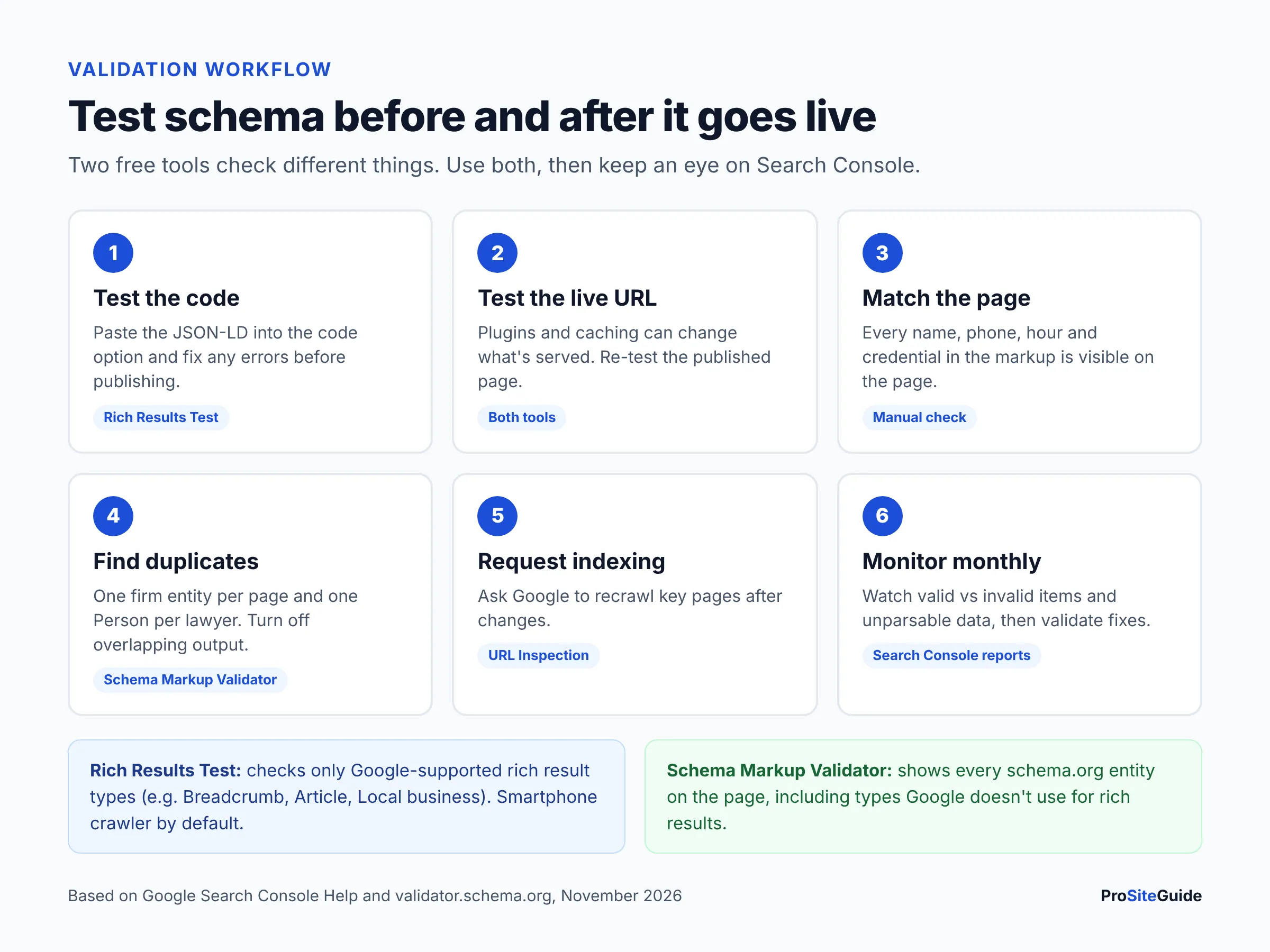
- Test the code before it goes live. Paste the JSON-LD into the Rich Results Test’s code option. Fix anything flagged as an error.
- Publish, then test the live URL in both tools. Plugins and caching can change what’s actually served.
- Compare against the visible page. Every name, phone, hour and credential in the markup should appear on the page itself.
- Check for duplicates. One firm entity per page, one Person per lawyer.
- Request indexing for key pages using URL Inspection in Search Console.
- Monitor monthly. Search Console’s rich result status reports show valid and invalid items over time and let you validate fixes. There’s also an “Unparsable structured data” report for syntax problems. Our GA4 and Search Console setup guide walks through getting access.
Common law firm schema mistakes
- Self-serving review stars. Marking up testimonials or an embedded Google reviews widget on your own site. Google’s review snippet guidelines say pages using LocalBusiness or Organization markup are ineligible for star reviews when the business controls the reviews about itself. This includes embedded third-party widgets. Attorney advertising rules on testimonials apply separately.
- Relying on FAQ rich results. Google limited FAQ rich results in August 2023 to “well-known, authoritative government and health websites.” Existing FAQPage markup does no harm and needn’t be removed, but it won’t make a firm’s FAQ appear in results. HowTo rich results were dropped entirely in September 2023.
- Using the deprecated Attorney type for new markup, or using it for individual lawyers.
- Marking up invisible content. Hours, areas or credentials that appear only in the code. Google’s guidelines say not to mark up content readers can’t see, and violations can lead to a manual action that removes rich result eligibility.
- Inconsistent NAP. A different suite number or phone in schema than on your Google Business Profile and directory listings. Consistency is part of local SEO for lawyers, and schema should mirror it.
- Keyword-stuffed names. Using “Anytown Probate Lawyer | Harbor & Pine” as the
name. Use the firm’s actual name. - One office’s address on every location page. Each office needs its own LegalService entity with its own URL.
- Set-and-forget. A lawyer leaves, hours change or the firm moves, and the schema keeps the old details for years.
Law firm schema checklist
- Firm marked up once as
LegalServicewith name, address, phone, URL, hours, logo and a stable@id - Each office has its own LegalService entity and page
- Each attorney bio has a
Person(inProfilePage) withworksForpointing at the firm - Breadcrumbs on all inner pages
- Article or BlogPosting on posts, with the author linked to a bio page
- No review or rating markup about the firm on the firm’s own site
- One tool owns each entity; theme and widget schema turned off where it overlaps
- Rich Results Test and Schema Markup Validator both pass on live URLs
- Search Console structured data reports checked monthly
Schema is one item on a bigger list. Our free law firm website checklist covers the rest, and the Start Here guide shows where to begin if you’re building or rebuilding your site.
FAQ
Is the Attorney schema type deprecated?
Yes. The schema.org Attorney page states that the type is deprecated because LegalService is more inclusive and less ambiguous. Existing Attorney markup still parses because Attorney is a subtype of LegalService, but use LegalService for the firm and Person for individual lawyers.
Does a solo lawyer need LegalService or Person schema?
Usually both. Mark up the practice as a LegalService, even if it carries your own name, so the address, phone and hours are described. Then add a Person on your bio or about page, linked with worksFor. If the site truly represents you rather than a practice, Person-only setups in Rank Math or Yoast are an option, but you lose the business fields.
Can I show review stars for my law firm in Google?
Not from markup on your own site. Google’s review snippet guidelines make reviews a business controls about itself ineligible for star snippets on LocalBusiness and Organization pages. Reviews on your Google Business Profile still appear in Maps and local results on their own.
Should I still use FAQ schema on law firm pages?
It’s optional. Since August 2023 Google shows FAQ rich results only for well-known government and health sites, so a law firm won’t get the expanded FAQ display. Google says existing FAQPage markup doesn’t need to be removed. The visible FAQ content itself is still useful to readers.
Do I need schema on every page?
No. Google’s Organization documentation says you don’t need organization markup on every page. Put firm details on the home or contact page, Person markup on bio pages, Article markup on posts and breadcrumbs on inner pages. Other pages can reference the firm by its @id.
How long does it take for schema changes to show up?
There’s no fixed time. Google has to recrawl the page first. Requesting indexing in Search Console can speed that up for key pages, and the structured data reports update as pages are recrawled. Even then, rich results are never guaranteed.
Does schema replace my Google Business Profile?
No. They do different jobs. Your Google Business Profile drives your Maps listing. Schema describes your website’s content. Keep the name, address, phone and hours identical in both.
Next steps
Start by running your home page through the Schema Markup Validator to see what’s already there. In most WordPress sites, an SEO plugin is already outputting something. Then:
- Choose one tool to own your schema and turn off overlapping output.
- Set the firm type to LegalService with details that match your Google Business Profile.
- Add Person markup to each attorney bio and link it to the firm.
- Add breadcrumbs and Article markup if your plugin doesn’t already.
- Validate live URLs, then check Search Console monthly.
Want this handled for you? ProSiteGuide builds and maintains fast, secure WordPress sites for law firms. Book a free consultation.
Sources
- Schema.org: LegalService
- Schema.org: Attorney (deprecated)
- Schema.org: Person
- Schema.org: LocalBusiness
- Google Search Central: Introduction to structured data
- Google Search Central: General structured data guidelines
- Google Search Central: Local business structured data
- Google Search Central: Organization structured data
- Google Search Central: Profile page structured data
- Google Search Central: Article structured data
- Google Search Central: Breadcrumb structured data
- Google Search Central: Review snippet guidelines
- Google Search Central Blog: Changes to HowTo and FAQ rich results (August 2023)
- Google Search Central: AI features and your website
- Google Search Console Help: Rich Results Test
- Google Search Console Help: Rich result status reports
- Schema Markup Validator
- Rank Math: Local SEO module
- Rank Math: Schema (rich snippets) documentation
- Rank Math: Pricing
- Yoast: Site representation settings
- Yoast: Local SEO