This article is general information, not legal advice. Check recording, texting and ethics questions with your state bar or counsel.
Quick answer: a hosted VoIP phone system for law firms moves your phone lines onto the internet, so calls ring on desk phones, computers and mobile apps. RingCentral, Nextiva and Ooma all sell this, and the right pick depends mostly on whether you need built-in texting, call recording and a Clio connection at your price point. Ooma is the simplest, lowest-priced entry; RingCentral has the broadest plan ladder; Nextiva has the lowest annual entry price but the steepest jump when billed monthly.
Key takeaways
- Prices below are per user per month from each vendor’s own page as of November 2026, before taxes and fees. They change, so confirm before you buy.
- Annual billing is much cheaper than monthly at RingCentral and Nextiva. Ooma lists its plans as “No Contract Necessary.”
- Recording, texting and CRM features are tied to plan level. Check the plan, not just the brand.
- Recording consent rules differ by state. Learn your state’s rule and plan a greeting before you turn recording on.
- Texting clients from a business number needs carrier registration (10DLC). Ask each vendor how it is handled and what it costs.
How we compared these VoIP phone systems
This comparison is based on each vendor’s official pricing and product pages, opened in November 2026. We have not run hands-on call-quality tests, and we do not give ratings or scores. Where a page did not state something, we say so and tell you to ask the vendor. Some pages show different content by region, plan size or sign-in state, so treat every number as “check the pricing page” rather than a quote.
Which VoIP phone system is best for a small law firm?
There is no single winner. Match the system to how your firm actually uses the phone:
- Solo or two-lawyer firm that wants simple and cheap: Ooma Office Essentials or Pro, because the list prices are flat per user and no contract is required.
- Firm that wants the biggest plan ladder, a Clio-related app option and add-ons: RingCentral (RingEX), with the caveat that Clio logging appears through a third-party app on RingCentral’s own app gallery.
- Firm that will commit to a year and wants the lowest annual per-user price: Nextiva NEXT Core, but read what is and is not in that plan.
- Firm that needs texting clients regularly: compare the monthly text allowances in the table, then ask about registration.
RingCentral vs Nextiva vs Ooma: how much do they cost per user?
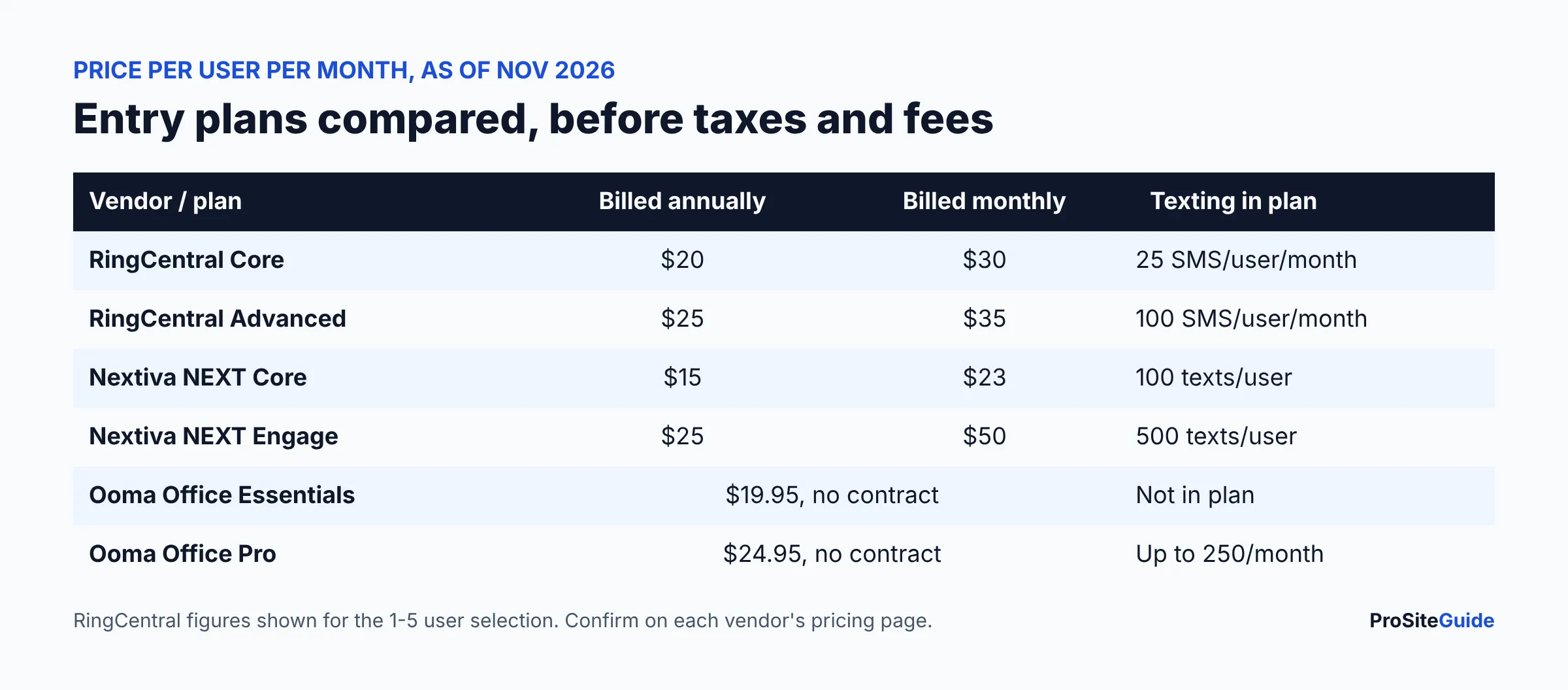
Here are the entry and mid-tier plans as published in November 2026. Prices exclude taxes and fees, and RingCentral’s figures are those shown for the 1 to 5 user selection on its page.
| Vendor and plan | Annual billing | Monthly billing | Notes from the vendor page |
|---|---|---|---|
| RingCentral RingEX Core | $20 | $30 | Unlimited domestic calling, on-demand call recording, 25 SMS per user per month |
| RingCentral RingEX Advanced | $25 | $35 | Adds CRM integrations, 100 SMS per user per month |
| RingCentral RingEX Ultra | $35 | $45 | 200 SMS per user per month, more reporting |
| Nextiva NEXT Core | $15 | $23 | 100 business texts per user, call recording listed |
| Nextiva NEXT Engage | $25 | $50 | 500 texts per user, virtual fax, single sign-on |
| Ooma Office Essentials | $19.95 | $19.95 | No contract; virtual receptionist, mobile app, free number transfer |
| Ooma Office Pro | $24.95 | $24.95 | Adds desktop app, texting up to 250 per month, call recording |
| Ooma Office Pro Plus | $29.95 | $29.95 | Texting up to 1,000 per month, call queuing, CRM integration |
Sources: RingCentral plans and pricing, Nextiva pricing and Ooma Office plans.
Annual vs monthly billing and minimum users
- RingCentral: the page says you can save up to 33% by paying annually and lets you pick a user count (1-5, 6-100, 100+). Always select your real headcount, since the page is built around those tiers.
- Nextiva: the page toggles Monthly and Annually and says annual Small Business pricing applies to new customers with 1 to 100 employees on a paid term of 12 months or longer. Add-ons are billed separately.
- Ooma: each plan is labeled “No Contract Necessary” and the page says applicable taxes and fees are not included. It does not state a separate annual discount on the page we opened, so ask sales.
Do not forget the extras. RingCentral’s page notes that taxes and fees (including an E911 service fee) may apply, and that phone rental needs a multi-year contract. Desk phones are bought separately at Nextiva. Ask each vendor for an all-in monthly total for your headcount.
Can a VoIP phone system record calls, and is it legal?
Yes, all three list call recording, but where it sits depends on the plan. RingCentral lists on-demand recording on Core. Nextiva’s comparison table shows call recording on its NEXT plans. Ooma lists call recording on Pro (its page describes on-demand and always-on recording under its feature list). Confirm retention length and who can access the files.
Whether recording is lawful depends on where the parties are. Some states let one participant consent to a recording (often called one-party consent). Others require everyone on the call to consent (all-party). A call between your office and a client in another state can raise both rules. The Reporters Committee for Freedom of the Press keeps a state-by-state recording guide that explains this at a general level, and it says to talk with a lawyer for your situation.
Practical habits that fit most firms, again as general information: tell callers at the start, put the notice in your auto-attendant greeting, record only when you have a reason, and treat recordings as confidential client material with limited access. Ask your state bar whether any ethics opinion covers recording clients.
How do auto-attendant, call routing and after-hours calls work?
An auto-attendant (or virtual receptionist) is the automated greeting that says “Press 1 for…” and sends callers to the right person. All three vendors describe one: Ooma lists a virtual receptionist even on Essentials, RingCentral includes auto attendant in its feature set, and Nextiva lists Smart Call Routing (Simple IVR) on every NEXT plan.
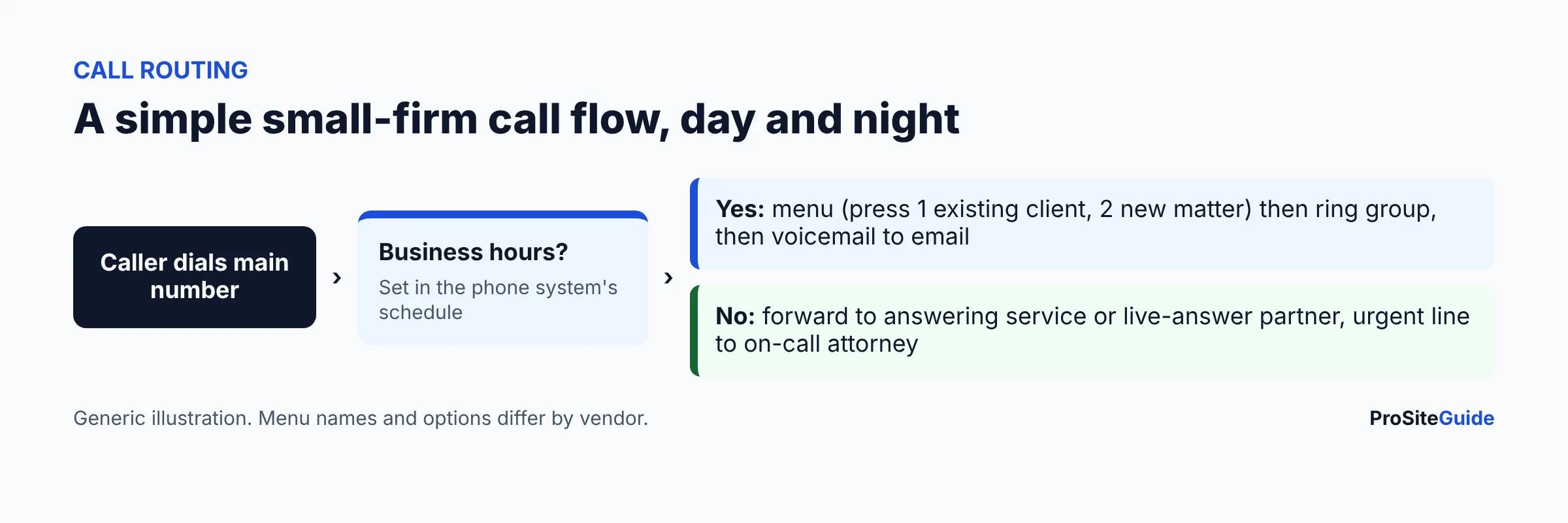
A sensible small-firm setup is below.
- Set business hours in the system so the greeting changes by time of day.
- Daytime: a short menu (existing client, new matter, billing), then a ring group, then voicemail sent to email.
- After hours: forward to a live answering service or an AI receptionist, with a single urgent route to the on-call lawyer.
- Test every path from an outside mobile phone before you publish the number.
If you want people to answer overflow and after-hours calls, see our comparison of Smith.ai vs Ruby virtual receptionists. Several VoIP vendors also sell their own AI receptionist add-ons (RingCentral lists one starting at $39, per its page); check how it handles intake and what it should never be allowed to say.
Callers often book consultations from the same call flow, so pair routing with an appointment scheduling tool.
Can a law firm text clients from a VoIP number?
Yes, but not for free-for-all volume. Business texting from a regular local number is regulated by carriers under “10DLC” (10-digit long code) rules: the business registers its brand and use case through a registry so carriers know the texts are legitimate. RingCentral’s page states that The Campaign Registry (TCR) registration is required for SMS/MMS and that additional TCR fees may apply. We could not verify Nextiva’s or Ooma’s registration fees from the pages we opened, so ask both.
Allowances differ widely, as the table shows: RingCentral Core includes 25 SMS per user per month, Nextiva NEXT Core 100 texts per user, and Ooma Pro up to 250 per month. Marketing or high-volume texting is a separate product at RingCentral (High Volume SMS, priced per message). For a law firm, keep texts to scheduling and logistics and avoid putting case details in them; check your state bar guidance on client communications. Texting rules for marketing (consent, opt-out) are their own area, so ask counsel.
Does it work with Clio and other legal software?
Only count an integration if the vendor lists it. What we found on official pages in November 2026:
- Ooma: its Office plans page lists Clio in its integrations, describing it as helping law offices capture every billable moment. It does not say in the text we read which plan includes it, so ask sales (Pro Plus lists “CRM Integration”).
- RingCentral: the RingCentral app gallery page mentions Clio through a third-party service, CallConnector.ai, which says it logs calls into Clio Manage and Clio Grow and has its own pricing. That is separate from RingCentral’s plans. RingEX Advanced lists “CRM integrations” generally.
- Nextiva: we did not find Clio on its integrations page. Its pricing page lists Outlook and Google contact sync, Salesforce and single sign-on. Ask whether a Clio connection exists or can be built through its API.
Before you commit, ask for the exact steps: does a call create a time entry, attach to a matter, or only show a call pop? That distinction is what saves billable minutes.
How do you keep your existing phone number?
Moving your current number to a new carrier is called porting. Ooma lists “Free Number Transfer” on its plans page. RingCentral and Nextiva both support bringing numbers, but we did not see porting terms or fees on the pages we opened, so ask. Practical steps:
- Get a recent bill from your current carrier and your account number or PIN.
- List every number to move: main line, fax, direct dials, and any that forward elsewhere.
- Ask the new vendor for a target date, and do not cancel the old service until the port completes.
- Have a temporary forwarding number ready in case the cutover is late.
Softphone apps, desk phones and mobile use
A softphone is the phone in an app. RingCentral says its app works on Windows, macOS, Android and iOS. Ooma lists a mobile app on every plan and a desktop app starting with Pro. Nextiva lists mobile on its NEXT plans and says VoIP desk phones work with every plan, bought separately. Lawyers working from home or court can then use the firm number without giving out a cell number. Check call forwarding and caller-ID settings so your outbound calls show the office number.
Your phones depend on your internet. A stable connection and a good router matter more than the vendor logo, and your website and email domain should stay under your own control. For email and calendar alongside the phone, see Microsoft 365 setup for law firms or Google Workspace setup for law firms, and keep the main number on your site consistent with your Google Business Profile.
What about 911 and emergency calls on VoIP?
VoIP 911 needs a registered address, because the call travels over the internet rather than a fixed line. Update the address whenever a user moves or works from a new place. RingCentral’s E911 cost recovery page notes a 911 service fee, which is not a government-mandated charge. Ooma lists a 911 service on its plans page. Ask each vendor how to set addresses per user, and what happens during an internet or power outage.
Which one should you pick? A short decision guide
| If you… | Look first at | Why |
|---|---|---|
| Want predictable flat pricing and no contract | Ooma Office Essentials or Pro | Per-user list prices and “No Contract Necessary” on its page |
| Plan to text clients regularly | Ooma Pro Plus, Nextiva NEXT Engage or RingCentral Advanced | Higher monthly text allowances; still ask about registration |
| Can commit to a year and want a low entry price | Nextiva NEXT Core or RingCentral Core | Annual pricing is far below monthly on both |
| Need Clio-related call logging | Ooma (Clio listed) or RingCentral with a third-party app | Confirm the plan and the steps before buying |
| Have more than 100 users or multiple offices | RingCentral or Nextiva sales | Their pages direct larger teams to contact sales |
Next, try the one you shortlist on a trial or demo with your real headcount, test the call flow from outside phones, and get the all-in price in writing. RingCentral’s page describes a 14-day free trial for new subscribers (SMS is not available in the trial).
Alternatives to consider
- Your existing carrier or cable provider: may bundle a hosted phone system with internet; compare features and contract length.
- A virtual receptionist service only: if you mainly want someone answering, see Smith.ai vs Ruby and keep a simple mobile or softphone line.
- Microsoft Teams Phone or a Google Voice plan: worth a look if you already live in those suites. We did not review their pricing here.
FAQ
How much does a VoIP phone system for a law firm cost?
From the vendors’ November 2026 pages, entry plans run roughly $15 to $30 per user per month depending on vendor and billing term, before taxes, fees and hardware. See the table above and each pricing page.
Is call recording on a VoIP system legal?
It depends on state law. Some states need one party’s consent; others need everyone’s. This is general information, not legal advice. Check your state and your bar’s guidance.
Can I keep my current office number?
Usually yes through porting. Ooma lists free number transfer. Ask the other vendors about terms and timing, and do not cancel your old service early.
Do I need 10DLC registration to text clients?
If you text from a standard local business number, carriers expect registration. RingCentral says TCR registration is required for SMS/MMS and fees may apply. Ask your vendor how it is handled.
Does RingCentral, Nextiva or Ooma integrate with Clio?
Ooma lists Clio on its plans page. RingCentral’s app gallery points to a third-party Clio logging app. We did not find Clio on Nextiva’s integrations page. Verify before buying.
Conclusion and next steps
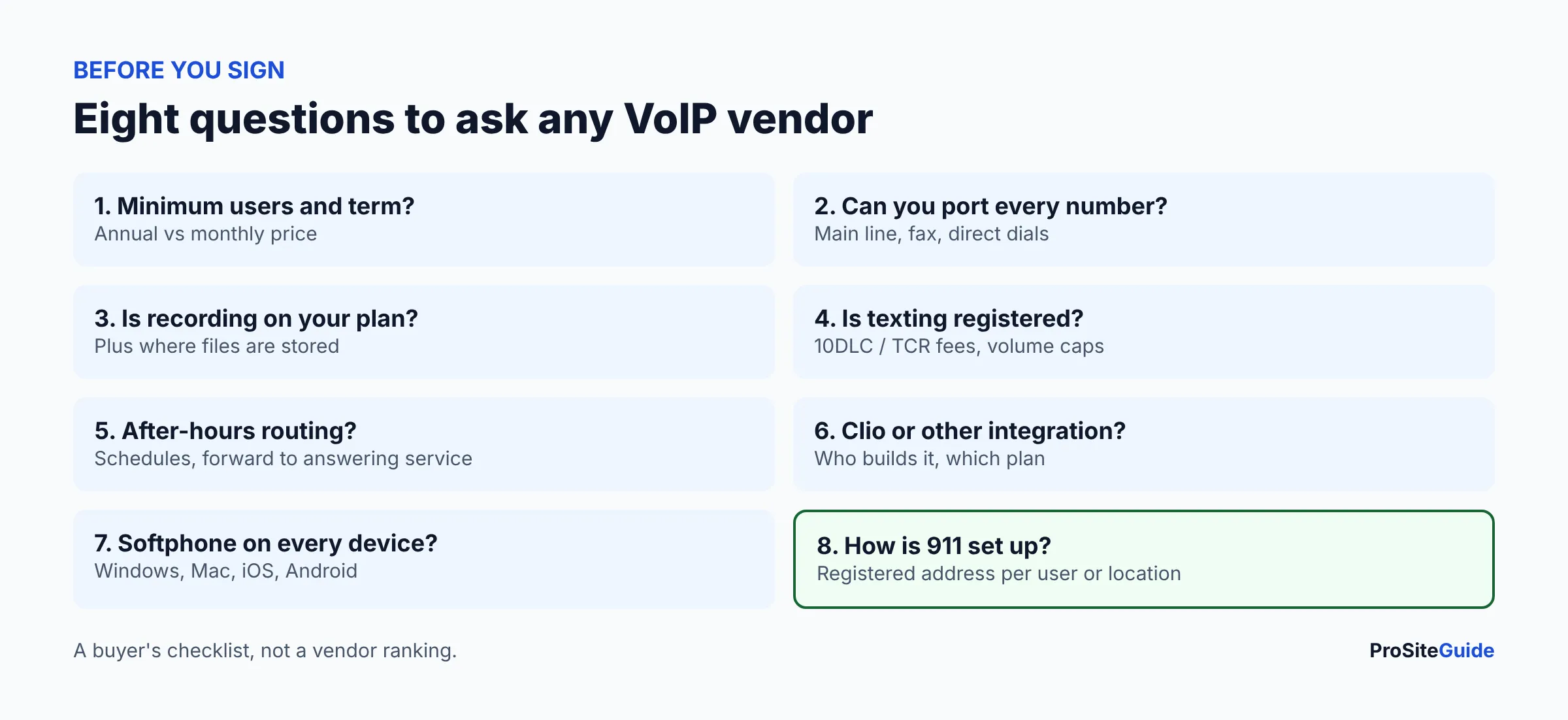
Pick two vendors, price them for your real headcount on annual and monthly terms, and ask the same eight questions of each, including recording, texting registration, Clio and 911. Start with our tool comparisons hub or the Start Here guide if you are setting up the whole firm.
Want this handled for you? ProSiteGuide builds and maintains fast, secure WordPress sites for law firms. Book a free consultation.