Quick answer: Law firm website accessibility means building your site so people with disabilities can use it. That includes people who use screen readers, navigate by keyboard only, have low vision or are deaf or hard of hearing. The U.S. Department of Justice says the ADA covers the goods and services businesses offer online, and points to the Web Content Accessibility Guidelines (WCAG) as helpful guidance. For a small firm, the practical target is WCAG 2.2 Level AA, reached through real fixes to your theme, content and forms, not a one-click widget.
Key takeaways
- The DOJ’s web accessibility guidance says ADA Title III applies to what businesses open to the public offer online. It sets no detailed technical rule for private businesses.
- The DOJ’s 2024 Title II web rule (WCAG 2.1 AA) covers state and local governments. It does not directly regulate private law firms.
- WCAG 2.2 Level AA is the current W3C benchmark. Most problems on firm sites are basic: contrast, alt text, keyboard access, form labels, headings, captions and PDFs.
- Overlay widgets don’t replace fixing the site itself. In 2025 the FTC ordered one overlay vendor to pay $1 million over its compliance claims.
- Start with the 30-minute self-check below, then have a developer fix what you find. Publish an accessibility statement with a working contact method.
Does the ADA apply to law firm websites?
The DOJ’s position is that it does. The ADA itself lists the “office of an accountant or lawyer” among public accommodations covered by Title III (42 U.S.C. § 12181(7)(F)). In its guidance on web accessibility (March 2022), the DOJ says it “has consistently taken the position that the ADA’s requirements apply to all the goods, services, privileges, or activities offered by public accommodations, including those offered on the web.”
Two points from that guidance matter for small firms:
- No detailed federal web standard exists for private businesses. The DOJ has no regulation setting technical web rules for Title III businesses. It names WCAG and the federal Section 508 standards as helpful guidance.
- Businesses have flexibility in how they comply. Flexibility still means the online content has to be accessible.
Courts have not agreed on every question about websites and Title III. State laws can add their own requirements too. This article doesn’t assess your firm’s legal exposure. If you’ve received a demand letter, or you want a view on your risk, talk to a lawyer who handles ADA matters in your state.
What about the DOJ’s 2024 Title II rule?
The 2024 rule covers governments, not private firms. The DOJ’s fact sheet on the Title II web rule says it applies to state and local governments, their agencies, special districts and certain transit authorities. It adopts WCAG 2.1 Level AA as the technical standard. An interim final rule published April 20, 2026 moved the compliance dates. Governments serving 50,000 or more people now have until April 26, 2027. Smaller governments and special districts have until April 26, 2028.
A private law firm isn’t directly covered by that rule. It still matters to you in two ways. First, it’s the clearest signal yet of the technical standard regulators consider reasonable. Second, a firm that builds websites, apps or online tools for a government client may be asked to meet it under contract.
Why accessibility matters for a small firm
Legal risk is only one reason. Your website is often a prospective client’s first contact with your firm. If someone using a screen reader can’t fill in your intake form, they’ll call the next firm on the list. Accessibility problems also tend to hurt everyone else. Low-contrast grey text is hard to read on a phone in sunlight. Tiny tap targets frustrate older clients. A video without captions gets skipped in a waiting room with the sound off.
Many accessibility fixes overlap with good SEO and usability work: clear headings, descriptive page titles, meaningful link text and fast, simple forms. If you’re planning a rebuild, put accessibility in the brief from day one. It’s cheaper than retrofitting. (See our guide to what a law firm website costs in 2026 for budgeting.)
What does WCAG 2.2 Level AA mean in practice?
WCAG (Web Content Accessibility Guidelines) is the W3C’s international standard for accessible web content. WCAG 2.2 became a W3C Recommendation on October 5, 2023, with an update in December 2024. It’s also published as ISO/IEC 40500:2025. Its success criteria come in three levels. Level A is the minimum, Level AA is the usual target, and Level AAA is the strictest. The 2.x versions are backwards compatible, so a site that meets 2.2 AA also meets 2.1 AA, the standard used in the Title II rule.
The W3C’s WCAG at a Glance organizes everything under four principles, often shortened to POUR:
- Perceivable: text alternatives for images, captions for video, enough contrast to see content.
- Operable: everything works from a keyboard, users get enough time, navigation is easy.
- Understandable: readable text, predictable behaviour, help avoiding and fixing form errors.
- Robust: clean code that works with browsers and assistive technology.
What’s new in WCAG 2.2 for a law firm site?
According to the W3C’s What’s New in WCAG 2.2, version 2.2 adds nine success criteria. Six are at Level A or AA. These are the ones most likely to affect a typical firm site:
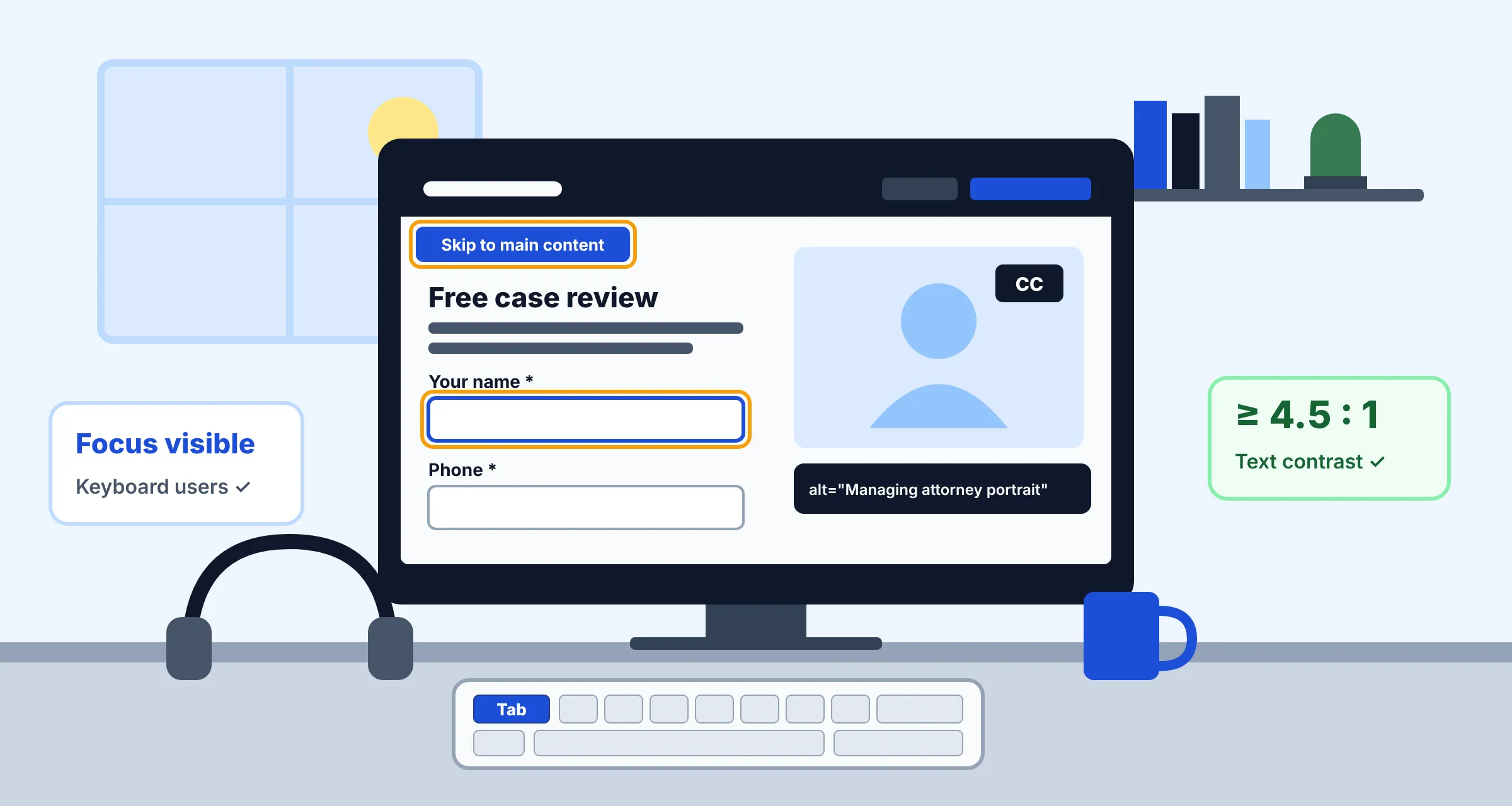
- Focus Not Obscured (Minimum), AA: a sticky header, cookie banner or chat bubble mustn’t completely hide the element a keyboard user has tabbed to.
- Target Size (Minimum), AA: buttons and links should be at least 24×24 CSS pixels or spaced well apart. “Call now” buttons and social icons are frequent offenders. Links inside sentences are exempt.
- Consistent Help, A: if your phone number, chat or contact link repeats across pages, keep it in the same relative place.
- Redundant Entry, A: a multi-step intake form shouldn’t make people type the same information twice.
- Accessible Authentication (Minimum), AA: a client portal login shouldn’t depend on a memory or puzzle test without an alternative, such as allowing password managers and paste.
- Dragging Movements, AA: anything that needs dragging, like a slider, needs a click or tap alternative.
Version 2.2 also removed one older criterion, 4.1.1 Parsing, as obsolete.
The most common accessibility issues on law firm websites
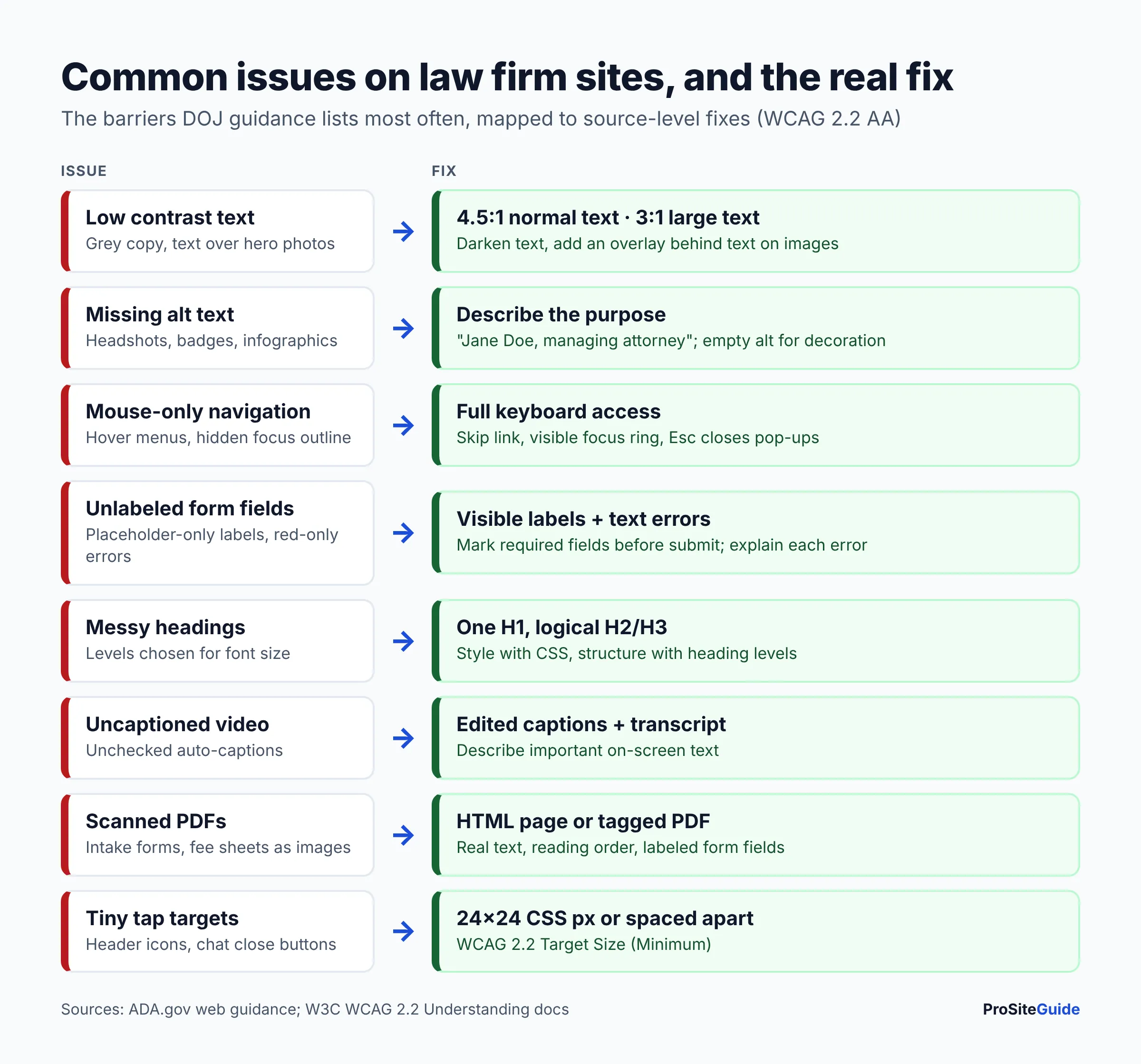
The DOJ’s guidance lists the same barriers that show up on many small-business sites: poor contrast, information conveyed by color alone, missing alt text, videos without captions, inaccessible forms and mouse-only navigation. Here’s how each one tends to appear on a firm site and what fixing it involves.
| Issue | How it shows up on firm sites | The real fix |
|---|---|---|
| Low color contrast | Light grey body text, white text over hero photos, pale gold buttons | Meet 4.5:1 for normal text and 3:1 for large text (about 24px, or about 18.5px bold). Add a dark overlay behind text on images. |
| Missing or poor alt text | Attorney headshots, award badges and infographics with no alt, or alt like “IMG_2041” | Short alt text that describes the image’s purpose (“Jane Doe, managing attorney”). Use empty alt for purely decorative images. |
| Keyboard traps and hidden focus | Menus that only open on hover, pop-ups you can’t close with Esc, focus outline removed in CSS | Every control reachable with Tab, a visible focus ring, a “Skip to content” link, dropdowns that open with Enter/Space |
| Unlabeled form fields | Intake forms that use grey placeholder text as the only label; errors shown only in red | A visible <label> for each field, required fields marked before submitting, error messages in text next to the field |
| Broken heading structure | Headings picked for font size; several H1s; skipped levels | One H1 per page, then H2/H3 in logical order. Style headings with CSS, not by picking a level. |
| Uncaptioned video | “Meet the firm” or FAQ videos with auto-generated captions nobody checked | Edited, synchronized captions and a transcript. Describe on-screen text that matters. |
| Inaccessible PDFs | Scanned intake forms, fee schedules and brochures that are just images of text | Publish the content as an HTML page where possible. Otherwise use tagged PDFs with real text, reading order and form fields. |
| Vague links and buttons | Many “Click here” or “Learn more” links; icon-only phone or social buttons | Link text that makes sense out of context (“Read about our DUI defense services”). Accessible names on icon buttons. |
| Tiny or crowded tap targets | Header phone icons, social icons, close buttons on chat widgets | At least 24×24 CSS pixels or enough spacing (WCAG 2.2 Target Size) |
The contrast thresholds come from the W3C’s Understanding Contrast (Minimum) page. It also notes these are hard cut-offs: a ratio of 4.499:1 fails the 4.5:1 requirement.
Why are contact and intake forms the highest priority?
Forms are where a visitor becomes a lead, and they’re where accessibility most often breaks. Check labels, error messages, required-field markers and any CAPTCHA. Some CAPTCHA puzzles can’t be solved without sight or fine motor control. A quieter spam filter or honeypot field is often a better choice. For the security side of forms, see how to add a secure contact form to a law firm website.
A 30-minute accessibility self-check for your firm’s site
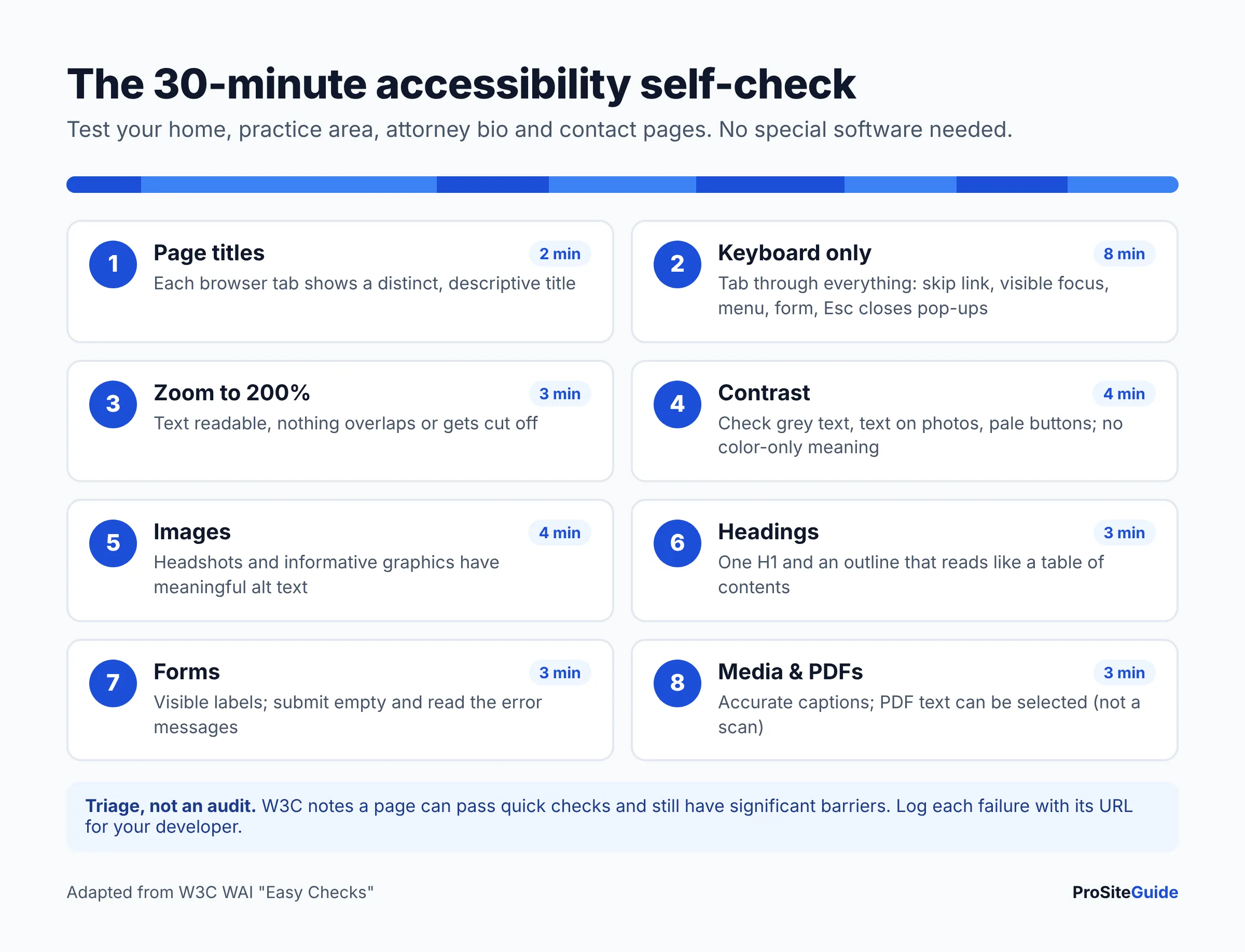
The steps below are adapted from the W3C’s Easy Checks. You need a browser and no special software. Test your homepage, one practice area page, your attorney bio page and your contact page. The W3C itself warns that a page “could seem to pass these checks, yet still have significant accessibility barriers,” so treat this as triage, not an audit.
- Page titles (2 min). Look at the browser tab on each page. Every page should have a distinct, descriptive title, such as “Estate Planning Lawyer in Austin | Doe Law”. Screen readers announce the title first.
- Keyboard only (8 min). Put the mouse away. Press Tab from the top of the page. Can you see where focus is at all times? Is the first stop a “Skip to main content” link? Can you open the menu, reach every link, fill in and submit the contact form, and close any pop-up or chat window with Esc? Does a sticky header ever cover the focused item?
- Zoom (3 min). Zoom the browser to 200%. Text should still be readable, with nothing overlapping or cut off. Navigation should still work.
- Contrast (4 min). Look for light grey text, text over photos and pale buttons. Check the doubtful ones with a contrast checker. The W3C keeps a list of evaluation tools, though it doesn’t endorse specific products. Also look for anything conveyed by color alone, like “fields in red are required”.
- Images (4 min). Run a free accessibility checker, or inspect your images in WordPress’s media library. Headshots, logos that link home and informative graphics need meaningful alt text. Decorative flourishes should have empty alt.
- Headings (3 min). Use a heading-outline browser extension or checker. You should see one H1 and a logical H2/H3 outline that reads like a table of contents.
- Forms (3 min). Every field needs a visible label that stays put when you start typing. Submit the form empty. Are the errors described in text, and can you tell which field to fix?
- Media and documents (3 min). Play each video. Are there accurate captions? Open your most-downloaded PDF and try to select the text. If you can’t, it’s probably a scanned image that screen readers can’t read.
Write down every failure along with the page URL. That list becomes the brief for your developer.
Automated checkers are useful but limited. They can’t tell whether alt text is accurate, whether the reading order makes sense or whether a form error is understandable. Only a person can judge those, ideally including someone who uses assistive technology every day.
Are accessibility overlays a shortcut to ADA compliance?
No. An accessibility overlay is a third-party script that adds a toolbar or tries to repair a page automatically in the visitor’s browser. It doesn’t change your theme, your content or your PDFs. Your underlying problems stay in place. Overlays are often marketed as instant compliance, and that marketing has drawn federal attention.
On April 22, 2025, the FTC approved a final order requiring accessiBe to pay $1 million. The FTC alleged that the company’s claims that its accessWidget plug-in could make any website WCAG-compliant were “false, misleading, or unsubstantiated.” The order bars the company from making such claims without evidence. It also addresses reviews that were presented as independent. The order binds that one company. It isn’t a ruling on every overlay product, but it’s a good reason to be skeptical of any “one line of code” compliance promise.
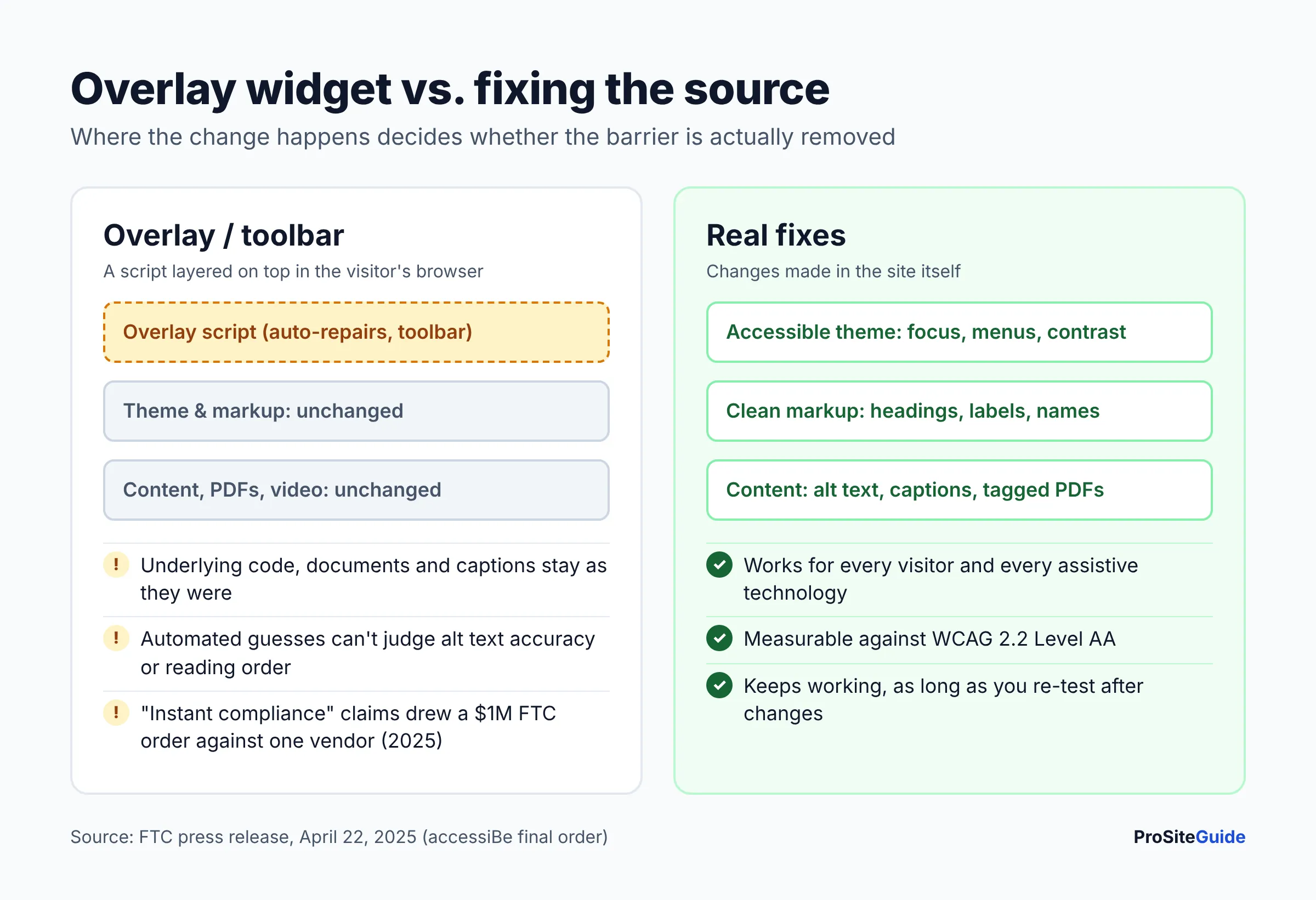
Real fixes happen in the source: an accessible theme, correct markup, edited alt text and captions, labeled forms and remediated documents. For WordPress sites, start with a theme built with accessibility in mind and plugins that don’t break keyboard access. Our roundups of the best WordPress themes for law firms and the best WordPress plugins for law firms cover what to look for.
How to work with a developer on accessibility
Most small firms don’t need an enterprise audit. They do need a clear target and a clear scope. When you hire or brief a developer:
- Name the standard in writing. “Conform to WCAG 2.2 Level AA” is specific. “Make it ADA compliant” isn’t.
- Hand over your self-check notes and list your key pages: home, practice areas, attorney bios, contact and intake, client portal login.
- Ask how they test. A good answer combines automated scans, manual keyboard testing and screen-reader spot checks. Be wary of anyone who only runs a scanner, or who proposes an overlay as the fix.
- Fix the template before the content. Theme-level problems like menus, focus styles, colors and headers repeat on every page. Fixing them once pays off fastest.
- Plan the content work. Alt text, captions and PDF remediation are often done by your team or a vendor, not the developer. Agree on who owns what.
- Re-test after changes. New plugins, page-builder edits and redesigns can quietly break accessibility. Add a quarterly check to your website maintenance routine.
Be cautious with any vendor that “guarantees” ADA compliance or lawsuit protection. No technical vendor can promise how a court or claimant will view your site.
Should your firm publish an accessibility statement?
It’s good practice. A statement tells visitors you take accessibility seriously and, more importantly, how to reach you if something doesn’t work. The W3C’s guidance on accessibility statements recommends at least:
- A commitment to accessibility for people with disabilities
- The standard you aim for (for example, WCAG 2.2 Level AA)
- Contact details for reporting problems: a phone number and email that someone actually monitors
The W3C also suggests listing known limitations, the steps you take and when the site was last reviewed. It offers a free statement generator. Keep the statement honest. Don’t claim full conformance you haven’t verified, and offer an alternative way to get the same information or service, such as a phone consultation. Link the statement from your site footer.
Want to check accessibility alongside SEO, security and speed? Our free law firm website checklist covers the whole site.
FAQ
Is there an official “ADA compliant” certification for websites?
No. The DOJ has not set a detailed technical standard for private businesses’ websites, and there’s no government certification. Vendors that sell “ADA certified” badges are making their own claims. WCAG conformance is the closest thing to a measurable benchmark.
Should a law firm aim for WCAG 2.1 or WCAG 2.2?
Aim for WCAG 2.2 Level AA. It’s the current W3C Recommendation, and because it’s backwards compatible, meeting it also covers WCAG 2.1 AA, the version named in the DOJ’s Title II rule for governments.
Does the 2024 DOJ Title II rule apply to my private law firm?
Not directly. The rule covers state and local governments and the services contractors provide on their behalf. A private firm’s own website falls under Title III, where DOJ guidance remains flexible. Firms doing government contract work should check their contracts and ask counsel.
Will an accessibility plugin or widget make my site compliant?
A widget alone won’t. Overlays don’t fix your underlying code, content or documents. The FTC’s 2025 order against accessiBe shows regulators take “instant compliance” claims seriously. Some WordPress plugins do help, for example by adding skip links or flagging missing alt text, but they support real fixes rather than replacing them.
Do PDFs on my site need to be accessible?
If a PDF delivers information or a service clients need, like an intake form, fee information or a guide, it should be usable with assistive technology. The simplest route is often to turn the content into a normal web page. Where a PDF is necessary, use a tagged PDF with real text, not a scan.
What should I do if I receive an ADA website demand letter?
Don’t ignore it, and don’t rush to install an overlay. Contact a lawyer experienced in ADA matters in your jurisdiction for advice. Separately, document your site’s current state and start a real remediation plan with your developer.
Next steps
Accessibility for a small firm is mostly about doing ordinary things well: readable colors, real labels, keyboard-friendly menus, captioned videos and documents people can actually open. Here’s where to start:
- Run the 30-minute self-check on your four most important pages this week.
- Fix theme-level issues first: contrast, focus, menus and forms.
- Work through content: alt text, headings, captions and PDFs.
- Publish an accessibility statement with a monitored contact method.
- Re-check every quarter and after any redesign. For legal questions, consult counsel and your state’s guidance.
Want this handled for you? ProSiteGuide builds and maintains fast, secure WordPress sites for law firms. Book a free consultation.
Sources
- ADA.gov: Guidance on Web Accessibility and the ADA (U.S. Department of Justice, March 2022)
- ADA.gov: Americans with Disabilities Act of 1990, as amended (42 U.S.C. § 12181)
- ADA.gov: Fact Sheet on the Title II Web and Mobile App Accessibility Rule
- W3C WAI: WCAG 2 Overview
- W3C WAI: WCAG 2 at a Glance
- W3C WAI: What’s New in WCAG 2.2
- W3C: Understanding SC 1.4.3 Contrast (Minimum)
- W3C: Understanding SC 2.5.8 Target Size (Minimum)
- W3C WAI: Easy Checks – A First Review of Web Accessibility
- W3C WAI: Web Accessibility Evaluation Tools List
- W3C WAI: Developing an Accessibility Statement
- FTC: FTC Approves Final Order Requiring accessiBe to Pay $1 Million (April 22, 2025)