Quick answer: Law firm website maintenance means keeping the software updated, backing the site up, watching for downtime and malware, renewing the domain, SSL certificate and plugin licenses, and keeping attorney bios, practice pages and contact forms accurate. For a typical small-firm WordPress site, hard costs are hosting plus a few premium plugin licenses. Your choice is whether to spend your own time on the rest or pay for a care plan. Published care plans start at $39 to $199 a month at the providers listed below, as of November 2026.
This guide breaks the work into a weekly, monthly, quarterly and annual schedule. It also lists the real cost components, with prices taken from vendors’ own pricing pages, so you can decide between DIY, a freelancer and an agency.
What does law firm website maintenance include?
Maintenance has two halves. The technical half keeps the site running and safe. The content half keeps it accurate. A law firm needs both, because a site that is up but lists a partner who left last year, or has a contact form that quietly stopped sending, still costs you clients.
1. Software updates (core, plugins, theme, PHP)
WordPress itself, every plugin and the theme all release updates, many of which fix security holes. Since version 3.7, WordPress applies minor and security releases automatically on most hosts, but major releases still need a click. The same official guide recommends backing up first, checking plugin and theme compatibility, and visiting the site afterward to confirm it still works. That “check afterward” step is the part people skip, and it is the part that matters on a site with intake forms and booking tools.
2. Backups you have actually tested
You need automatic daily backups, kept somewhere other than the server itself, with enough history to roll back past a problem you noticed late. Many managed hosts include them. For example, Kinsta’s entry plan includes automatic daily backups with 14 days of retention (as of November 2026). A backup only counts if a restore works, so test one a few times a year.
3. Uptime monitoring and security scans
Uptime monitoring checks the site every few minutes and alerts you when it goes down, so you hear about an outage from a tool, not from a prospective client. Security scanning looks for malware, changed files and known-vulnerable plugins. The hardening side (logins, two-factor, firewalls, user roles) is covered step by step in our law firm website security checklist. Maintenance is what keeps that checklist true month after month.
4. Renewals: domain, SSL certificate and licenses
Renewals fail quietly, and when they fail the result is loud:
- Domain. Under ICANN’s Expired Registration Recovery Policy, registrars must send reminders about one month and one week before expiry. If the domain lapses, the registrar must interrupt its DNS for a period after expiry, which takes the website offline and can disrupt email on that domain. Turn on auto-renew and keep the registrar’s contact email current. (Choosing a domain is covered in .law vs .com vs .attorney.)
- SSL certificate. Certificate lifetimes are getting shorter. Under the CA/Browser Forum schedule, the maximum validity of public TLS certificates dropped to 200 days on March 15, 2026, and is set to fall to 47 days by 2029. Free Let’s Encrypt certificates last 90 days and are meant to renew automatically. Manual renewal is no longer realistic. Confirm your host auto-renews, and monitor expiry anyway.
- Premium plugin and theme licenses. Most are annual subscriptions. If one lapses, the plugin usually keeps running but stops getting updates, including security fixes.
5. Content accuracy: bios, practice pages, contact details
This half of the work is specific to law firms. Attorney bios need new admissions, awards and departures. Practice area pages need to match the work you actually take. Office addresses, phone numbers and hours must match your Google Business Profile. Lawyer advertising rules apply to your website too, so outdated claims, results or credentials can become an ethics issue as well as a marketing one. Check your state bar’s advertising rules when you edit this kind of content.
6. Form and intake testing
Contact forms break silently after a plugin update, an email change or a host move. Submit a test through every form and confirm it reaches the right inbox or practice-management tool. Forms that handle sensitive details also need the setup described in our guide to a secure contact form for a law firm website.
7. Performance, broken links and accessibility
Sites slow down as images, plugins and scripts pile up. Check page speed periodically, remove plugins you no longer use, and fix broken links to removed pages or dead external sources. Accessibility deserves a recurring check too. The U.S. Department of Justice’s guidance on web accessibility says it has consistently taken the position that the ADA applies to the web content of businesses open to the public, and it points to WCAG as helpful technical guidance. New content (PDFs, images without alt text, embedded videos) is where accessibility problems usually creep back in. Ask your state bar or counsel about your firm’s specific obligations.
A law firm website maintenance schedule
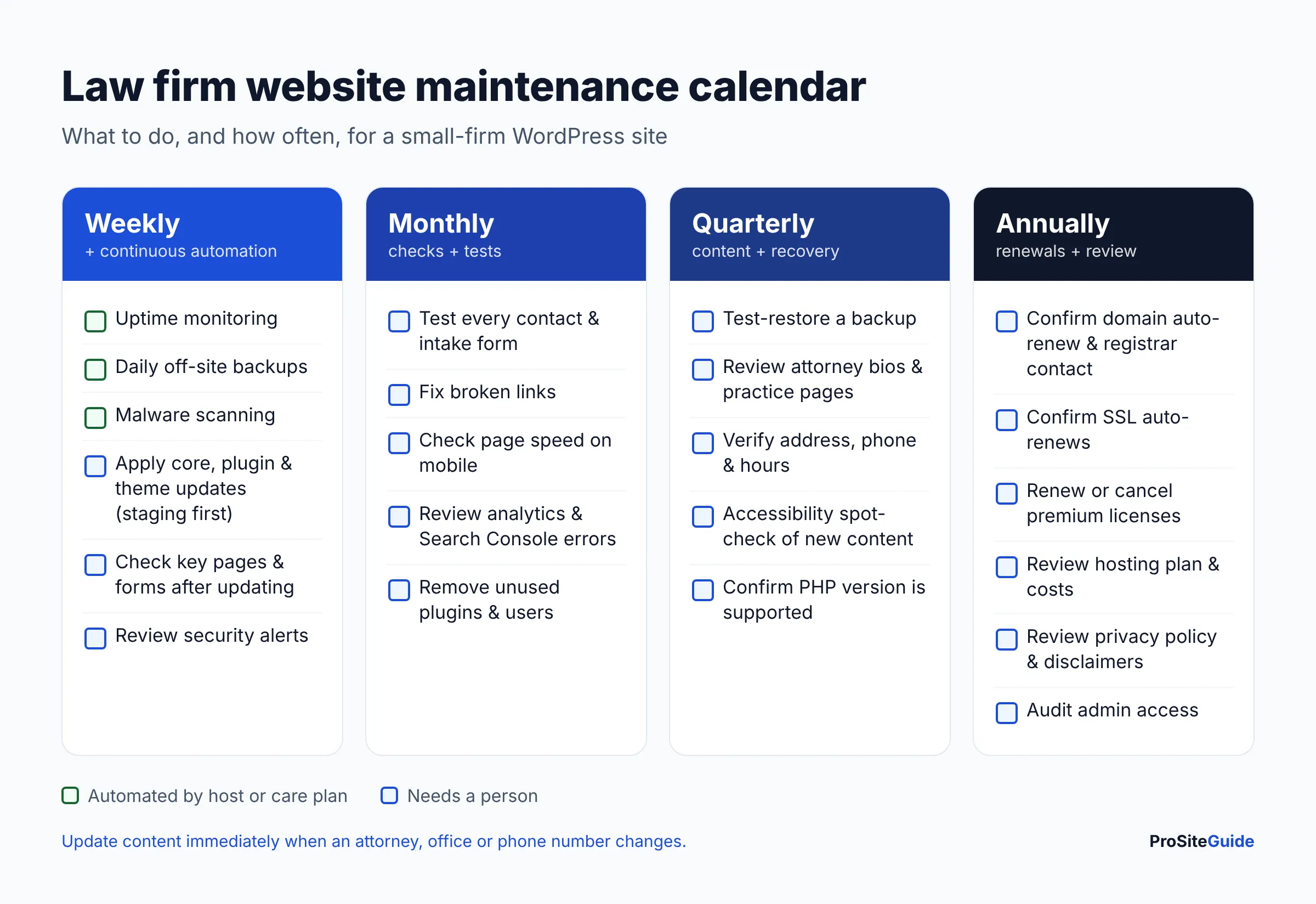
Here is a practical cadence for a small firm’s WordPress site. Automate whatever can be automated, and keep human attention for the things that need judgment: checking the site after updates, testing forms and reviewing content.
| Frequency | Tasks | Automate or manual? |
|---|---|---|
| Continuous / daily | Uptime monitoring, daily off-site backups, malware scanning, automatic security releases | Automated (host or care plan) |
| Weekly | Apply plugin, theme and core updates (ideally on staging first), then check key pages and forms after updating; review security alerts | Manual check after updates |
| Monthly | Test every contact and intake form; scan for broken links; check page speed; review analytics and Search Console for errors; remove unused plugins and users | Mostly manual |
| Quarterly | Test-restore a backup; review attorney bios, practice pages, contact details and hours; spot-check accessibility on new content; confirm PHP version is supported by your host | Manual |
| Annually | Confirm domain and SSL auto-renewal and registrar contact details; renew or cancel premium licenses; review hosting plan and costs; review privacy policy and disclaimers; audit who has admin access | Manual |
What does law firm website maintenance cost?
Most articles quote broad ranges with no source. A more useful approach is to add up the actual parts. Some costs you pay whoever does the work. Others depend on whether that’s you or someone you hire.
Fixed costs: hosting, domain and licenses
The examples below are real list prices from official pages, as of November 2026. They are examples, not a market average, and your stack may need different tools. Prices change often, and several vendors run introductory discounts.
| Cost item | Example (official price, as of November 2026) | Billing |
|---|---|---|
| Managed WordPress hosting | Kinsta Single 20GB: $35/month, or $350/year billed annually (1 site, daily backups, uptime monitoring included) | Monthly or annual |
| Form plugin | Gravity Forms Basic: $59/year (1 site) | Annual |
| SEO plugin | Yoast SEO Premium: $118.80/year ex VAT (1 site) | Annual |
| Caching / performance plugin | WP Rocket Single: regular price shown as $5/month billed yearly (1 site); discounted during a November 2026 sale, renews at the regular rate | Annual |
| Domain renewal | Varies by registrar and extension; .law and similar specialty extensions usually cost more than .com | Annual (multi-year possible) |
| SSL certificate | Usually free and auto-renewed by your host (e.g. Let’s Encrypt) | Automatic |
A small firm site using that exact stack would spend roughly $590 a year on hosting and those three licenses at regular prices, before the domain. Many sites need fewer premium plugins, and some need more. For how hosting choices compare, see our guide to the best hosting for law firm websites.
Labor: what WordPress care plans cost
A website care plan (also called a WordPress maintenance plan) is a monthly subscription where someone else handles updates, backups, monitoring and small edits. The published prices below come from each provider’s pricing page, as of November 2026. They show how plans are structured. We have not tested them, and we are not endorsing them.
| Provider (example) | Published plans | Notable inclusions / terms |
|---|---|---|
| GoWP | Free $0, Pro $39, Business $99 per site/month | Pro adds automatic updates with visual checks, daily backups (90 days), daily security scans. Business adds 5 human edits/month (tasks of about 30 minutes or less). |
| WP Buffs | Maintain $89, Protect $179, Perform $239, Custom $359 per month | Weekly updates and uptime monitoring from the first tier; unlimited edits from Protect; safe updates on staging only listed on Custom. |
| Redefine Web (law-firm focused) | Essential $199, Growth $299, Scale $499 per month | Hosting included; 1/2/4 content edits per month by tier; 6-month initial term. |
Two things stand out. First, “edits” mean very different things: an AI edit, a 30-minute human task and “unlimited” are not the same product. Second, whether updates are tested on a staging copy before going live is often reserved for higher tiers. For a site that brings in clients, that is the feature worth paying for. Also check whether hosting is included, because that changes the comparison a lot.
Maintenance is an ongoing cost, separate from the build. For the upfront side, see how much a law firm website costs in 2026.
DIY vs freelancer vs agency: which fits your firm?
| DIY (you or staff) | Freelancer | Agency / care plan | |
|---|---|---|---|
| Cash cost | Hosting and licenses only | Hourly or a monthly retainer; rates vary widely | Fixed monthly fee (see examples above), sometimes with hosting |
| Hidden cost | Your non-billable hours; mistakes during updates | Single point of failure if they’re unavailable | Edit limits, contract terms, upsells |
| Best for | Simple sites, someone tech-comfortable in the office | Firms wanting a named person who knows the site | Firms wanting predictable cost and documented processes |
| Watch out for | Skipped tasks when the caseload gets busy | No backup coverage, unclear response times | Automated updates with no human check; lock-in to their hosting |
| Who holds the keys | You | Make sure you do | Make sure you do |
A simple rule: if no one at the firm will reliably do the monthly and quarterly tasks, DIY isn’t really free. It just postpones the cost until something breaks. On the other hand, if your site runs on a hosted builder, much of the technical work is done by the platform. Our Squarespace vs WordPress vs Wix comparison covers that trade-off.
What to ask a website maintenance provider
- Do you test updates on a staging copy first? And does a person check the live site afterward?
- Where are backups stored, how long are they kept, and when did you last test a restore?
- What counts as an “edit” and how many are included? Ask for an example, such as adding a new attorney bio.
- What’s your response time for an outage, a hacked site and a routine request? Get it in writing.
- Is malware cleanup included, or billed separately?
- Do you test our contact and intake forms, including any integration with our practice-management software?
- Who owns the domain, hosting account and licenses? They should be in the firm’s name, with the provider added as a user.
- What’s the contract term and exit process? How do we get a full copy of the site if we leave?
- Who on your team can access our site, and do you use two-factor authentication and individual logins?
- What do the monthly reports show? Ask for a sample.
If you’re switching hosts as part of the change, follow our guide to moving a law firm website without downtime.
Signs your law firm website is being neglected
- The WordPress dashboard shows a long list of pending plugin updates, or plugins flagged as no longer maintained.
- Browsers show a “Not secure” or certificate warning.
- Nobody can say when the last backup was made, or where it is stored.
- Attorney bios still list people who left, or miss recent hires.
- The copyright year, office address or phone number is out of date.
- Form submissions dropped off and no one checked whether the form still works.
- Pages are noticeably slower than they used to be on a phone.
- You don’t have the logins for your own domain registrar or hosting account.
- Google Search Console reports errors that have sat there for months.
Any two of these mean it’s time to catch up, either with a one-time cleanup or by starting a regular plan.
FAQ
How much does lawyer website maintenance cost per month?
It depends on who does the work. If you handle it yourself, you pay only hosting and licenses. In the example stack above, that comes to roughly $49 a month averaged over the year. Published care plans from the providers we looked at start at $39, $89 and $199 a month (the last includes hosting), as of November 2026.
Doesn’t my web host already do maintenance?
Partly. Good managed hosts handle server security, backups, SSL and uptime monitoring. They usually don’t update your plugins with testing, check your forms or keep your content accurate. Read your plan’s feature list to see where the host’s job ends.
Can I just turn on automatic updates for everything?
Automatic security releases for WordPress core are sensible and on by default for most sites. Auto-updating every plugin is a trade-off. You get patches faster, but an update can break a page or form with nobody noticing. If you use auto-updates, pair them with uptime monitoring, daily backups and a regular form test.
How often should a law firm update website content?
Update immediately when something factual changes, such as a new attorney, a departure, a new office or a new phone number. Beyond that, a quarterly review of bios, practice pages and disclaimers is a reasonable minimum.
Do Squarespace or Wix sites need maintenance?
Less technical maintenance, because the platform handles software updates, hosting and SSL. You still own the content, form testing, accessibility of what you add, domain renewal and access control.
Next steps
- Make sure the firm owns, and can log into, the domain registrar, hosting account and every premium license.
- Turn on domain auto-renew and confirm your SSL certificate renews automatically.
- Confirm daily off-site backups exist, then test one restore.
- Put the schedule above on a calendar and assign each task to a named person, or price out a care plan with the questions above.
- Work through the security checklist once, then let maintenance keep it current.
Want this handled for you? ProSiteGuide builds and maintains fast, secure WordPress sites for law firms. Book a free consultation.
Sources
- WordPress.org: Updating WordPress
- ICANN: Expired Registration Recovery Policy
- DigiCert: TLS/SSL certificate validity FAQ
- Let’s Encrypt: FAQ
- ADA.gov: Guidance on Web Accessibility and the ADA
- Kinsta: Pricing
- Gravity Forms: Pricing
- Yoast SEO Premium
- WP Rocket: Pricing
- GoWP: Pricing
- WP Buffs: Pricing
- Redefine Web: Law firm website maintenance