Quick answer: A strong attorney bio page tells a prospective client, within a few seconds, who you help, what kinds of matters you handle, why you are qualified, and how to contact you. Lead with a client-focused intro, back it with verifiable credentials (bar admissions, education, experience), add one human detail, and finish with a clear call to action. Keep every claim truthful and check your state’s lawyer advertising rules before you publish.
Below you’ll find the structure, a fill-in template, a checklist, schema markup tips and the ethics points to watch.
Key takeaways
- Write the first two sentences for the client: who you help and with what. Move the résumé details lower on the page.
- Every bio needs the same core blocks: photo, name and title, intro, practice focus, bar admissions and education, experience, a personal touch and a contact CTA.
- Clear authorship and real credentials are what Google’s helpful content guidance calls the “Who” of a page. Legal topics are held to a higher accuracy bar.
- Add schema.org Person markup with
sameAslinks to profiles that confirm your identity, such as your state bar listing. - Avoid “expert” or “specialist” wording and unqualified case results unless your state’s rules allow them. Rules vary, so check with your state bar.

What do clients look for on an attorney bio page?
Clients look for reassurance that you handle their kind of problem, that you are properly licensed, and that you are someone they could talk to. Most people reach a bio after reading a practice area page or seeing your name in Google, so they are already partway through deciding. The bio page has to answer a few unspoken questions:
- Do you handle my kind of matter? Name your practice focus in plain words: “I represent employees in wage and overtime disputes,” not “litigation.”
- Are you qualified and licensed where I am? List bar admissions by state and court, plus your education.
- Have you done this before? Give years in practice and the types of matters you handle. Past results need care (see the ethics section).
- Will I be comfortable working with you? A current, approachable photo and one or two human details help.
- How do I reach you, and what happens next? Show a direct phone number, an email or form, and what the first consultation looks like.
Referral sources and other lawyers also read bios, and they tend to care more about credentials and experience. A good structure serves both groups: client-focused language at the top, detailed credentials below.
How to write an attorney bio: the structure
Here is the order that works for most small-firm sites. Each block has one job, and the sequence follows the client questions above.
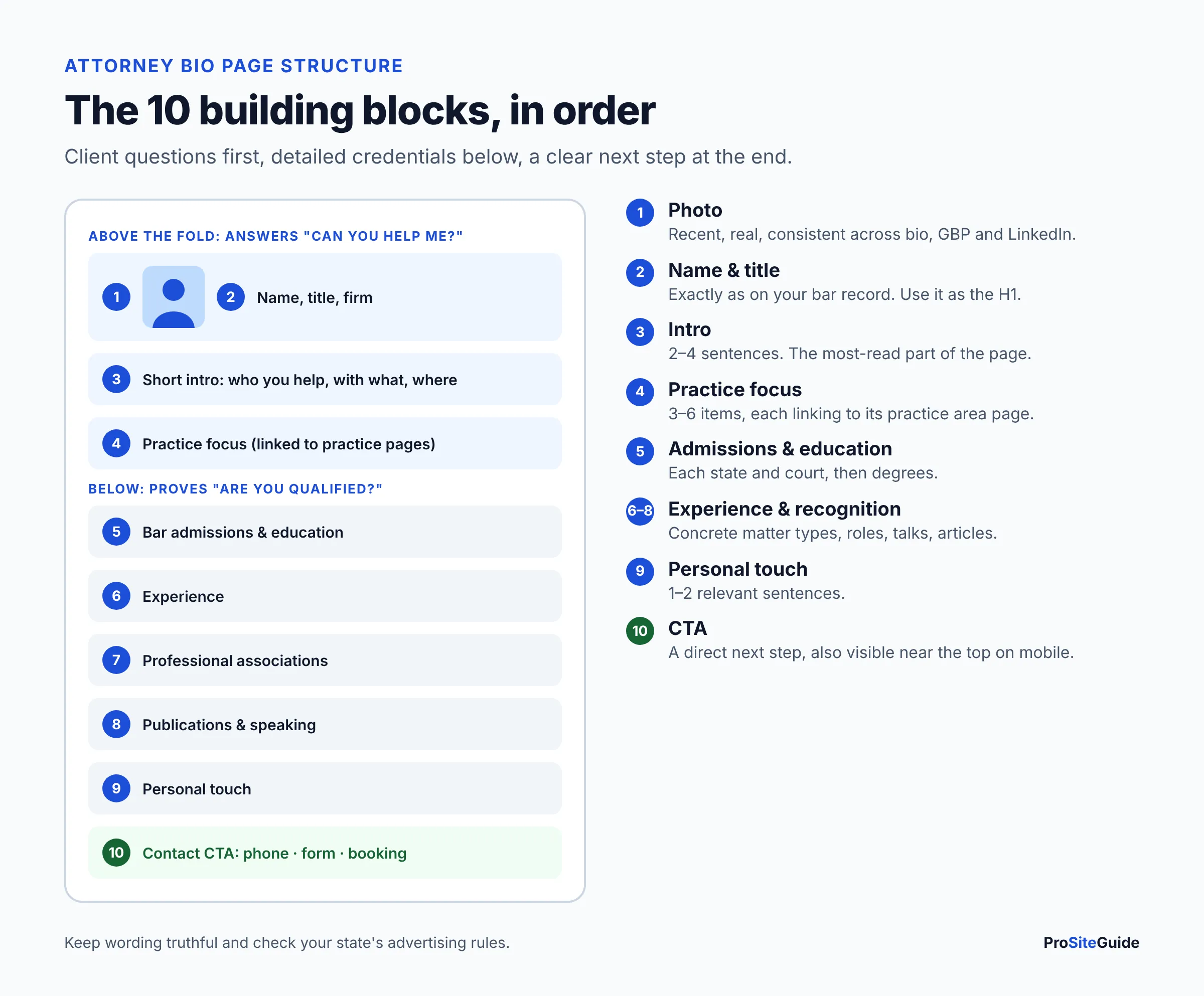
1. Professional photo
Use a recent, well-lit headshot that looks like you do when you walk into a meeting. Photo tips are covered in their own section below.
2. Name, title and firm
Use your name exactly as it appears on your bar record and your Google Business Profile, for example “Jordan A. Reyes, Partner.” Mark the name up as the page’s main heading. If you have a nickname clients use, add it once in the intro.
3. Short intro (two to four sentences)
This is the most-read part of the page. Say who you help, with what problem, and where. Leave out your law school here. A formula that works: [Who you help] + [the problem you solve] + [where] + [how you work].
4. Practice focus
List three to six practice areas or matter types, each linked to its own page. Your practice area pages carry the detailed explanation of each service. The bio only needs to show that you are the person who does that work. This avoids two pages competing for the same search.
5. Bar admissions and education
List each state bar and the federal courts you’re admitted to, with the year if you like. Then your J.D. and undergraduate degree. Readers check this section to confirm you can take their case, so make it easy to scan as a list.
6. Experience
Describe the kinds of matters you handle and the clients you serve. Include prior roles that matter to clients, such as a former prosecutor in a criminal defense bio or in-house counsel in a business bio. Keep it short and concrete. “Represented landlords in eviction and lease disputes since 2015” says more than “extensive experience.”
7. Professional associations
List bar sections, practice-specific associations and committee roles. If you list a directory honor or rating, add one line of plain English on what it is. Many clients won’t know what it means, and some states have rules about how ratings are presented.
8. Publications and speaking
CLE presentations, bar journal articles and community talks show expertise without you having to call yourself an expert. Link to each one where you can. That gives readers and search engines something to verify.
9. Personal touch
One or two sentences about why you practice this kind of law, your community involvement, or a life outside work. Keep it relevant and brief. It should make you approachable, not take over the page.
10. Contact call to action
End with a direct next step: phone, email, or a link to book a consultation. Repeat a compact contact button near the top on mobile. If the CTA links to a form, use a secure contact form with a clear note not to send confidential details before you’ve agreed to represent them.
Attorney bio template (fill-in, with a fictional example)
Copy this template and replace the bracketed text. The example below it uses a fictional attorney and a fictional firm, invented only to show the format. It is not a real lawyer or a real result.
[PHOTO: recent headshot, alt text "[Full name], [title] at [Firm]"]

[Full name as on bar record], [Title]
[Firm name] | [City, State]

INTRO
[I help / Full name helps] [who] with [problem] in [location].
[One sentence on how you work or what clients can expect.]
[Call or book a consultation: phone | link]

PRACTICE FOCUS
- [Practice area 1] (link to practice area page)
- [Practice area 2] (link)
- [Practice area 3] (link)

BAR ADMISSIONS
- [State] State Bar, [year]
- U.S. District Court, [District], [year]

EDUCATION
- J.D., [Law school], [year]
- [Degree], [University], [year]

EXPERIENCE
[2-4 sentences: matter types, client types, relevant prior roles.]

PROFESSIONAL ASSOCIATIONS
- [Association / bar section], [role if any]

PUBLICATIONS & SPEAKING
- "[Title]," [Publication or event], [year] (link)

OUTSIDE THE OFFICE
[1-2 sentences: why you do this work, community, interests.]

CONTACT
[Phone] | [Email or secure form link] | [Office address]
[Book a consultation button]

[Disclaimer if any results or testimonials appear, per your state's rules]
Filled-in example (fictional attorney)
FICTIONAL EXAMPLE. “Jordan A. Reyes” and “Riverbend Family Law” are invented for illustration.
Jordan A. Reyes, Partner
Riverbend Family Law | Springfield, [State]

Jordan Reyes helps parents in [County] County work through divorce,
custody and child support, ideally without a courtroom fight. Clients
get a plan in plain English at the first meeting and a direct line to
Jordan, not a call center.
Call (555) 010-0000 or book a consultation online.

PRACTICE FOCUS
- Divorce and legal separation
- Child custody and parenting plans
- Child support modification
- Mediation

BAR ADMISSIONS
- [State] State Bar, 2014
- U.S. District Court, [District], 2016

EDUCATION
- J.D., [Law school], 2014
- B.A., Psychology, [University], 2011

EXPERIENCE
Jordan has focused on family law since 2014 and handles negotiated
settlements, mediation and contested custody hearings. Before joining
Riverbend, Jordan clerked for a family court judge.

PROFESSIONAL ASSOCIATIONS
- [State] State Bar, Family Law Section, member
- [County] Bar Association

PUBLICATIONS & SPEAKING
- "Parenting Plans for School-Age Children," [County] Bar CLE, 2025

OUTSIDE THE OFFICE
Jordan coaches youth soccer and volunteers at a legal aid clinic
one evening a month.
Notice what the example leaves out: no “best,” no “expert,” no dollar figures, and no promises about outcomes. It still gives clients what they need to decide.
Should an attorney bio be in first person or third person?
Either works. Pick one and use it consistently on the page. Third person (“Jordan helps…”) is the traditional firm style. It is easy to reuse in court filings, conference programs and directories, and it reads well when the firm has several lawyers. First person (“I help…”) feels warmer and more direct, and it suits solos and consumer practices such as family law, criminal defense and personal injury.
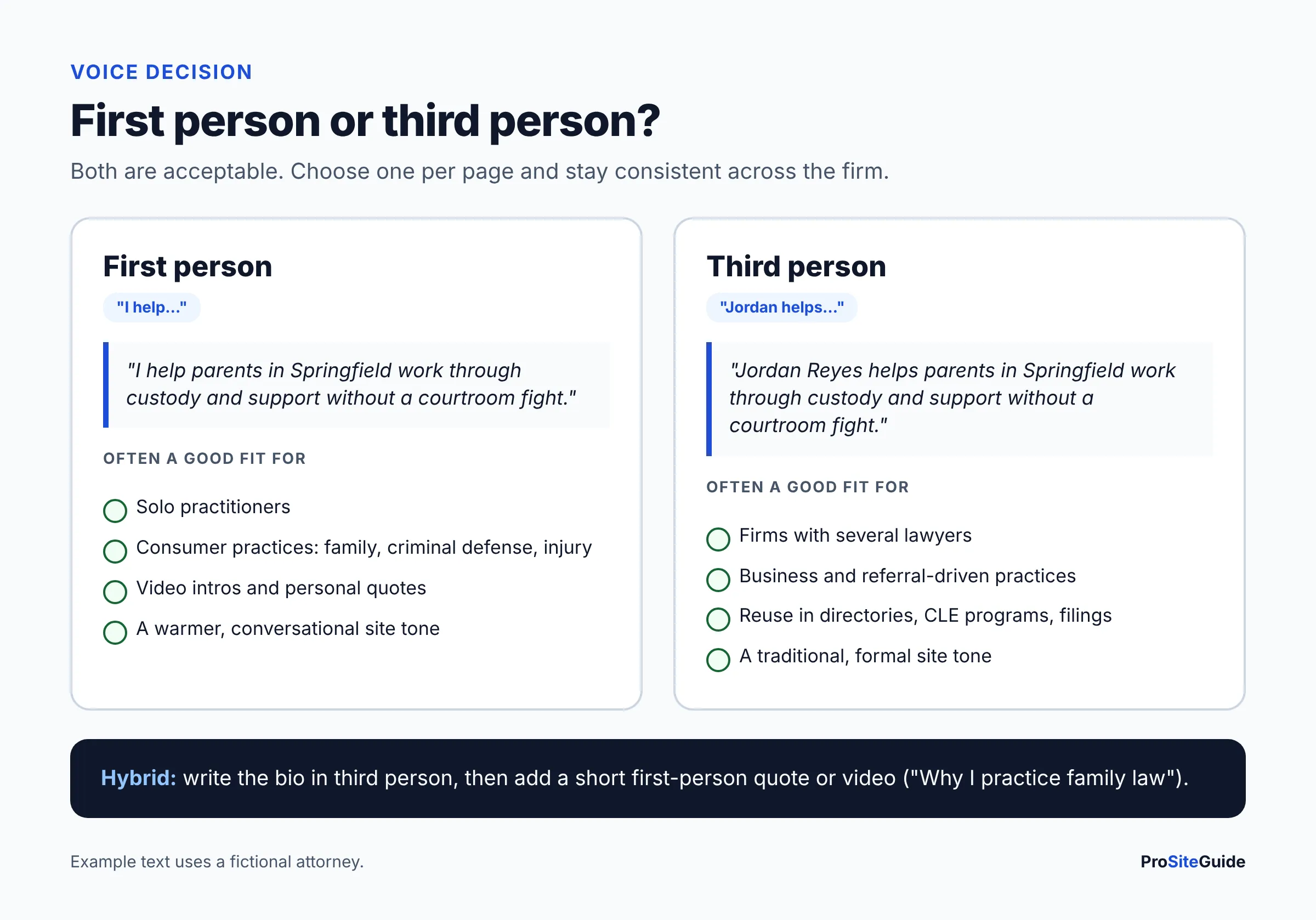
A common hybrid: write the bio in third person and add a short first-person quote or video intro (“Why I practice family law”). Multi-lawyer firms should choose one voice for every bio so the team pages look consistent.
How long should a lawyer bio be?
Most attorney bio pages land between 300 and 700 words. FindLaw’s own bio-writing guide suggests 300 to 500. There’s no ideal word count. Length should follow content: a lawyer with publications, speaking and two decades of experience needs more room than a new associate.
What matters more is that the intro is short (under about 80 words) and the rest is scannable with subheadings and lists. Also keep a 50 to 100 word “short bio” for directories, event programs and the team grid on your About page.
E-E-A-T: why your bio matters for SEO and trust
Your bio page is the clearest way to show Google and readers who stands behind your site’s legal content. Google’s guidance on creating helpful, reliable, people-first content describes E-E-A-T (experience, expertise, authoritativeness and trustworthiness) and says “trust is most important.” It is not a single ranking factor. Google says its systems use a mix of signals that line up with it.
The same page explains that topics affecting people’s health, finances or safety, called “Your Money or Your Life” (YMYL) topics, get extra weight on E-E-A-T. Most legal questions qualify. Three points from the guidance apply directly to attorney bios:
- Who: Google recommends bylines where readers expect them, linked to background on the author. Link your blog posts and practice area pages to the bio of the attorney who wrote or reviewed them.
- Honesty: The guidance says fabricated creator profiles, such as made-up names, AI-generated headshots or false credentials, are deceptive. Use real photos and real, verifiable credentials.
- Why: Content should exist mainly to help visitors, not to attract search traffic. A bio written for clients, not stuffed with “best [city] lawyer” phrases, fits that.
Practical SEO for an attorney profile page is simple. Give the page a descriptive URL (/attorneys/jordan-reyes/) and a title tag like “Jordan A. Reyes | Family Law Attorney in Springfield”. Use one H1 with your name and link the bio to and from the relevant practice pages. The wider local SEO checklist for lawyers covers how bio pages fit into the rest of your local strategy.
Attorney profile page SEO: Person schema and sameAs
Add Person structured data to each bio so search engines can connect the page to the real lawyer. The schema.org Person type includes the properties a bio needs: name, jobTitle, worksFor, alumniOf, memberOf, image, url, knowsAbout and sameAs.
sameAs is the one people skip. Schema.org defines it as the URL of a reference page that “unambiguously indicates the item’s identity.” For a lawyer, that typically means your state bar’s public profile, your LinkedIn page and established legal directory profiles. Only list profiles that are actually yours and kept up to date.
Two details trip people up:
- “Attorney” is not a person type. On schema.org, Attorney sits under LocalBusiness and LegalService, so it describes a firm, not a lawyer, and it is marked as deprecated in favor of LegalService. For the lawyer, use
Person, and pointworksForto your firm’sLegalServiceentity. - ProfilePage is an option. Google’s ProfilePage structured data documentation lists “an employee page on a company website” as a valid use, with the Person as the page’s
mainEntity.
A minimal example for the fictional attorney above:
<script type="application/ld+json">
{
  "@context": "https://schema.org",
  "@type": "ProfilePage",
  "mainEntity": {
    "@type": "Person",
    "name": "Jordan A. Reyes",
    "jobTitle": "Partner, Family Law Attorney",
    "url": "https://www.example.com/attorneys/jordan-reyes/",
    "image": "https://www.example.com/images/jordan-reyes-headshot.jpg",
    "worksFor": { "@type": "LegalService", "name": "Riverbend Family Law" },
    "alumniOf": { "@type": "CollegeOrUniversity", "name": "[Law school]" },
    "knowsAbout": ["Divorce", "Child custody", "Mediation"],
    "sameAs": [
      "https://[state bar profile URL]",
      "https://www.linkedin.com/in/[profile]"
    ]
  }
}
</script>
Firm-level markup (LegalService, address, hours) and how it ties to each attorney is covered in our schema markup guide for law firms. Validate any markup with Google’s Rich Results Test or the Schema Markup Validator before you publish.
Attorney headshot and photo guidance
Your headshot should be recent, professional and approachable. Clients want to recognize you at the first meeting. Practical rules:
- Current: retake it if your appearance has changed noticeably.
- Consistent: use the same background, framing and crop for every lawyer at the firm, and the same photo on your bio, Google Business Profile and LinkedIn.
- Real: no AI-generated or heavily retouched headshots. Google’s guidance specifically lists AI-generated headshots in fabricated profiles as deceptive.
- Light: export at around twice the displayed size in WebP or JPEG, and compress it. A large, uncompressed portrait is a common cause of slow bio pages (see our law firm website speed guide).
- Labeled: use a descriptive file name such as
jordan-reyes-family-law-attorney.jpg, which Google’s image SEO guidance recommends over generic names, and short alt text like “Jordan A. Reyes, family law attorney.” The W3C images tutorial explains that alt text should convey what the image means. Our accessibility guide covers the rest of WCAG.
Advertising rules: what not to say in a lawyer bio
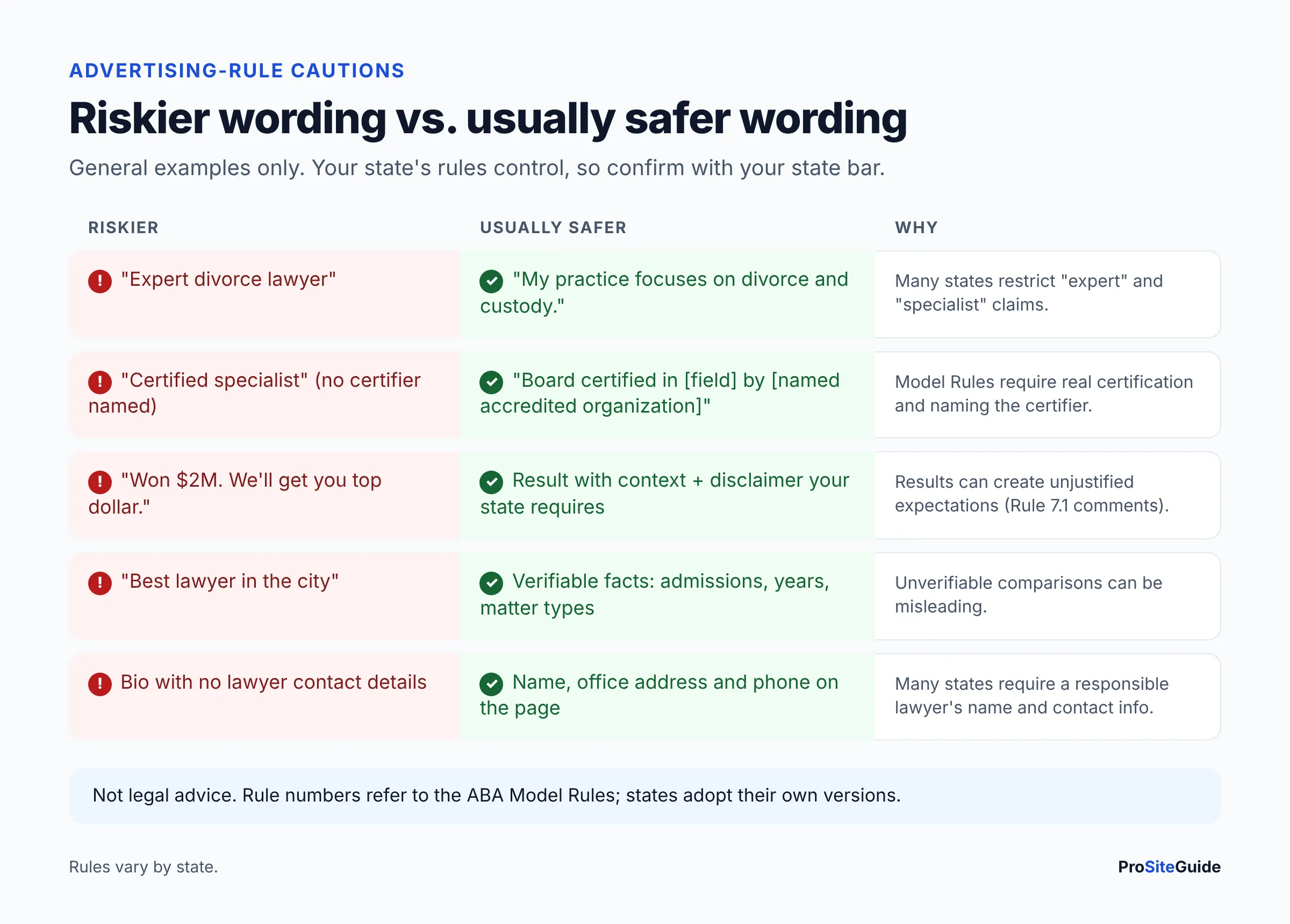
Your bio is a communication about your services, so lawyer advertising rules apply to it. This section is general information. Your state’s version of the rules controls, and the details vary, so confirm with your state bar’s ethics resources or hotline.
Misleading statements (Model Rule 7.1). ABA Model Rule 7.1 says a lawyer shall not make a false or misleading communication about the lawyer or the lawyer’s services, and most states have adopted similar language. Minnesota’s adopted Rule 7.1 is one example. It also covers true statements that mislead because they leave out important facts.
Past results. The comment to Minnesota’s Rule 7.1 explains that truthfully reporting results can still mislead if it leads a reasonable person to form “an unjustified expectation” of the same result without reference to the specific facts. It notes that an appropriate disclaimer or qualifying language may help. Some states require specific disclaimer wording or restrict results and testimonials more tightly. If you mention outcomes, add context and check your state’s rule.
“Specialist,” “expert” and “certified.” The ABA Model Rules (Rule 7.2(c) since the 2018 amendments) restrict stating or implying that you are certified as a specialist unless you are certified by an accredited organization that is named in the communication. States differ a lot here. Minnesota’s Rule 7.2(c), for example, requires a lawyer who claims to be a specialist but isn’t certified by a board-accredited organization to state that in the same paragraph. “Expert” is treated cautiously in many states. “Practice focuses on…” or “concentrates in…” is usually safer phrasing, but confirm locally.
Responsible lawyer and contact information. Many states require advertising to include the name and contact information of at least one responsible lawyer or firm. Minnesota’s Rule 7.2(d) is one example. A bio page with your name, office address and phone number usually covers this.
Link your bio to practice area pages and your Google Business Profile
Your bio should be connected to the rest of your site and to your Google listing. Search engines and clients both follow these links.
- Bio to practice pages: link each practice area in your “Practice focus” list to its page.
- Practice pages to bio: on each practice area page, add an “Attorneys who handle this” block linking back to the right bios.
- Blog posts to bio: add an author or “reviewed by” byline linking to the bio.
- Google Business Profile: Google’s Business Profile guidelines name lawyers as individual practitioners. A lawyer can have their own profile if they work in a public-facing role and can be contacted directly at the verified location during stated hours. Link that profile’s website field to your bio page, not the homepage. Our Google Business Profile guide for law firms covers solo naming rules and when a separate profile makes sense.
- Consistency: keep your name, title, phone and photo the same on the bio, GBP, bar profile and LinkedIn.
Attorney bio page checklist
Use this table to audit each bio before publishing, and again whenever you review the site. For a whole-site audit, use our free law firm website checklist.
| Item | What “done” looks like | Why it matters |
|---|---|---|
| Headshot | Recent, real, compressed, descriptive file name and alt text | Recognition, trust, page speed, accessibility |
| Name and title | Matches bar record and GBP, used as the H1 | Identity and consistency |
| Intro | 2–4 sentences: who you help, with what, where | The most-read part of the page |
| Practice focus | 3–6 items, each linked to its practice page | Relevance and internal linking |
| Bar admissions | Each state and court listed | Clients confirm you can take their case |
| Education | J.D. and undergraduate degree | Expected credential detail |
| Experience | Concrete matter types and prior roles | Shows experience without hype |
| Associations, publications, speaking | Listed and linked where possible | Verifiable expertise signals |
| Personal touch | 1–2 relevant sentences | Approachability |
| Contact CTA | Phone, form or booking link, visible on mobile | Turns readers into consultations |
| Ethics review | No unqualified “expert/specialist,” results have context or disclaimers per state rules | Lawyer advertising compliance |
| Schema | Person (or ProfilePage + Person) with sameAs, validated | Helps search engines identify you |
| Links in | From practice pages, blog bylines and the GBP website field | Authorship and local relevance |
| SEO basics | Clean URL, descriptive title tag and meta description | Visibility for searches on your name |
| Review date | Checked at least twice a year | Admissions, roles and photos change |
Common attorney bio mistakes
- Opening with law school. Put the client’s problem first and credentials second.
- A wall of text. Use headings and lists so people can scan.
- Legalese. “Represents clients in matters involving…” says less than plain English.
- No way to act. A bio without a phone number or booking link is a dead end.
- Copying another lawyer’s bio. It is easy to spot, and it does nothing to set you apart.
- Outdated details. A former firm, an old photo or a lapsed membership erodes trust.
- Generic team template. If your theme forces every bio into a tiny card, consider one of the WordPress themes for law firms with proper attorney profile layouts.
FAQ
What should be included in an attorney bio?
Include a professional photo, your name and title, a short client-focused intro, practice areas, bar admissions, education, relevant experience, associations, publications or speaking, a brief personal note and clear contact details.
Can I call myself an expert or specialist in my bio?
Be careful. The ABA Model Rules restrict implying specialist certification unless you hold it from an accredited organization that you name, and many states limit “expert” and “specialist” further. Check your state’s rules or ask your state bar’s ethics hotline.
Can I list case results on my bio page?
Often yes, but with care. Results must be truthful and presented so they don’t create unjustified expectations. Many states expect context or a disclaimer, and some have specific requirements. Confirm your state’s rule first.
How often should I update my attorney bio?
Review it at least twice a year and whenever something changes: a new bar admission, role, publication, office or photo.
Does every attorney need a separate bio page?
Yes, if they meet clients. A dedicated page per lawyer gives each person a URL for name searches, bylines, schema and a Google Business Profile link. A team grid alone can’t do that.
Should I add a video to my bio?
A short, first-person intro video can help clients feel they know you before calling. Add captions, keep it brief, and keep the key text on the page so it can be read and indexed.
Next steps
Start with the intro. Rewrite your first two sentences so they say who you help and with what. Then work down the template, run the checklist, add Person schema with sameAs, and link the bio from your practice pages and Google Business Profile. Before publishing, have someone check the wording against your state’s advertising rules. If you’re building out the rest of the site, our Start Here guide shows what to tackle next.
Want this handled for you? ProSiteGuide builds and maintains fast, secure WordPress sites for law firms. Book a free consultation.
Sources
- Google Search Central: Creating helpful, reliable, people-first content
- Google Search Central: ProfilePage structured data
- Google Search Central: Google Images SEO best practices
- Google Business Profile Help: Guidelines for representing your business
- Schema.org: Person
- Schema.org: Attorney
- Minnesota Rules of Professional Conduct, Rule 7.1
- Minnesota Rules of Professional Conduct, Rule 7.2
- W3C WAI: Informative images tutorial
- FindLaw: Five steps for writing an engaging bio