Quick answer: Practice area pages rank and convert when each page covers one service in one place, answers the questions a prospective client has before calling, and makes the next step obvious. Use a consistent structure: a clear H1 with the service and city, an intro that says who you help and where, your process, how fees work, attorney credentials, FAQs and a contact form. Then keep every claim within your state’s attorney advertising rules.
This guide covers that structure section by section. It also covers when to split a page into sub-pages, local signals, schema markup, the ethics rules that apply to marketing copy, and how to track results in Google Search Console.
Key takeaways
- One page per practice area you actively handle. Add sub-pages only where clients search for a distinct problem.
- The first screen should say what you handle, for whom, and where, and it should show a phone number or form.
- Google has no preferred word count. Answer real client questions instead of padding to a target length.
- FAQ rich results have been limited to well-known government and health sites since August 2023. Write FAQs for readers, not for search snippets.
- “Specialist”, “expert”, results and testimonials are regulated in many states. Check your state bar’s rules before you publish.
What is a practice area page?
A practice area page is a page on a law firm website that describes one type of legal work the firm handles, such as DUI defense, probate or workers’ compensation. It is usually the page that matches a prospective client’s search (“probate lawyer in Dayton”), so it often decides whether that person calls you or goes back to the results.
A good practice area page has three jobs:
- Answer. Confirm that you handle this kind of matter, in this location, and explain in plain words what usually happens next.
- Reassure. Show who the lawyer is, how you work and what the client can expect, without hype or promises.
- Convert. Make contact easy: a visible phone number, a short form and a clear note on what happens after they reach out.
Most weak practice pages fail at job one. They describe the area of law in general terms (“Family law covers many issues…”) and never say who the firm helps or where. Searchers and search engines both need that information near the top.
What should a law firm practice area page include?
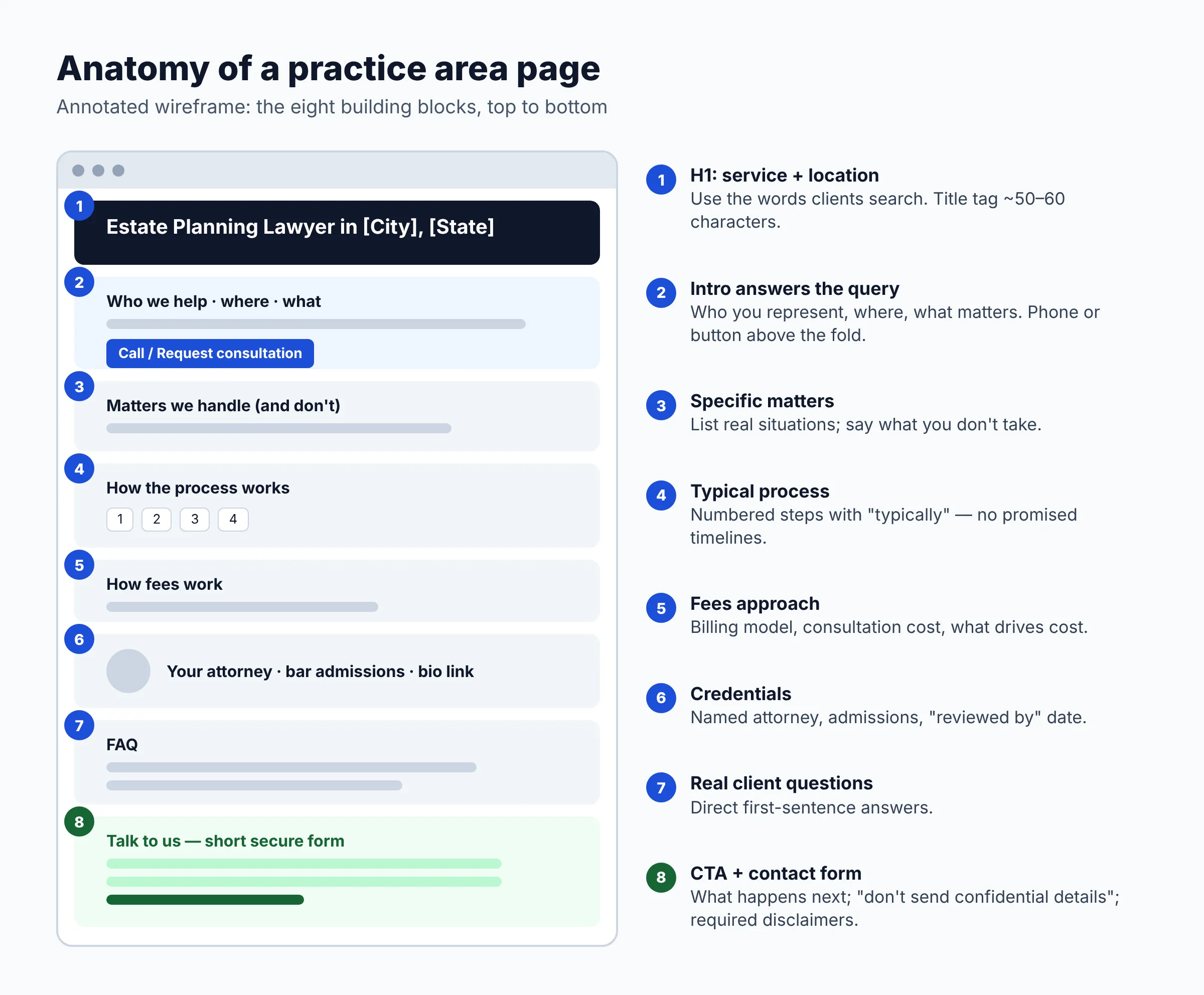
A law firm practice area page should include eight building blocks, in roughly this order. The wireframe below shows how they fit on the page.
1. H1 with the service and location
Name the service the way clients search for it, plus the city or region you serve. “Estate Planning Lawyer in Columbus, Ohio” beats “Wills & Trusts Solutions”. Your SEO title (the title tag) can be close to the H1 but shorter, roughly 50–60 characters, so it is less likely to be cut off in results.
2. An intro that answers who, where and what
The first two or three sentences should say who you represent, where, and what kinds of matters. If you only represent one side (employees, not employers; defendants, not plaintiffs), say so. This filters out poor-fit calls and helps the right people stay. Put a phone number or a “Request a consultation” button in or right next to this block.
3. Matters you handle (and don’t)
List the specific situations covered, such as “contested and uncontested divorce, custody modifications, relocation disputes”. Add a line on what you don’t take. Specific lists also give you natural wording for the variations people search for, without stuffing keywords.
4. How the process works
Prospective clients worry about the unknown. A numbered list of typical steps (first consultation, documents to gather, filing, negotiation, hearing) is one of the most reassuring things you can add. Use “typically” and “often” and note that timelines depend on the facts and the court.
5. How fees work
You don’t have to publish prices, but you should explain how billing works for this service: flat fee, hourly, contingency, or a mix. Say whether the first consultation is free or paid, and what affects cost. If you work on contingency, check your state’s rules on how you describe fees and costs in advertising.
6. Attorney credentials
Show the lawyer who handles these matters: name, photo, bar admissions, years in practice, relevant memberships and a link to the full bio. Google’s guidance on creating helpful content asks “who created this?” and recommends bylines that link to the author’s background. For legal topics, which Google treats as “Your Money or Your Life” subjects, that trust signal matters even more. A “Written by” or “Reviewed by [attorney name]” line with a date works well.
7. FAQs
Add 4–8 questions that callers actually ask, written the way they ask them. Start each answer with a direct one-sentence response, then add detail. Your intake staff or receptionist are the best source of questions.
8. Call to action and contact form
End with a clear next step and a short form (name, phone, email, a brief description). Say what happens after they submit, such as “We reply within one business day”, but only if that’s true. Warn people not to send confidential details through the form. Our guide to a secure contact form for law firm websites covers encryption, spam filtering and disclaimer wording.
Example outline: a fictional estate planning page
Illustrative only. “Harbor & Pine Law” is a made-up firm and does not refer to any real practice.
- SEO title: Estate Planning Lawyer in Columbus, OH | Harbor & Pine Law
- H1: Estate Planning Lawyer in Columbus, Ohio
- Intro: We help individuals and families in Franklin County prepare wills, trusts and powers of attorney. Flat-fee packages. Call (555) 010-0000 or request a consultation.
- H2: Estate planning matters we handle: wills, revocable living trusts, powers of attorney, health care directives, plan updates after marriage or divorce. (We do not handle tax litigation.)
- H2: How the process works: 1) 30-minute consultation, 2) questionnaire and documents, 3) draft review, 4) signing meeting, 5) periodic reviews.
- H2: What does estate planning cost? Flat fees by package; what changes the price; what the consultation costs.
- H2: Your attorney: photo, bar admission, years in practice, link to bio.
- H2: Estate planning FAQ: Do I need a trust or just a will? What happens if I die without a will in Ohio? How often should I update my plan?
- H2: Talk to us about your plan: short form, phone, office hours, “don’t send confidential details” note, required disclaimers.
- Related links: Probate administration page, Medicaid planning page, attorney bio, contact page.
Should you have one page per service or a hub and spokes?
Have one page for each practice area you actively handle, and add sub-pages (spokes) only where clients search for a distinct problem that needs its own answer. A single “Services” page that lists everything can’t match specific searches or answer specific questions.
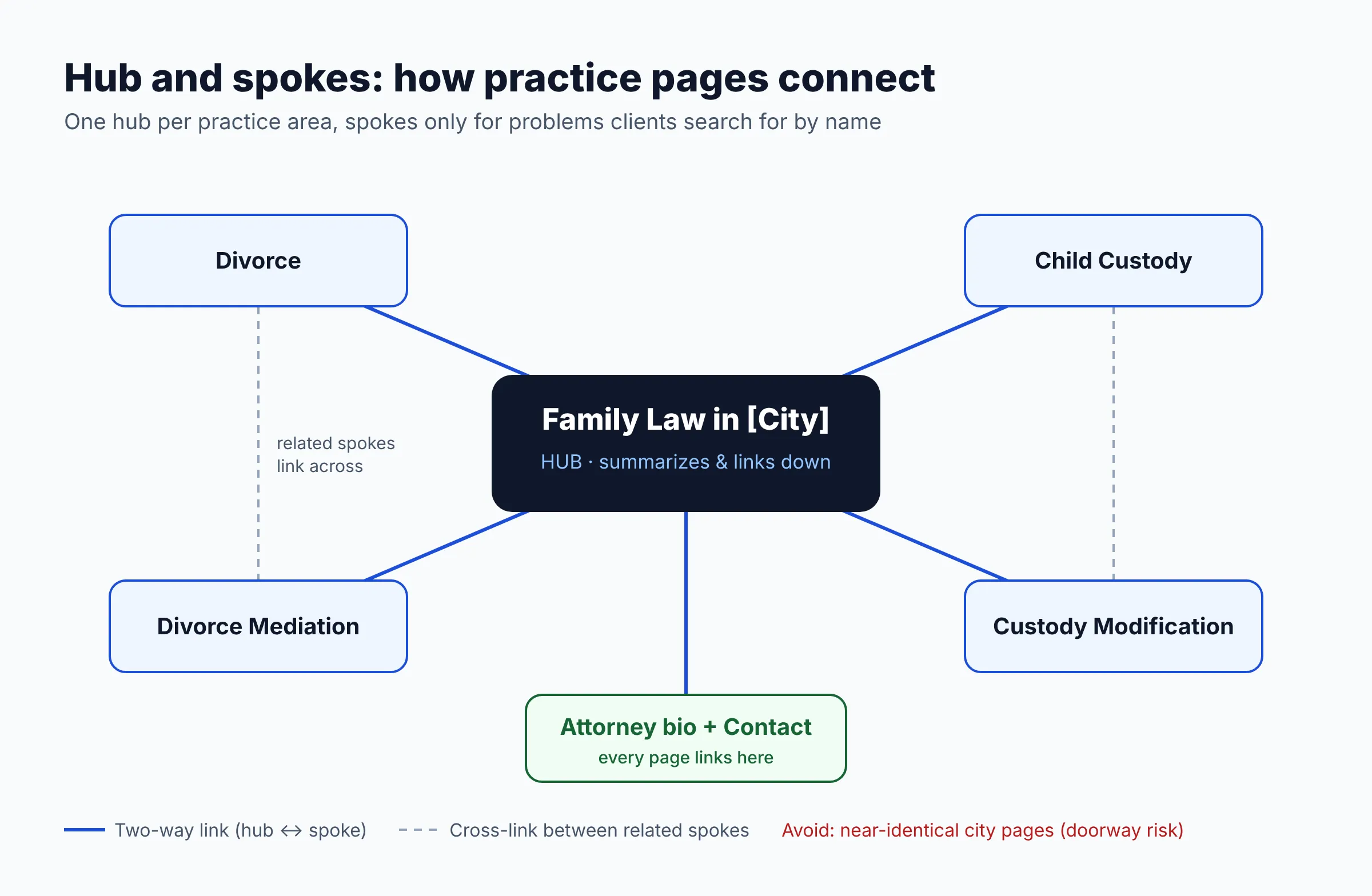
A hub-and-spoke setup looks like this. The hub is “Family Law in [City]”. It summarizes each service and links down to spokes such as “Child Custody” and “Divorce Mediation”. Each spoke links back to the hub and across to closely related spokes.
Split a topic into its own page when:
- people search for it by its own name (e.g. “DUI lawyer” vs “criminal defense lawyer”);
- the process, fees or questions differ enough to fill a useful page; and
- you actually take those cases regularly.
Be careful with city pages. Google’s spam policies list “multiple domain names or pages targeted at specific regions or cities that funnel users to one page” as doorway abuse. Swapping the city name on otherwise identical pages fits that description. Create a location page only where you have a real office or genuinely serve that area with something specific to say, such as the local court, office directions or procedures.
How do local signals help practice area pages rank?
Local signals tell search engines where you practice, so your page can show for “near me” and city searches. The basics:
- Name the city and region naturally in the H1, intro and where relevant (court names, county). Don’t repeat it in every sentence.
- Keep your name, address and phone consistent across your website footer, contact page, schema markup and Google Business Profile.
- Follow Google Business Profile rules. Google’s Business Profile guidelines say the business name must match the real-world name (no added keywords), and a lawyer shouldn’t create multiple profiles for different practice areas. Practice areas belong on your website and in your profile’s categories and description.
- Link profile and pages sensibly. A location’s profile should point to the page that represents that office, usually the home page or a location page.
Our guide to Google Business Profile for law firms covers setup, categories and reviews in detail.
How do you write for search intent and AI answers?
Write for the person behind the search, and lead each section with a direct answer. Search intent means what the searcher is trying to do. Someone typing “Columbus DUI lawyer” wants to hire someone. Someone typing “what happens at a DUI arraignment” wants information first. A practice page should serve the hiring intent. Informational questions can go in its FAQ or in linked articles.
On AI answers, Google’s documentation on AI features and your website says there are no additional requirements to appear in AI Overviews or AI Mode. The page must be indexed and eligible for a snippet, and normal SEO best practices apply. Google says you don’t need special markup or “AI text files”. In practice, that means:
- Use question-style headings that match real searches (“How much does a divorce cost in Ohio?”).
- Answer in the first sentence under each heading, so the passage makes sense on its own.
- Define legal terms in one plain sentence (“Probate is the court process that…”).
- Keep key information in text, not only in images or videos.
- Don’t pad. Google says it has no preferred word count. Simple services may need 800 words, complex ones far more.
How should practice area pages link to each other?
Every practice page should be reachable from your main navigation or a practice areas hub, and should link to its attorney bio, related practice pages and the contact page. Google’s AI features guidance names internal links as a way to make content easy to find. Some tips:
- Use descriptive anchor text (“our probate administration page”), not “click here”.
- Link from blog posts to the relevant practice page when a post answers a related question.
- Link attorney bios back to the practice pages each lawyer handles.
- Avoid orphan pages, meaning pages that nothing else on your site links to.
What schema markup should a law firm practice area page use?
Use LegalService structured data for your firm (name, address, phone, URL), usually set site-wide or on the home and contact pages, and keep it consistent with what’s visible on the page. Schema.org defines LegalService as “a business that provides legally-oriented services, advice and representation, e.g. law firms”. It is a subtype of LocalBusiness.
Some points that many guides miss:
- The Attorney type is deprecated. Schema.org’s Attorney page says, “This type is deprecated – LegalService is more inclusive and less ambiguous.” Use LegalService for the firm and a Person (with jobTitle) for individual lawyers.
- Google doesn’t guarantee features. Google’s local business structured data docs require
nameandaddress, recommend using the most specific LocalBusiness subtype, and state that valid markup doesn’t guarantee a rich result. - FAQ rich results are mostly gone for law firms. On August 8, 2023, Google announced that FAQ rich results would “only be shown for well-known, authoritative government and health websites.” Existing FAQ markup does no harm, but don’t expect it to produce FAQ dropdowns in results.
- No self-serving review stars. Google’s review snippet rules make pages with LocalBusiness or Organization markup ineligible for star ratings when the business controls the reviews about itself.
- Mark up only what’s visible. Google’s structured data policies say not to mark up content readers can’t see, and misleading markup can lead to a manual action.
A minimal example for the fictional firm above (validate your own with Google’s Rich Results Test or the Schema Markup Validator):
{
  "@context": "https://schema.org",
  "@type": "LegalService",
  "name": "Harbor & Pine Law",
  "url": "https://www.example.com/",
  "telephone": "+1-555-010-0000",
  "address": {
    "@type": "PostalAddress",
    "streetAddress": "100 Example St, Suite 200",
    "addressLocality": "Columbus",
    "addressRegion": "OH",
    "postalCode": "43215",
    "addressCountry": "US"
  },
  "areaServed": "Franklin County, Ohio",
  "employee": {
    "@type": "Person",
    "name": "Jordan Example",
    "jobTitle": "Attorney"
  }
}
On WordPress, an SEO plugin usually outputs the organization schema for you. Check that it uses LegalService and the same name, address and phone as your footer and Business Profile.
Which attorney advertising rules apply to practice area pages?
Your website is a communication about your services, so your state’s version of the attorney advertising rules applies to every practice page. The ABA Model Rules of Professional Conduct are the starting point, but they are only a model. Each state adopts its own version, often with changes. What follows is general information. Check your own state bar’s rules and ethics opinions, and ask its ethics hotline if you’re unsure.
- Rule 7.1 (false or misleading communications): bars false or misleading statements about a lawyer or the lawyer’s services. Common risk areas include past results, comparisons with other lawyers and wording that creates unjustified expectations.
- Rule 7.2 (specific rules): since the ABA’s 2018 amendments, this rule covers specialization. Lawyers can generally say they focus on a field if it’s not misleading, but a “certified specialist” claim requires certification by an approved organization that is named in the communication. The rule also requires the name and contact information of a lawyer or firm responsible for the content.
- Rule 7.3 (solicitation): mostly concerns targeted, live person-to-person contact. Per this summary of the 2018 amendments, communications to a general audience, such as a website, aren’t solicitation under the model rule. Some states are stricter.
States differ. Minnesota’s Rule 7.2, for example, says a lawyer “shall not state or imply that a lawyer is a specialist or certified as a specialist” except under specific conditions, including naming the certifying organization or stating in the same paragraph that the lawyer isn’t certified by an accredited organization. Other states have their own rules on disclaimers, testimonials, past results and labels such as “Attorney Advertising”.
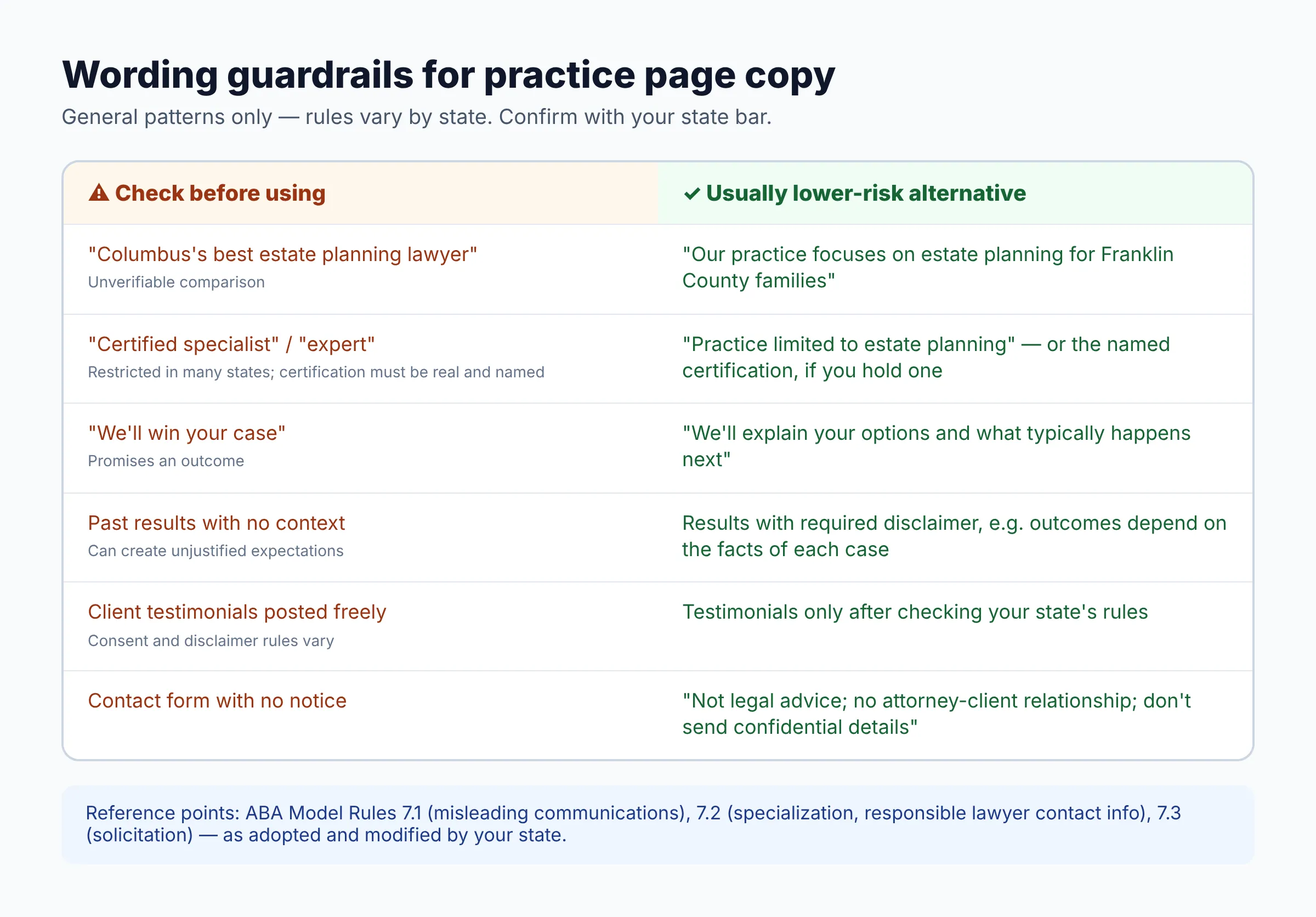
Practical guardrails for copy:
- Avoid “specialist”, “expert” and “best” unless your state clearly allows the claim and you can back it up. “Focuses on” or “practice limited to” is often safer, but confirm locally.
- Never promise outcomes. Add “results depend on the facts of each case” where you discuss past matters, and check whether your state requires a specific disclaimer.
- Before using testimonials or reviews, check your state’s rules on consent, disclaimers and whether they’re allowed at all.
- Include a “this page is not legal advice and doesn’t create an attorney-client relationship” note near the form.
- Keep a dated copy of each page version if your state requires you to retain advertising records.
How do you measure whether practice area pages are working?
Use Google Search Console for visibility and your analytics and intake records for conversions. Search Console’s Performance report shows clicks, impressions, click-through rate and average position, and you can group the data by page and query. Google says AI Overviews and AI Mode traffic is included in that report under the “Web” search type.
- In Search Console, open Performance, filter by the practice page URL and note impressions, clicks and the top queries.
- Check whether the queries match the page’s intent. If a page gets impressions for a service you don’t offer, clarify the copy.
- If impressions are high but CTR is low, rewrite the title tag and meta description so they state the service, place and next step.
- Track phone clicks and form submissions as conversions in your analytics tool, per page.
- Ask intake to record how each new client found you, then compare consults and retained clients by page each quarter.
- Review high-value pages at least yearly, and right away when the law, fees or attorneys change.
Practice area page checklist
Use this checklist before publishing or when auditing an existing page. For the rest of the site, see our free law firm website checklist.
| Item | What “done” looks like | Why it matters |
|---|---|---|
| One service per page | Page targets a single practice area (or one clear sub-topic) | Matches specific searches; avoids competing pages |
| H1 + SEO title | Service + city; title roughly 50–60 characters | Relevance and a clean search listing |
| Intro | Who, where and what in 2–3 sentences; phone or button visible | Answers the searcher immediately |
| Matters handled | Specific list, plus what you don’t take | Fewer poor-fit leads; natural keyword variety |
| Process | Numbered typical steps with “typically” language | Reduces anxiety; avoids implied promises |
| Fees | Billing model, consultation cost, cost drivers | Answers a top question before the call |
| Attorney credentials | Named lawyer, bar admissions, bio link, reviewed-by date | Trust for a “Your Money or Your Life” topic |
| FAQs | 4–8 real client questions, direct first-sentence answers | Long-tail searches and AI answer passages |
| CTA + form | Short secure form, response expectation, confidentiality note | Turns visits into consultations |
| Local consistency | Name, address and phone match footer, schema and Business Profile | Clear local signals |
| Internal links | Links to hub, bio, related services and contact page; descriptive anchors | Discovery and context |
| Schema | LegalService (not Attorney); only visible info; validated | Clear entity data; policy compliance |
| Ethics review | No unverified “specialist/expert/best”; required disclaimers present | State bar compliance |
| Measurement | Search Console baseline noted; calls and forms tracked | Shows what to fix next |
Speed and security also affect conversions: a slow or flagged site loses visitors before they read a word. See the law firm website security checklist if you’re on WordPress.
FAQ
How long should a practice area page be?
As long as it takes to answer a prospective client’s main questions, and no longer. Google says it has no preferred word count. A narrow service may be well covered in under 1,000 words, while a complex area with many sub-issues may need more, or a hub with spokes.
Should I still add FAQ schema to practice area pages?
It’s optional. Since August 2023, Google shows FAQ rich results only for well-known, authoritative government and health sites, so law firm FAQ markup is unlikely to produce dropdowns in results. Google says existing markup causes no problems. The visible FAQ section itself is still worth having.
Can I call myself a specialist on my practice area page?
It depends on your state. Under the ABA model rule, claiming to be a certified specialist requires certification by an approved organization that you name. Many states have their own conditions or disclaimers. Check your state bar’s version of Rule 7.2 before using “specialist”, “certified” or “expert”.
Do I need separate pages for each city I serve?
Only if each page has genuinely distinct, useful content, such as a real office or local court information. Near-identical pages with only the city name changed can count as doorway pages under Google’s spam policies.
Should I list my fees on the page?
You don’t have to list prices, but you should explain how you bill for that service and what the first consultation costs. That answers one of the most common pre-call questions. Confirm any fee-advertising rules in your state, especially for contingency fees.
Next steps
- List the practice areas that bring in most of your revenue and start with those pages.
- Draft each one using the eight building blocks and the checklist above.
- Have the responsible attorney review the copy against your state bar’s advertising rules.
- Check that your name, address and phone match your Business Profile, and that LegalService schema is in place.
- Record a Search Console baseline, then review each page quarterly.
Want this handled for you? ProSiteGuide builds and maintains fast, secure WordPress sites for law firms. Book a free consultation.
Sources
- Google Search Central: Creating helpful, reliable, people-first content
- Google Search Central: AI features and your website
- Google Search Central: Spam policies (doorway abuse)
- Google Search Central Blog: Changes to HowTo and FAQ rich results (August 2023)
- Google Search Central: Local business structured data
- Google Search Central: Review snippet structured data
- Google Search Central: General structured data guidelines
- Google Business Profile Help: Guidelines for representing your business on Google
- Search Console Help: Performance report (Search results)
- Schema.org: LegalService
- Schema.org: Attorney (deprecated)
- Minnesota Rules of Professional Conduct, Rule 7.2
- IP Ethics Law: ABA approves changes to attorney advertising ethics rules