Quick answer: For most small law firms, the best domain registrar is Cloudflare Registrar if your DNS will live at Cloudflare, or Porkbun if you want flat, low pricing with no strings attached. Both sell a .com for roughly $11–$12 a year with the same price at renewal, include free WHOIS privacy, and support security-key two-factor login. Whichever you pick, the account must be in the firm’s name, with auto-renew and registrar lock switched on.
Key takeaways
- Renewal price matters more than the first-year price. You will renew the firm’s domain for decades, so a $0.01 promo followed by a $19.99 renewal costs more than a flat $11.81.
- Cloudflare and Porkbun price .com at or near cost, with renewal equal to registration. Hostinger and others lead with promos that renew higher.
- .law is not sold everywhere. Porkbun, Hostinger, Namecheap and GoDaddy offer it; it did not appear on Cloudflare’s published TLD list when we checked.
- The firm, not the web developer, should own the registrar account. Give vendors delegated access or DNS records, never the domain itself.
- Turn on auto-renew, registrar lock and app- or key-based 2FA the day you register.
How we compared these registrars
We have not run hands-on tests of these registrars, and there are no scores in this article. The comparison is based on each vendor’s official pricing pages, help documentation and terms, opened in November 2026. Where a vendor’s site blocked automated access and we could not confirm a figure, we say so instead of guessing. Domain prices change often (and the wholesale .com price itself rose from $10.26 to $10.97 on November 1, 2026), so confirm the price at checkout.
Two terms come up repeatedly. A registrar is the company you pay to hold your domain on record. A registrar lock (also called transfer lock) is a setting that blocks the domain from being moved to another registrar until you switch it off.
Best domain registrars for law firms at a glance
Prices below are US dollars for a one-year, non-premium registration, as of November 2026.
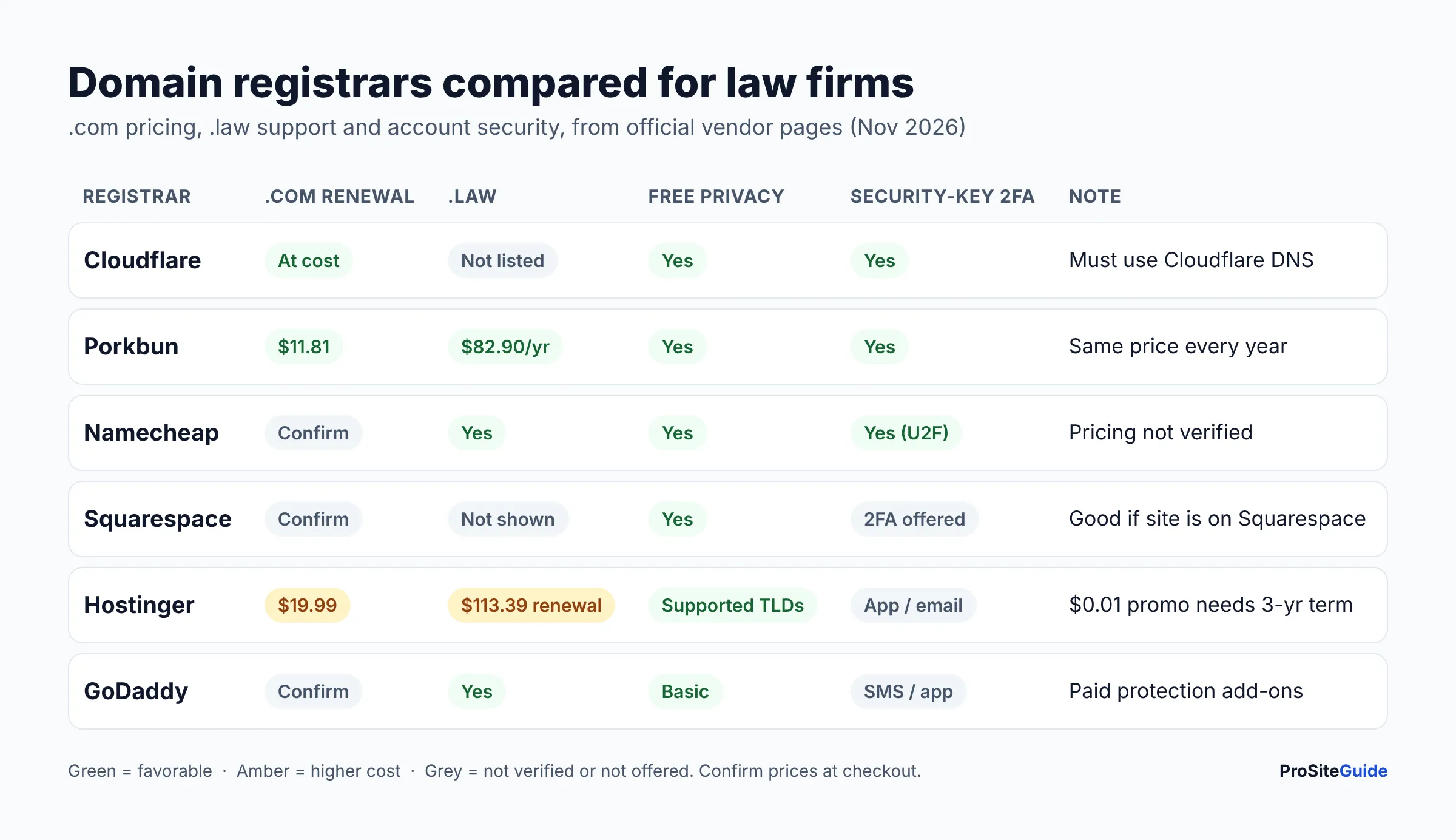
| Registrar | .com first year | .com renewal | .law offered? | WHOIS privacy | 2FA options | Best for |
|---|---|---|---|---|---|---|
| Cloudflare Registrar | At cost (no markup) | At cost | Not on published TLD list | Free redaction | App, security key, email | Firms using Cloudflare DNS |
| Porkbun | $11.81 | $11.81 | Yes, $82.90/yr | Free | App, security key, passkeys | Flat pricing, .law at a fair renewal |
| Namecheap | $12.08 on sale (regular $15.98) | $19.98 | Yes, $105.98/yr (registry verification) | Free, on by default | App or U2F key (one at a time) | Familiar dashboard, many TLDs |
| Squarespace Domains | “From $10” (advertised) | Confirm at checkout | Not shown on official pages | Free for eligible domains | Yes | Firms whose site is on Squarespace |
| Hostinger | $0.01 with a 3-year term (promo) | $19.99 | Yes, $80.99 then $113.39/yr | Free for supported extensions | App or email | Bundling with Hostinger hosting |
| GoDaddy | Not verified (site blocked us) | Not verified | Yes (registry verification) | Basic privacy advertised as free | SMS or app (2SV) | Firms already invested in GoDaddy |
Which domain registrar is best for each type of law firm?
Cloudflare Registrar: best if your DNS is (or will be) on Cloudflare
Cloudflare is the cheapest place to keep a .com long term because it does not mark up prices. Its Registrar page says registration, transfer and renewal prices are “always at or below what registries and ICANN charge us.” With the new $10.97 wholesale .com fee plus the $0.20 ICANN fee, that works out to roughly $11.17 a year, though Cloudflare shows the exact figure in its dashboard. Domains are locked by default, WHOIS redaction is free and DNSSEC is one click.
The catch is important. Cloudflare’s Registrar FAQ states that “all domains on Cloudflare Registrar use Cloudflare nameservers.” If your developer or host needs different nameservers, you would have to move the domain elsewhere. You also cannot buy a domain here and park it with outside DNS. And when we checked Cloudflare’s TLD policies list, .attorney and .lawyer were listed but .law was not.
- Pros: at-cost pricing with no renewal jump; lock on by default; security-key 2FA and the option to require 2FA for every account member.
- Cons: you must use Cloudflare DNS; no .law on its published list; non-refundable registrations.
If you are weighing Cloudflare’s wider services (CDN, firewall), see our guide to using Cloudflare for a law firm website.
Porkbun: best overall for flat pricing and .law
Porkbun’s domain price list shows .com at $11.81 for registration, renewal and transfer, with no first-year teaser. It also lists .law at $82.90, .attorney at $49.95 and .lawyer at $56.13, each the same price at renewal. Its .com page lists free WHOIS privacy, free Let’s Encrypt SSL, DNS powered by Cloudflare, email forwarding and URL forwarding.
Unlike Cloudflare, Porkbun lets you point nameservers anywhere. For security, it supports app-based 2FA and physical security keys (WebAuthn), plus passkeys.
- Pros: same price every year; sells .law with no renewal jump; free privacy and SSL; use any DNS host.
- Cons: a few cents above Cloudflare for .com; no hosting or email bundle (which can also be a plus).
Namecheap: a solid, familiar alternative
On Namecheap‘s own pricing page (checked November 18, 2026), a .com costs $12.08 for the first year on sale (regular $15.98) and renews at $19.98 a year, plus ICANN’s $0.20 fee. Legal extensions cost more than at Porkbun: .law is $105.98, .attorney $65.98 and .lawyer $74.48 a year. Namecheap runs frequent promotions, so check the cart total and the renewal price before paying. Its help center does confirm the essentials. A free Domain Privacy subscription is added to every registration, renewal and transfer for eligible extensions and is on by default. 2FA comes as an authenticator app or U2F security key, one method at a time. You can set or release registrar lock under Sharing & Transfer. Namecheap also sells .law under the registry’s eligibility rules.
- Pros: free privacy on by default; security-key 2FA; wide extension choice including .law.
- Cons: .com renews at $19.98, well above Porkbun or Cloudflare; .law, .attorney and .lawyer cost more than at Porkbun; expect add-on offers at checkout, so read the cart before paying.
Choosing Namecheap? Search for your firm’s domain at Namecheap (affiliate link: we may earn a commission at no extra cost to you). Our step-by-step Namecheap registration guide shows which checkout extras to skip and how to lock down the account.
Squarespace Domains: best if your website is on Squarespace
Squarespace took over the former Google Domains customers. Its domain page advertises domains “for only $10” and says WHOIS privacy, SSL, DNSSEC, email forwarding and two-factor authentication are included. It also keeps a domain activity log showing changes by “domain owners and managers,” which is useful when a vendor has access. The page did not list an exact .com renewal price or .law availability, so confirm both at checkout.
- Pros: all-in pricing with privacy and security included; activity log; easy if the site is on Squarespace.
- Cons: renewal price and .law support not published on the pages we opened.
Hostinger: fine if you host there, but watch the renewal
Hostinger’s domain search page showed a .com at $0.01 for the first year, but only “when you choose a 3-year term,” with renewal at $19.99 a year and transfers at $9.99. Its .law page lists $80.99 for the first year, then $113.39 a year at renewal. Privacy protection is free “for supported extensions,” and account 2FA uses an authenticator app or email codes.
- Pros: one dashboard for hosting and domain; low promo price.
- Cons: renewals are much higher than Cloudflare or Porkbun; .law renews about $30 more per year than at Porkbun; no security-key 2FA listed.
For the hosting side, see our best hosting for law firm websites comparison.
GoDaddy: workable, but the upsells add up
GoDaddy’s pricing pages blocked our automated requests, so we cannot quote its current .com price. Confirm it, and especially the renewal price, before buying. Its help center confirms that you can lock or unlock a domain from Domain Settings and that two-step verification works by SMS or authenticator app. GoDaddy also sells a separate Domain Protection feature that adds identity checks. Before you can transfer away, you must turn off Domain Privacy and set Domain Protection to none. Its help page also notes that domains bought in a bundle are locked for 120 days after registration. GoDaddy sells .law to eligible legal professionals.
- Pros: large company, phone support, offers .law.
- Cons: pricing not verified here; paid protection tiers and add-ons; extra steps and a 120-day lock on bundled domains.
Can a law firm register a .law domain anywhere?
No. Only certain registrars sell .law, and the registry checks eligibility after purchase. Per GoDaddy’s .law help page and Namecheap’s requirements page, eligible registrants are licensed lawyers, law firms, courts, law schools and legal regulators. Inactive or non-practicing lawyers do not qualify. A domain that fails verification can be suspended or deleted without a refund, so register it in the exact legal name of the lawyer or firm.
Whether .law is worth it compared with a .com is a separate question. We cover that in .law vs .com vs .attorney domains for law firms.
Who should own a law firm’s domain account?
The firm should. The domain is the address for your website and, more importantly, your email. Whoever controls the registrar account controls both. Under ICANN’s Transfer Policy, the authorization code needed to move a domain goes to the “Registered Name Holder.” If that holder is a former developer, a marketing agency or a departed associate, getting your domain back can take weeks, and in the meantime you have no access.
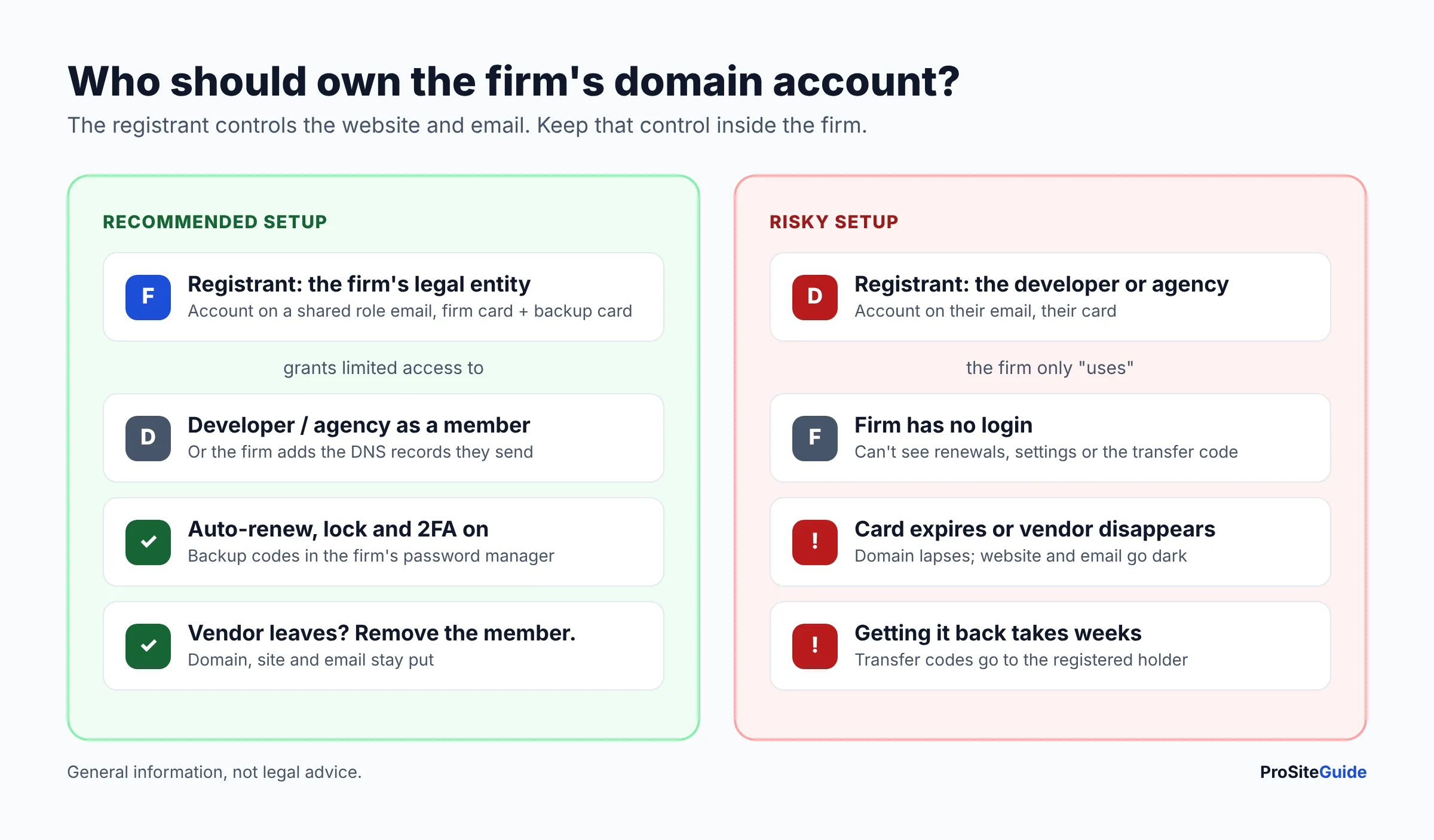
- Registrant name: the firm’s legal entity name, not the developer’s company or a personal name.
- Account email: a role address on the firm’s own domain (for example, admin@yourfirm.com) that more than one person can reach, ideally on properly configured firm email.
- Payment card: a firm card, with a backup card on file so auto-renew does not fail.
- Vendor access: invite developers as members with limited roles where the registrar supports it (Cloudflare and Squarespace both document multi-user access), or just give them the DNS records they need to add.
- Recovery: store the login, 2FA backup codes and security key details in the firm’s password manager, not in one person’s phone.
What security settings should a law firm turn on at its registrar?
Turn on four settings the day you register: auto-renew, registrar lock, strong 2FA and WHOIS privacy. Together they stop the two most common ways firms lose a domain: an expired card, and an account takeover followed by a transfer.
- Auto-renew on, with a backup card. Cloudflare, for example, attempts auto-renew about 30 days before expiry and retries if it fails. Consider registering for several years.
- Registrar lock on. Leave it on except during a planned transfer.
- 2FA with an authenticator app or security key. Avoid SMS where you can. Cloudflare, Porkbun and Namecheap all support hardware keys.
- WHOIS privacy on. It keeps personal phone numbers and addresses out of public lookups. It is free at every registrar in this list for eligible extensions.
- DNSSEC on, where your DNS host supports it. It helps prevent forged DNS answers. Turn it off before a transfer and back on afterward.
These settings are one part of a broader routine. Our law firm website security checklist covers the rest.
How do you register a domain for a law firm?
- Pick the name and extension. Check your state bar’s rules on firm names and trade names before you commit.
- Create the registrar account in the firm’s name, using a shared role email and a firm card.
- Turn on 2FA (app or security key) before buying anything, and save the backup codes in the firm password manager.
- Search and add the domain to the cart. Remove add-ons you do not need. Hosting, email and “protection” bundles are separate decisions.
- Enter the firm’s legal name as registrant. For .law, this must match the name the registry can verify.
- Check out, then confirm the settings: auto-renew on, lock on, privacy on.
- Verify the registrant email. Registrars send a contact verification email. Squarespace, for instance, suspends domains that are not verified within 15 days.
- Point DNS to your website host and email provider, or send the records to your developer to add.
How do you transfer a law firm domain to a better registrar?
A transfer moves the domain’s registration without touching your website, as long as DNS records are copied first. Most transfers add one year to the registration, and the transfer fee covers it.
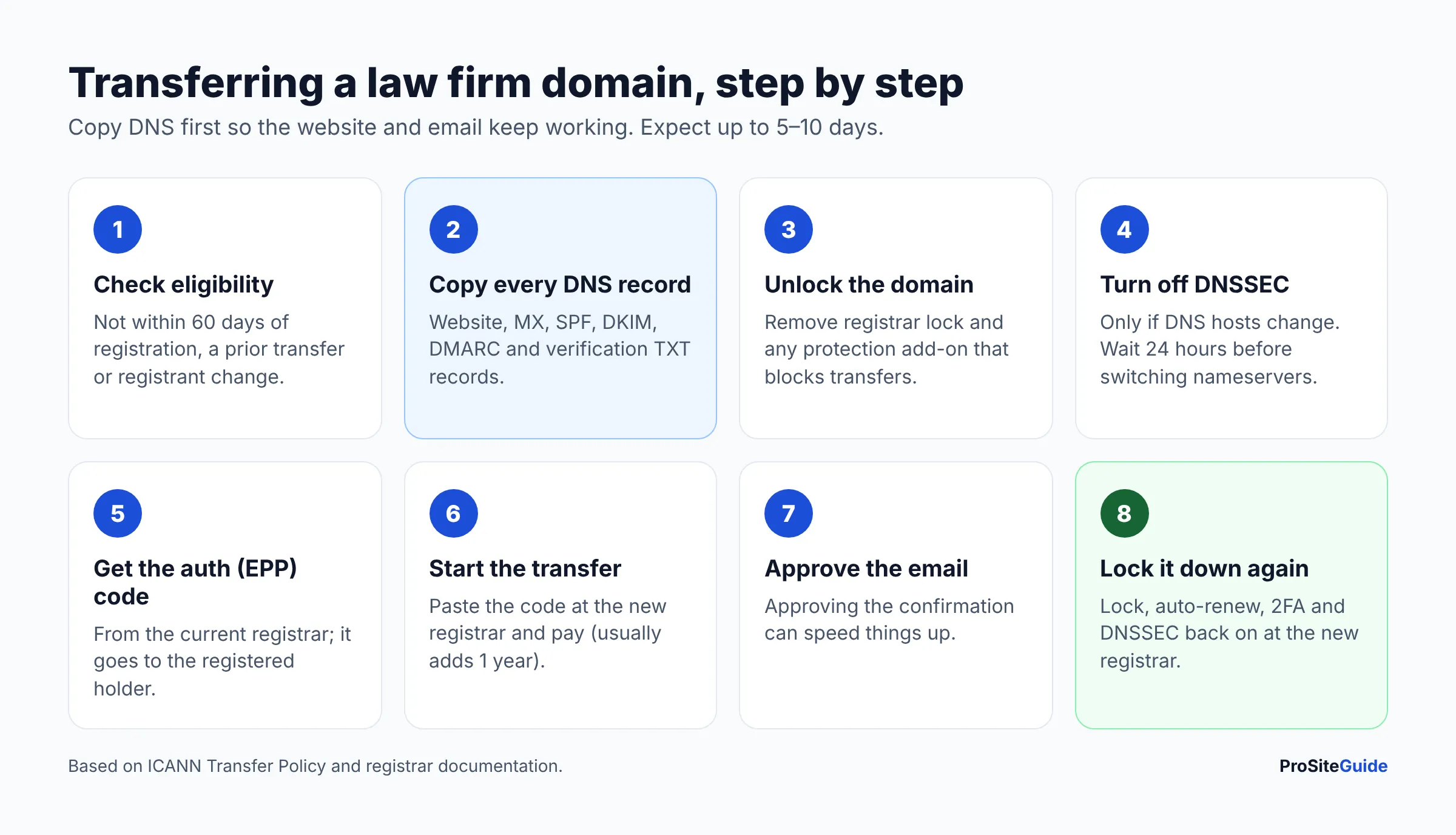
- Check eligibility. ICANN lets registrars refuse transfers within 60 days of registration, a prior transfer or a registrant change.
- Export every DNS record (website, MX, SPF, DKIM, DMARC, verification TXT records) and recreate them at the new DNS host. Missing email records is the most common way a transfer breaks firm email.
- Unlock the domain and disable privacy or protection add-ons at the current registrar if they block transfers, as GoDaddy requires.
- Turn off DNSSEC if you are also changing DNS hosts. Cloudflare asks you to wait at least 24 hours before changing nameservers.
- Get the authorization (EPP) code and start the transfer at the new registrar. For Cloudflare, the domain must first be active on Cloudflare DNS.
- Approve the transfer email. Transfers can take up to 5–10 days depending on the losing registrar.
- Re-enable lock, auto-renew, 2FA and DNSSEC at the new registrar.
If you are moving hosting at the same time, follow our guide to moving a law firm website to a new host without downtime and change one thing at a time.
FAQ
What is the cheapest domain registrar for a .com?
Over several years, Cloudflare Registrar is usually the cheapest because it charges the registry and ICANN cost with no markup. Porkbun is close at $11.81 a year (as of November 2026). Promo prices like Hostinger’s $0.01 first year can look cheaper, but its $19.99 renewal makes it more expensive after year one.
Cloudflare Registrar vs Namecheap vs Porkbun: which should a law firm choose?
Choose Cloudflare if you want the lowest long-term .com cost and will run DNS on Cloudflare. Choose Porkbun if you want flat pricing, freedom to use any DNS host, or a .law domain. Namecheap is a reasonable alternative with free privacy and security-key 2FA, but confirm its renewal price first.
Should my web developer register the domain for us?
No. The developer can do the setup, but the domain should be registered in the firm’s name, in an account the firm controls. Give the developer delegated access or the DNS records to add.
Is it better to buy the domain from my web host?
Usually not. Keeping the domain at a separate registrar means you can change hosts without touching your domain or email. Bundled domains also tend to renew at higher prices, and some carry longer transfer locks.
What happens if the firm’s domain expires?
Your website and email stop working once the registrar suspends the domain. After the grace and redemption periods, someone else can register it. Auto-renew, a backup card and a multi-year registration prevent this.
Do I need WHOIS privacy if the firm’s address is public anyway?
It is still worth turning on. It is free at every registrar here, it cuts spam to the registrant email, and it keeps a personal phone number or home address out of public lookups if one was ever used.
Conclusion: pick a registrar, then lock it down
For most small firms, the short list is Cloudflare Registrar (lowest long-term .com cost, Cloudflare DNS required) or Porkbun (flat pricing, any DNS, .law available). Next steps:
- Check who your domain is registered to today with a WHOIS lookup, and fix the owner if it is not the firm.
- Turn on auto-renew, registrar lock, 2FA and privacy.
- If you are paying high renewals, plan a transfer outside your busy season.
- Confirm your email authentication records survive any DNS change.
Want this handled for you? ProSiteGuide builds and maintains fast, secure WordPress sites for law firms. Book a free consultation.
Sources
- Cloudflare Registrar product page
- Cloudflare Registrar FAQ
- Cloudflare: Transfer your domain to Cloudflare
- Cloudflare: Two-factor authentication
- Cloudflare TLD policies
- Porkbun domain pricing
- Porkbun .com page
- Porkbun: App-based 2FA
- Porkbun: Security keys (WebAuthn)
- Namecheap: Free Domain Privacy
- Namecheap: Two-factor authentication
- Namecheap: Registrar lock
- Namecheap: .LAW registration requirements
- Squarespace Domains
- Squarespace: Verify your Squarespace-managed domain
- Hostinger domain search and pricing
- Hostinger .law domain
- Hostinger: Two-factor authentication
- GoDaddy: Lock or unlock my domain
- GoDaddy: Transfer my domain away from GoDaddy
- GoDaddy: About .LAW domains
- ICANN Transfer Policy
- Domain Name Wire: Verisign raising wholesale .com prices