Quick answer: If the .com version of your firm name is available at a reasonable price, register it and make it your main address. If it isn’t, a .law domain is the strongest alternative, because only verified lawyers and law firms can hold one. Google ranks .law, .attorney and .lawyer the same as .com, so the choice comes down to trust, memorability and cost, not SEO.
This guide covers what each legal extension requires, what they cost as of November 2026, how to pick the name itself without running into bar rules or trademark problems, and how to register a domain and point it at your website.
.com, .law, .attorney, .lawyer and .esq at a glance
The letters after the dot are called the top-level domain, or TLD. .com is the original commercial TLD. The legal ones (.law, .attorney, .lawyer, .esq) are newer “generic” TLDs, or gTLDs, launched under ICANN’s new gTLD program. They differ mainly in who is allowed to register them.
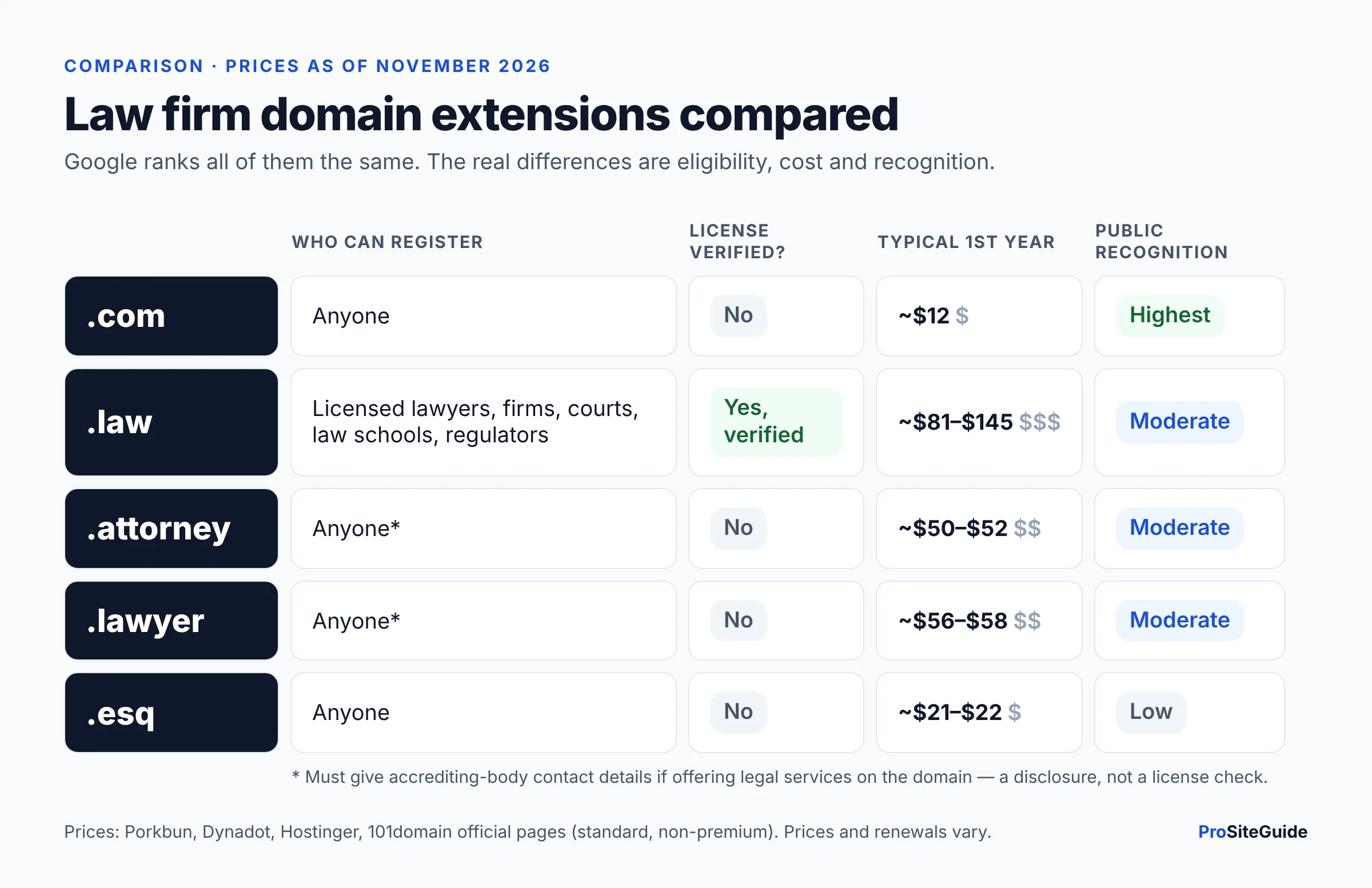
| Extension | Who can register | Typical 1st-year price (Nov 2026) | Main strength | Main weakness |
|---|---|---|---|---|
| .com | Anyone | About $12 | Everyone knows it; people type it by default | Good short names are usually taken |
| .law | Verified, currently licensed lawyers, law firms, courts, law schools, legal regulators | About $81–$145 | Credential check signals “real law firm” | Most expensive; no privacy service; eligibility must stay current |
| .attorney | Anyone (legal-services users must give accrediting-body details) | About $50–$52 | Clearly legal; many names still open | Long; no real verification |
| .lawyer | Anyone (legal-services users must give accrediting-body details) | About $56–$58 | Clearly legal; reads naturally (“smith.lawyer”) | No real verification; suggests an individual more than a firm |
| .esq | Anyone | About $21–$22 | Cheap; HTTPS enforced automatically | Least familiar to the public; no verification |
Prices are from the registrar pages listed in the cost section below. They change often and differ between registrars, so check before you buy.
What does a .law domain require?
.law is the only legal extension with real eligibility verification. According to the .law registration FAQ, the registrant must be one of the following:
- A qualified lawyer: currently licensed to practice. Lawyers with inactive or non-practicing status are not eligible.
- A law firm formed by qualified lawyers.
- A court, a law school, or a legal regulator such as a bar association.
Here is how verification works in practice:
- Your name must match your licensing record. The registrant name on the domain has to match the name you use with your licensing body. An independent verification agency checks it against public records and may ask for documents if the records aren’t enough.
- No privacy service. You can’t register with private registration or a placeholder name. GoDaddy’s .law help page lists domain privacy as “not supported.” (Personal data is still redacted from public lookups, per the FAQ.)
- No separate verification fee. The FAQ says you will never be asked to pay separately for eligibility verification.
- Eligibility is ongoing. GoDaddy describes verification as “an ongoing effort maintained by the .LAW registry.” If you go inactive or leave practice, plan for the domain.
- Don’t let it lapse. The FAQ says an expired .law domain stops resolving, and after 75 days it becomes available to other qualified lawyers.
Practical tip: register .law in the name of the person or entity that actually holds the license or runs the firm. Don’t register it in your web designer’s or office manager’s name. The registrant should be someone who will still be at the firm in ten years.
What about .attorney, .lawyer and .esq?
.attorney and .lawyer
Both are open registrations. GoDaddy’s help pages for .attorney and .lawyer say anyone can register them on a first-come, first-served basis. If you plan to offer legal services on the domain, you must also give the name, email and phone number of your accrediting body (for most US lawyers, the state bar or licensing authority). That is a disclosure, not a license check. So a .attorney or .lawyer address tells visitors “this is about law,” but it doesn’t prove the owner is a lawyer.
Many short, practice-area and surname combinations are still free in both extensions, which is their main appeal. The downside is length: “harrisonbaker.attorney” is longer to say and type than “harrisonbaker.com.”
.esq
.esq is run by Google Registry. Its official .esq page says anyone can register one, with no bar number, license check or verification. It also says .esq is on the HSTS preload list. In plain terms, browsers will only load .esq sites over HTTPS, so you must have an SSL certificate in place before the site works. Most hosts provide one free. .esq is cheap, but it is the least familiar of the legal extensions.
How much do .law, .attorney and .lawyer domains cost?
Here are standard (non-premium) prices for a one-year registration, taken from official registrar pages as of November 2026. “Renewal” is the yearly price after the first year, where the registrar publishes it.
| Extension | Porkbun (1st year) | Dynadot (register / renew) | Namecheap (register / renew) | Other |
|---|---|---|---|---|
| .com | $11.81 | $11.62 / $11.62 | $12.08 / $19.98 | — |
| .law | $82.90 | $85.82 / $85.82 | $105.98 / $105.98 | Hostinger $80.99, renews at $113.39; 101domain $144.99, renews at $159.99 |
| .attorney | $49.95 | $51.58 / $51.58 | $65.98 / $65.98 | — |
| .lawyer | $56.13 | $58.00 / $58.00 | $74.48 / $74.48 | — |
| .esq | $21.11 | $21.62 / $21.62 | — | — |
A few things to know about pricing:
- Compare renewal prices, not just year one. The same .law domain ranges from about $81 to $160 a year depending on where you renew it. Over ten years that gap adds up.
- Premium names cost more. Registries set aside short or keyword names (think “divorce.law”) as “premium,” often priced far above the standard rate. All prices above are for standard names.
- Expired domains cost extra to recover. Dynadot lists a $240.40 restore fee for .law, and Porkbun charges a $200 restoration fee during the redemption period. Turn on auto-renew.
- Domains are a small line item. Even the most expensive option here is a fraction of what the website itself costs. See our breakdown of what a law firm website costs in 2026.
Does .law vs .com affect SEO?
No, not directly. Google addressed this in its post on handling new top-level domains: its systems “treat new gTLDs like other gTLDs (like .com and .org),” and “Keywords in a TLD do not give any advantage or disadvantage in search.” The post is from 2015, but it is still Google’s main official statement on the topic.
Real-world data points the same way. A July 2026 study of law firm search results by Custom Legal Marketing looked at 9,113 ranking law firm domains. It found no meaningful ranking difference between legal-TLD sites and .com sites. It also found that only about 1.4% of ranking law firm domains used a legal TLD, while roughly 94% used .com. (The study comes from an SEO agency, so treat it as one data point.)
What does affect rankings is your content, your Google Business Profile, links from other sites, and site quality. Changing an existing domain also matters, in the wrong direction. Moving a site that already ranks to a new domain is a site migration, and it can cost you traffic for a while even when you set up redirects properly. Don’t switch domains to chase rankings. If you do need to move, follow a careful process like the one in our guide to moving a law firm website without downtime.
Which extension do clients trust more?
There is no solid public research on how legal consumers react to each extension, so this comes down to common sense:
- .com wins on habit. When someone hears your domain on the radio or reads it off a business card, they will often type .com whether you said it or not. If someone else owns your .com, some of your referrals may land on their site.
- .law has a real trust story. Because the registry verifies licenses, you can honestly say a .law address belongs to a licensed lawyer or firm. That matters more as fake law firm websites become a common scam.
- .attorney and .lawyer are clear but unverified. They tell people what you do. They don’t prove who you are.
- Watch the “.law.com” trap. Some people will type “yourfirm.law.com,” which goes to a subdomain of someone else’s website, not yours. You can’t fix that with a redirect because you don’t control that domain. The fix is repetition: print the full address clearly and say it the same way every time.
Should you buy both and redirect?
For most small firms, yes. Pick one primary domain for the website and email. Register one or two others to protect the name and catch mistyped traffic. Then forward them all to the primary with a permanent (301) redirect. Google’s redirect documentation recommends a permanent server-side redirect and treats the redirect’s target as the main (canonical) URL. That way the extra domains don’t create duplicate content.
A sensible setup for a firm called Harrison Baker:
- Primary: harrisonbaker.com (or harrisonbaker.law if the .com is taken)
- Redirects: harrisonbaker.law or harrisonbakerlaw.com, plus a common misspelling if there is an obvious one
- Email: on the primary domain only, so clients see one consistent address. Set it up with SPF, DKIM and DMARC as described in our law firm email setup guide.
Don’t buy every extension. Two or three domains cover most of the risk. Ten domains just means ten renewals to keep track of.
How to choose a law firm domain name
The extension is half the decision. The name in front of the dot matters more, because it goes on business cards, email signatures, court filings and ads for years.
Firm name or practice area and city?
Use your firm name in most cases. It matches your letterhead and Google Business Profile, it’s what referrers will search for, and it stays accurate if you add practice areas or open a second office. Keyword domains like “austindivorcelawyer.com” no longer give a ranking edge in their own right. They can also become misleading if your practice changes, which brings in the bar rules covered below. A keyword domain can still work as an extra domain for a specific campaign, if it is accurate.
Keep it short and easy to say
- Use the radio test. Say it out loud once. Could a stranger type it correctly? If you have to spell it out, simplify it.
- Shorten long firm names. “Harrison, Baker & Delacroix-Whitfield LLP” can become harrisonbaker.com or hbdlaw.com. Adding “law” or “legal” (harrisonbakerlaw.com) is a common, clear fix when the bare name is taken.
- Avoid hyphens and numbers. People forget hyphens, and “4” vs “four” causes confusion. Both make email addresses harder to dictate over the phone.
- Check for awkward word breaks. Read the run-together name to see if it spells something unintended.
Stay clear of trademarks
Don’t register a domain that uses another firm’s name, a well-known brand, or a confusingly similar variation. It invites a dispute and could be seen as misleading. Before you commit, search the USPTO trademark database, run a plain web search, and check your state’s business entity records. If you’re building a brand name rather than using surnames, consider a proper trademark clearance.
Check your state’s rules on firm names and trade names
Bar rules treat your domain much like your firm name. The ABA deleted the old Model Rule 7.5 on firm names in 2018, as FindLaw explains. The governing standard is now Model Rule 7.1, which prohibits false or misleading communications about a lawyer’s services. Utah’s version of the comment to Rule 7.1, quoted in Utah State Bar Ethics Opinion 21-02, says it plainly: a lawyer or firm “may be designated by a distinctive website address, social media username or comparable professional designation that is not misleading.” The same comment says a firm name is misleading if it implies a connection with a government agency, a public or charitable legal services organization, or a lawyer who isn’t part of the firm.
What that means for a domain:
- Avoid names that sound official, like “countylegalaid.law” or “statebarhelp.com.”
- Don’t include the name of a lawyer who isn’t with the firm.
- Be careful with “& Associates” style names if you are a solo. Utah’s opinion notes that a solo can’t use “Doe & Associates” if there are no associates.
- Be wary of superlatives like “best” or “top” in a domain. They are hard to back up under Rule 7.1.
- Some states require registration. For example, the North Carolina State Bar’s 2005 Formal Ethics Opinion 8 treated a website URL that is more than a minor variation of the firm’s name as a trade name that must be registered with the Bar.
Rules and numbering vary by state, so check your own state bar’s advertising rules or ethics hotline before you settle on anything other than your firm name.
How to register your domain and point it to your website
- Shortlist and check availability. Search your top two or three names in .com, .law and one other legal extension at a registrar. Note which are standard-priced and which are premium.
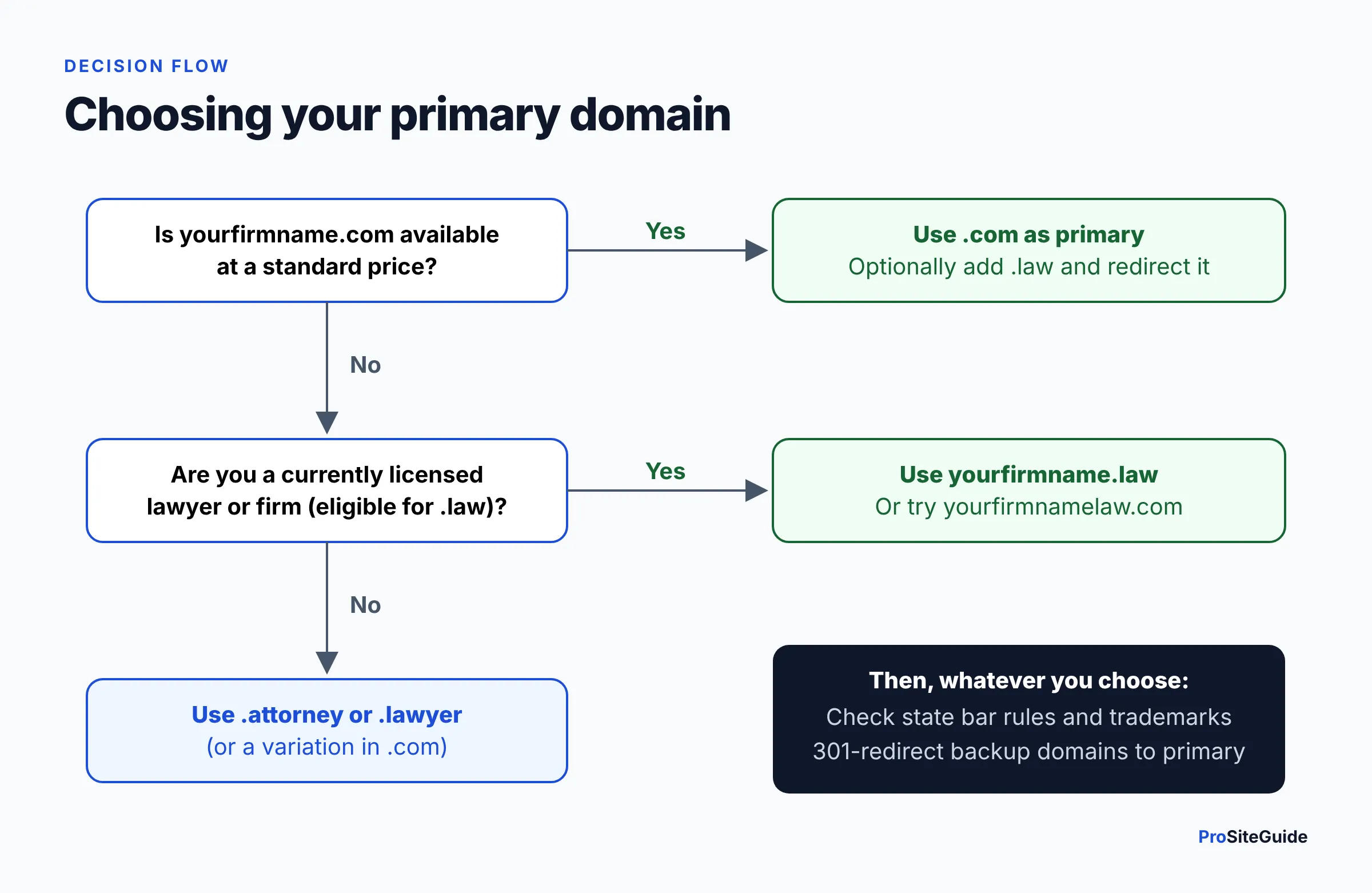
- Decide your primary domain. Use the decision flow above: .com if you can get it, otherwise .law if you’re eligible, otherwise .attorney or .lawyer.
- Register in the firm’s name, with a firm-controlled email. Use the firm (or, for .law, the licensed lawyer or firm whose name matches public licensing records) as the registrant. Use an email address the firm controls long-term, not a vendor’s address or an employee’s personal Gmail.
- Secure the account. Turn on two-factor authentication, registrar lock (transfer lock) and auto-renew. Register for several years if you plan to keep the name.
- Answer the verification emails. Registrars send a contact-verification email after registration. The .law FAQ warns that if you don’t complete it within 15 days, the domain is put on hold. For .law, respond quickly to any license-verification request too.
- Point the domain at your host. You have two options. You can switch the domain’s nameservers to the ones your host gives you, so the host manages DNS. Or you can keep DNS at the registrar and add the A record (an IP address) and/or CNAME record your host specifies. If you already have email on the domain, keep your MX (mail) records intact when you make changes. If you haven’t picked a host yet, see our comparison of the best hosting for law firm websites.
- Add the domain in your website platform and turn on HTTPS. In WordPress hosting dashboards, Squarespace or Wix, add the domain as the primary domain and issue the free SSL certificate. For .esq this is mandatory before the site will load at all. If you’re still choosing a platform, see Squarespace vs WordPress vs Wix for law firms.
- Redirect your secondary domains. Set each extra domain to forward to the primary with a permanent (301) redirect. Use your registrar’s forwarding feature or your host’s redirect settings, and make sure HTTPS works on the extra domains too.
- Test, then verify in Google Search Console. Visit every version (with and without www, http and https, each extra domain) and confirm they all land on the same https:// address. Then add the primary domain to Google Search Console.
Where to register it: Porkbun has the lowest prices on legal extensions in the table above. If you prefer a familiar dashboard with free privacy and security-key 2FA, search for your firm’s domain at Namecheap (affiliate link: we may earn a commission at no extra cost to you). Our Namecheap walkthrough covers checkout and account security, and the registrar comparison covers the alternatives.
DNS changes can take a few hours to show up everywhere, so make changes outside business hours if a live site or email is involved.
FAQ
Is .law better than .com for a law firm?
Not automatically. .com is more familiar, cheaper and what people type by habit. .law is better when your .com is taken or awkward, or when you want the trust signal of a verified extension. Search rankings are not a reason to pick either one.
Can anyone register a .law domain?
No. Only currently licensed lawyers, law firms formed by them, courts, law schools and legal regulators qualify, and the registrant name is checked against public records. Inactive or non-practicing lawyers are not eligible.
Do I need to be a lawyer to register .attorney or .lawyer?
No. Anyone can register them. If you offer legal services on the domain, you must provide your accrediting body’s contact details, but there is no license verification like .law has.
Will switching my existing .com to .law help my rankings?
No. Google treats the extensions the same, and a domain change is a site migration with some short-term risk. If you like .law, register it and redirect it to your existing site instead.
Can my domain be different from my firm name?
Often, yes, as long as it isn’t misleading. Some states treat a different URL as a trade name with extra requirements, such as registration with the bar. Check your state bar’s rules first.
What happens if my .law domain expires?
It stops working, which breaks your website and any email on it. According to the .law FAQ, after 75 days it becomes available for other qualified lawyers to register. Keep auto-renew on and a valid payment card on file.
Conclusion: pick one primary domain and protect it
For most small firms, the order is simple: your firm name in .com if you can get it, .law if you can’t (and you’re eligible), then .attorney or .lawyer. Keep the name short, accurate and free of other people’s trademarks. Check it against your state bar’s rules. Register a backup extension and redirect it to the primary.
Next steps: register the domain with auto-renew and two-factor authentication, set up professional email on it, and connect it to reliable hosting.
Want this handled for you? ProSiteGuide builds and maintains fast, secure WordPress sites for law firms. Book a free consultation.
Sources
- Join.law – .law Frequently Asked Questions (eligibility and verification)
- GoDaddy Help – About .LAW domain names
- GoDaddy Help – About .ATTORNEY domains
- GoDaddy Help – About .LAWYER domains
- Google Registry – .esq
- Google Search Central Blog – Google’s handling of new top level domains
- Google Search Central – Redirects and Google Search
- Custom Legal Marketing – Do .law, .legal and .lawyer domains help law firms rank higher? (July 2026)
- Porkbun pricing: .com, .law, .attorney, .lawyer, .esq, domain products
- Dynadot pricing: .com, .law, .attorney, .lawyer, .esq
- Hostinger – .law domain
- 101domain – About .LAW
- Utah State Bar – Ethics Opinion 21-02 (trade names, Rule 7.1 comment)
- North Carolina State Bar – 2005 Formal Ethics Opinion 8
- FindLaw – Naming your law firm without breaking the rules
- USPTO – Search our trademark database