Quick answer: Choose Smith.ai if your firm takes a lot of new-client calls that run long (intake, qualification, conflict questions) or you want a cheap AI option. Its plans bill per call and list legal extras like conflict checks and Clio, MyCase and Lawmatics integrations. Choose Ruby if you want a live person to answer every call and most of your calls are short (messages, transfers, “is my attorney in?”). Ruby bills per receptionist minute, so short calls cost less.
Below: a verdict by firm type, a side-by-side table, worked billing examples using each vendor’s published prices (as of November 2026), and the confidentiality questions to ask before anyone outside your firm answers your phone.
Smith.ai vs Ruby: the verdict by firm type
| Your firm | Better fit | Why |
|---|---|---|
| Solo, tight budget, fine with AI answering first | Smith.ai (AI Receptionist) | Free tier with 25 calls, Pro from $150/month. Humans can take over on transfer. |
| High-volume intake (PI, criminal defense, immigration) | Smith.ai (human receptionists) | Per-call billing doesn’t penalize long intake calls. Conflict checks and intake questions are listed add-ons. |
| Mostly existing-client calls and quick transfers (estate planning, business law) | Ruby | Short calls are cheap when you pay by the minute. A live person answers every call. |
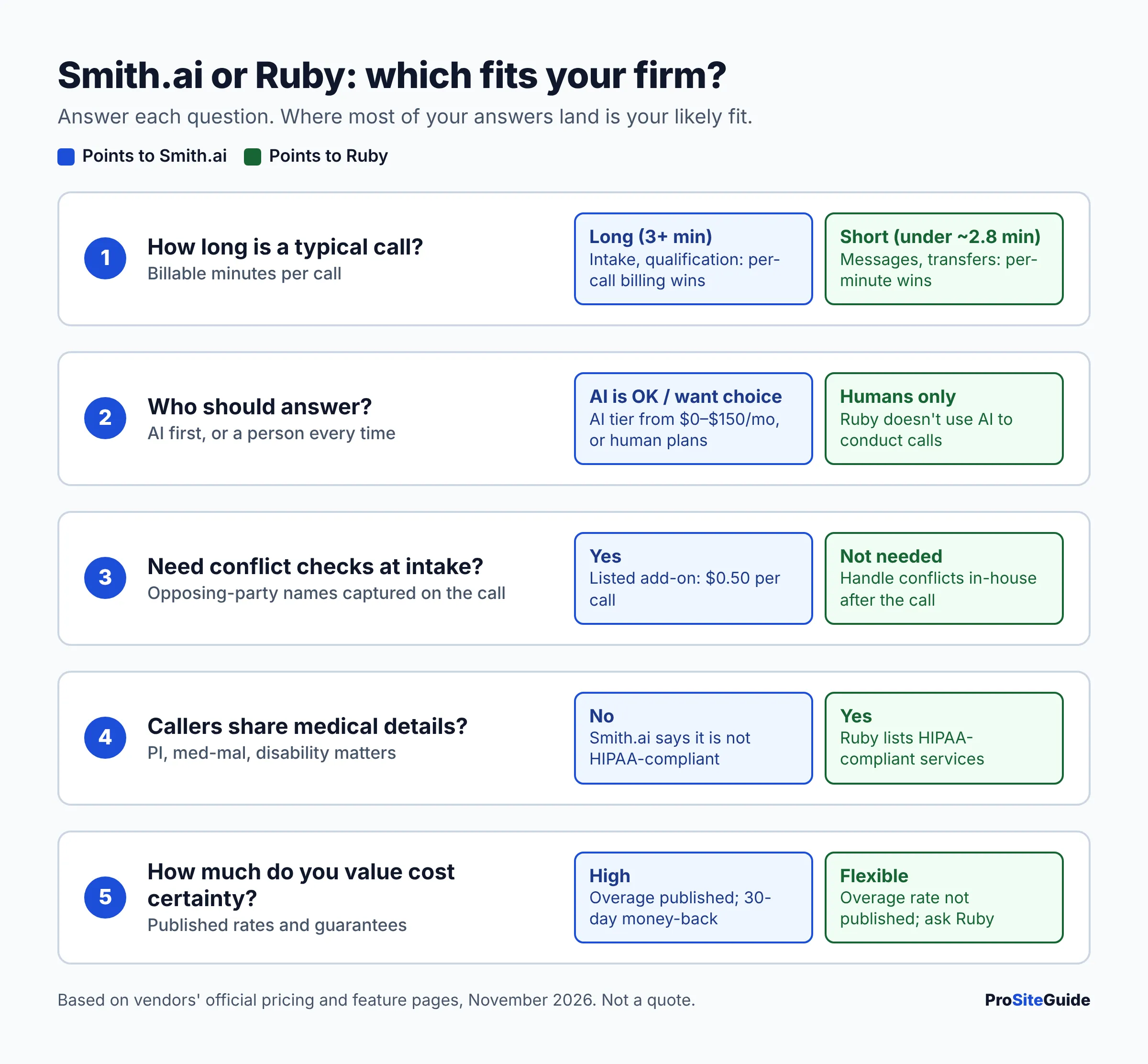
| Wants humans only, no AI on the line | Ruby, or Smith.ai’s human plans | Ruby says it doesn’t use AI to conduct calls. Smith.ai’s Virtual Receptionist plans are also answered by people. |
| Lots of Spanish-speaking callers | Either | Both offer bilingual answering. Smith.ai charges $1/call for its dedicated Spanish line on human plans. |
| Health-related matters (e.g. med-mal, disability) | Ruby (confirm) | Ruby lists HIPAA-compliant services. Smith.ai’s legal page says it is not HIPAA-compliant. |
How we compared
We have not used either service. This comparison is based only on each vendor’s official pricing pages, feature pages, integration pages and billing documents, opened in November 2026. Where the vendors don’t publish something (for example, Ruby’s overage rate), we say so instead of guessing. Prices change often, so confirm with the vendor before you sign up.
Smith.ai vs Ruby comparison table
| Feature | Smith.ai | Ruby |
|---|---|---|
| Billing unit | Per call (spam and wrong numbers excluded) | Per receptionist minute, rounded up |
| Human receptionist plans | Starter $300/30 calls, Basic $810/90, Pro $2,100/300, Enterprise custom | $250/50 min, $395/100 min, $720/200 min, $1,725/500 min |
| Overage | $11.50, $10.50 or $8.50 per call, depending on plan | Billed at your plan’s “predetermined rate”. Not listed on the pricing page. |
| AI receptionist | Yes. Free (25 calls), Pro from $150/month, Enterprise from $500/month | No AI answering. AI only helps behind the scenes (transcripts, call flows), at no extra cost |
| Hours | 24/7 at no extra charge | 24/7, including weekends and holidays |
| Bilingual | Spanish line $1/call on human plans. Spanish on the AI Receptionist at no extra cost | 24/7 English–Spanish answering listed |
| Lead intake and qualification | Included (5 intake questions). Extended intake $1.50/call | Lead qualification and intake listed as features |
| Conflict checks | $0.50/call add-on | Not listed on pages we reviewed |
| Appointment scheduling | $1.50/call add-on (human plans). Included on AI plans | Listed as a feature |
| Legal integrations | Clio, MyCase, Lawmatics, plus Zapier. First CRM free, then $0.50/call each | Clio, MyCase, Rocket Matter, Lawmatics, Filevine, Law Ruler, plus Zapier |
| Payments | $1/call (Square, PayPal, LawPay and others) | Payment collection listed |
| Outbound calls | Follow-up calls to clients or leads, no cold calling | Outbound call assists, billed by the minute |
| Website chat | $140/month for 20 chats up to $600/month for 120, or $10 per chat | $143/month for 10 chats up to $520/month for 50. 20% off when bundled with a call plan |
| Contract | Month-to-month. 10% off a 12-month plan | “No long-term contracts” |
| Guarantee or trial | 30-day money-back guarantee for new clients (up to $1,000, overage excluded) | None listed. Ask the vendor |
| HIPAA | Not HIPAA-compliant (per its legal page) | HIPAA-compliant services listed |
Sources: Smith.ai receptionist pricing, Smith.ai AI Receptionist pricing, Smith.ai chat pricing, Smith.ai legal page, Ruby pricing, Ruby integrations. All prices as of November 2026.
Smith.ai pricing explained
Smith.ai sells three things that are easy to mix up: an AI Receptionist, human Virtual Receptionists, and website chat. All of them bill by the call or chat, not by the minute.
Human Virtual Receptionist plans
On the receptionist pricing page (as of November 2026), plans start at $300/month for 30 calls ($11.50 per extra call), then $810 for 90 calls ($10.50 extra) and $2,100 for 300 calls ($8.50 extra). The page says live agents staff the service 24/7 at no extra charge, and that wrong numbers and spam don’t count toward your quota as long as forwarded calls pass Caller ID.
The base price includes lead qualification, intake (five short-answer questions), a dedicated number or porting of your existing one, and one CRM integration. Most extras cost a small amount per call. These are the ones most relevant to law firms:
- Appointment booking: $1.50 per call
- Extended intake (six more questions): $1.50 per call
- Conflict checks: $0.50 per call
- Text and email follow-up: $0.50 per call
- Call recording and transcription: $0.25 per call
- Accept payments (including LawPay): $1.00 per call
- Dedicated Spanish line: $1.00 per call
- Extra CRM integrations: $0.50 per call each
Add-ons apply to the calls that use them, so a firm that adds booking, conflict checks and recording can pay more per call than the plan price suggests.
AI Receptionist plans
The AI Receptionist is much cheaper. As of November 2026 it has a Free plan with 25 real calls a month ($3.00 per extra call), Pro from $150/month for 75 calls (higher tiers at 150 and 300 calls), and Enterprise from $500/month for 300 calls. Every tier lists 24/7 answering, recording, transcripts and summaries, lead qualification, AI scheduling, and native integrations including Clio. Smith.ai says callers can be transferred to a live, North America-based receptionist. Cancellation needs 30 days’ notice.
Before you put an AI on your firm’s main line, think about it carefully. Callers to a law firm are often stressed and describe sensitive facts. Decide in advance which calls should go straight to a person.
Ruby receptionist pricing explained
The Ruby pricing page (as of November 2026) lists four receptionist plans. The plans differ only in how many minutes they include:
| Ruby plan | Monthly price | Effective cost per included minute* |
|---|---|---|
| 50 minutes | $250 | $5.00 |
| 100 minutes | $395 | $3.95 |
| 200 minutes | $720 | $3.60 |
| 500 minutes | $1,725 | $3.45 |
*Our math: plan price divided by included minutes.
Ruby says there are no extra fees for activation, onboarding, setup or customization, and that optional AI enhancements come with every plan at no extra cost. Its homepage says “No long-term contracts.” Ruby doesn’t publish its overage rate. Its billing FAQ says extra minutes are billed “at your plan’s predetermined rate”, that you aren’t moved to a bigger plan automatically, and that unused minutes don’t roll over. Ask for the overage rate in writing.
What counts as a Ruby “receptionist minute”?
Ruby’s billing FAQ says it bills receptionist time, not total call time:
- The clock starts when a receptionist picks up and stops when they transfer the call (to you or voicemail) or hang up.
- Hold time counts. Your talk time after a transfer does not.
- Calls round up to the next 30-second mark, so a 10-second call is billed as half a minute.
- Outbound call assists count the specialist’s call time plus the time spent emailing you the result.
- Ruby says it doesn’t bill for calls outside your live answering hours.
One inconsistency: Ruby’s per-minute vs per-call article describes rounding in 60-second increments, but the billing FAQ says 30 seconds. Ask Ruby which one applies to your contract.
Per call vs per minute: what a month might cost
Billing model matters more than headline price. Here’s the key comparison at included rates, as of November 2026:
- A Smith.ai Starter call costs $10.00 ($300 ÷ 30 calls), however long it lasts.
- A Ruby 200-minute plan minute costs $3.60 ($720 ÷ 200).
- So at those rates, calls that average less than about 2.8 billable minutes ($10.00 ÷ $3.60) tend to favor Ruby, and longer calls tend to favor Smith.ai.
The scenarios below are illustrations, not quotes. They assume no add-ons, no spam, and that your calls fit the plan described. Ruby overage can’t be priced because the rate isn’t published.
Example 1: Small intake practice, 60 calls averaging 3 minutes
- Smith.ai (human): Starter $300 + 30 extra calls × $11.50 = $645. That’s cheaper than moving up to Basic at $810. Starter plus overage stays cheaper than Basic up to about 74 calls a month.
- Ruby: 60 × 3 = 180 receptionist minutes, which fits the 200-minute plan at $720. Hold time and rounding up could push you closer to 200.
- Smith.ai AI Receptionist: Pro at 75 calls is $150, if you’re comfortable with AI answering first.
Example 2: Same 60 calls, but long intake calls averaging 6 minutes
- Smith.ai (human): still $645, because call length doesn’t change the price. Add $90 if every call uses extended intake ($1.50 × 60).
- Ruby: 360 minutes. That’s the 500-minute plan at $1,725, or the 200-minute plan ($720) plus 160 overage minutes at a rate Ruby didn’t publish.
Example 3: Busy existing-client line, 150 calls averaging 1.5 minutes
- Ruby: 225 minutes, so the 200-minute plan at $720 plus 25 overage minutes. With 30-second rounding, a 1-minute-10-second call is billed as 1.5 minutes.
- Smith.ai (human): Basic $810 + 60 × $10.50 = $1,440. Pro at $2,100 would be worse at this volume.
To use this for your own firm, pull last month’s call count and total minutes from your phone system. Divide minutes by calls to get your average call length, then run both models.
AI vs human: how each service answers the phone
Ruby is human-first. Its homepage says, “An AI virtual receptionist that independently picks up and conducts the call isn’t how Ruby works.” AI is used for transcripts, sentiment analysis and call flows that help its receptionists.
Smith.ai gives you a choice. Its legal page says all calls on Virtual Receptionist plans are answered by a real person 24/7, by agents working from home offices across North America. Its AI Receptionist answers first and can hand callers to a person. Its chat plans are described as “live-staffed web chats — powered by AI.”
Integrations: Clio, MyCase and CRMs
Both connect to the big legal practice-management tools. Smith.ai names Clio, MyCase and Lawmatics, plus Zapier. Its first CRM integration is free and each extra one costs $0.50 per call. Ruby’s integrations page lists Clio, MyCase, Rocket Matter, Lawmatics, Filevine and Law Ruler, plus HubSpot, Salesforce, Zoho, Keap and Zapier. Neither page we reviewed names PracticePanther or Smokeball, so if you use one of those, ask whether Zapier is the route. If you haven’t chosen practice software yet, see our Clio vs MyCase vs PracticePanther comparison.
Confidentiality and intake: what law firms should check
A receptionist service talks to people who may become your clients. Under ABA Model Rule 1.18 (duties to prospective clients), information a prospective client shares can create confidentiality duties. In some situations it can also create conflicts that limit who the firm can represent later, even if you never take the case. Ethics rules also generally make lawyers responsible for supervising non-lawyer help, including outside vendors. Your state’s version of these rules may differ, so check your state bar’s guidance and ethics opinions.
Practical steps, whichever service you pick:
- Limit early intake. Script the receptionist to collect names, contact details, opposing parties and a one-line matter type, not the full story, until conflicts are cleared.
- Run conflicts early. Smith.ai offers a conflict-check add-on. With Ruby, ask how opposing-party names can be passed to your conflict process.
- No legal advice. Write the script so receptionists (and any AI) never assess a case, quote fees you haven’t approved, or promise representation.
- Know where data goes. Find out where recordings, transcripts and intake notes are stored, who can access them, and how long they’re kept. Ask for the vendor’s security documentation.
- Health information. If callers may share medical details, note that Smith.ai says it isn’t HIPAA-compliant, while Ruby lists HIPAA-compliant services.
- Match your website. Your web forms are the other front door. Use the same rules there; see how to add a secure contact form to a law firm website.
Pros and cons
Smith.ai
- Pro: Per-call billing keeps long intake calls predictable.
- Pro: Legal extras (conflict checks, LawPay payments, Clio/MyCase/Lawmatics) are priced openly.
- Pro: AI tier from $0 to $150/month for very small firms.
- Pro: 30-day money-back guarantee for new clients, and published overage rates.
- Con: Per-call add-ons add up quickly.
- Con: Expensive for lots of short calls.
- Con: Not HIPAA-compliant.
Ruby
- Pro: Live humans answer every call, with no AI on the line.
- Pro: Cheaper for short calls and transfers.
- Pro: Broad legal integration list. No setup fees.
- Pro: HIPAA-compliant services listed.
- Con: Overage rate not published.
- Con: Hold time is billable, and calls round up.
- Con: Long intake calls get expensive. No guarantee or trial listed.
Alternatives to consider
- Other legal answering services. Several services focus on law firms. Compare them on the same points: billing unit, overage, intake depth and integrations.
- A part-time in-house receptionist. Usually costs more, but gives you full control over confidentiality and training.
- Better self-service intake. A secure web form that feeds your practice-management software can take pressure off the phone. Pair it with voicemail-to-email on your firm’s domain email.
- Chat only. If most leads come from your website, a chat plan from either vendor may cost less than full phone coverage.
FAQ
Is Smith.ai or Ruby cheaper for a law firm?
It depends on call length. At included rates (as of November 2026), a Smith.ai Starter call costs $10.00 and a minute on Ruby’s 200-minute plan costs $3.60. Calls averaging under about 2.8 billable minutes tend to favor Ruby, and longer calls tend to favor Smith.ai. Smith.ai’s AI Receptionist ($150/month for 75 calls on Pro) is cheaper than either human service.
Does Ruby use AI to answer calls?
No. Ruby says live receptionists answer calls, and AI only helps behind the scenes with transcripts and call flows.
Do both offer 24/7 answering?
Yes. Smith.ai lists 24/7 live staffing at no extra charge, and Ruby lists 24/7 coverage including weekends and holidays. Both let you limit answering to the hours you choose.
Can they schedule consultations and take payments?
Yes. Smith.ai charges $1.50 per call for booking and $1.00 per call for payments (LawPay is supported) on human plans. Ruby lists scheduling and payment collection as features but doesn’t show separate prices on its pricing page.
Are there long-term contracts?
Neither requires one. Smith.ai is month-to-month (10% off for 12 months) and offers a 30-day money-back guarantee to new clients. Ruby says “No long-term contracts” but doesn’t publish cancellation terms, so ask before signing.
Is it ethical to use a virtual receptionist for legal intake?
Many firms do, but the lawyer stays responsible for supervising the vendor and protecting what prospective clients share. Keep early intake short, run conflicts before collecting details, and check your state bar’s guidance.
Bottom line and next steps
Pick Smith.ai for intake-heavy practices, legal add-ons and the low-cost AI option. Pick Ruby for a human-only front desk and lots of short calls. Before you decide:
- Pull last month’s call count and total minutes, and run the per-call vs per-minute math above.
- Ask Ruby for its overage rate and rounding increment in writing. Ask Smith.ai which add-ons your script would trigger.
- Write your intake script with conflict checks and a “no legal advice” rule.
- Make sure your website’s forms and overall site follow the same intake rules as the phone.
Want this handled for you? ProSiteGuide builds and maintains fast, secure WordPress sites for law firms. Book a free consultation.
Sources
- Smith.ai: Virtual Receptionist plans and pricing
- Smith.ai: AI Receptionist pricing
- Smith.ai: Web chat pricing
- Smith.ai: Legal answering service for law firms
- Smith.ai: Spanish support for AI Receptionist (June 2025)
- Ruby: Plans and pricing
- Ruby: Homepage (service model, contracts)
- Ruby: Integrations
- Ruby: Billing FAQs (PDF)
- Ruby: Per-minute vs per-call virtual receptionist pricing