This article is general information, not legal advice.
Quick answer: this 1Password review for law firms comes down to one choice. Teams Starter Pack suits a firm of up to 10 people that just needs shared vaults at a flat price. 1Password Business suits firms that want single sign-on, admin reports, more guest accounts and managed Travel Mode. Both use the same Secret Key plus account password design and end-to-end encryption.
Prices below are as of November 2026 from 1Password’s business pricing page. Confirm them before you buy, because vendors change plans often.
Key takeaways
- Teams Starter Pack: $24.95 per month flat for up to 10 members, billed yearly ($299.40 per year). Business: $8.99 per user per month, billed yearly.
- SSO unlock (Microsoft Entra ID, Google Workspace, Okta and others) is a Business feature, per 1Password’s support pages.
- Each account needs a password you remember and a Secret Key you must store safely. Plan for lost-access recovery on day one.
- A password manager helps show “reasonable efforts” under ABA Model Rule 1.6(c), but it does not replace a security policy.
Is 1Password good for law firms?
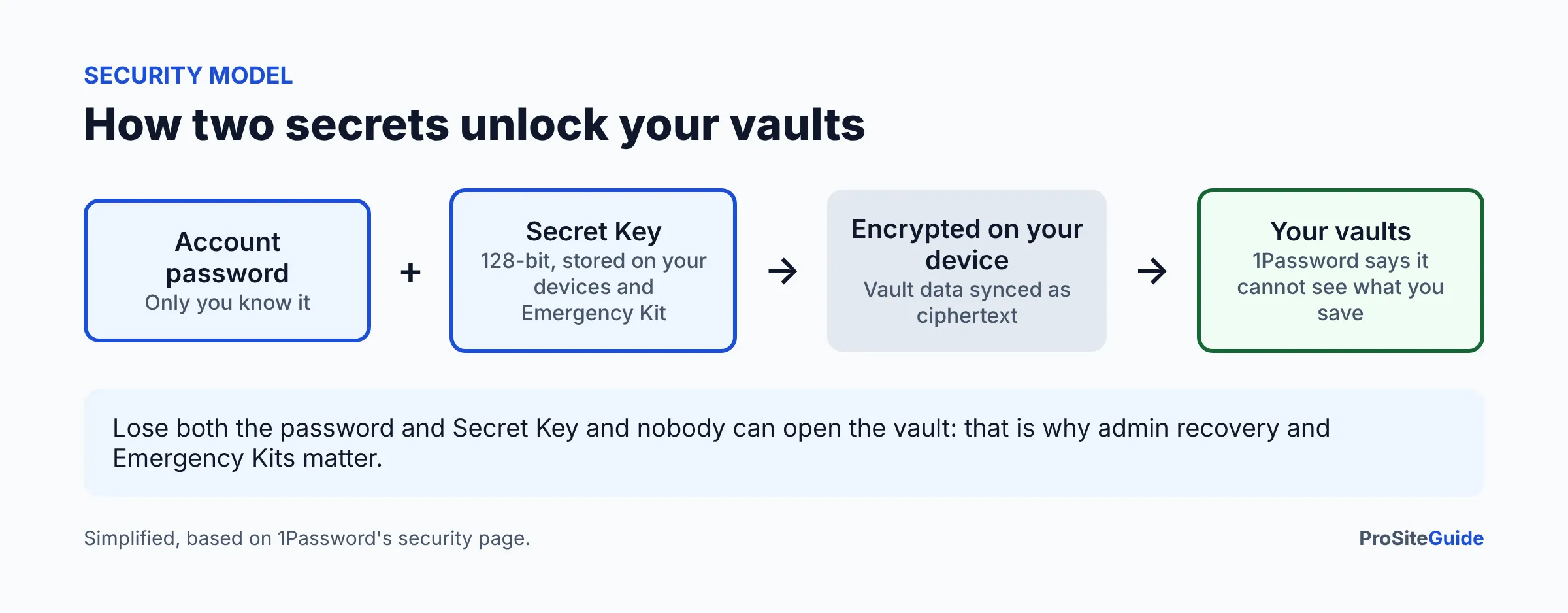
For most small firms, yes, on the merits of its design. 1Password uses two secrets to protect an account, and its security page says the company cannot see what you save. It also holds SOC 2 Type 2 certification and publishes information on independent assessments. Those are reasons to put it on a shortlist. They are not a guarantee, and no tool removes the need for good habits such as unique passwords and multi-factor authentication.
This page is a deep review of one product. For a side-by-side with other options, see our password manager comparison for law firms. For step-by-step rollout, see how to set up 1Password for a law firm.
How we compared
We have not run 1Password inside a firm for this review. The comparison is based on 1Password’s official pricing, security and support pages, which we opened in November 2026. We give no ratings or scores. Where a page did not say, we say so.
What does 1Password cost for a law firm?
| Plan | Price (as of November 2026) | Guest accounts | Best for |
|---|---|---|---|
| Teams Starter Pack | $24.95/month flat, up to 10 members, billed yearly ($299.40/year); add-on seats $4.99/seat/month, up to 20 members | 5 | Small firms with no identity provider |
| Business | $8.99/user/month, billed yearly ($107.88/user/year) | 20 | Firms wanting SSO, reports, managed Travel Mode |
| Enterprise | Not listed; contact sales | Not listed | Large organizations needing onboarding and a Customer Success Manager |
Both paid tiers offer a 14-day free trial with no credit card, according to the pricing page. Payment options listed include credit card, ACH direct debit for eligible US bank accounts and gift cards. One caution: the Teams headline on the page shows a per-user figure that does not obviously match the flat $24.95 in the FAQ. Treat the flat monthly figure as the one to verify with 1Password before budgeting.
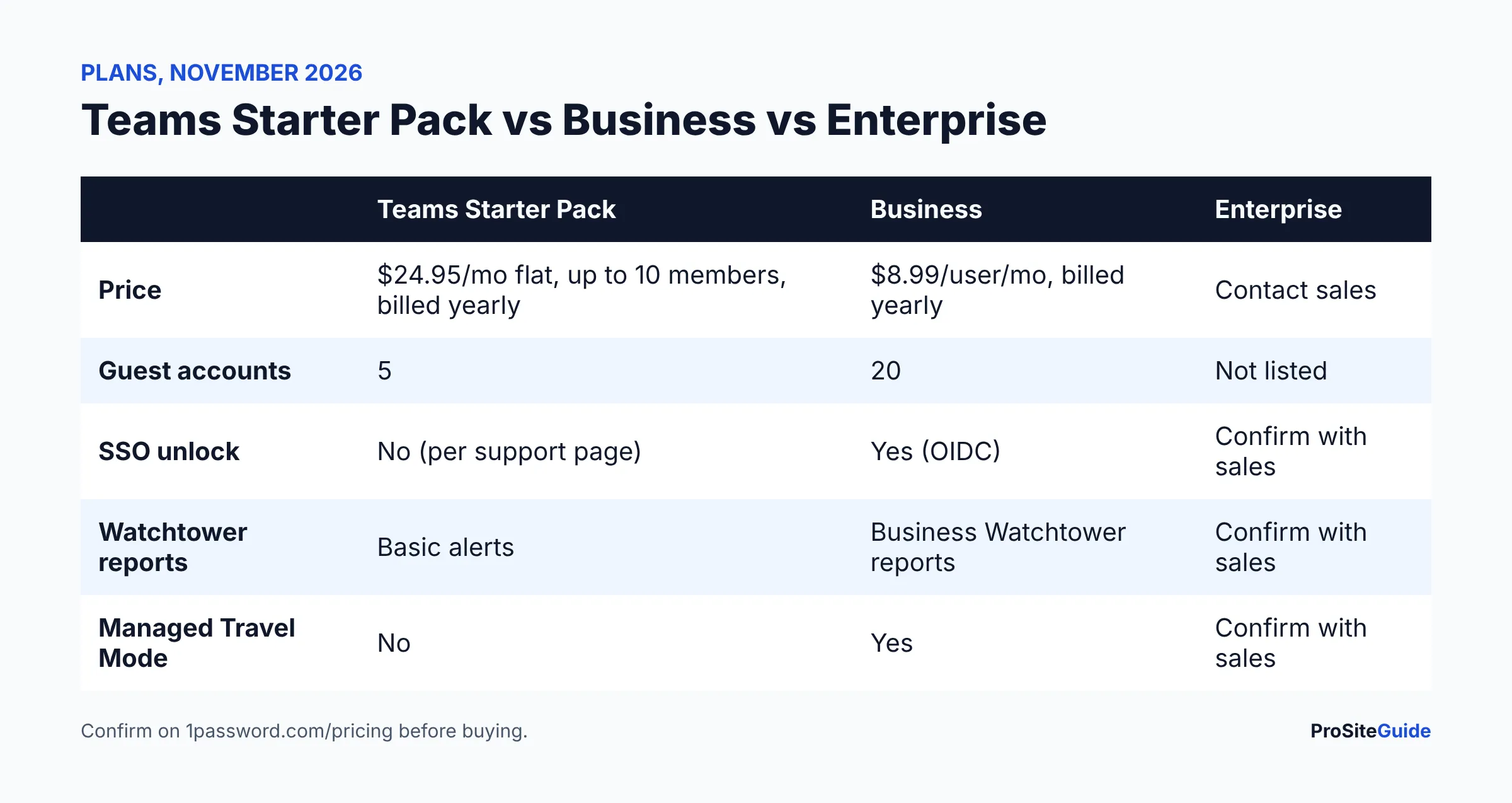
Math example for a 6-person firm: Teams Starter Pack is $299.40 per year at the listed flat rate. Business at $8.99 per user would be 6 × $107.88 = $647.28 per year. Business costs more, so it needs to earn its keep through SSO, reports or guests.
How does the Secret Key security model work?
Your 1Password account is protected by an account password only you know and a 128-bit Secret Key, per the 1Password security page. The page describes a dual-key model and says 1Password cannot see what you have saved. It also says the service uses Secure Remote Password so credentials are not sent across the internet to sign in.
In plain terms: someone who steals your password still lacks the Secret Key, and someone who gets the encrypted data from 1Password’s servers cannot open it with the password alone. The trade-off is that you must keep the Secret Key (often saved in an Emergency Kit) somewhere safe.
Has 1Password been audited?
1Password states it is SOC 2 Type 2 certified, and the report can be requested. Its security assessments page also lists ISO/IEC 27001:2022, 27017:2015, 27018:2019 and 27701:2019, earlier penetration tests and code review by Independent Security Evaluators in 2020, an architecture assessment by Onica, and a HackerOne bug bounty. Newer penetration test reports are shared through the 1Password Trust Center. Ask for the SOC 2 report if your clients or insurer request vendor evidence.
How do shared vaults and permissions work?
A vault is a container of logins and notes. Instead of passing passwords by email or chat, a firm puts them in a shared vault, for example “Billing”, “Court e-filing” or “Marketing accounts”, and grants access to people or groups. 1Password says Business includes expanded role-based vault sharing and permissions compared with Teams Starter Pack. We could not open the detailed permission-level page, so check 1Password’s support site for the exact levels each plan offers.
A practical pattern for a small firm: one vault per function, not per person, and staff added by group so departures need one change.
Does 1Password support guest accounts for outside people?
Yes. The pricing page lists 5 guest accounts on Teams Starter Pack and 20 on Business. Guests are useful for a bookkeeper, an IT contractor or a marketing vendor who needs a single vault. Share only the vault they need, and remove them when the engagement ends. Avoid sharing client-confidential passwords with outsiders unless your engagement terms cover it.
What does Watchtower do?
Watchtower flags compromised sites, passwords exposed in a data breach, reused and weak passwords, unsecured http logins, sites where passkeys or two-factor codes are available but not saved, and expiring items, per 1Password’s Watchtower page. For business accounts, admins can use Business Watchtower reports to track issues across items in shared vaults. That is a Business feature on the pricing page; Teams lists general security alerts only.
Does 1Password support passkeys and two-factor codes?
Yes. 1Password’s plans list 2FA, biometrics and passkeys, and Watchtower prompts you to store one-time codes and passkeys where a site supports them. Our website team often points firms to the law firm website security checklist, where strong, unique admin passwords and 2FA are first-line items.
Which plan includes single sign-on?
1Password’s Unlock with SSO page ties the feature to 1Password Business. Supported providers include Microsoft Entra ID, Google Workspace, Okta, Duo, JumpCloud, OneLogin, Ping Identity, Auth0 and generic OIDC. If you run Microsoft 365 or Google, this matters: staff sign in with the identity they already use, and removing the account in your directory cuts access. See our guides to Microsoft 365 setup and Google Workspace setup for the identity side.
How do offboarding and account recovery work?
Per 1Password’s recovery page, team administrators, owners and members of a custom group with the Recover Accounts permission can recover accounts for people who cannot sign in. The person gets a new Secret Key and password, regains vaults, and their two-factor authentication is reset. 1Password recommends at least two people have recovery ability.
For offboarding, the checklist is:
- Remove the person from groups and vaults, or suspend or remove the account from the admin console.
- Change shared credentials they could see, such as bank portals, e-filing and registrar logins. Removal does not erase anything a person has already seen or copied.
- Reassign any items kept only in their private vault.
- Record the date and what was changed in your file.
What is Travel Mode and do lawyers need it?
Travel Mode hides vaults on a device unless they are marked safe for travel. Admins can turn it on for team members, but 1Password says managed Travel Mode requires Business. It is relevant if lawyers carry devices across borders, where a device may be inspected. It is not a substitute for your own travel and device policy.
What are the limitations?
- Cost: Business is per-user and costs more than the flat Teams pack for small groups.
- Secret Key: users must safeguard it; it adds a step on new devices.
- SSO and reports are Business-only per 1Password’s pages.
- No built-in legal features: it will not manage client files, trust accounting or email encryption. For email, see law firm email encryption.
- Shared accounts still need a rule: who owns each login and who rotates it.
Does 1Password help meet ABA Model Rule 1.6(c)?
ABA Model Rule 1.6(c) says a lawyer shall make reasonable efforts to prevent unauthorized access to, or disclosure of, information relating to the representation. A password manager with encryption, MFA and access controls is a common reasonable step, but what is reasonable depends on facts. Your state bar’s version of the rule governs, so check with it. This is general information only.
Who should choose which plan?
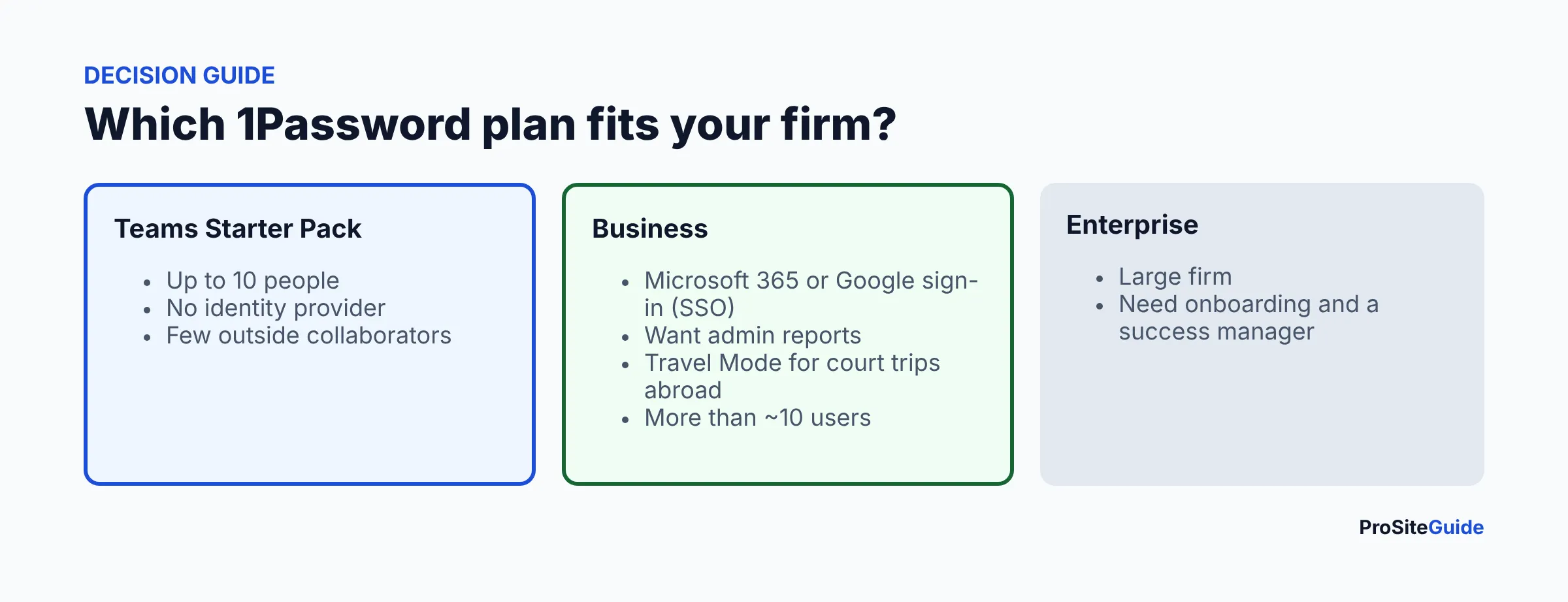
- Choose Teams Starter Pack if you are 10 or fewer, use no SSO and need a few outside guests.
- Choose Business if you use Microsoft 365 or Google sign-in, need reports or Travel Mode, or expect to grow.
- Contact sales about Enterprise only for a larger firm needing dedicated onboarding.
- Compare alternatives first in our hub comparison and see the tool comparisons.
FAQ
How much is 1Password Business?
$8.99 per user per month billed yearly ($107.88 per user per year) as of November 2026, per 1Password’s pricing page. Confirm before buying.
Is there a free trial?
The pricing page lists 14 days free with no credit card for Teams Starter Pack and Business.
Can 1Password recover a lost master password?
Not by itself. Administrators or permitted members can run account recovery, which issues a new Secret Key and password. Set this up before anyone is locked out.
Does Teams Starter Pack include SSO?
1Password ties Unlock with SSO to Business. See its SSO support page.
Is 1Password SOC 2 certified?
1Password states it holds SOC 2 Type 2 certification and that the report can be requested.
Is it enough for ethics compliance?
No tool alone is. It supports reasonable efforts under Rule 1.6(c) alongside policies, MFA, training and backups.
Conclusion and next steps
- Count your users and outside guests, then use the table to pick Teams Starter Pack or Business.
- Start the 14-day trial and test recovery with a second administrator.
- Follow our setup guide, then write a one-page password policy.
Want this handled for you? ProSiteGuide builds and maintains fast, secure WordPress sites for law firms. Book a free consultation.