Quick answer: Most small law firms that draft in Word every day should choose Microsoft 365 Business Standard. It costs $14 per user per month on an annual plan and includes the desktop Office apps. Choose Google Workspace if your firm works mostly in the browser, values simple sharing, and doesn’t depend on complex Word templates. If you want built-in retention and legal holds, the plans to compare are Google Workspace Business Plus (which includes Vault) and Microsoft 365 Business Premium, both $22 per user per month on annual billing as of November 2026.
Most comparisons of these two suites for lawyers were written between 2016 and 2022. Since then both vendors have changed plan names, prices and AI bundles. This guide uses the current US pricing pages and admin documentation, then gives you a decision framework for your type of firm.
How much do Google Workspace and Microsoft 365 cost per user?
At the entry and middle tiers the prices are now identical. Below are the published US list prices per user per month with a one-year commitment, as of November 2026. Sources: the Google Workspace pricing page and Microsoft’s Microsoft 365 business plan comparison.
| Tier | Google Workspace (annual) | Microsoft 365 (annual / month-to-month) |
|---|---|---|
| Entry | Business Starter: $7. 30 GB pooled storage per user, web apps | Business Basic: $7 / $8.40. Web and mobile Office apps only, 100 GB mailbox, 1 TB OneDrive |
| Middle | Business Standard: $14. 2 TB pooled storage per user | Business Standard: $14 / $16.80. Desktop Word, Excel, PowerPoint and Outlook |
| Compliance and security | Business Plus: $22. 5 TB pooled storage, includes Vault and eDiscovery | Business Premium: $22 / $26.40. Adds Intune, Defender for Business, Purview data protection and a 1.5 TB email archive |
| Apps only | Not offered | Apps for business: $10 / $12. Desktop apps and 1 TB storage, no business email hosting listed |
Some details are easy to miss on those pages:
- Month-to-month costs more. Google’s pricing toggle says a one-year commitment saves 16%. Microsoft’s plan pages list the monthly price separately. For Business Standard it’s $16.80 instead of $14.
- Microsoft now leads with “with Copilot” bundles. Its comparison page puts Business Standard with Copilot ($23.50) and Business Premium with Copilot ($32) first. If you don’t want Microsoft’s AI add-on yet, choose the plain plan.
- Microsoft also sells “no Teams” versions. Business Standard (no Teams), for example, is listed at $10.79. That can suit a firm that already uses Zoom.
- Both suites cap their business plans at 300 users. That limit won’t affect a small firm.
Side-by-side: what each suite gives a small law firm
| Need | Google Workspace | Microsoft 365 |
|---|---|---|
| Email on your own domain | All plans (Gmail) | Basic, Standard and Premium (Outlook / Exchange) |
| Desktop Word and Excel | No. Docs and Sheets run in the browser | Standard, Premium and Apps for business |
| Storage | 30 GB, 2 TB or 5 TB pooled per user | 1 TB OneDrive per user plus a 100 GB mailbox |
| Retention and legal holds | Vault in Business Plus and Enterprise | Org-wide retention policies in Business Premium (see the eDiscovery section below for caveats) |
| Two-factor sign-in | 2-Step Verification. Admins can require it | Free security defaults require MFA registration |
| Device management | Advanced endpoint management in Business Plus | Intune and Defender for Business in Premium |
| Migration help | Google Workspace Migrate is listed from Business Standard up | Built-in Google Workspace migration for mail, calendar and contacts |
| Practice management add-ins | Clio and MyCase publish Gmail add-ons | MyCase publishes an Outlook add-in (Microsoft-hosted accounts only) |
Does your firm need desktop Word and Excel?
Answer this first, because it settles the choice for many firms. Legal work tends to run on Word: tracked changes passed back and forth with opposing counsel, pleading and caption templates, numbered paragraphs, tables of authorities and court-specific formatting. Courts, clients and other firms will keep sending you .docx files.
Google Docs can open and edit Office files, and it’s very good for live co-editing. The friction comes from complex formatting going back and forth. A heavily styled brief or a template full of macros is where browser editors tend to struggle. If your lawyers or staff spend hours in Word each day, the desktop app matters.
You can also combine the two. A firm can keep Google Workspace for email and files, then buy Microsoft 365 Apps for business ($10 per user per month on annual billing as of November 2026) for the people who need desktop Word. Microsoft’s page lists desktop Word, Excel, PowerPoint and Outlook plus 1 TB of storage, but not business email hosting. Run the numbers, though. Google Business Standard plus Apps for business costs more per person than Microsoft 365 Business Standard on its own.
Retention, legal holds and eDiscovery: Google Vault vs Microsoft Purview
Retention means keeping email and files for a set period, even if a user deletes them. A legal hold preserves data indefinitely for a matter. eDiscovery means searching and exporting that data. Small firms rarely need enterprise review platforms. Built-in retention still helps when a departing employee deletes a mailbox or a client’s file is challenged years later.
Google Vault
Google’s Vault overview describes it as an information governance and eDiscovery tool. You can retain data for set periods, place holds, search across users’ data and export the results. Among small-business plans, Vault licenses are included in Business Plus and not in Starter or Standard. Google’s pricing page confirms this: Business Plus adds “eDiscovery” and “Vault to retain, archive, and search data.”
Microsoft Purview
On Microsoft’s side, licensing is more layered. The Microsoft Purview service description lists the plans that give users rights to each feature:
- Organization-wide retention policies are licensed with Business Premium (and enterprise E3/E5). Business Basic and Standard are only listed for Teams chat retention.
- The archive mailbox is 50 GB on Basic and Standard. Business Premium is listed among the licenses that allow a 1.5 TB archive.
- Purview Audit (Standard) is listed for Business Basic, Standard and Premium.
- eDiscovery (Premium), Microsoft’s full review workflow, is tied to E5-level licenses.
Microsoft’s Get started with eDiscovery page adds that admins and users working on eDiscovery cases require Microsoft 365 E3 or E5 licenses. If you plan to run your own searches and holds, confirm with Microsoft or a Microsoft partner what your Business plan actually covers before you buy.
In practice: if you need straightforward retention and holds at small-firm prices, Google Business Plus has the simpler story. Microsoft Business Premium gives you stronger security and device management, plus retention policies. Neither replaces a dedicated litigation review platform when a big production comes in.
Security and confidentiality: what lawyers should check
Bar guidance doesn’t prefer either vendor. It asks lawyers to make reasonable efforts to protect client information. North Carolina’s 2011 Formal Ethics Opinion 6 allows cloud software “provided the lawyer uses reasonable care to safeguard confidential client information.” Wisconsin’s Formal Ethics Opinion EF-15-01 names multifactor authentication and encryption among the safeguards lawyers should understand. It also cites ABA Formal Opinion 477 for the point that “it is not always reasonable to rely on the use of unencrypted email.” Check your own state bar’s guidance, because the details vary by state.
Both suites can meet the basics if you turn them on:
- Two-factor sign-in. Google’s admin guide on 2-Step Verification says Google enforces it for administrator accounts, and admins can require it for everyone else. Microsoft’s security defaults require every user to register for MFA, block legacy sign-in protocols and cost nothing extra. Require it for every user, not just admins.
- Encrypted email. Microsoft lists Purview Message Encryption with Business Premium. That lets you send encrypted mail to recipients on any address. Business Basic and Standard need an Azure Information Protection add-on for it, according to the same service description.
- Lost laptops and phones. Business Premium includes Intune and Defender for Business. Google Business Plus lists advanced endpoint management. If your firm has no IT person, these tools are only useful once someone configures them.
Your email domain also needs SPF, DKIM and DMARC records whichever suite you pick. Our law firm email setup guide walks through those DNS records. Website security is a separate job, covered in our law firm website security checklist.
Which suite works better with Clio, MyCase and other practice management tools?
The big practice management platforms support both suites, with some caveats:
- Clio: the Clio for Gmail add-on, published by Clio on the Google Workspace Marketplace, logs emails and attachments to matters and adds contacts and time entries from your inbox. Clio also markets an Outlook add-in. Check Clio’s integrations directory for its current requirements.
- MyCase: MyCase’s calendar integration provides two-way sync with either Google or Outlook. Events have to be saved to a calendar named “MyCase”. Its email article describes add-ins for both Gmail and Outlook. The Outlook add-in needs Outlook 2016 or later with a Microsoft 365 subscription. It is incompatible with local Exchange servers and with “third-party Microsoft 365 accounts” such as GoDaddy.
That last point catches many small firms. If you bought Microsoft 365 through a domain registrar’s reseller bundle, confirm that your practice management add-ins support that account type before you rely on them. If you’re still choosing a CRM or intake tool, our Lawmatics vs Clio Grow comparison covers that layer.
Which is easier for a small firm to use?
Google Workspace is usually the easier suite to run. There is one admin console and one storage pool. Everything works in a browser on Windows, Mac or Chromebook, and sharing a document is a single click. New staff often already know Gmail.
Microsoft 365 has more moving parts: Outlook, OneDrive, SharePoint, Teams and several admin centers. It suits people who already work in Outlook and Word and want those programs to keep working offline. It also has more options, which matters when an IT provider manages your devices. The trade-off is setup time. A misconfigured SharePoint can be harder to untangle than a Google shared drive.
How hard is it to switch between them?
Email moves well in both directions. Documents take more planning. Here is what the vendor tools cover:
- Google to Microsoft: Microsoft’s Google Workspace migration guide covers mail and rules, calendar and contacts in batches. It lists gaps: shared calendars, room bookings and auto-reply settings don’t move. It also recommends turning off archiving policies first. Drive files need a separate step.
- Microsoft to Google: Google’s data import tool imports email from Exchange Online and files from OneDrive business editions. Google’s pricing page lists Google Workspace Migrate from Business Standard up.
Any switch also changes your domain’s MX and verification records. Plan a cutover window and check that your website’s contact form still delivers mail afterward. Our guide to a secure contact form for a law firm website explains how form email is routed.
Which should your firm choose? A decision guide by firm type
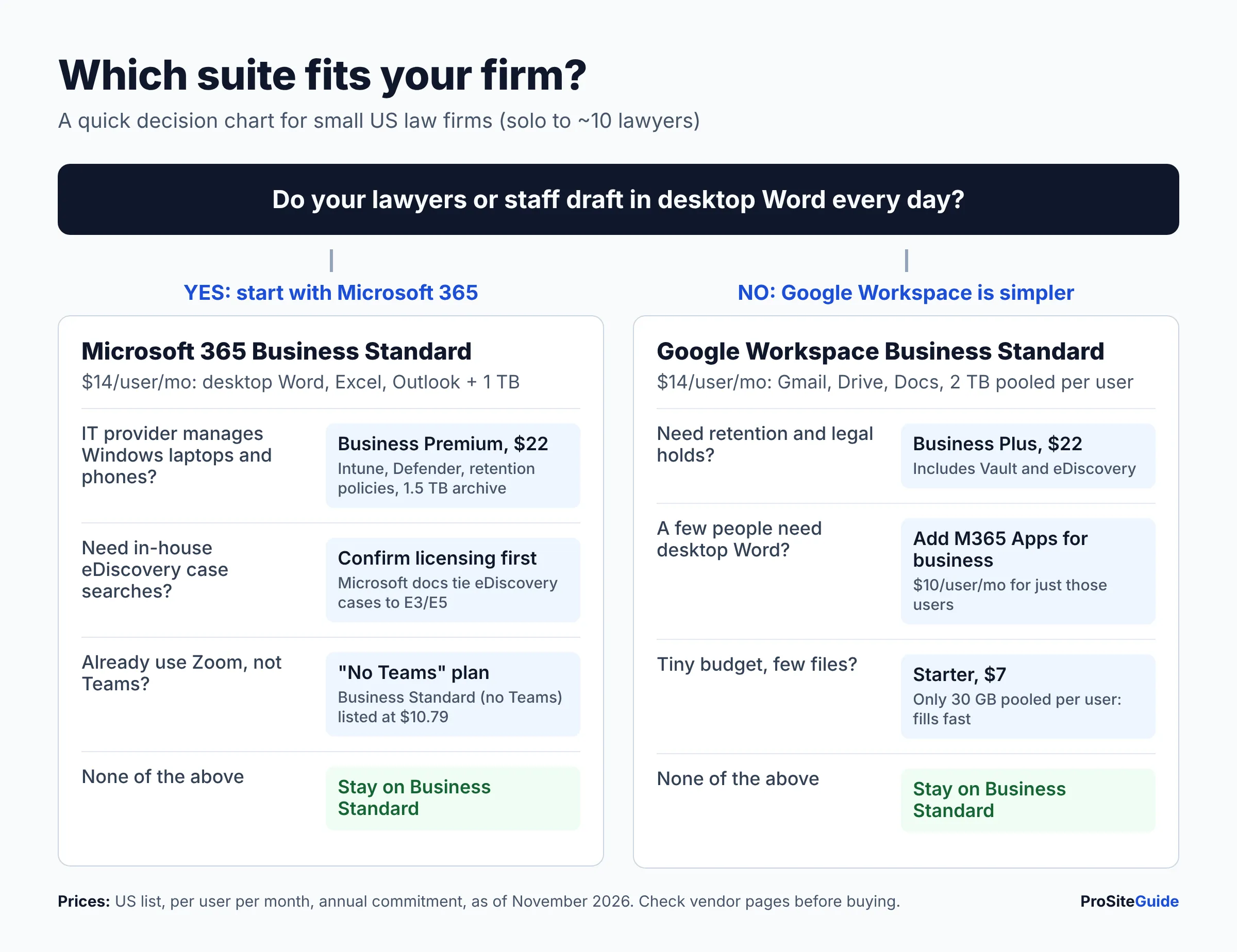
- Solo or new firm, browser-first, light drafting: Google Workspace Business Standard ($14). Starter’s 30 GB fills up fast once you store client files, so Standard is the realistic floor.
- Litigation or transactional firm that lives in Word: Microsoft 365 Business Standard ($14). You get desktop Office, Outlook and 1 TB per user at the same price.
- Firm that wants retention and holds without enterprise licensing: Google Workspace Business Plus ($22) with Vault.
- Firm with an IT provider managing Windows laptops and phones: Microsoft 365 Business Premium ($22). It adds Intune, Defender, retention policies and the larger archive. Confirm eDiscovery licensing if you need case searches.
- Firm already on Google that has a few Word power users: keep Workspace and add Microsoft 365 Apps for business ($10) for those users.
- Firm with a client or co-counsel who requires a specific platform: follow that requirement. Being compatible with your main referral sources is worth more than small feature differences.
All prices are per user per month on annual billing as of November 2026. Both vendors offer free trials (14 days for Google). Run a real matter through your shortlisted suite before you move the whole firm.
FAQ
Is Google Workspace or Microsoft 365 cheaper for a law firm?
Neither, at list price. As of November 2026 both charge $7, $14 and $22 per user per month for their three main business tiers on annual billing. The real cost difference comes from whether you need extra desktop Office licenses, add-ons or an IT provider to configure the suite.
Can I use my firm’s domain for email with either suite?
Yes. Every Google Workspace plan and Microsoft 365 Business Basic, Standard and Premium include custom-domain email. Microsoft 365 Apps for business does not list business email. If you haven’t picked a domain yet, see our comparison of .law vs .com vs .attorney domains.
Which Google Workspace plan includes Vault?
Among small-business plans, only Business Plus. Vault is also included in Enterprise and some Frontline and Education editions, according to Google’s Vault overview.
Is it ethical for lawyers to store client files in Google Drive or OneDrive?
State bar opinions such as North Carolina 2011 FEO 6 and Wisconsin EF-15-01 allow cloud storage when the lawyer takes reasonable care to protect client information. That means vetting the provider, using strong authentication and keeping up with security practices. Rules differ by state, so check with your state bar.
Do I need the “with Copilot” Microsoft plans?
No. Microsoft still sells Business Basic, Standard and Premium without the Copilot bundle. Google Workspace plans now include Gemini features. Before your firm uses AI tools on client matters, review your firm’s policy and your bar’s guidance on AI.
Conclusion: next steps
Start with one question: does your firm need desktop Word every day? If it does, start with Microsoft 365 Business Standard. If it doesn’t, Google Workspace Business Standard is the simpler choice. Move up to Business Plus or Business Premium only when you need retention, holds or managed devices. Then:
- Confirm that your practice management software’s add-ins support the account type you’re buying.
- Start a trial and test your real templates and workflows.
- Require two-factor sign-in for every user on day one.
- Set up SPF, DKIM and DMARC for your domain before you send client mail.
Want this handled for you? ProSiteGuide builds and maintains fast, secure WordPress sites for law firms. Book a free consultation.
Sources
- Google Workspace pricing (US)
- Microsoft 365: compare all business plans
- Microsoft 365 Business Standard
- Microsoft 365 Business Premium
- Microsoft 365 Business Basic
- Microsoft 365 Apps for business
- Google Vault overview
- Microsoft Purview service description
- Microsoft: Get started with eDiscovery
- Microsoft Entra security defaults
- Google: Protect your business with 2-Step Verification
- Microsoft: Perform a Google Workspace migration
- Google: About the data migration service
- Clio for Gmail (Google Workspace Marketplace)
- MyCase: Calendar integration sync tutorial
- MyCase: Syncing emails to MyCase
- North Carolina State Bar 2011 Formal Ethics Opinion 6
- State Bar of Wisconsin Formal Ethics Opinion EF-15-01